A dedicated cockpit can make sim racing feel more consistent, comfortable, and immersive than a basic wheel stand. Adding an integrated monitor or TV mount also helps create a cleaner setup while keeping the display positioned for racing.
We’ve gathered 10 racing simulator cockpits with monitor mounts, including compact single-screen designs, aluminum-profile frames, and triple-monitor-ready options. Use the guide below to narrow your choices by compatibility, adjustability, footprint, and long-term upgrade potential.
Best 10 Racing Simulator Cockpits with Monitor Mounts Picks for 2026
Best Overall
ARES WING Cockpit with Detachable TV Mount

- Reinforced frame with eight nonslip feet
- Detachable mount supports up to 50-inch screens
- Adjustable seat and controls for varied driving positions
Best For: Flexible PC, PlayStation, and Xbox setups
Best Heavy-Duty Build
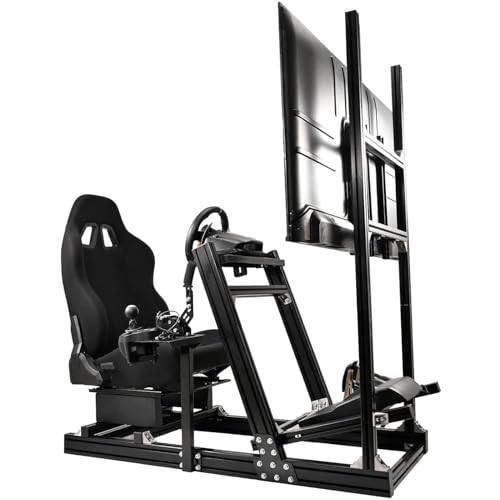
- Rigid 40×80 mm aircraft-grade aluminum frame
- Adjustable mount supports 24- to 70-inch displays
- Extensive seat, control, and posture adjustments
Best For: Dedicated rooms and direct-drive racing setups
Best Compatibility
CAMMOO Cockpit with Adjustable Monitor Mount

- 31-hole wheel and 26-hole shifter panels
- Fits 32- to 60-inch VESA displays
- Includes lumbar support, headrest, and cup holder
Best For: Multi-device households and varied racing hardware
Best for Triple Screens
Dardoo Cockpit with Triple Monitor Stand

- Supports one to three 24- or 32-inch monitors
- Thickened 50 mm steel-tube vertical frame
- Adjustable controls and memory-sponge racing seat
Best For: Panoramic multi-monitor sim-racing environments
Compact 8 Nm Rig

- 3060 aluminum frame recommended for up to 8 Nm
- Fold-forward seat suits compact spaces
- Adjustable single-monitor VESA mount for 24–34-inch displays
Best For: Apartment and bedroom sim-racing setups
Large-Screen Comfort Rig

- Monitor stand supports 32–65-inch screens up to 99 pounds
- Reclining high-density foam seat suits longer sessions
- Dual shifter mounts and broad 4D adjustment range
Best For: Comfort-focused racers using a large single display
Professional Triple-Screen Rig
25 Nm Aluminum Triple-Monitor Cockpit
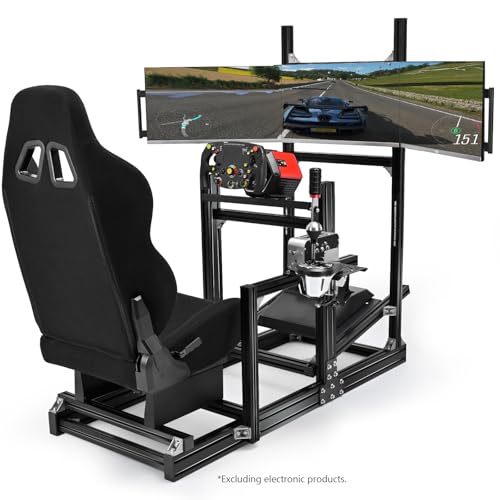
- 8040 aluminum frame supports up to 25 Nm
- Triple mount fits three 24–32-inch monitors
- Extensive adjustment and sliding ergonomic seat
Best For: Dedicated high-torque, triple-screen sim-racing rooms
Adjustable Red-Seat Pick

- Modular wheel, pedal, shifter, and seat adjustments
- Height-adjustable mount for 24- to 50-inch displays
- Steel frame with pillows and anti-slip feet
Best For: Customizable home racing setups with Logitech or Thrustmaster gear
Large-Display Stability Pick

- Mount supports 27- to 65-inch screens up to 220 pounds
- Direct-drive support up to 15 N·m
- Adjustable setup for users 1.5 to 2 meters tall
Best For: Large-screen and higher-torque simulator installations
Aluminum Direct-Drive Pick

- Aluminum-alloy frame with seat and monitor mount included
- Adjustable wheel, pedals, shifter, frame, and VESA support
- Broad compatibility with Logitech, Fanatec, MOZA, and Thrustmaster
Best For: Expandable direct-drive setups with flexible mounting options
Best Overall – ARES WING Cockpit with Detachable TV Mount
The ARES WING is a practical choice among racing simulator cockpits with monitor mounts, combining a reinforced steel frame, adjustable driving position, and a detachable mount for displays up to 50 inches. Its compatibility with Fanatec, Thrustmaster, Logitech, Moza, PC, PlayStation, and Xbox systems makes it a versatile all-in-one foundation.
Best For: Racers who want a stable, customizable cockpit for console or PC sim racing without permanently blocking a household TV.
Pros:
- Reinforced frame and eight nonslip support feet help reduce shaking during high-torque racing.
- Detachable monitor mount supports screens up to 50 inches and 77 pounds.
- Adjustable seat, wheel, pedals, shifter, and monitor mount accommodate different driving positions.
- Comfortable padded PU-leather seat reclines from 90 to 150 degrees.
Cons:
- Monitor support is limited to displays up to 50 inches.
- Wheel, pedals, shifter, and TV are not included.
- Its 53.7-inch depth requires dedicated floor space.
With its broad device compatibility and removable display support, this cockpit balances immersion and room flexibility well. It is especially appealing for buyers who need a sturdy setup that can be adjusted or stored around an existing entertainment area.
Best Heavy-Duty Build – Marada 8040 Aluminum Cockpit
The Marada 8040 is built for shoppers prioritizing rigidity in racing simulator cockpits with monitor mounts. Its aircraft-grade aluminum profile, one-piece wheel stand, and adjustable monitor bracket support a wide range of direct-drive equipment and displays from 24 to 70 inches.
Best For: Serious sim racers who want a highly adjustable, heavy-duty aluminum-frame rig for larger screens and powerful wheel bases.
Pros:
- 40×80 mm aluminum profile and reinforced connections provide a solid foundation.
- Monitor bracket fits 24- to 70-inch displays and adjusts up, down, forward, and backward.
- Supports equipment from Fanatec, Thrustmaster, Logitech, Moza, and other listed brands.
- Seat, wheel, pedals, shifter, and posture can be extensively adjusted.
Cons:
- At 120.2 pounds, it is substantially heavier than the other listed options.
- Its 60-inch depth and 54.3-inch height require considerable space.
- Wheel and pedals are not included, and the listed warranty is three months.
The Marada stands out when frame strength, adjustability, and large-screen support matter more than portability. Its size and weight make it better suited to a dedicated sim-racing room than a setup that must be moved frequently.
Best Compatibility – CAMMOO Cockpit with Adjustable Monitor Mount
The CAMMOO offers broad accessory compatibility for shoppers comparing racing simulator cockpits with monitor mounts. Its 31-hole wheel panel and 26-hole shifter panel accommodate numerous Logitech, Thrustmaster, Fanatec, Hori, Mad Catz, and PXN devices, while the mount fits 32- to 60-inch VESA displays.
Best For: Families or multi-device households that need a flexible cockpit with comfortable seating and easy hardware positioning.
Pros:
- Expanded wheel and shifter hole patterns support a wide range of racing hardware.
- Monitor mount offers 30-degree tool-free tilt and supports 32- to 60-inch screens.
- Reinforced triangular frame, anti-slip base, and dual-slide rails promote stability.
- Headrest, lumbar support, padded PU leather, and a built-in cup holder add comfort.
Cons:
- Assembly is easier with two people.
- Wheel, pedals, shifter, and monitor are not included in the supplied details.
- Its 54-inch depth and 82-pound weight may be difficult to move regularly.
The CAMMOO is a strong fit when hardware flexibility is the priority. Its broad mounting options and comfortable seat make it adaptable, while the included display adjustments help create a more personalized viewing angle.
Best for Triple Screens – Dardoo Cockpit with Triple Monitor Stand
The Dardoo is designed for panoramic immersion, making it a compelling option among racing simulator cockpits with monitor mounts. Its vertical support structure holds one to three 24- or 32-inch displays, with adjustable screen distance, height, and angles for a tailored multi-monitor view.
Best For: Racers building a triple-screen setup for immersive PC or console driving simulations.
Pros:
- Triple-monitor stand supports up to three 24- or 32-inch displays.
- Thickened 50 mm steel tubes and a vertical column design provide strong support.
- Steering wheel, pedals, shifter, handbrake, and seat positions are adjustable.
- Breathable cloth seat with memory sponge and dual-rail sliding supports longer sessions.
Cons:
- It is designed around smaller 24- or 32-inch displays rather than larger single screens.
- Steering wheel, pedals, and shifter are not included.
- The 66-inch listed depth may require a dedicated space.
Choose the Dardoo when a multi-display racing environment is more important than a compact footprint. Its adjustable triple-monitor stand and sturdy frame provide the foundation for a more immersive cockpit, provided you have room for the extended layout.
Compact 8 Nm Rig – Foldable Aluminum Cockpit
The RACGTING 3060 is a practical choice among racing simulator cockpits with monitor mounts for players who want a complete setup without giving up much floor space. Its fold-forward seat, adjustable driving position, integrated VESA monitor stand, and broad wheel compatibility make it well suited to bedrooms, apartments, and compact gaming areas.
Best For: Space-conscious sim racers using wheel bases up to 8 Nm who want an integrated single-monitor setup.
Pros:
- Rigid 3060 aluminum-profile frame is recommended for wheel bases up to 8 Nm.
- Foldable padded seat helps reduce the storage footprint when the rig is not in use.
- Adjustable wheel, pedal, and shifter positions support a range of driving preferences.
- Built-in VESA mount supports 75×75 through 200×200 patterns and most 24–34-inch monitors.
Cons:
- The monitor mount is designed for a single display rather than a triple-screen setup.
- Its recommended 8 Nm limit may not suit higher-torque direct-drive systems.
Choose this cockpit if convenience and storage flexibility matter as much as driving position. It delivers a notably complete package, but serious users with high-torque wheel bases may need a heavier-duty frame.
Large-Screen Comfort Rig – 4D Adjustable Steel Cockpit
The Supllueer cockpit stands out among racing simulator cockpits with monitor mounts for its large-screen support and comfort-focused adjustment range. Its reinforced steel frame, reclining seat, dual shifter locations, and detachable monitor stand offer flexibility for extended sessions and varied cockpit layouts.
Best For: Racers who want a comfortable, adjustable steel cockpit with support for screens from 32 to 65 inches.
Pros:
- Heavy-duty monitor stand supports 32–65-inch screens up to 99 pounds.
- Supports 12 VESA patterns from 75×75 to 400×400.
- 4D adjustments include dual steering positions, pedal tilt, and 360-degree shifter mounting.
- High-density foam seat reclines from 65 to 180 degrees and accommodates users 150–186 cm tall.
Cons:
- The supplied details do not specify a direct-drive torque rating.
- At 32 pounds, it may offer less mass than heavier professional-grade aluminum rigs.
- The listed warranty is three months, alongside permanent online technical support.
This is a strong option when display size and seating comfort are priorities. Its wide adjustment range should appeal to shared or frequently reconfigured setups, while buyers running powerful direct-drive hardware may want to confirm their stability requirements first.
Professional Triple-Screen Rig – 25 Nm Aluminum Triple-Monitor Cockpit
The Anman 8040 is built for demanding users comparing racing simulator cockpits with monitor mounts. Its rigid aluminum frame supports up to 25 Nm of direct-drive torque, while the included triple-screen bracket, extensive adjustment, and sliding racing seat target immersive and performance-oriented installations.
Best For: Serious sim racers building a triple-monitor setup around high-torque direct-drive equipment.
Pros:
- Heavy-duty 8040 aluminum construction is rated to support up to 25 Nm of direct-drive torque.
- Triple-monitor bracket accommodates three 24–32-inch displays.
- Frame, wheel mount, and pedal plate offer broad, effectively infinite adjustment.
- Seat includes slide rails, an adjustable backrest, and molded high-density foam.
Cons:
- The 123-pound rig is considerably heavier and less convenient to move.
- Its triple-screen arrangement requires three compatible displays rather than a simple single-monitor setup.
- The stated monitor range tops out at 32 inches per screen.
For users who want a stable foundation for powerful direct-drive hardware and a panoramic field of view, this is the most performance-oriented option in the group. Its size, weight, and triple-monitor requirement make it better suited to a dedicated racing room than a multipurpose space.
Adjustable Red-Seat Pick – Dardoo G923 Cockpit
The Dardoo G923 is a practical choice among racing simulator cockpits with monitor mounts for drivers who want an adjustable frame, dedicated seat, and display support in one setup. Its modular design accommodates Logitech and Thrustmaster equipment, while the monitor bracket fits 24- to 50-inch displays and supports multiple VESA standards.
Best For: Home racers seeking a customizable cockpit with a red seat and integrated monitor bracket.
Pros:
- Adjustable wheel, pedal, shifter, seat, and backrest positions.
- Monitor bracket adjusts in height and supports 24- to 50-inch displays.
- Alloy-steel frame, anti-slip feet, cable-management ties, and included lumbar and neck pillows.
Cons:
- Wheel, pedals, shifter, and monitor are not included.
- Direct-drive support is specified up to 8 N·m.
- Its approximately 83.6-pound weight and wide footprint may require dedicated floor space.
This Dardoo cockpit emphasizes adjustability and comfort rather than a compact footprint. It is a sensible fit for users building around compatible Logitech or Thrustmaster controls and a mid-size display.
Large-Display Stability Pick – Anman Pro Cockpit
The Anman Pro Simulator Cockpit is designed for racers who need a stable platform and a substantial monitor mount. As one of the racing simulator cockpits with monitor mounts, it combines a round-tube frame, adjustable driving position, and support for displays from 27 to 65 inches.
Best For: Endurance racers and users pairing a large screen with a direct-drive wheel.
Pros:
- Heavy-duty monitor mount supports 27- to 65-inch screens up to 220 pounds.
- Supports direct-drive wheels with torque up to 15 N·m.
- Adjustable wheel, pedal, seat, and backrest positions suit users about 1.5 to 2 meters tall.
- Rubber feet and four-hole flange connections help limit slipping and vibration.
Cons:
- Wheel, pedals, shifter, and other controls are not included.
- The large-screen mount and cockpit require meaningful floor space.
- Its listed compatibility and platform details should be checked against the user’s exact equipment.
With a high-capacity display stand and stronger direct-drive rating than the other listed models, the Anman is aimed at more demanding simulator installations. Its adjustable seat and controls also make it suitable for shared use across different driver heights.
Aluminum Direct-Drive Pick – DIWANGUS DWT250603 Cockpit
The DIWANGUS DWT250603 offers a substantial aluminum-alloy frame for builders comparing racing simulator cockpits with monitor mounts. It includes the seat, wheel deck, pedal platform, shifter plate, and adjustable VESA support, while its broad equipment compatibility makes it suitable for Logitech, Thrustmaster, Fanatec, MOZA, PXN, and SIMAGIC components.
Best For: Drivers building a dedicated, direct-drive-ready cockpit with flexible control positioning.
Pros:
- Aluminum-alloy profile chassis helps keep the seat, wheel, and pedals aligned.
- Adjustable wheel deck, pedal platform, shifter plate, frame length, and monitor mount.
- Supports a wide range of listed wheelbases, including Fanatec, MOZA, Logitech, and Thrustmaster models.
- Monitor plate supports VESA patterns from 75×75 to 200×200 mm.
Cons:
- Monitor, wheel, pedals, and shifter are sold separately.
- Display size, weight, and VESA fit must be checked before ordering.
- The cockpit has a substantial 396-pound user-capacity specification but still needs dedicated setup space.
The DIWANGUS stands out for its aluminum construction and extensive adjustment range. It is a strong candidate for users who want a ready-to-expand cockpit rather than a temporary desk-based racing arrangement.
How We Picked These Racing Simulator Cockpits with Monitor Mounts
We focused on the features that matter most in a home racing setup: frame construction, seat and pedal adjustability, steering-wheel support, monitor-mount design, and compatibility with popular racing hardware. We also considered whether each cockpit appears suited to casual use, stronger force-feedback wheels, or future expansion.
Because included hardware and dimensions can vary by seller, verify the listing’s measurements, load limits, mounting patterns, and included accessories before ordering.
Quick Comparison
| Setup Type | Best For | What to Check |
|---|---|---|
| Single-monitor cockpit | Most bedrooms, offices, and compact gaming rooms | Screen size limit and mount adjustment |
| Triple-monitor or TV-mount frame | Immersive wide-view racing | Overall width, rigidity, and display weight capacity |
| Aluminum-profile cockpit | Upgraders and enthusiasts | Profile dimensions, brackets, and included seat hardware |
| Wheel-stand-style cockpit | Casual racers and smaller budgets | Stability under force feedback and pedal support |
Key Buying Factors
Frame Strength and Stability
A rigid frame reduces flex when braking hard or using a powerful direct-drive wheel. Aluminum-profile designs are especially attractive because they can be reinforced or reconfigured, while lighter tubular frames may be easier to move.
Monitor Mount Compatibility
Check whether the mount is intended for one monitor, a TV, or three displays. Confirm VESA compatibility, supported screen size, height adjustment, and whether the mount attaches to the cockpit or stands independently. A triple-screen setup needs more floor space and a stronger mounting structure.
Seat, Pedal, and Wheel Adjustability
Look for sliding seat rails, adjustable pedal angles, and a wheel deck that can be positioned comfortably. These adjustments matter for sharing the cockpit with other drivers and for maintaining a relaxed knee, wrist, and shoulder position during longer sessions.
Hardware and Upgrade Support
Confirm compatibility with your wheel, pedals, shifter, and handbrake before buying. Some cockpits are designed around common Logitech-style equipment, while others are better suited to Fanatec, Thrustmaster, Moza, or direct-drive hardware. Mounting holes and included brackets are not universal.
Room and Cable Management
Measure the available floor area, including space for entering the seat and reaching the pedals. Consider display height, rear clearance, power-cable routing, and whether the cockpit can be moved or folded when not in use.
Who Should Buy Which Racing Simulator Cockpits with Monitor Mounts?
Choose a compact single-monitor cockpit if you want a straightforward setup for everyday racing and have limited space. An aluminum-profile model is the better long-term choice for enthusiasts who expect to upgrade their wheelbase, pedals, or displays. Pick a triple-monitor-ready cockpit when peripheral vision is a priority and you have room for a wide, permanent installation. If comfort and shared use matter most, prioritize a padded seat with generous adjustment range over the lowest price.