The right audio mixer can make a podcast studio easier to control, monitor, and expand. The options in this roundup range from dedicated podcast production consoles to compact mixers for straightforward multi-mic recording.
We compare the features that matter most, including input count, USB connectivity, phantom power, effects, routing, portability, and ease of use.
Best 10 Audio Mixer for Podcast Studio Picks for 2026
Best All-in-One Studio Hub

- Four mic inputs and four headphone outputs
- 14-track SD recording and USB connectivity
- Customizable sound pads with editing software
Best For: Multi-person podcasts, live streams, and integrated production
Best Premium Compact Studio

- Two combo inputs with up to 76 dB gain
- Touchscreen, faders, and six SMART pads
- APHEX effects for broadcast-style processing
Best For: Compact two-person podcast and streaming studios
Best Traditional Mixer Value

- Ten inputs for flexible studio routing
- USB, SPX effects, EQ, and high-pass filters
- One-knob compressors and rugged metal chassis
Best For: Input-heavy studios that prefer tactile mixer controls
Best Portable Beginner Bundle

- Two XLR inputs with up to 60 dB gain
- Eight customizable effects and loopback
- Built-in battery rated for up to eight hours
Best For: Beginners, mobile podcasters, and two-person shows
Compact Broadcast Pick

- Two Onyx mic preamps with phantom power
- Four-channel desktop design
- 1/4-inch and RCA main outputs
Best For: Podcasts, small studios, and broadcast setups
Feature-Rich Channel Value
12-Channel USB Bluetooth Mixer
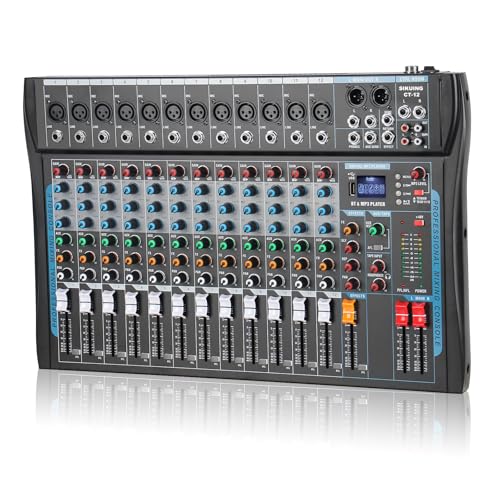
- 12 channels with mic and line inputs
- USB and Bluetooth connectivity
- 16-bit DSP, EQ, and phantom power
Best For: Multi-source podcasting, streaming, and karaoke
Simple Eight-Channel Workhorse

- Eight-channel analog mixer
- Two mic/line inputs with phantom power
- Three-band EQ on every channel
Best For: Small studios mixing microphones and stereo line sources
Compact Podcast Pick

- 48V phantom power, PAD, and 80Hz high-pass filter
- 99 DSP effects with USB recording and Bluetooth
- Compact design for home studios and streaming
Best For: Home podcasters and small recording setups
Multi-Mic Studio Choice

- Eight XLR and 1/4-inch-capable input channels
- Per-channel EQ, gain, FX, PFL, and fader controls
- USB recording, Bluetooth, headphone monitoring, and peak indicators
Best For: Multi-person podcasts and expandable studios
Flexible Six-Input Option

- Four XLR inputs with 48V phantom power
- USB, Bluetooth, and U-disk playback support
- 3-band EQ, independent faders, and 16 DSP effects
Best For: Small studios mixing voices, music, and instruments
Best All-in-One Studio Hub – Mixcast 4
For creators seeking an audio mixer for podcast studio production, the TASCAM Mixcast 4 combines four mic inputs, recording, USB connectivity, Bluetooth, and hands-on touchscreen control. Its built-in sound pads and included editing software make it suited to both recording and live content.
Best For: Podcasters and streamers who want an integrated production workflow with multiple microphones, headphones, sound effects, and onboard recording.
Pros:
- Four mic inputs and four individual headphone outputs support group podcasting.
- Records up to 14 tracks directly to an SD card.
- Eight banks of customizable sound pads add music, jingles, and effects during production.
- Includes touchscreen control and TASCAM Podcast Editor software.
Cons:
- Its larger feature set may be more than a simple voice-recording setup requires.
- It is corded and weighs about 2,550 g.
The Mixcast 4 is a strong choice when a podcast studio needs recording, routing, effects, and editing in one dedicated unit rather than separate devices.
Best Premium Compact Studio – RØDECaster Duo
The RØDECaster Duo is a compact audio mixer for podcast studio setups that need two microphone or instrument inputs, broadcast-oriented processing, and a streamlined control surface. Its touchscreen, faders, SMART pads, and APHEX effects put core production tools within reach.
Best For: Solo creators and two-person podcast or streaming setups that prioritize compact size, high-gain preamps, and built-in processing.
Pros:
- Two Neutrik combo inputs accept microphones or instruments.
- Revolution Preamps provide up to 76 dB of gain.
- Includes four broadcast-quality faders, a touchscreen, and six SMART pads.
- APHEX processing includes Aural Exciter and Big Bottom effects.
Cons:
- Two main combo inputs limit it to smaller microphone setups.
- It has fewer channels than the TASCAM Mixcast 4 and Yamaha MG10XU.
With its compact footprint and focused control layout, the RØDECaster Duo is a practical fit for creators who want polished podcast and streaming features without a larger mixer.
Best Traditional Mixer Value – Yamaha MG10XU
The Yamaha MG10XU is a conventional 10-input audio mixer for podcast studio work that benefits from flexible channel capacity, USB connectivity, and hands-on analog-style controls. Its EQ, high-pass filters, compressors, and SPX effects help shape voices and other connected sources.
Best For: Studios that need more inputs and tactile mixing controls for microphones, instruments, and additional audio sources.
Pros:
- Ten inputs provide more capacity than compact podcast-focused mixers.
- USB connectivity supports computer-based audio workflows.
- Three-band EQ, high-pass filters, and one-knob compressors aid sound shaping.
- Rugged powder-coated metal chassis is designed for durability.
Cons:
- It lacks dedicated podcast features such as trigger pads and a touchscreen.
- Its conventional mixer layout may require more manual setup.
- It is relatively heavy at 7.7 pounds.
The MG10XU makes the most sense for a podcast studio that values channel flexibility and traditional mixing controls over an all-in-one podcast interface.
Best Portable Beginner Bundle – MAONO E2 Gen2
The MAONO E2 Gen2 is an accessible audio mixer for podcast studio beginners who want a bundled, portable setup. It combines two XLR combo inputs, USB-C and 3.5mm connections, customizable effects, loopback, and a built-in battery for flexible recording and streaming.
Best For: New podcasters, mobile creators, and two-person shows that need simple controls, sound effects, and computer or phone connectivity.
Pros:
- Two low-noise preamps offer up to 60 dB of gain for dynamic microphones.
- Eight customizable sound-effect buttons support clips up to 20 seconds each.
- Built-in 1500mA battery provides up to eight hours of use.
- Supports Bluetooth, USB-C, 3.5mm connections, loopback, and one-touch mute.
Cons:
- Two XLR combo inputs limit larger group recordings.
- Its compact feature set is less suited to high-channel-count studio routing.
- The supplied package-list note is truncated, so included accessories should be verified before purchase.
The E2 Gen2 stands out for convenience: it offers enough connectivity and creative control for a small podcast setup while remaining portable and approachable.
Compact Broadcast Pick – Mackie 402VLZ4
The Mackie 402VLZ4 is a practical audio mixer for podcast studio setups that need clean microphone inputs without a bulky console. Its two Onyx preamps, phantom power, and compact 2.5-pound design suit small desktop recording spaces and broadcast-style workflows.
Best For: Podcasts, small studios, and broadcast setups using up to two microphones.
Pros:
- Two Onyx mic preamps provide high headroom, low noise, and improved RF rejection.
- Phantom power supports compatible condenser microphones.
- Four line inputs plus 1/4-inch and RCA main outputs offer flexible connections.
- Compact desktop design is easy to place and move.
Cons:
- Limited to four channels and two mic inputs.
- Requires the included external power adapter.
- Does not provide a built-in power-cord socket.
Choose this Mackie when microphone quality, straightforward controls, and portability matter more than extensive channel capacity or built-in digital features.
Feature-Rich Channel Value – 12-Channel USB Bluetooth Mixer
This 12-channel console is a versatile audio mixer for podcast studio, streaming, karaoke, and live recording applications. It combines multiple microphone inputs with USB, Bluetooth, 16-bit DSP effects, three-band EQ, and +48V phantom power for a broad range of connected sources.
Best For: Multi-source podcasting, streaming, interviews, karaoke, and small live or studio productions.
Pros:
- Offers 12 channels with microphone and balanced line connections.
- USB and Bluetooth support direct connections to computers and mobile devices.
- Built-in 16-bit DSP effects and three-band EQ provide sound-shaping options.
- +48V phantom power supports condenser microphones.
Cons:
- Its many controls and features may be more than a simple podcast setup needs.
- The supplied notes identify USB as the audio input, so connection details should be confirmed for a particular workflow.
- It is corded electric rather than battery powered.
This model is a strong fit when you want one console to handle several microphones, wireless device connections, computer recording, and effects without adding separate equipment.
Simple Eight-Channel Workhorse – Mackie Mix8
The Mackie Mix8 is a straightforward audio mixer for podcast studio work when you need more inputs than a four-channel desktop model but do not need USB or Bluetooth. It provides two mic/line inputs, two stereo 1/4-inch line inputs, three-band EQ, phantom power, and an aux send with stereo returns.
Best For: Small studios and podcasts combining microphones with stereo playback or other line-level sources.
Pros:
- Eight-channel layout accommodates microphones and stereo line sources.
- Two mic/line inputs include phantom power for studio condenser microphones.
- Three-band EQ is available on all channels.
- Aux send and stereo returns support external processing or monitoring setups.
Cons:
- Uses wired connectivity and lacks USB or Bluetooth features.
- Only two microphone inputs are listed.
- Its RCA output specification may require adapters or compatible equipment in some studio setups.
The Mix8 makes sense for buyers who prefer a familiar analog workflow and need additional stereo inputs, while accepting that computer and mobile connections require separate hardware.
Compact Podcast Pick – 4-Channel DSP Mixer
For a compact audio mixer for podcast studio setups, this four-channel console combines microphone connectivity, phantom power, USB recording, and Bluetooth streaming in a small chassis. Its PAD switch and high-pass filter are useful for managing louder sources and low-frequency rumble.
Best For: Home podcast studios, solo creators, and small recording or streaming setups.
Pros:
- 48V phantom power supports condenser microphones.
- PAD and 80Hz high-pass filter help control distortion and rumble.
- 99 DSP effects provide reverb, delay, and other sound-shaping options.
- USB recording and Bluetooth 5.0 add flexible playback and streaming options.
Cons:
- Only two XLR microphone inputs are specified, despite four total channels.
- Bluetooth range is listed at up to 15 feet.
- Software update support is unspecified.
This is a practical choice when desk space matters and you want built-in effects plus straightforward computer or mobile connectivity. Its 365-day manufacturer warranty is also longer than some comparable options.
Multi-Mic Studio Choice – 8-Channel USB Mixer
This eight-channel audio mixer for podcast studio use is designed for projects that need multiple microphone and line connections. It adds per-channel gain, EQ, effects, faders, headphone monitoring, USB playback and recording, and Bluetooth streaming.
Best For: Multi-person podcasts, live streams, small performances, and studios connecting several sources.
Pros:
- Eight channels provide room for multiple microphones and devices.
- Each channel includes gain, FX, PFL, EQ, and volume controls.
- USB, Bluetooth, REC/TAPE, XLR, and 1/4-inch connectivity support varied workflows.
- Headphone monitoring and LED peak indicators assist with level control.
Cons:
- The larger channel count may be more than a simple one- or two-mic setup needs.
- Software update support is unspecified.
- Its corded-electric design requires a nearby power source.
Choose this model when expandability and hands-on control are priorities. The eight inputs and independent channel controls make it better suited to group recording or production setups than minimalist podcast desks.
Flexible Six-Input Option – Bluetooth DSP Mixer
This six-channel audio mixer for podcast studio work supports four XLR inputs, stereo line channels, 48V phantom power, USB playback and recording, and Bluetooth streaming. Its 3-band EQ and 16 DSP effects offer basic hands-on control for voices, music, and connected instruments.
Best For: Small studios, karaoke or streaming setups, and creators mixing microphones with music or instruments.
Pros:
- Four XLR inputs support condenser and dynamic microphones.
- 48V phantom power is available on the first four channels.
- USB and Bluetooth support playback, mixing, and recording workflows.
- Independent faders, 3-band EQ, and 16 DSP effects provide practical control.
Cons:
- The listed manufacturer warranty is only 90 days.
- The supplied dimensions are relatively large for a compact mixer.
- The notes describe a traditional analog product, so operation may require setup familiarity.
This model fits buyers who want four microphone inputs plus stereo channels for music or instruments. It offers broad connectivity and useful effects, but the short warranty is worth weighing before purchase.
How We Picked the Best Audio Mixer for Podcast Studio Use
We focused on the needs of podcast creators rather than general live-sound buyers. Each selected mixer was evaluated for microphone connectivity, recording workflow, monitoring options, computer integration, and suitability for solo shows, interviews, or small production teams. We also considered whether a model offers useful extras such as onboard effects, Bluetooth, programmable controls, multitrack recording, or dedicated streaming features.
Input count is only one part of the decision. A mixer with four inputs may be a better fit than an eight- or 12-channel model if it provides cleaner routing and simpler podcast controls. Conversely, larger consoles can offer valuable room for co-hosts, guests, instruments, and future expansion.
Quick Comparison
| Best For | Look For | Typical Advantage |
|---|---|---|
| Solo or two-person podcasts | 2–4 mic inputs and USB connectivity | Simple setup and compact size |
| Guest interviews | At least four mic inputs and flexible monitoring | Room for multiple speakers |
| Live streaming | USB audio, sound pads, effects, and routing | Faster real-time production |
| Growing studios | More channels, quality preamps, and expansion options | Longer useful lifespan |
Key Buying Factors for an Audio Mixer for Podcast Studio
Inputs and Microphone Compatibility
Count how many microphones you will use now and how many you may add later. XLR inputs are important for standard dynamic and condenser microphones. If you use condenser models, confirm that the mixer provides 48V phantom power and that it can supply it safely to the required channels.
USB Recording and Routing
A USB audio interface lets the mixer connect directly to a computer for recording, streaming, or video calls. Check whether the USB connection provides a simple stereo mix or separate channels. Multitrack capability is more useful when you want to edit each voice independently after recording.
Podcast Controls and Onboard Processing
Dedicated podcast consoles may include sound pads, voice effects, mix-minus support, quick mute controls, and touchscreen or app-based operation. These features can streamline live production, but a conventional mixer may offer better value if you mainly record clean voice tracks for later editing.
Monitoring and Room Workflow
Look for a headphone output arrangement that matches your production. Multiple independent headphone mixes are helpful when guests need different monitor levels. Also check the location of mute, gain, and level controls, especially if the mixer will sit within reach during a live show.
Size, Build, and Expansion
Compact models suit small desks and mobile setups, while larger consoles provide more channels and hands-on control. Prioritize solid controls, accessible connections, and enough headroom for your expected setup rather than buying extra channels you will never use.
Who Should Buy Which Audio Mixer for Podcast Studio?
Choose an All-In-One Podcast Console If
You want integrated recording, streaming controls, effects, sound pads, and minimal dependence on additional software. These models are especially practical for live interviews and creators who value a fast, repeatable workflow.
Choose a Compact Audio Interface Mixer If
You record one to four microphones and want a small, affordable setup for a home studio. This category is usually easier to learn and transport, provided it has the inputs and monitoring features you need.
Choose a Traditional Analog Mixer If
You prefer physical faders, straightforward signal flow, and flexible control over microphones, music, and external sources. Analog mixers can be excellent for studio or live use, but verify that the specific model includes USB recording if computer connectivity is required.
Choose a Larger Channel Mixer If
You regularly host several guests, connect instruments or playback devices, or expect your studio to grow. Extra channels and stronger routing options can prevent an expensive replacement later.