Secret Santa gifts for PC gamers work best when they make the desk more comfortable, organized, or useful. These picks range from small accessories to setup upgrades, with compatibility details worth checking before you buy.
14 Christmas Gift Ideas for PC Gamers
1. intpw Powered USB Hub
For Expanding a Crowded Setup

- Adds USB-A and USB-C data ports for compatible computers.
- Includes two USB-C PD charging ports that do not transfer data.
- Powered by the included 65W adapter; does not support video output.
Best For: A gamer who has run out of USB ports for peripherals.
2. Univivi 36-Inch Under-Desk Cable Tray
For Clearing Desk Clutter
Univivi 36-Inch Under-Desk Cable Tray

- 36-inch fabric tray holds and hides desk cables and adapters.
- Installs with clamps or screws; check desk measurements and edge clearance.
- Built-in ties help keep items in place, and the tray unfolds for access.
Best For: Someone looking to tidy cables beneath their gaming desk.
3. Acer Adjustable Single Monitor Arm
For a More Flexible Screen Position
Acer Adjustable Single Monitor Arm

- Fits 17–34-inch monitors weighing 4.4–19.8 pounds with VESA 75×75 or 100×100.
- Supports tilt, swivel, rotation, and height adjustment.
- Uses a C-clamp or grommet mount; check desk thickness and shape.
Best For: A gamer with a compatible monitor and suitable desk.
4. FIFINE AmpliGame A6T USB Microphone Kit
For Clearer Team Chat and Streaming
FIFINE AmpliGame A6T USB Microphone Kit

- USB microphone kit is described as plug-and-play for Windows, Mac OS, PS4, and PS5.
- Includes a boom arm, shock mount, pop filter, and 8.2-foot cable.
- Has a touch-mute button, volume knob, and RGB lighting.
Best For: A PC gamer who streams, records, or chats with teammates.
5. STREBITO 142-Piece Precision Screwdriver Set
For Hands-On PC Projects
STREBITO 142-Piece Precision Screwdriver Set
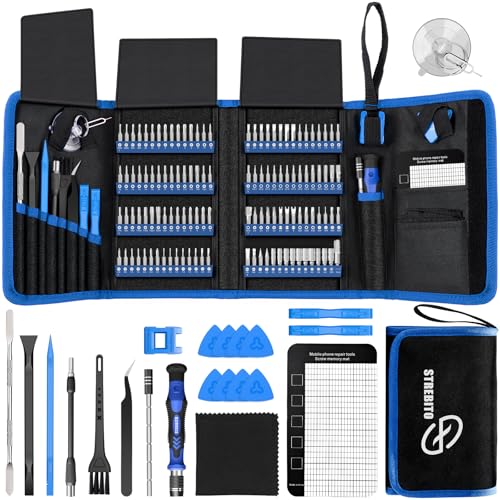
- Includes 120 driver bits and 22 repair accessories.
- The listed uses include computers, laptops, SSDs, and game consoles.
- A magnetic mat, labeled bit holders, and storage bag help organize small parts.
Best For: A gamer who enjoys PC repairs or upgrades.
6. HUION Keydial Mini Programmable Keypad
For Custom Shortcuts
HUION Keydial Mini Programmable Keypad

- Offers 18 programmable keys and a dial with up to three functions.
- Connects over Bluetooth and supports Windows and Mac OS.
- Custom shortcut setup requires the Huion driver; software must support the shortcut.
Best For: A gamer who wants quick access to custom controls or stream shortcuts.
7. Redragon M810 PRO Wireless Gaming Mouse
For Cable-Free Mouse Movement
Redragon M810 PRO Wireless Gaming Mouse

- Connects wirelessly using a 2.4GHz receiver and has RGB lighting.
- Features eight programmable buttons and five adjustable onboard DPI levels.
- Rechargeable battery is listed for up to 45 hours in eco mode.
Best For: A PC gamer who wants a wireless mouse with remappable buttons.
8. YEELIGHT Monitor Light Bar
For Focused Desk Lighting

- USB-powered bar clips onto flat or curved monitors 0.3–1.1 inches thick.
- Offers stepless dimming and color temperature adjustment from 2700K to 6500K.
- Its low-profile design is described as webcam-friendly.
Best For: Someone who spends long sessions at a monitor and wants adjustable desk light.
9. Large Extended Gaming Mouse Pad
For More Room to Move
Large Extended Gaming Mouse Pad

- 35.4-by-15.7-inch surface fits a keyboard and mouse.
- Non-slip rubber base and stitched edges help keep the pad in place.
- Waterproof coating is designed to make spills easier to clean.
Best For: A gamer who wants one broad surface for keyboard and mouse.
10. 16-Outlet Surge Protector with USB Ports
For Powering a Busy Desk
16-Outlet Surge Protector with USB Ports

- Provides 16 AC outlets and six USB ports: three USB-A and three USB-C.
- Has a six-foot cord with a flat plug and widely spaced outlets.
- Rated for 1875W/15A; connected devices should stay within that capacity.
Best For: Someone with multiple devices and chargers near their gaming setup.
11. NEWDERY Dual PS5 Controller Charging Dock
For Keeping Controllers Together
NEWDERY Dual PS5 Controller Charging Dock

- Charges two compatible PS5 DualSense or DualSense Edge controllers simultaneously.
- Includes a USB cable and has charging indicator lights and anti-slip mats.
- The listing says to remove controller skins or cases and use a 5V/3A adapter.
Best For: A PC gamer who also uses compatible PS5 controllers.
12. EMEET C950 1080p Webcam
For Calls and Camera-Ready Sessions

- USB webcam offers 1080p video at 30 frames per second and a 70-degree view.
- Includes a built-in omnidirectional microphone and physical privacy cover.
- Listed compatibility includes Windows 10/11, macOS 10.14+, and Linux.
Best For: A gamer who joins video calls or wants a webcam with a cover.
13. 6amLifestyle Dual Under-Desk Headphone Hanger
For Storing Two Headsets
6amLifestyle Dual Under-Desk Headphone Hanger

- Clamp-on hanger holds two sets of headphones beneath a desk.
- Arms rotate 360 degrees and have soft rubber pads.
- Fits surfaces 5–53 mm thick and requires no drilling.
Best For: Someone who wants headphones off the desktop and close at hand.
14. Acer Adjustable GPU Support Bracket
For Supporting a Desktop Graphics Card
Acer Adjustable GPU Support Bracket

- Height adjusts from 70 to 120 mm in listed 0.5 mm increments.
- Aluminum alloy body has silicone pads and a magnetic base.
- Tool-free hand tightening is described for setup; check the tower layout and fit.
Best For: A desktop PC gamer whose graphics card setup can use a support bracket.
Choosing a Secret Santa Gift for a PC Gamer
Start with what you know about the recipient’s setup. A desk accessory is often a safer pick than a component that changes how the PC runs. A large mouse pad, headphone hanger, monitor light, or cable tray can be useful without needing to know their game library or preferred play style. For the more setup-specific options, use a quick check of the recipient’s desk, monitor, or device compatibility before choosing.
If they talk about streaming, recording, or voice chat, the FIFINE microphone kit and EMEET webcam serve different needs. The microphone kit includes a boom arm and pop filter for desk audio. The webcam has a built-in mic and a physical privacy cover, so it suits calls or camera use. For a gamer with a crowded desk, the powered USB hub expands data ports, while the power strip provides outlets and USB charging ports. Check whether they need USB-C or USB-A connections and remember that the hub’s charging ports do not transfer data.
Match the Gift to Your Budget
For a smaller Secret Santa budget, consider a mouse pad, headphone hanger, precision screwdriver set, or compact keypad. These gifts have a clear use and can fit into a wider range of setups. The tool set is especially appropriate for someone who already maintains electronics; it is less personal for a gamer who never opens their devices.
A monitor light bar, webcam, microphone kit, or power accessory may make a more substantial gift. Monitor arms and cable trays can also have a larger impact on a desk, but they require more measurements and installation planning. Choose based on how much setup detail you can confirm, not just the apparent size of the gift. A practical Christmas present should feel considered and usable, even without holiday-themed styling.
Check Compatibility and Personalization
Before choosing a monitor arm, confirm the screen size, weight, VESA pattern, and desk mounting surface. The Acer arm is specified for 17–34-inch monitors weighing 4.4–19.8 pounds and VESA 75×75 or 100×100. Its clamp or grommet mount also needs an appropriate desk edge or opening. For the Univivi cable tray, check the 36-inch length and ensure the desk edge has enough clearance for the clamps.
For PC accessories, check the connections and operating system. The USB hub’s data ports and charging ports have different functions, and its listing says it does not support video output. The HUION keypad needs driver setup for custom shortcuts. For the mouse or keyboard, consider whether the recipient prefers wireless or wired controls and whether programmable buttons fit their habits. The PS5 controller dock is only a fit if they use compatible DualSense or DualSense Edge controllers; its instructions call for removing cases or skins while charging.
Personal touches can come from choosing an accessory that matches the recipient’s routine. A cable tray suits someone who complains about cords; the dual headphone hanger helps someone who switches between headsets; a webcam with a cover is thoughtful for a person who values camera privacy. If you are uncertain, discreet, practical desk accessories are usually easier to match than specialized hardware.
Timing and Last-Minute Decisions
For a last-minute decision, prefer an item whose fit is easy to confirm or that needs little installation. The mouse pad, screwdriver set, webcam, and headset hanger have relatively clear use cases, though compatibility and desk space still matter. Monitor arms and cable trays call for measuring before purchase, and a GPU support bracket depends on the recipient’s desktop case and graphics card arrangement.
Avoid making delivery assumptions from a product description. Check the current listing for availability, arrival estimates, and return terms before ordering, especially close to Christmas. If you cannot verify a key dimension or connection in time, choose a less setup-dependent option from this list. That keeps a Secret Santa gift useful and considerate without turning the surprise into a troubleshooting project.