The right PC gaming gift can make play more comfortable, tidy a desk, or add new ways to enjoy favorite games. This 2026 guide includes choices for players, streamers, and PC builders, with compatibility details to check before choosing.
19 PC Gaming Christmas Gift Ideas
1. beyerdynamic DT 770 Pro 80-Ohm Headphones
For Focused Listening
beyerdynamic DT 770 Pro 80-Ohm Headphones

- Closed-back design provides passive isolation for gaming, recording, and other listening.
- The 80-ohm version is loud enough from most laptops and works best with an audio interface or headphone amp.
- Includes replaceable velour ear pads, a fixed 3 m cable, and a 1/4-inch adapter.
Best For: A PC gamer who prefers wired audio and wants a headset-style option for focused listening.
2. COMHOMA Big and Tall Gaming Chair
For a More Adjustable Setup
COMHOMA Big and Tall Gaming Chair

- Features a spacious seat, wider backrest, thick padding, and faux-leather upholstery.
- Height-adjustable armrests and an integrated footrest offer options for changing sitting positions.
- The chair requires assembly; check the listed dimensions and desk space before gifting.
Best For: A gamer looking for roomy seating and adjustable armrests for long desk sessions.
3. Z-Edge 27-Inch Curved QHD Gaming Monitor
For a Sharper, Smoother Display
Z-Edge 27-Inch Curved QHD Gaming Monitor

- The 27-inch curved screen has a 2560 × 1440 QHD resolution.
- Supports up to 165 Hz through DisplayPort and up to 144 Hz through HDMI.
- Includes two HDMI inputs, one DisplayPort, and a 100 × 100 mm mount pattern.
Best For: A PC gamer whose system can support a QHD high-refresh-rate display.
4. Acer 13-in-1 USB-C Docking Station
For a Laptop Desk Setup
Acer 13-in-1 USB-C Docking Station

- Provides two HDMI outputs, one DisplayPort, USB ports, Gigabit Ethernet, audio, and SD/TF readers.
- The included 110 W adapter supplies up to 100 W to a compatible host laptop through USB-C PD.
- Triple-display extension depends on Windows laptop and GPU support; macOS supports mirroring across multiple displays.
Best For: A gamer who connects a compatible laptop to several desk peripherals and displays.
5. Acer Wireless Multi-Platform Gaming Headset
For Wireless Team Play
Acer Wireless Multi-Platform Gaming Headset

- Connects over 2.4 GHz wireless or Bluetooth and is listed as compatible with PC, PS4, PS5, Switch, and Steam Deck.
- The flip-to-mute boom microphone can be raised to mute and lowered to resume voice chat.
- The listed battery life is up to 70 hours at 50% volume.
Best For: A multiplayer gamer who wants wireless audio and an easy-to-mute boom mic.
6. Univivi 36-Inch Under-Desk Cable Tray
For a Tidier Gaming Desk
Univivi 36-Inch Under-Desk Cable Tray

- The 36-inch tray is designed to hold and conceal power adapters, sockets, and cables under a desk.
- Installation can use clamps or screws, depending on the desk and setup.
- Measure first: the listing calls for 5.3 inches of clear space along the desk edge.
Best For: A PC gamer who wants to organize visible cables beneath a compatible desk.
7. HUANUO Adjustable Single Monitor Arm
For More Flexible Screen Positioning
HUANUO Adjustable Single Monitor Arm

- Fits monitors from 13 to 32 inches and weighing 4.4 to 19.8 pounds, with VESA 75 × 75 mm or 100 × 100 mm patterns.
- Offers tilt, swivel, and rotation adjustments, with the screen lifting up to 39.6 cm from the desktop.
- Mounts with a C-clamp or grommet base; check the desk thickness and underside clearance.
Best For: A gamer with a compatible monitor who wants adjustable screen height and position.
8. FIFINE AmpliGame SC3 Gaming Audio Mixer
For a Streaming Audio Upgrade
FIFINE AmpliGame SC3 Gaming Audio Mixer

- Includes an XLR microphone input with 48 V phantom power for compatible condenser microphones; it does not support USB microphones through that input.
- Four channels provide separate controls for microphone, line-in, headphones, and line-out audio.
- Features front mute and monitor buttons, four customizable sound-effect buttons, and six voice-changing modes.
Best For: A PC gamer or streamer who uses an XLR microphone and wants hands-on audio controls.
9. Redragon K668 Hot-Swap RGB Gaming Keyboard
For Keyboard Customizers
Redragon K668 Hot-Swap RGB Gaming Keyboard

- The wired 108-key keyboard includes four shortcut keys and RGB lighting with up to 19 preset modes.
- Hot-swap sockets accept many 3-pin or 5-pin switches without soldering; it comes with linear Red switches.
- Two sets of mixed-color keycaps and software for remapping, lighting, and macros support personalization.
Best For: A PC gamer who wants a full-size keyboard they can customize.
10. EasySMX X15 Wireless PC Gaming Controller
For Controller-Friendly Games
EasySMX X15 Wireless PC Gaming Controller

- Supports Windows PC, Steam, Switch, Android, and iOS, with 2.4 GHz, Bluetooth, and wired USB-C connection modes.
- Hall Effect joysticks and triggers, two programmable back buttons, and dual vibration are listed features.
- The 1000 mAh battery is listed for up to 20 hours of play; the controller has no microphone jack or gyro sensor.
Best For: A PC gamer who enjoys racing, platform, or action games with a controller.
11. EPOMAKER Click Lite Wireless Gaming Mouse
For Lightweight Mouse Control
EPOMAKER Click Lite Wireless Gaming Mouse

- The 59 g mouse offers five programmable buttons and adjustable sensitivity from 800 to 12,000 DPI.
- Connects over 2.4 GHz wireless, Bluetooth, or USB-C and is listed for PC, Mac, and Linux use.
- Its 500 mAh rechargeable battery is listed for up to 78 hours of use.
Best For: A gamer who wants a lightweight mouse with adjustable sensitivity and multiple connection options.
12. 6amLifestyle Dual Under-Desk Headphone Hanger
For Headset Storage
6amLifestyle Dual Under-Desk Headphone Hanger

- The clamp-on hanger stores two headphones and its arms rotate 360 degrees beneath or beside a desk.
- Padded arms and raised ends help keep headphones from slipping and protect their surfaces.
- Fits desk edges from 5 mm to 53 mm thick and attaches without drilling.
Best For: A gamer who wants to keep one or two headsets off the desktop between sessions.
13. Large Extended Gaming Mouse Pad
For a Shared Keyboard and Mouse Surface
Large Extended Gaming Mouse Pad

- The 31.5 × 15.7-inch pad provides space for a keyboard and mouse on one surface.
- Its natural-rubber base is designed to grip the desk, with stitched edges and a smooth tracking surface.
- A water-resistant coating is described as helping protect against spills; the pad is 3 mm thick.
Best For: A PC gamer who wants a broad surface for both keyboard and mouse.
14. CORSAIR RM850x 850 W Modular Power Supply
For a Carefully Planned PC Build
CORSAIR RM850x 850 W Modular Power Supply

- This fully modular ATX power supply has an 850 W output rating.
- It is listed as ATX 3.1 compliant, PCIe 5.1 ready, and equipped with a native 12V-2x6 connector.
- Check the recipient’s component power needs and case fit before gifting.
Best For: A desktop builder upgrading a system after checking power and component compatibility.
15. Montech AIR 903 Base Mid-Tower PC Case
For a New Desktop Build
Montech AIR 903 Base Mid-Tower PC Case
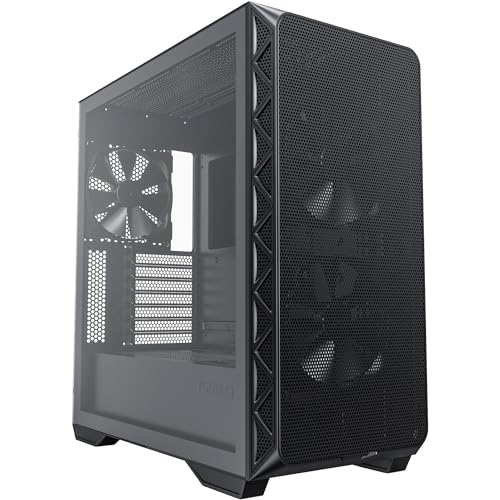
- The mid-tower case supports Extended ATX motherboards and is listed with three pre-installed fans.
- A mesh front panel is described as supporting airflow, with eight expansion slots.
- Check motherboard, graphics card, power supply, and drive fit before starting a build.
Best For: A PC gamer planning a new build or a case change with airflow in mind.
16. Logitech G29 Racing Wheel and Pedals
For Racing Simulation Fans
Logitech G29 Racing Wheel and Pedals

- The wheel and pedal set is listed for PC, PS5, and PS4 gaming.
- It features force feedback, 900-degree rotation, and a leather-covered steering wheel.
- Pressure-sensitive brake pedals have adjustable pedal faces; a desk or rig mount may be useful for setup.
Best For: A racing game fan with room to set up a wheel and pedals.
17. Samsung 990 PRO 2 TB Internal SSD
For More Internal Game Storage
Samsung 990 PRO 2 TB Internal SSD

- This internal M.2 2280 PCIe 4.0 SSD has 2 TB of storage.
- The listing gives sequential read speeds up to 7,450 MB/s and write speeds up to 6,900 MB/s.
- Check for an available compatible M.2 PCIe 4.0 slot in the recipient’s PC or laptop.
Best For: A PC gamer comfortable checking motherboard or laptop compatibility before adding storage.
18. Crucial X9 2 TB Portable SSD
For Portable Game and File Storage

- The external 2 TB SSD connects over USB-C and is listed for Windows, Mac, Android, and several game consoles.
- Transfer speeds are listed up to 1,050 MB/s; USB-C and USB-A connection options are noted.
- The drive is described as IP55 water- and dust-resistant and drop-resistant up to 7.5 feet.
Best For: A gamer who wants portable space for games, recordings, backups, or other files.
19. 8BitDo Arcade Stick for Windows and Switch
For Arcade-Style Controls
8BitDo Arcade Stick for Windows and Switch

- The arcade stick is compatible with Windows and Nintendo Switch.
- Connects via Bluetooth, 2.4 GHz with the included receiver, or wired USB-C.
- Button mapping and macros can be customized with the supported software; the mounting plate supports Sanwa arcade sticks.
Best For: A PC fighting-game fan who prefers arcade-style buttons and joystick controls.
Choosing a PC Gaming Christmas Gift
Start with what the recipient already enjoys and what their setup is missing. A competitive player may appreciate a high-refresh-rate monitor or a lightweight mouse, while someone who plays racing games may get more use from a wheel and pedals. For a streaming setup, consider the audio mixer or a headset with a flip-to-mute microphone. Desk accessories such as a monitor arm, cable tray, headphone hanger, or extended mouse pad can be thoughtful choices when you do not know which games or components they use.
For larger gifts, think about the practical space they need. A gaming chair, wheel, monitor, or PC case can change how a room is arranged. Measure desk edges, available floor space, monitor placement, and the room needed for assembly. If those details are unknown, a smaller accessory or external SSD may be easier to fit into an existing setup.
Set a Budget That Fits the Gift
These PC gaming Christmas gift ideas cover a wide range of sizes and levels of commitment. A mouse pad, headphone hanger, or cable tray can refresh a desk without changing the computer. A keyboard, controller, headset, or mouse is a more personal peripheral gift, so consider the recipient’s preferred layout, connection style, and games. Monitors, chairs, racing wheels, storage upgrades, and PC components usually call for a larger budget and a clearer understanding of the setup.
The price of an accessory is only part of the decision. Some products need additional compatible parts or space. For example, the audio mixer’s XLR cable is not included, the racing wheel may need a stable mounting surface, and an internal SSD requires a suitable slot. When comparing options, account for anything needed to use the gift comfortably, while avoiding assumptions about what the recipient already owns.
Check Compatibility and Personalize Thoughtfully
Compatibility matters especially for electronics and PC parts. Before choosing the QHD monitor, consider the graphics card’s ability to drive the desired resolution and refresh rate. Confirm that a monitor fits a mount’s size, weight, and VESA limits. A USB-C dock relies on the laptop’s native USB-C, graphics, and system support; triple-display behavior differs between Windows and macOS. For a controller or headset, check the devices and platforms the recipient actually uses.
For PC upgrades, confirm the exact motherboard, case, and power needs. The internal SSD requires a compatible M.2 PCIe slot, and a new power supply or case must suit the rest of the build. A case change can involve moving components, while a power supply needs appropriate connectors and adequate output for the system. If you cannot check those details, desk gear or external storage avoids some of the uncertainty.
Personalization can also be simple. A keyboard with extra keycaps and programmable controls lets its owner change the look and function. A mouse with adjustable DPI accommodates different preferences. A fight stick’s button mapping can be tailored to favorite games. For comfort-oriented gifts, use known preferences where possible: wired or wireless audio, roomier or firmer seating, and the amount of desk space available.
Timing and Last-Minute Decisions
Give yourself time to check measurements, ports, and setup requirements before buying a larger item. A monitor arm needs an appropriate desk edge or grommet, and the cable tray requires clear space beneath the tabletop. A dock’s display modes depend on the connected computer, while a chair and PC case may need assembly. For anything that could require a configuration change, confirm compatibility early enough to resolve questions before Christmas.
When time is short, choose a product with a clear fit for a known need. If the recipient has mentioned cable clutter, a desk organizer is easy to connect to that interest. If you know they play racing or fighting games, a dedicated controller can feel more personal. For an uncertain setup, a portable SSD or broad desk accessory may be more straightforward, provided its connection and size suit their devices. A useful Christmas gift does not need festive styling: matching a real gaming habit or desk need is what makes it feel considered.