A thoughtful gift for a PC gamer can improve the comfort, sound, or organization of the setup they use every day. These ideas range from major desk upgrades to useful add-ons, so consider their space and existing gear when choosing.
Christmas Gifts for PC Gamers
1. COMHOMA Big and Tall Gaming Chair
A More Comfortable Gaming Seat
COMHOMA Big and Tall Gaming Chair

- Wide seat and backrest with thick padding and built-in lumbar pocket springs.
- Height-adjustable armrests and a reclining back with three positions.
- Includes an integrated footrest; user assembly is required.
Best For: PC gamers who spend long stretches at their desk and want a spacious chair.
2. Furologee 60-Inch Gaming Desk
A Roomy Home Gaming Station
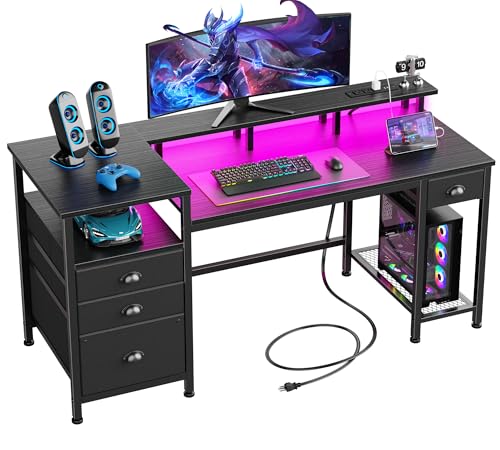
- 60-inch desk with a full monitor stand, four drawers, and three open shelves.
- Built-in RGB lights offer 20 colors, 22 modes, and adjustable brightness.
- Charging station has three power outlets and two USB ports; desk can be assembled with storage on either side.
Best For: Gamers who need room for a monitor, peripherals, and accessories.
3. NETGEAR Nighthawk WiFi 7 Router RS90
4. Redragon K668 Hot-Swap RGB Keyboard
Customizable Mechanical Controls
Redragon K668 Hot-Swap RGB Keyboard

- Full-size 108-key wired keyboard with hot-swappable switch sockets.
- Offers 19 preset RGB lighting modes and four dedicated shortcut keys.
- Includes two sets of keycaps and adjustable two-stage feet.
Best For: PC gamers who enjoy customizing their keyboard's switches, shortcuts, and look.
5. Valorise Wireless Gaming Headset
A Chat-Ready Audio Gift
Valorise Wireless Gaming Headset

- Supports 2.4GHz wireless, Bluetooth 5.4, and wired 3.5 mm connections.
- Has a retractable microphone with one-touch mute and selectable 7.1 surround sound.
- Listed battery life ranges from 45 to 100 hours depending on mode and features used.
Best For: Players who chat with teammates or want a wireless headset for compatible devices.
6. Redragon M810 PRO Wireless Gaming Mouse
Wireless Precision for the Desktop
Redragon M810 PRO Wireless Gaming Mouse

- Connects over 2.4GHz wireless and has eight programmable buttons.
- Offers five onboard DPI levels, including settings up to 10,000 DPI.
- Rechargeable battery life is listed up to 45 hours in eco mode.
Best For: PC gamers who want programmable controls and fewer cables on the desk.
7. acer Adjustable GPU Support Bracket
A Small Upgrade Inside the PC
acer Adjustable GPU Support Bracket

- Height adjusts from 70 to 120 mm in 0.5 mm increments.
- Magnetic base and silicone pads help position the support in a compatible case.
- Tool-free height adjustment; check the desktop case and graphics card clearance first.
Best For: A desktop PC owner whose graphics card could use added support.
8. AREYLO Extended Gaming Mouse Pad
A Bigger Surface for Play
AREYLO Extended Gaming Mouse Pad

- Measures 31.5 by 15.7 inches to fit a mouse and keyboard.
- Non-slip rubber base and stitched edges are designed for steady, durable use.
- Waterproof coating can be wiped clean with a damp cloth.
Best For: Gamers who want one broad surface for their mouse and keyboard.
9. AOC 27-Inch QHD Gaming Monitor
A High-Refresh Visual Upgrade
AOC 27-Inch QHD Gaming Monitor

- 27-inch IPS display with 2560 × 1440 resolution.
- Supports up to 240 Hz over DisplayPort and Adaptive-Sync.
- Connections include one DisplayPort 1.4 and two HDMI 2.0 ports; check the PC's output and performance.
Best For: PC gamers whose hardware and desk can accommodate a QHD, high-refresh display.
10. Logitech Z623 2.1 Speaker System
Desktop Sound Without a Headset
Logitech Z623 2.1 Speaker System
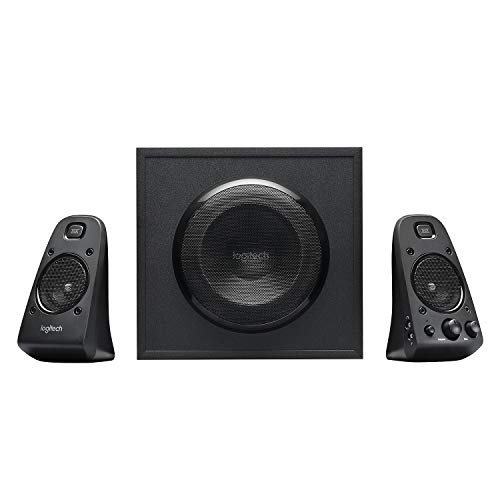
- Wired 2.1 system pairs two satellite speakers with a subwoofer.
- Connects through RCA or 3.5 mm inputs and can accept up to three audio devices.
- Compatible devices include computers and game consoles; it has no wireless connectivity.
Best For: Players who prefer speakers and have room for a subwoofer.
11. Crucial X9 2TB Portable SSD
Portable Space for Games and Files

- External solid-state drive with 2 TB capacity and listed speeds up to 1,050 MB/s.
- Connects over USB and is compatible with Windows, Mac, Android, and listed consoles.
- Compact drive includes a USB-C cable; confirm the intended device supports the connection.
Best For: Players who need portable extra storage for games, files, or backups.
12. BenQ ScreenBar Pro Monitor Light
Task Lighting That Frees Desk Space
BenQ ScreenBar Pro Monitor Light

- Clamps onto compatible monitors and provides adjustable brightness and color temperature.
- Motion sensor turns the light on nearby and off after five minutes of absence.
- Designed to illuminate the desk while limiting screen reflection; powered by USB-C or the included adapter.
Best For: Gamers who also work or study at their desktop and want more task lighting.
Choosing a Christmas Gift for a PC Gamer
Start with what the recipient already uses and what regularly gets in the way. A chair or desk can change the feel of a whole room, but these are larger purchases that need space and assembly. A keyboard, mouse, headset, or mouse pad is easier to fit into an existing setup, though preferences such as key feel, mouse shape, and headset comfort are personal. If you are unsure, a practical accessory like a monitor light or portable SSD may be a simpler fit.
Think about how the person plays. A competitive player may appreciate a high-refresh monitor, programmable mouse, or keyboard shortcuts. Someone who joins voice chat often may get more use from a headset with a retractable microphone and mute control. A gamer who shares a room or prefers open audio might like speakers, provided there is space for the subwoofer. Desk workers who game after hours may value lighting, storage, or a larger work surface as much as another gaming peripheral.
Match the Gift to Your Budget
Set a comfortable spending range before comparing features. Smaller accessories such as a mouse pad, light bar, or internal GPU support bracket can refresh an existing setup without requiring a major room change. Keyboards, mice, headsets, and portable storage offer more involved upgrades while remaining focused on one part of the experience. A monitor, desk, router, or chair is a larger commitment; it may be useful to coordinate with family or ask the recipient for measurements and preferences before buying.
Look for the feature they will actually use. Extra lighting modes matter less if the gamer keeps the lights off, and a broad desk is useful only if the room can accommodate it. For a portable SSD, the storage capacity and connection are more relevant than bonus software. For a chair, seat dimensions and available floor space deserve attention. A gift that fits the setup is often more useful than one with the longest feature list.
Compatibility and Personalization
PC gaming setups vary. Check the device connections before choosing a monitor, speaker system, headset, or storage drive. The AOC monitor lists DisplayPort and HDMI inputs, while the Logitech speakers use RCA or 3.5 mm connections. The Crucial SSD uses USB, and the headset supports wireless and wired connection options. Confirm the recipient’s computer or accessories have the matching ports and support the intended connection.
For bigger hardware changes, compatibility includes more than plugs. A high-refresh display is most useful when the PC can drive the games at suitable settings. A Wi-Fi router works with an existing modem or gateway, but service and home layout affect results. A GPU bracket needs the right clearance inside the case. The desk needs enough room, and the chair should suit the user’s body and preferred seating position. When exact details are unknown, ask a low-key question or check their setup with them rather than guessing.
Personal taste matters just as much. Keyboard sound, keycaps, mouse shape, headset fit, and RGB lighting are subjective. If you can, notice what they currently use and what they have mentioned wanting to change. For a surprise, choose a feature that complements their known habits rather than replacing a favorite item with a different style.
Timing and Last-Minute Decisions
For a large item, plan around setup time and available space. Desks and chairs require assembly, so allow time for the recipient to put them together. A monitor, router, or desk may also involve moving cables and adjusting a room. Smaller accessories are generally easier to hand over on Christmas Day, but connection and fit still matter.
If time is short, favor gifts with straightforward uses and a clear match to the current setup: a desk mat for someone with room, a light bar for a compatible monitor, or a portable drive for a device with USB support. Avoid relying on delivery timing or assuming a particular connection will fit. A short note explaining why you chose the item can make a practical gift feel personal, especially when it supports a hobby they already enjoy.