A useful computer accessory can make his desk more comfortable, capable, or enjoyable, whether he works from home, creates, or games. This guide spans practical upgrades and more immersive gear; check device and desk compatibility before choosing.
Computer Accessory Gifts for His Setup
1. UGREEN DXP2800 2-Bay NAS
A Home Media and Backup Hub

- Centralizes photos, videos, computer backups, and personal files across devices.
- Supports two HDD bays and two M.2 NVMe SSD slots, with storage drives sold separately.
- Designed for apps including Docker and compatible Plex media server applications.
Best For: A man managing growing photo, media, or project libraries across devices.
2. XPPen Artist 13.3 Pro V2 Drawing Tablet
A Screen for Digital Art
XPPen Artist 13.3 Pro V2 Drawing Tablet

- 13.3-inch fully laminated FHD display pairs with a battery-free stylus.
- Tilt support and 16,384 pressure levels offer varied drawing control.
- Includes a red dial, eight customizable shortcut keys, and a three-in-one cable.
Best For: A man who illustrates, edits images, or wants a hands-on digital art setup.
3. Anker Prime 14-in-1 Docking Station
A One-Cable Desk Connector
Anker Prime 14-in-1 Docking Station

- Provides 14-in-1 connectivity, including dual HDMI ports and USB connections.
- Offers up to 160W total output and data transfer speeds up to 10Gbps.
- Dual-display support depends on laptop capability; macOS mirrors the two external displays.
Best For: A laptop user seeking a central connection point for monitors and desk devices.
4. intpw Powered 9-Port USB Hub
More Ports for a Busy Setup

- Combines USB-A and USB-C data ports with two USB-C charging ports.
- Provides data transfer up to 10Gbps on selected ports and includes a 65W power adapter.
- Does not support video output; the USB-C PD ports do not transfer data.
Best For: A man with several USB accessories and limited computer ports.
5. HUANUO FlowLift Dual Monitor Arm
A More Flexible Two-Screen Desk
HUANUO FlowLift Dual Monitor Arm

- Fits two 13- to 32-inch monitors weighing 4.4 to 19.8 pounds each, with VESA 75x75 or 100x100 holes.
- Offers tilt, swivel, rotation, and height adjustment up to 15.75 inches.
- Uses a C-clamp or grommet mount and includes cable management.
Best For: A man with two compatible monitors and a suitable wooden desk.
6. EMEET NOVA 4K Webcam
A Clearer Video Call View

- Supports 4K video at 30 frames per second; default resolution is 1080p.
- Includes PDAF autofocus, automatic light adjustment, and two built-in microphones.
- Has a physical privacy cover and a stand that rotates horizontally.
Best For: A man who takes video calls, streams, or records tutorials.
7. fifine D6 Macro Keypad
Shortcuts at a Touch

- Provides 15 customizable LCD macro keys for assigned operations.
- Works with software including OBS Studio and Streamlabs, plus other applications and plugins.
- Customizable RGB lighting has nine controllable modes.
Best For: A man who streams, edits, presents, or repeats computer actions.
8. FIFINE AmpliGame AM8 USB/XLR Microphone
A Voice Setup Upgrade
FIFINE AmpliGame AM8 USB/XLR Microphone

- Connects by USB or XLR; the separate XLR cable is not included.
- USB mode includes tap-to-mute, a headphone jack, and microphone gain control.
- Cardioid dynamic design is suited to voice recording, gaming, and streaming.
Best For: A man recording voice chat, podcasts, streams, or presentations.
9. RIWUCT Adjustable Aluminum Laptop Stand
A Lift for Laptop Work
RIWUCT Adjustable Aluminum Laptop Stand
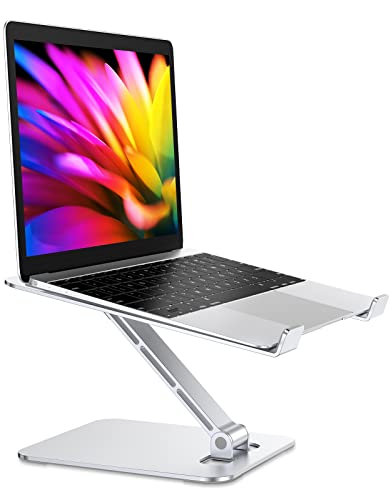
- Adjusts in height up to 7.48 inches and folds for storage or carrying.
- Fits laptops from 10 to 16 inches and supports up to 8.8 pounds.
- Open design leaves space for ventilation; non-slip straps and pads help steady it.
Best For: A man who uses a laptop at a desk or in several places.
10. Pulsar X2 CrazyLight Wireless Gaming Mouse
Lightweight PC Gaming Control
Pulsar X2 CrazyLight Wireless Gaming Mouse

- Wireless mouse with a symmetrical, low-profile shape for claw or fingertip grips.
- Features the XS-1 sensor with up to 32,000 DPI sensitivity.
- Includes 16 low-friction dot skates for smooth movement.
Best For: A PC gamer who prefers a lightweight mouse and precise control.
11. LG 34-Inch UltraWide Curved Monitor
Room for More on Screen
LG 34-Inch UltraWide Curved Monitor

- 34-inch curved display has 3440 x 1440 resolution and a 21:9 aspect ratio.
- Supports 100Hz refresh rate and Picture-by-Picture for two input sources.
- Includes USB-C with up to 65W power delivery, two HDMI ports, and height and tilt adjustment.
Best For: A man who works, games, or multitasks across several windows.
12. SanDisk Extreme Portable 2TB SSD
Portable Space for Projects
SanDisk Extreme Portable 2TB SSD

- Provides 2TB of portable storage and USB-C connectivity.
- Advertises read speeds up to 1050MB/s and write speeds up to 1000MB/s.
- Includes password protection with 256-bit AES hardware encryption and a carabiner loop.
Best For: A man who moves large files, backs up projects, or carries a game library.
13. KINESIS Freestyle Edge RGB Plus Keyboard
A Split Keyboard for Long Sessions
KINESIS Freestyle Edge RGB Plus Keyboard

- Split mechanical design has programmable keys and RGB lighting.
- Includes detachable palm support, a lift kit, and Mac keycaps.
- Listed with hotswap linear switches and a PC USB-A connection.
Best For: A man who types for long hours and wants an adjustable keyboard layout.
14. Bose QuietComfort Wireless Headphones
A Quieter Listening Space
Bose QuietComfort Wireless Headphones

- Over-ear Bluetooth headphones offer noise cancelling and Quiet and Aware listening modes.
- Provide up to 24 hours of battery life, with USB-C charging.
- Include adjustable EQ, multipoint Bluetooth, a protective case, and an audio cable.
Best For: A man seeking focused computer time, music, or a quieter work session.
15. Edifier R1280T Powered Bookshelf Speakers
A Pair for Desk Audio
Edifier R1280T Powered Bookshelf Speakers

- Powered stereo speakers have a 4-inch full-range driver and 13mm silk dome tweeter.
- Two AUX inputs allow connection to two devices at once.
- A remote and side controls adjust volume, bass, and treble.
Best For: A man who listens to music, watches videos, or games at his desk.
16. CyberPower CP1500PFCLCD UPS
Backup Power for a Workstation

- 1500VA/1000W sine wave UPS supports computers, workstations, and network devices.
- Has 12 outlets: six battery-backup and surge-protected, plus six surge-protected.
- LCD shows battery and power conditions; automatic voltage regulation corrects minor fluctuations.
Best For: A man with a desktop or home office setup that benefits from backup power.
17. Logitech G920 Racing Wheel, Pedals and Shifter
A More Immersive Racing Setup
Logitech G920 Racing Wheel, Pedals and Shifter

- Bundle includes a force-feedback racing wheel, pedals, and six-speed H-pattern shifter.
- Built-in clamps secure the wheel and shifter to a table or racing rig.
- Compatible with Xbox Series X|S, Xbox One, and PC.
Best For: A man who enjoys racing games on PC or Xbox.
Choosing a Computer Accessory for Him
Start with the part of his setup he uses most. A remote worker may benefit from a webcam, microphone, docking station, or backup power. A creator might appreciate a drawing display, portable SSD, powered USB hub, or programmable keypad. For gaming, consider the mouse, ultrawide monitor, headphones, speakers, or racing wheel. A gift tied to something he already does is more likely to fit than a gadget chosen for novelty alone.
Think about whether the gift solves a small daily annoyance or changes how he uses the computer. A laptop stand or monitor arm can make a desk easier to arrange. A docking station brings compatible accessories together, while speakers and headphones change the sound experience. Larger choices such as a monitor, storage system, or racing wheel can be especially appealing, but they call for more checking before purchase.
Set a Budget That Fits the Upgrade
Computer accessories range from modest desk additions to substantial equipment. Set a comfortable budget first, then focus on the improvement he will notice most. A stand, hub, webcam, or mouse can be a practical upgrade without changing the whole setup. A monitor, NAS enclosure, keyboard, or racing wheel may have a bigger role in his workspace and deserves closer compatibility checks.
For products that need other equipment, include those costs in your plan. The DXP2800 NAS is diskless, so its HDDs or SSDs are purchased separately. The microphone’s XLR cable is also not included. A display tablet needs a compatible computer, and a docking station is useful only when the laptop supports the required USB-C display and power features. Looking at the complete setup helps keep a gift within budget after the main item is chosen.
Check Compatibility and Personal Preferences
Before ordering, confirm the computer, ports, operating system, and space available. The Anker dock supports Windows and ChromeOS plus compatible USB-C, USB4, and Thunderbolt laptops; it does not support Linux, and macOS mirrors its two external displays. The monitor arm has requirements for screen size, weight, VESA holes, desk material, and desk thickness. The racing wheel is listed for PC and Xbox consoles, while the drawing tablet needs a computer connection.
Personalization can matter as much as technical fit. Some people favor a split keyboard, while others prefer a familiar layout. Mouse shape and grip are individual choices. For desk audio, consider whether he has room for bookshelf speakers; for headphones, consider whether he wants to hear the room around him, since these headphones offer both Quiet and Aware modes. If you are unsure, a discreet look at his current ports, desk, and accessories can answer many practical questions.
Timing and Last-Minute Decisions
For Christmas shopping, leave time to check model details and any separate components the gift needs. A compact accessory may be simpler to fit into an existing setup, but even a hub or webcam depends on available connections. Larger equipment needs more room and may involve rearranging his desk. Avoid making plans around delivery dates unless you have confirmed them with the seller.
If you are deciding close to Christmas, prioritize what you can verify: his computer type, free desk space, existing monitor connections, and the activity he enjoys. A known need such as more storage or a better video-call camera can guide a quick choice. For less certain preferences, choose a product category he already uses and check its fit carefully. A thoughtful computer accessory gift should make his everyday work, creativity, or downtime feel more comfortable and engaging.