A thoughtful computer accessory can make creative work, study, or everyday computer use more comfortable and organized. This guide includes desk upgrades, input devices, storage, and tools for making or managing digital content.
14 Computer Accessory Gift Ideas
1. XP-PEN Artist 13.3 Pro V2 Drawing Tablet
For the Digital Artist
XP-PEN Artist 13.3 Pro V2 Drawing Tablet

- 13.3-inch, fully laminated display pairs with a battery-free pen featuring 16K pressure levels.
- Includes a foldable stand, pen holder, replacement nibs, and artist glove.
- Connects to compatible USB-C devices; it must be used with a computer or laptop.
Best For: Someone who enjoys digital illustration, handwritten notes, or photo editing.
2. Anker Prime 14-in-1 Docking Station
For a More Connected Desk
Anker Prime 14-in-1 Docking Station

- Provides 14-in-1 connectivity, including dual HDMI outputs and audio and Ethernet ports.
- Offers up to 160W total output, with charging for up to four devices simultaneously.
- Check laptop compatibility: it supports USB-C, USB4, and Thunderbolt; macOS mirrors both external displays.
Best For: A laptop user adding displays and peripherals to a home office.
3. MAONO PD200XS USB/XLR Microphone Kit
For the Home Creator
MAONO PD200XS USB/XLR Microphone Kit

- USB and XLR connections suit compatible computers and audio interfaces; XLR cable is not included.
- Includes an adjustable boom arm, shock mount, and USB cable.
- USB mode supports software audio adjustments, RGB lighting, mute control, and headphone monitoring.
Best For: Someone recording podcasts, voiceovers, streams, or video calls.
4. HUANUO FlowLift Single Monitor Arm
For a Freer Desk Surface
HUANUO FlowLift Single Monitor Arm

- Fits supported 13–32-inch monitors weighing 4.4–19.8 pounds with 75x75 or 100x100 VESA patterns.
- Adjusts by tilt, swivel, and rotation; includes clamp and grommet mounting options.
- Check the desk surface and monitor weight and mounting pattern before gifting.
Best For: Someone who wants to reposition a compatible monitor and free desk space.
5. SABLUTE Ergonomic Wireless Keyboard and Mouse
For Everyday Typing Comfort
SABLUTE Ergonomic Wireless Keyboard and Mouse

- The keyboard has wave keys, a faux lambskin palm rest, adjustable stands, and backlighting.
- The wireless set uses a 2.4GHz USB receiver with USB-A and USB-C support.
- Includes keyboard shortcut keys and a mouse with six buttons and adjustable DPI.
Best For: Someone who spends long stretches working or creating at a computer.
6. Nulea M501 Wireless Trackball Mouse
For Compact Cursor Control
Nulea M501 Wireless Trackball Mouse

- Thumb-operated trackball moves the cursor without moving the mouse across the desk.
- Connects to up to three devices using Bluetooth or the included USB receiver.
- Rechargeable design has six buttons; the buttons are not programmable.
Best For: Someone who prefers trackball control or works with limited desk space.
7. iCasso Large Beige Floral Desk Mat
For a Coordinated Workspace
iCasso Large Beige Floral Desk Mat

- The 35.4-by-15.7-inch mat gives a keyboard, mouse, and other desk items room to sit together.
- Smooth Lycra surface, rubber base, and stitched edges support daily desk use.
- Beige floral design suits someone who likes a coordinated desk aesthetic.
Best For: Someone refreshing a study, dorm, bedroom, or home-office workspace.
8. SanDisk Extreme Portable SSD, 2TB
For Files on the Move
SanDisk Extreme Portable SSD, 2TB

- Provides 2TB of portable storage with a USB-C connection.
- The listing states read speeds up to 1050MB/s and write speeds up to 1000MB/s.
- Includes password protection with 256-bit AES hardware encryption and a carabiner loop.
Best For: A student, photographer, or professional moving large files between computers.
9. Philips 27-Inch 4K UHD USB-C Monitor
For a Clearer, Roomier View
Philips 27-Inch 4K UHD USB-C Monitor
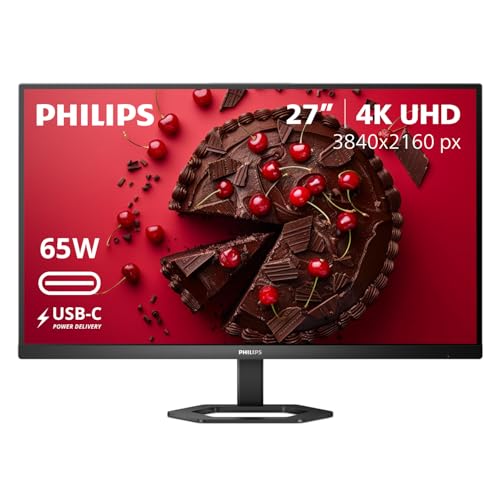
- 27-inch IPS display has 3840x2160 resolution and DisplayHDR 400.
- USB-C supports up to 65W Power Delivery for compatible laptops, with video and data over one cable.
- Stand adjusts for height, pivot, and tilt; LowBlue Mode and Flicker-Free features are included.
Best For: Someone working with documents, photos, design projects, or multiple windows.
10. USB-C KVM Switch for Two Computers
For Switching Between Computers
USB-C KVM Switch for Two Computers

- Lets two compatible USB-C computers share one HDMI monitor, keyboard, and mouse.
- A physical button switches between computers; HDMI output supports up to 4K at 60Hz.
- USB-C PD input supports up to 100W for a connected laptop with a compatible power adapter.
Best For: Someone using separate work and personal computers at one desk.
11. Datacolor Spyder X Pro Monitor Calibrator
For More Consistent Screen Color
Datacolor Spyder X Pro Monitor Calibrator

- Designed to calibrate laptop and desktop monitors for more consistent color.
- Guided software includes 12 predefined calibration targets and single-click calibration.
- SpyderProof lets users compare a display before and after calibration using their own images.
Best For: A photographer or designer who wants more consistent monitor colors.
12. AULA F75 Pro Hot-Swappable Mechanical Keyboard
For a Custom Typing Setup
AULA F75 Pro Hot-Swappable Mechanical Keyboard

- Compact 81-key, 75% layout includes arrow keys and a multifunction knob.
- Connects by Bluetooth 5.0, 2.4GHz wireless, or USB-C; supports up to five devices.
- Hot-swappable base supports compatible 3-pin or 5-pin switches; RGB lighting can be adjusted or turned off.
Best For: A computer enthusiast who enjoys customizing a keyboard and desk setup.
13. 8-in-1 External Blu-ray Drive and Hub
For Disc and Card Access
8-in-1 External Blu-ray Drive and Hub
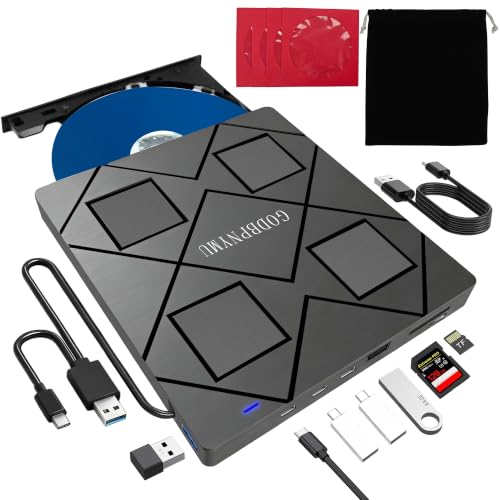
- Reads and burns supported Blu-ray, DVD, and CD formats; Blu-ray playback requires third-party software.
- Includes USB-C and USB ports plus an SD/TF card slot for compatible devices.
- Slim drive comes with a carrying case and four disc sleeves; it is not for phones or tablets.
Best For: Someone with a disc collection, archival projects, or a computer without an optical drive.
14. VSD M18 Programmable Macro Keypad
For One-Tap Shortcuts
VSD M18 Programmable Macro Keypad

- Offers 18 programmable keys, including 15 LCD visual keys that can display JPG, PNG, or GIF images.
- Can trigger shortcuts, macros, app launches, text input, media controls, or OBS scene changes.
- USB-C connection supports Windows 11 and newer and macOS 11 and newer.
Best For: A gamer, editor, or power user who likes customizing repeated tasks.
Choosing a Gift for Her Computer Setup
Start with what she already does at her desk. A digital artist may get more use from the XP-PEN display tablet, while a photographer or designer may appreciate monitor calibration or portable storage for large files. For someone who records or streams, the MAONO microphone kit brings a mic, boom arm, and USB connection together. If her computer is mainly for work or study, a monitor, keyboard-and-mouse set, or docking station can improve an everyday setup.
Pay attention to the kind of improvement she wants. A large desk mat changes the feel and look of a workspace without requiring a complicated setup. A trackball mouse or monitor arm can suit a crowded desk. The programmable keypad and mechanical keyboard make more sense for someone who enjoys setting up shortcuts or personalizing how her equipment feels. An accessory is most useful when it fits a habit she already has.
Budget and the Scale of the Upgrade
These gifts range from simple desk additions to larger equipment changes. A desk mat is a modest refresh; a mouse, keyboard, or macro keypad adds new ways to interact with a computer. A monitor arm, docking station, and KVM switch are more involved choices because they depend on the rest of the desk setup. Displays, storage, drawing equipment, and audio gear can support specific creative or work needs.
Consider the full setup cost, not only the main item. A monitor arm needs a compatible monitor and suitable desk edge or grommet opening. A KVM switch requires two compatible computers, an HDMI display, and shared USB devices. The Blu-ray drive can play discs only with third-party playback software. Where an item needs an accessory or particular software to work as intended, account for that when choosing a gift.
Compatibility and Personalization
Check what devices she owns before selecting a computer accessory. The docking station depends on USB-C, USB4, or Thunderbolt support and DP Alt Mode and Power Delivery; on macOS its two external displays mirror one another. The KVM switch requires compatible USB-C computers with Thunderbolt video output and an HDMI monitor. The Philips monitor’s single-cable arrangement depends on a laptop that supports USB-C video and charging.
For a monitor arm, confirm screen weight, VESA pattern, and desk mounting conditions. For a keyboard or mouse, check operating system and preferred connection type. The drawing tablet requires a computer or laptop and a compatible connection. For storage, verify the computer has a suitable USB connection and that the drive’s capacity matches her file needs. If you are unsure, discreetly checking a device model or asking someone who knows her setup can prevent a mismatched gift.
Personalization can be practical as well as decorative. The floral mat, backlit SABLUTE keyboard, and RGB mechanical keyboard offer visual choices for the desk. The AULA keyboard supports switch replacement, while the VSD macro keypad lets users assign icons and actions to keys. These are particularly fitting when the recipient enjoys configuring equipment herself.
Timing and Last-Minute Decisions
For a Christmas gift chosen late, favor items that fit many setups and require little installation, such as a desk mat or portable SSD, while still checking connection compatibility. A keyboard and mouse set may be a straightforward daily upgrade, but confirm her preferred layout and operating system if possible. Larger gifts such as monitors, monitor arms, docking stations, and KVM switches deserve an earlier compatibility check because they depend on desk space and existing equipment.
If the gift is a surprise and the setup is unknown, choose based on a known interest: drawing, photography, streaming, gaming, or organizing a desk. Include a short note explaining the feature that made you think of her, such as the trackball’s compact cursor control or the monitor’s USB-C connectivity. That makes the Christmas gift feel considered while leaving her room to decide how it fits into her workspace.