Choosing the right HDMI extender depends on more than advertised distance. Resolution, refresh rate, cable type, signal stability, and installation features all affect real-world performance.
This roundup covers simple male-to-female extension cables, HDMI couplers, and active Ethernet-based systems for home theaters, offices, classrooms, and commercial installations.
Best 10 Hdmi Extenders Picks for 2026
Best Cable Pick

- 4K at 60Hz with HDR and 3D support
- Braided construction rated for 15,000+ bends
- Two 6.6-foot male-to-female cables
Best For: Simple short HDMI extensions for TVs, consoles, PCs, and monitors
Best Long-Run Pick

- Up to 230 feet at 1080p
- IR, loop-out, EDID, and PoC features
- Supports 4K at 30Hz over Cat5e/6/7
Best For: Home theaters, conference rooms, signage, and CCTV installations
Best Compact Pick
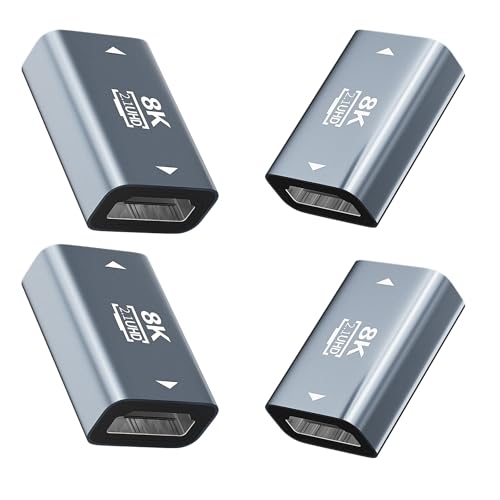
- Supports 8K/60Hz and 4K/120Hz
- Shielded aluminum body with gold-plated contacts
- Four-pack for home, office, or travel
Best For: Joining HDMI cables in tight spaces or keeping spare adapters available
Best Installation Alternative

- Up to 130 feet at 4K/30Hz
- Mirror and extended display modes
- IR, loop-out, and PoC included
Best For: Dual-display installations, home theaters, meetings, and live streaming
Best High-Speed Cable
Highwings 8K HDMI Extender Cable
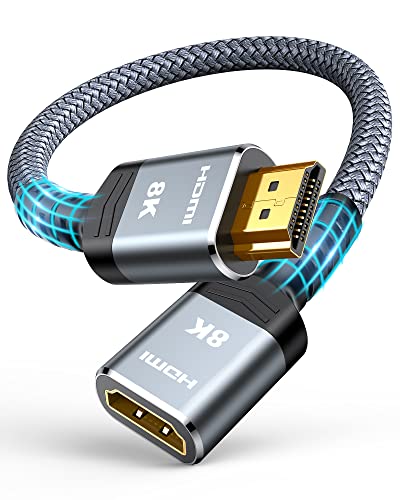
- Supports 48Gbps and 8K at 60Hz
- Includes HDR, ARC, and 3D support
- Flexible, durable 1-foot design
Best For: High-bandwidth gaming and home theater connections
Best Long-Run Solution
Steetek HDMI Extender Over Ethernet

- Reaches up to 164 feet over Cat5e/Cat6/Cat7
- Supports 1080p at 60Hz and 3D
- PoC and EDID simplify installation
Best For: Long-distance Full HD TV, monitor, and projector connections
Best Extra-Length Cable
Highwings 3.3-Foot 8K HDMI Extender

- Adds 3.3 feet of HDMI reach
- Supports 48Gbps and 8K at 60Hz
- Built for gaming and home theater use
Best For: High-resolution setups needing a little extra cable length
Best Long-Range Pick

- 4K@60Hz HDR transmission up to 400 feet
- Two-way IR, RS-232, CEC, and PoC
- HDMI loop-out with zero-latency HDBaseT
Best For: Long-distance 4K installations and advanced device control
Best Simple Extension
8K HDMI 2.1 Male-to-Female Cable
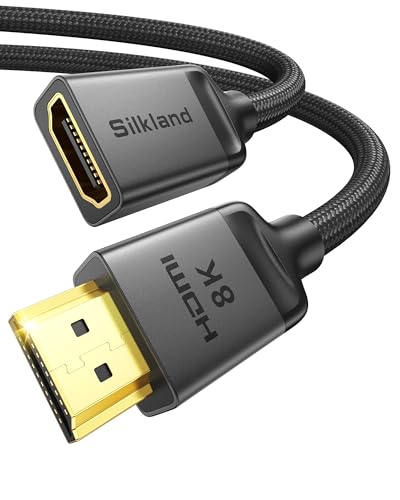
- Supports 8K@60Hz and 4K@120Hz
- 48Gbps bandwidth with eARC and dynamic HDR
- Braided, shielded design for compact setups
Best For: Short HDMI extensions for TVs, consoles, and streaming devices
Best for Two Displays

- Sends one source to two displays
- 4K@30Hz up to 165 feet over CAT6/7
- PoC, IR control, EDID, and HDMI loop-out
Best For: Two-screen distribution in meeting rooms, bars, and home setups
Best Cable Pick – Braided 4K HDMI Extension
For short, straightforward HDMI extenders, the Twozoh HDMI Extension Cable is a practical male-to-female option. It supports 4K at 60Hz, HDR, 3D, and up to 10 Gbps, making it suitable for extending connections between common home-entertainment and gaming devices.
Best For: Extending an existing HDMI connection by 6.6 feet for TVs, monitors, consoles, streaming devices, and PCs.
Pros:
- Supports 4K at 60Hz, HDR, and 3D.
- Braided cable has a stated bending life of more than 15,000 bends.
- Gold-plated connectors and compatibility with a wide range of HDMI devices.
- Two cables are included in the package.
Cons:
- This is a short cable extension rather than a long-distance HDMI-over-network solution.
- It uses standard HDMI connectors and does not add features such as remote-control pass-through.
The Twozoh is a sensible choice when you simply need extra reach without installing a transmitter and receiver. Its 4K/60Hz support and braided construction make it a useful everyday cable extender.
Best Long-Run Pick – OREI 4K HDMI Over Cat Cable
The OREI EX-170C is one of the more capable HDMI extenders for sending uncompressed video and audio over existing Cat5e, Cat6, or Cat7 cable. It reaches up to 230 feet at 1080p or 131 feet at 4K/30Hz and adds useful installation features such as IR pass-through, loop-out, EDID copy, and PoC.
Best For: Home theaters, classrooms, conference rooms, digital signage, and 4K CCTV installations requiring a long cable run.
Pros:
- Extends 1080p up to 230 feet or 4K at 30Hz up to 131 feet.
- HDMI loop-out supports local display monitoring.
- One-way IR pass-through enables source control from the receiver location.
- PoC allows one power adapter at the transmitter, and the metal housing is designed for dependable installation.
Cons:
- Supports 4K at 30Hz, not 4K at 60Hz.
- It is not compatible with HDMI ARC.
- Requires a direct Cat5e or Cat6 connection and should not be used through network switches or routers.
This OREI model is better suited to structured installations than casual cable extension. Its long reach and control features are valuable, but buyers should confirm that 4K/30Hz meets their display requirements.
Best Compact Pick – 8K HDMI 2.1 Coupler 4-Pack
This HDMI female-to-female coupler is a compact way to join two HDMI cables when you need extra reach or a cleaner connection in a tight space. It is specified for HDMI 2.1 performance up to 8K at 60Hz and 4K at 120Hz, with support for HDR, ARC, VRR, 3D, and Dolby sound.
Best For: Connecting two existing HDMI cables for compatible TVs, monitors, PCs, consoles, projectors, and other HDMI-equipped devices.
Pros:
- Rated for 8K at 60Hz and 4K at 120Hz.
- Supports HDR, ARC, VRR, 3D, and Dolby sound.
- Shielded aluminum shell and gold-plated contacts help support a stable connection.
- Plug-and-play design and a four-pack provide convenient spares.
Cons:
- It is a passive coupler, so it does not actively boost or regenerate an HDMI signal.
- Actual performance depends on the connected cables and devices.
Choose this adapter when the problem is connector reach rather than a very long cable run. Its small size and high stated bandwidth make it convenient for desks, entertainment centers, and travel kits.
Best Installation Alternative – PWAY HT275 HDMI Extender
The PWAY HT275 is a long-distance HDMI extender that uses a single Cat6 cable to send video and audio up to 130 feet at 4K/30Hz or 230 feet at 1080p. It combines IR control, HDMI loop-out, mirror and extended display modes, and power over cable for a cleaner multi-room or dual-display setup.
Best For: Home theaters, meetings, live streaming, and installations that need a remote display plus local monitoring.
Pros:
- Supports 4K at 30Hz and reaches up to 230 feet at 1080p.
- Offers mirror and extended display modes for flexible dual-screen setups.
- HDMI loop-out allows local preview while sending content to a remote screen.
- IR control and PoC reduce the need for extra wiring at the receiver.
Cons:
- Its 4K mode is limited to 30Hz rather than 60Hz.
- Installation requires a suitable Cat5/Cat6/Cat7 cable run.
- The supplied details list the unit as having no power plug, so setup requirements should be checked before purchase.
The HT275 is a useful alternative to the OREI for buyers who want extended-display modes alongside long-distance transmission. It is most compelling when loop-out, IR control, and one-adapter PoC simplify the installation.
Best High-Speed Cable – Highwings 8K HDMI Extender Cable
If you need a short HDMI extender for a modern gaming or home theater setup, this Highwings male-to-female cable is built for high-bandwidth connections. It supports HDMI 2.1 features, including up to 8K at 60Hz, 4K at 120Hz, and 48Gbps data transfer, while offering a simple plug-and-play way to extend an existing cable.
Best For: Gamers and home theater users who need a durable, high-speed HDMI extension for devices such as PS5 consoles, Roku sticks, TVs, and laptops.
Pros:
- Supports up to 48Gbps bandwidth, 8K at 60Hz, and 4K at 120Hz.
- Includes HDR, ARC, HDMI Ethernet Channel, and 3D support.
- Flexible nylon construction and gold-plated ports are designed for frequent use.
- Compact 1-foot length can help with port access and cable management.
Cons:
- The 1-foot length may not provide enough reach for larger setups.
- This is a male-to-female extension cable, not a long-distance HDMI-over-Ethernet system.
For nearby components, this is one of the more capable HDMI extenders in the group. Its high bandwidth and flexible construction make it a practical choice when you want to preserve modern video features without adding a separate transmitter and receiver.
Best Long-Run Solution – Steetek HDMI Extender Over Ethernet
For installations where a standard HDMI cable is too short, this Steetek HDMI extender sends uncompressed 1080p video and audio up to 164 feet over a single Cat5e, Cat6, or Cat7 cable. It is designed for point-to-point connections and includes features that simplify setup, including Power over Cable and EDID copying.
Best For: Offices, classrooms, commercial AV systems, and home setups that need Full HD signals routed to a distant TV, monitor, or projector.
Pros:
- Extends 1080p video and audio up to 164 feet over Ethernet cable.
- Supports 1080p at 60Hz and 3D content.
- PoC requires only one included power adapter.
- EDID copy helps establish compatible display settings.
Cons:
- Maximum listed resolution is 1080p, so it is not intended for 4K or 8K systems.
- Requires a separate Cat5e, Cat6, or Cat7 cable run.
- Uses a transmitter-and-receiver kit rather than a simple cable extension.
This is the better fit when distance matters more than ultra-high resolution. Its long reach, EDID support, and reduced power-cable clutter make it a practical HDMI extender for fixed installations with Full HD displays.
Best Extra-Length Cable – Highwings 3.3-Foot 8K HDMI Extender
This 3.3-foot Highwings HDMI extender provides extra reach for nearby components while retaining support for HDMI 2.1 features. With up to 48Gbps bandwidth, 8K at 60Hz, and 4K at 120Hz support, it is suited to modern TVs, gaming consoles, streaming devices, and laptops that need a little more connection length.
Best For: Users who want a flexible 3.3-foot HDMI extension for gaming consoles, home theaters, TVs, laptops, or streaming devices.
Pros:
- Supports 48Gbps bandwidth, 8K at 60Hz, and 4K at 120Hz.
- Provides HDR, ARC, HDMI Ethernet Channel, and 3D support.
- 3.3-foot length offers more reach than a compact 1-foot adapter.
- Nylon outer material and gold-plated connectors are designed for durability.
Cons:
- It is intended for nearby connections rather than long-distance signal distribution.
- The longer cable takes more space than a short port-saving adapter.
If you need a little extra slack without moving to a powered extender system, this cable offers a useful middle ground. It combines a practical 3.3-foot length with the bandwidth needed for current high-resolution gaming and home theater equipment.
Best Long-Range Pick – 400ft HDBaseT HDMI Extender
For demanding HDMI extender installations, the OREI UHD-EXB400R-K sends 4K video up to 400 feet over CAT5e/6/7 cable. HDBaseT transmission, zero latency, HDR support, and two-way IR make it suited to whole-room or multi-room setups where reliable control matters.
Best For: Long-distance 4K home theater, commercial displays, and installations needing IR, RS-232, CEC, or PoC.
Pros:
- Supports 4K@60Hz, HDR, Dolby Vision, HDCP 2.2, and 18Gbps bandwidth.
- Reaches up to 400 feet over CAT5e/6/7 with lossless, lag-free HDBaseT transmission.
- Includes two-way IR, HDMI loop-out, RS-232 control, CEC, and power over cable.
Cons:
- Requires the included matching OREI transmitter and receiver; it is not interchangeable with other models or brands.
- More installation-focused than a simple plug-and-play HDMI cable.
This is the strongest option here for maximum range and advanced control features. Its model-specific pairing requirement is worth noting before expanding an existing system.
Best Simple Extension – 8K HDMI 2.1 Male-to-Female Cable
If you only need a little extra reach, this 3.3-foot HDMI extender provides a straightforward male-to-female connection for TVs, streaming sticks, consoles, and other HDMI devices. It supports HDMI 2.1 features while helping position devices behind wall-mounted displays or in tight spaces.
Best For: Extending a single HDMI connection for gaming consoles, streaming devices, home theater equipment, and compact TV setups.
Pros:
- Supports 8K@60Hz, 4K@120Hz, dynamic HDR, 3D, eARC, and 48Gbps bandwidth.
- Braided construction, triple shielding, gold-plated connectors, and a 28AWG copper core help support signal stability.
- Works with HDMI 2.0 and 1.4 devices and is available in several lengths.
Cons:
- This 3.3-foot version extends only one end of a standard HDMI cable rather than transmitting over long distances.
- Very thin standard HDMI cables may cause black screens or compatibility issues.
- Correct connector orientation and the usage instructions are important for setup.
Choose this cable when your problem is a short connection, not a room-to-room run. It is the simplest HDMI extender in the group and offers strong bandwidth for modern gaming and display equipment.
Best for Two Displays – 4K HDMI Over CAT6 Splitter
This OREI HDMI extender splitter sends one HDMI source to two displays over CAT6/7 cable, making it practical for meeting rooms, bars, exhibitions, and home setups with screens in separate locations. It also provides a local HDMI loop-out and remote IR control.
Best For: Distributing one source to two monitors or TVs across medium-distance CAT6/7 cable runs.
Pros:
- Supports simultaneous 1-in/2-out distribution with up to 165 feet at 4K@30Hz or 230 feet at 1080p@60Hz.
- Power over cable eliminates separate adapters for the receiver units.
- Includes HDMI loop-out, EDID management, IR control, and plug-and-play setup.
Cons:
- 4K transmission is limited to 30Hz and 165 feet.
- Shielded CAT6 cable is recommended for best results.
- It is designed for two displays, so it is less suitable for larger distribution systems.
This is a practical middle ground for sending one source to two screens without installing separate HDMI cables. Its distance and refresh-rate limits should be checked against the intended displays.
How We Picked These Hdmi Extenders
We selected products across the main HDMI extension categories, including passive cables, female-to-female couplers, and transmitter-receiver kits that run over Cat5e, Cat6, or Cat7 Ethernet cable. We compared stated resolution and refresh-rate support, maximum transmission distance, HDMI version, HDR compatibility, and installation features such as power over cable, IR control, EDID management, loop-out ports, and signal splitting.
Because extension needs vary widely, the list includes compact options for adding a few feet as well as active solutions designed for long cable runs. Product claims should still be checked against your source, display, and cable infrastructure before purchase.
Quick Comparison
- Short cable extensions: Passive HDMI extension cables and couplers are the simplest choices for connecting equipment that is slightly too far apart.
- High-bandwidth systems: HDMI 2.1 cables and couplers are better suited to 8K, 4K at 120Hz or 240Hz, HDR, and gaming features, provided every component supports the required bandwidth.
- Long-distance video: Ethernet-based extenders can send HDMI signals much farther than ordinary copper HDMI cables, often with IR, EDID, and PoC features.
- Multi-display setups: HDMI-over-Ethernet splitters with one input and two outputs are useful when the same source must feed two screens.
Key Buying Factors for Hdmi Extenders
Distance and Cable Infrastructure
For runs of only a few feet, a passive extension cable or coupler usually adds the least complexity. For longer distances, choose an active Ethernet extender and use the recommended Cat5e, Cat6, or Cat7 cable. Actual range can vary with cable quality, interference, wall plates, and installation conditions.
Resolution, Refresh Rate, and Bandwidth
Match the extender to the highest format you plan to use. 4K at 60Hz requires more bandwidth than 4K at 30Hz, while 4K at 120Hz and 8K require HDMI 2.1-class hardware and suitable cables. A system advertised for 8K may not support every combination of HDR, chroma format, or refresh rate.
Control and Installation Features
IR pass-through helps control a remote source from the display location. EDID management can improve compatibility between sources and screens, while loop-out ports support local monitoring. PoC can reduce power-cable clutter, but verify how the included transmitters and receivers are powered.
Who Should Buy Which Hdmi Extenders?
Choose a passive extension cable if you need a short, inexpensive reach increase and your existing HDMI connection already works reliably. Choose a coupler when you already have two compatible HDMI cables and want a compact joiner.
Choose an Ethernet extender for wall-to-wall installations, projectors, conference rooms, or any run beyond the practical range of a standard HDMI cable. For demanding 4K or 8K gaming, prioritize bandwidth and refresh-rate specifications over distance claims. Choose an extender with IR, EDID, or PoC when the equipment will be installed out of sight or managed remotely.