Connecting older consoles, analog video equipment, computers, and modern TVs is easier with the right HDMI converter. This roundup compares 10 options across RCA, DisplayPort, USB-C, HDMI extension, and audio-extraction needs.
Use the buying guide below to match the converter type, resolution support, cable distance, and audio features to your setup before you buy.
Best 10 Hdmi Converters Picks for 2026
Best Budget RCA Converter
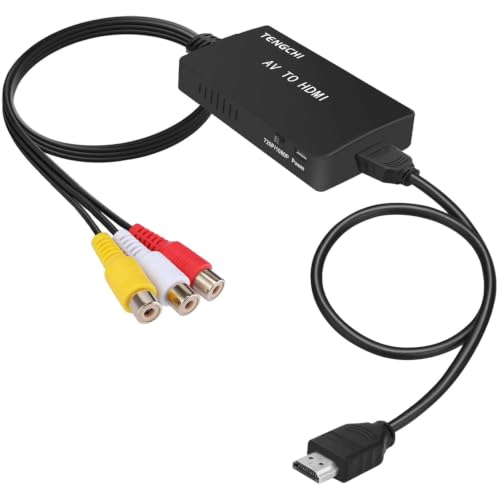
- Converts RCA input to 1080p HDMI output
- Supports PAL, NTSC, and SECAM formats
- Includes HDMI and USB cables
Best For: Older consoles, VCRs, and DVD players
Best Long-Distance HDMI Extender

- Extends 1080p up to 230 feet
- Supports 4K at 30Hz up to 131 feet
- Adds IR pass-through and HDMI loop-out
Best For: Home theaters, classrooms, and CCTV installations
Best USB-C HDMI Converter
Anker 4K USB-C to HDMI Adapter

- Outputs video up to 4K at 60Hz
- Plug-and-play with no driver installation
- Compact aluminum and braided-cable design
Best For: Compatible laptops and USB-C devices
Best Complete RCA Conversion Kit

- Converts RCA input to 720p or 1080p HDMI
- Includes RCA, HDMI, and USB cables
- Supports PAL, NTSC, and SECAM formats
Best For: Retro consoles, VHS players, and DVD equipment
Compact Display Upgrade
BENFEI DisplayPort to HDMI Adapter

- Up to 4K at 30Hz and 1080p at 60Hz
- Compact body with a latching DisplayPort connector
- Uni-directional with an 18-month warranty
Best For: DisplayPort computers connecting to HDMI displays
Retro AV Revival
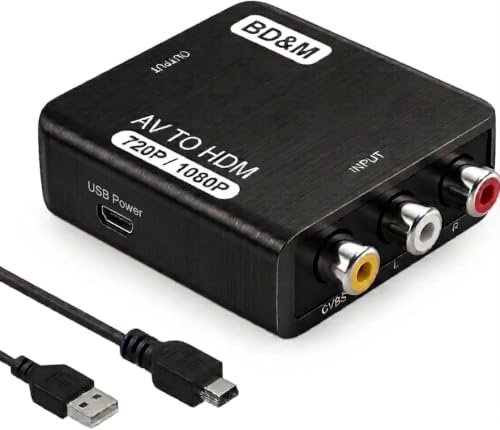
- Converts RCA/composite AV to HDMI
- Supports 720p and 1080p output
- Compatible with retro consoles, VCRs, and DVD players
Best For: Older RCA devices connected to modern HDMI displays
Rugged 4K Connectivity
Highwings 4K DisplayPort to HDMI Adapter

- Supports 4K at 30Hz and 1440p at 60Hz
- Reinforced design rated for up to 25,000 flexes
- Passive, uni-directional adapter with an 18-month warranty
Best For: Durable DisplayPort-to-HDMI desktop and graphics-card connections
Classic AV Revival

- Converts composite RCA input to 720p/1080p HDMI output
- Supports consoles, VCRs, DVD players, and multiple TV formats
- Requires 5V USB power and does not support HDMI-to-RCA conversion
Best For: Connecting legacy composite AV devices to modern HDTVs or monitors
Dedicated Audio Routing

- Extracts HDMI audio through optical or 3.5mm outputs
- Provides 2.0CH, 5.1CH, and pass modes
- Supports 4K/30Hz but not ARC, eARC, or 7.1-channel audio
Best For: Sending HDMI-source audio to external optical or AUX equipment
Retro Console Bridge

- Converts composite AV to 720p/1080p HDMI at 60Hz
- Works with many retro consoles, VCRs, and DVD players
- Requires 5V USB power and does not enhance original video quality
Best For: Using composite-output retro devices with modern TVs or projectors
Best Budget RCA Converter – RCA to HDMI Adapter
This RCA-to-HDMI converter is a practical choice among HDMI converters for connecting older composite devices to a modern HDTV or monitor. It converts yellow, white, and red RCA input to 1080p HDMI output and requires USB power during use.
Best For: PS1/PS2/PS3 consoles, VHS and VCR players, DVD players, and other devices with standard composite AV output.
Pros:
- Converts composite RCA signals to HDMI 1080p output.
- Supports multiple PAL, NTSC, and SECAM input formats.
- Includes an HDMI cable, USB power cable, and one-year warranty.
Cons:
- Does not support 3D, 4K, or HDMI-to-AV conversion.
- Requires a separate 5V/1A power source; the power supply is not included.
Choose this model when you need a straightforward way to use legacy AV equipment with an HDMI display. Its limits are important, but its 1080p conversion and broad format support suit basic retro-gaming and media setups.
Best Long-Distance HDMI Extender – OREI 4K HDMI Over Cat5
For installations that need more reach than a standard HDMI cable, this OREI unit is one of the more capable HDMI converters and extenders in this group. It sends uncompressed video and audio over a direct CAT5e/6/7 cable, reaching up to 230 feet at 1080p or 131 feet at 4K@30Hz.
Best For: Home theaters, conference rooms, classrooms, digital signage, and CCTV setups requiring long HDMI runs.
Pros:
- Supports resolutions up to 4K@30Hz over long cable distances.
- Provides HDMI loop-out for local display monitoring.
- Includes one-way IR pass-through and PoC for simpler installation.
- EDID copy helps optimize display compatibility.
Cons:
- Does not support 4K@60Hz or HDMI ARC.
- Requires a direct CAT5e/6/7 connection and is not intended for network switches or routers.
This is a strong fit when distance and remote control matter more than 4K refresh rate. Confirm your cable path, display requirements, and compatibility with the stated 4K@30Hz limit before purchasing.
Best USB-C HDMI Converter – Anker 4K USB-C to HDMI Adapter
This compact Anker adapter is a convenient HDMI converter for turning a compatible laptop’s USB-C port into an HDMI connection. It supports video up to 4K and works with USB-C DP Alt Mode, USB4, and Thunderbolt connections without requiring driver installation.
Best For: Connecting compatible laptops to HDMI-equipped TVs, monitors, or projectors.
Pros:
- Supports video output up to 4K@60Hz.
- Plug-and-play operation requires no installation.
- Aluminum housing and braided-nylon cable are designed for everyday durability.
- Backed by an 18-month warranty.
Cons:
- Requires a USB-C port with DP Alt Mode, USB4, or Thunderbolt support.
- Does not support charging or Power Delivery.
Pick this adapter for a simple laptop-to-display connection when your USB-C port supports video output. It is portable and capable, but it should not be purchased as a charging or docking solution.
Best Complete RCA Conversion Kit – GINGIN AV to HDMI Converter
This GINGIN model is a convenient option among HDMI converters for restoring composite video from older consoles, tape players, and DVD equipment on a modern display. It converts RCA input to 720p or 1080p HDMI output and includes both RCA and HDMI cables.
Best For: Retro consoles, Wii and N64 systems, VHS/VCR players, DVD players, and other composite AV sources.
Pros:
- Converts yellow, white, and red RCA input to 720p or 1080p HDMI output at 60Hz.
- Includes HDMI, USB power, and male RCA cables.
- Supports PAL, NTSC, and SECAM input formats.
- Includes 18 months of after-sales service and a 30-day money-back period.
Cons:
- RCA inputs are for HDMI output only; it does not convert HDMI to RCA.
- Requires a separate 5V/1A power adapter during use.
The included cables make this a convenient starter kit for legacy equipment, especially if you are assembling a retro-gaming or VHS setup. As with similar composite converters, it is intended for RCA sources rather than high-resolution or reverse-direction conversion.
Compact Display Upgrade – BENFEI DisplayPort to HDMI Adapter
For anyone comparing HDMI converters for a computer-to-display setup, the BENFEI adapter offers a compact DisplayPort-to-HDMI solution. It supports up to 4K at 30Hz and includes a latching connector for a more secure fit.
Best For: Connecting a DisplayPort computer or laptop to an HDMI monitor, projector, or TV.
Pros:
- Supports up to 3840×2160 at 30Hz and 1080p at 60Hz.
- Compact, lightweight design is convenient for presentations and travel.
- Gold-plated connector and latching design support stable signal transmission.
- Includes an 18-month warranty and customer support.
Cons:
- Uni-directional; it cannot convert an HDMI source to a DisplayPort monitor.
- It is intended for DisplayPort-source devices, not HDMI-output devices.
This is a practical choice when you need a small, straightforward adapter for a DisplayPort computer and an HDMI display. Confirm the direction and desired refresh rate before buying.
Retro AV Revival – BD&M RCA to HDMI Converter
Among HDMI converters for older entertainment equipment, the BD&M RCA-to-HDMI model is designed to bring composite AV sources to modern screens. It supports PAL and NTSC signals, offers 720p or 1080p HDMI output, and uses a plug-and-play setup.
Best For: Connecting VCRs, DVD players, older game consoles, camcorders, and other RCA-output devices to an HDMI TV or monitor.
Pros:
- Converts standard RCA/composite AV signals to HDMI output.
- Supports 720p and 1080p HDMI output for compatibility with modern displays.
- Works with devices such as PS1, PS2, PS3, Xbox, N64, Wii, VHS players, and DVD players.
- Compact design and no-driver setup simplify installation.
Cons:
- Requires the included USB power connection during use.
- Designed for RCA/composite sources rather than DisplayPort or other digital inputs.
This converter makes sense for restoring access to older media collections or retro consoles on an HDMI-equipped display. Its simple connection process is useful for casual home entertainment setups, provided your source device has standard RCA output.
Rugged 4K Connectivity – Highwings 4K DisplayPort to HDMI Adapter
For HDMI converters intended for high-definition desktop setups, the Highwings adapter connects a DisplayPort source to an HDMI display with support for 4K at 30Hz. Its reinforced nylon construction, gold-plated ports, and latch-free design are aimed at frequent handling.
Best For: Desktops, laptops, and graphics cards with DisplayPort outputs that need to connect to an HDMI monitor, TV, or projector.
Pros:
- Supports 4K at 30Hz, 1440p/2K at 60Hz, and 1080p Full HD.
- Provides synchronized high-definition audio and video.
- Durable nylon construction and 24K gold-plated ports are rated for up to 25,000 flexes.
- Compatible with many AMD, NVIDIA, HP, Dell, and Lenovo DisplayPort systems.
Cons:
- Uni-directional and cannot convert HDMI output to DisplayPort input.
- Passive design does not support docking stations.
- Monitor-to-monitor or TV-to-TV connections are not supported.
The Highwings model is a solid fit when durability and 4K compatibility matter in a conventional DisplayPort-source setup. Check that your device provides DisplayPort output and that the display settings match the intended resolution and refresh rate.
Classic AV Revival – RCA to HDMI Converter
For connecting older composite-video equipment to a modern display, this HDMI converter changes yellow, white, and red RCA input into 720p or 1080p HDMI output. It is a straightforward option for legacy game consoles, VCRs, DVD players, and similar devices, but it requires USB power and works only from RCA to HDMI.
Best For: Users connecting composite AV consoles or video players to an HDTV or monitor.
Pros:
- Supports 720p and 1080p HDMI output.
- Works with PAL, NTSC, SECAM, and other listed standard TV formats.
- Compatible with devices including PS2, PS3, Xbox, N64, Wii, VHS, VCR, and DVD players.
- Includes a Micro USB power cable and offers plug-and-play setup.
Cons:
- Does not convert HDMI to RCA.
- Requires a separate 5V power adapter; one is not included.
- Provides one listed port and is intended for standard composite input.
This is a practical HDMI converter for giving older RCA-equipped hardware a connection to newer screens. Confirm that your source has composite outputs and plan for the required USB power connection.
Dedicated Audio Routing – 4K HDMI Audio Extractor
This HDMI converter is designed for setups that need audio separated from an HDMI signal. It passes video while sending sound through optical or 3.5mm output, with selectable 2.0-channel, 5.1-channel, and pass modes. It supports up to 4K at 30Hz through HDMI 1.4, although several source and format limitations apply.
Best For: Users routing HDMI-source audio to an optical receiver, 3.5mm speakers, or compatible AV equipment.
Pros:
- Extracts HDMI audio to optical or 3.5mm AUX output.
- Offers 2.0CH, 5.1CH, and pass modes for different audio setups.
- Supports 4K at 30Hz, HDCP 1.4, and up to 10.2Gbps bandwidth.
- Works with sources such as Blu-ray players, cable boxes, PCs, PS4, PS5, Xbox, and Fire TV.
Cons:
- Does not support ARC or eARC, and the TV cannot be used as the input source.
- Does not support 7.1-channel audio.
- Some listed streaming and console devices support only 1080p through this unit.
Choose this HDMI converter when audio routing is the main requirement rather than simple video conversion. Check your source resolution, audio connection, and receiver requirements before buying.
Retro Console Bridge – AV to HDMI Adapter
This HDMI converter turns analog yellow, white, and red AV signals into 720p or 1080p HDMI at 60Hz for a TV, projector, or HD display. Its plug-and-play design suits older consoles and video players, though it needs USB power and cannot improve the original video quality.
Best For: Bringing composite-output retro consoles, VCRs, and DVD players back to use on modern displays.
Pros:
- Converts composite AV input to 720p or 1080p HDMI at 60Hz.
- Supports PS1, PS2, PS3, Xbox 360, Wii, N64, SNES, VHS, VCR, and DVD players.
- Accepts PAL, NTSC, SECAM, and other listed standard TV formats.
- Includes a USB power cable and requires no additional drivers.
Cons:
- Supports AV-to-HDMI only, not HDMI-to-AV conversion.
- Requires a separate 5V power source; no adapter is included.
- It cannot improve the source video’s original quality, and PS2 must be set to RGB output.
This is a sensible HDMI converter for retro hardware and other composite sources. Its compatibility list is broad, but buyers should verify the console’s output setting and have a suitable 5V USB power source ready.
How We Picked These Hdmi Converters
We selected these Hdmi Converters by comparing the connection types they support, stated resolution limits, signal direction, compatibility features, and practical use cases. The list includes simple RCA-to-HDMI upscalers for legacy consoles and VHS equipment, DisplayPort and USB-C adapters for computers, HDMI extenders for longer cable runs, and an audio extractor for separating sound from an HDMI signal.
We also considered features that can prevent setup problems, including PAL/NTSC support, EDID handling, infrared pass-through, loop-out connections, power requirements, and compatibility with common TVs, monitors, game consoles, and home theater equipment. Always verify the exact ports on both source and display before ordering.
Quick Comparison
- For retro consoles and VCRs: Choose an RCA-to-HDMI converter with composite video and left/right audio inputs.
- For a laptop or desktop: Use a USB-C-to-HDMI or DisplayPort-to-HDMI adapter, depending on the computer’s available output.
- For long HDMI runs: An HDMI extender over Cat5 or Cat6 cable is more practical than using an extremely long standard HDMI cable.
- For separate speakers or headphones: An HDMI audio extractor can split audio to optical or 3.5mm outputs.
- For simple installations: A basic, powered converter is usually easier to configure than a feature-heavy switch or scaler.
Key Buying Factors for Hdmi Converters
Input and Output Compatibility
Hdmi Converters are not interchangeable. RCA-to-HDMI models accept composite analog signals, while DisplayPort and USB-C adapters convert digital video outputs to HDMI. Check whether the source provides video through USB-C; not every USB-C port supports DisplayPort Alt Mode.
Resolution and Refresh Rate
Legacy composite sources are commonly upscaled to 720p or 1080p, but upscaling cannot restore detail that was not present in the original signal. For computer use, check both resolution and refresh rate. A 4K adapter that supports 60Hz is preferable for compatible USB-C or DisplayPort sources, while some HDMI extenders are limited to 4K at 30Hz.
Signal Direction and Power
Many adapters work in only one direction, such as DisplayPort to HDMI. They cannot convert HDMI back to DisplayPort. RCA converters and some HDMI accessories also require USB power, so confirm that a suitable power source and cable are included or available.
Audio and Installation Features
If sound is not reaching the display, check whether the converter carries audio and whether the source is configured correctly. For more advanced setups, look for EDID management, HDMI loop-out, IR control, PoC, optical audio, or 3.5mm output. These features are useful but can add configuration requirements.
Who Should Buy Which Hdmi Converters?
Retro gamers and owners of older video equipment should choose an RCA-to-HDMI model that supports their console or player’s PAL/NTSC format and includes the required composite cables. Laptop and desktop users should select a USB-C or DisplayPort adapter that matches the computer’s port and desired refresh rate.
Home theater installers may benefit from an HDMI-over-Cat5 extender when the display is far from the source. Users connecting external speakers, headphones, or an older receiver should consider an HDMI audio extractor with the output format their audio system accepts.
Before purchasing, confirm the source connector, display input, maximum resolution, audio path, power needs, and cable length. Those checks usually matter more than choosing the converter with the longest feature list.