Mini PCs with 48GB RAM offer a useful middle ground between compact size and desktop-class multitasking. They can handle demanding productivity, creative applications, gaming, and local AI workloads without taking up much desk space.
This roundup compares 10 models across Intel and AMD platforms, with attention to processor performance, graphics capability, storage, upgrade potential, connectivity, and overall value.
Best 10 Mini PCs with 48gb RAM Picks for 2026
Best for Gaming
X7 Gaming Mini PC with Ryzen 7 255

- Ryzen 7 255 with Radeon 780M graphics
- 48GB RAM plus dual 1TB SSDs
- Upgradable to 96GB with OCuLink eGPU support
Best For: Gaming, editing, virtualization, and large local file libraries
Best for Creators

- 48GB DDR5-5600 for demanding multitasking
- 1TB Crucial PCIe 4.0 SSD included
- USB4, quad-display output, and OCuLink expansion
Best For: Video editing, programming, and multi-application workflows
Best Compact Design

- Small 130 x 128 x 45mm metal chassis
- 48GB DDR5-5600, upgradeable to 96GB
- Four-display support with Wi-Fi 7 and OCuLink
Best For: Space-conscious gaming, office, and multi-monitor setups
Best Quiet Powerhouse
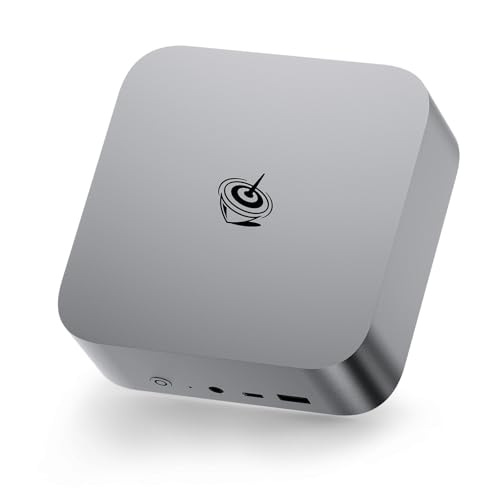
- 64GB DDR5 with support up to 256GB
- Ryzen 7 H255 and Radeon 780M graphics
- Quiet cooling and three-display support
Best For: Demanding multitasking, creative work, and quiet home-office setups
Best AI-Ready Option

- 48GB Crucial DDR5-5600 and 1TB NVMe SSD
- Ryzen AI processor with integrated NPU
- OCuLink, quad-display output, and Wi-Fi 7
Best For: Local AI, programming, content creation, and expandable home labs
Best Value Alternative

- 32GB DDR5 starting configuration
- Memory expansion support up to 128GB
- Ryzen 5 7640HS with triple-display output
Best For: Everyday computing, moderate gaming, and future memory upgrades
Best with Extra Features
Reatan X7 48GB/2TB Gaming Mini PC

- 48GB Crucial DDR5-5600 RAM
- 2TB PCIe 4.0 SSD
- OCuLink, Wi-Fi 7, and quad-display support
Best For: Gaming and heavy creative multitasking
Flexible Workstation Choice

- 32GB DDR5 RAM expandable to 96GB
- Ryzen 7 PRO 6850U with Radeon 680M graphics
- Dual 2.5Gbps LAN and quad-display support
Best For: Upgradeable office, server, and workstation setups
Best Value Storage Balance
Reatan X7 48GB/1TB Gaming Mini PC

- 48GB Crucial DDR5-5600 RAM
- 1TB PCIe 4.0 SSD expandable to 8TB
- OCuLink, Wi-Fi 7, and four-display support
Best For: Power users wanting 48GB RAM with upgradeable storage
Best Overall – GMKtec K15 AI Mini PC
For buyers comparing mini pcs with 48gb ram, the GMKtec K15 stands out for its balanced Intel performance, generous connectivity, and storage expansion. Its Core Ultra 5 125U, 48GB of DDR5 memory, and 1TB PCIe 4.0 SSD suit demanding multitasking, video editing, and compact workstation setups.
Best For: Multitaskers, creators, and users who want multiple displays, dual networking, and OCuLink eGPU expansion.
Pros:
- 48GB DDR5 RAM and 1TB SSD are included.
- Supports quad-display output, including HDMI 2.1 and DisplayPort.
- Offers OCuLink, triple M.2 expansion, dual 2.5GbE, Wi-Fi 6E, and Bluetooth 5.2.
- Includes Windows 11 Pro and a stated three-year limited warranty for eligible sales.
Cons:
- Its 15W processor is efficiency-focused rather than a high-power desktop chip.
- Some expansion features may require additional drives or an external GPU.
The K15 is the most feature-rich option here for a compact home workstation or flexible creator system. Its unusually broad expansion and display support make it especially appealing when connectivity matters as much as memory capacity.
Best for Gaming – X7 Gaming Mini PC with Ryzen 7 255
Among mini pcs with 48gb ram, this X7 emphasizes gaming and expandability. The Ryzen 7 255 processor, Radeon 780M graphics, 48GB of Crucial DDR5 memory, and dual 1TB NVMe SSDs provide a strong starting point for gaming, editing, virtualization, and large project files.
Best For: Gamers and creators who want 2TB of included storage, integrated Radeon graphics, and an OCuLink eGPU path.
Pros:
- Ryzen 7 255 provides 8 cores, 16 threads, and boost speeds up to 4.9GHz.
- Includes 48GB DDR5-5600 memory and two 1TB PCIe 4.0 SSDs.
- Memory can expand to 96GB, while both storage and OCuLink support future upgrades.
- Dual heat pipes are designed for sustained gaming and rendering workloads.
Cons:
- The included 48GB memory runs single-channel until a second memory stick is installed.
- OCuLink hardware requires manual assembly after opening the chassis.
- Warranty coverage is listed as one year.
This X7 is a compelling pick if included storage and gaming-oriented hardware are priorities. The single-channel memory configuration is worth noting, but the upgrade ceiling and OCuLink support give the compact system room to grow.
Best for Creators – Ryzen 7 255 Creator Mini PC
This creator-focused option gives shoppers seeking mini pcs with 48gb ram a capable compact system for heavy multitasking. It combines a Ryzen 7 255 processor with 48GB of DDR5-5600 memory, a 1TB Crucial PCIe 4.0 SSD, USB4, and OCuLink expansion.
Best For: Video editors, programmers, and users running many applications, project files, or local virtual machines at once.
Pros:
- 48GB DDR5-5600 RAM is suited to large multitasking workloads.
- Includes a genuine Crucial 1TB PCIe 4.0 NVMe SSD.
- Supports quad-display output through USB4 and HDMI 2.1.
- Wi-Fi 7, Bluetooth 5.4, dual USB4, and OCuLink provide modern connectivity.
Cons:
- OCuLink is not hot-swappable and requires opening the case for installation.
- Using OCuLink requires one M.2 2280 PCIe 4.0 SSD slot.
- Its included 1TB storage may be limited for extensive video libraries.
The system’s strongest advantage is its creator-oriented balance of memory, fast storage, display output, and expansion. Choose it when smooth multitasking and modern peripheral support matter more than having multiple SSDs preinstalled.
Best Compact Design – X7 OCuLink Mini PC
For shoppers comparing mini pcs with 48gb ram in a particularly small chassis, this X7 pairs a Ryzen 7 255 processor with Radeon 780M graphics and Crucial DDR5 memory. Its metal enclosure, selectable cooling modes, and broad display support make it suitable for both work and mainstream gaming.
Best For: Buyers wanting a compact metal mini PC with upgradeable memory, multiple displays, and strong wired and wireless connectivity.
Pros:
- Compact 130 x 128 x 45mm metal design with Silent, Standard, and Performance modes.
- 48GB DDR5-5600 RAM can be upgraded to 96GB.
- Radeon 780M graphics, DP 2.0, HDMI 2.1, and two USB4 ports support up to four displays.
- Includes 2.5GbE, Wi-Fi 7, Bluetooth 5.4, and an M.2-to-OCuLink adapter.
Cons:
- The 1TB SSD may require expansion for large game or media collections.
- OCuLink expansion requires installation and is not described as a hot-swappable connection.
- Warranty coverage is listed as one year.
This model is a strong fit when desk space is limited but expandability and connectivity remain important. Its adjustable cooling and four-display capability add flexibility, while the upgradeable RAM and storage help extend its useful life.
Best Quiet Powerhouse – Beelink SER9 MAX
If you want mini pcs with 48gb ram or more, the Beelink SER9 MAX goes a step further with 64GB of DDR5 memory. Its Ryzen 7 H255 processor, Radeon 780M graphics, and dual SSD support make it a strong choice for demanding multitasking, creative work, and entertainment in a compact system.
Best For: Users who want quiet operation, strong integrated graphics, multiple displays, and substantial upgrade headroom.
Pros:
- 64GB DDR5 RAM can be upgraded to 256GB.
- Ryzen 7 H255 and Radeon 780M support demanding productivity, 4K editing, and gaming workloads.
- Supports three displays and includes USB4, 10Gbps Ethernet, Wi-Fi 6, and Bluetooth 5.2.
- MSC2.0 cooling is rated for operation as low as 32dB.
Cons:
- It exceeds the requested 48GB capacity, which may be more memory than basic users need.
- Graphics are integrated rather than provided by a dedicated GPU.
The SER9 MAX is a well-rounded performance mini PC with unusually generous memory, fast networking, and a quiet cooling design. It is especially appealing when you need a compact workstation that can grow over time.
Best AI-Ready Option – X8 Ryzen AI 9 HX 470
Among mini pcs with 48gb ram, the X8 is the closest match to the requested capacity, pairing 48GB of Crucial DDR5-5600 memory with a 1TB PCIe 4.0 NVMe SSD. Its Ryzen AI 9 HX 470 processor, integrated NPU, and Radeon 890M graphics target local AI, content creation, programming, and advanced multitasking.
Best For: AI users, creators, programmers, and home-lab enthusiasts who value memory and storage upgrades.
Pros:
- Includes the requested 48GB RAM capacity and supports up to 96GB.
- Ryzen AI 9 HX 470 offers 12 cores, 24 threads, and up to 5.2GHz.
- OCuLink provides an expansion path for a desktop graphics card.
- Supports up to four displays, including 8K output, plus Wi-Fi 7 and 2.5Gbps LAN.
Cons:
- External GPU capability requires purchasing a compatible graphics card separately.
- Its advanced features may be unnecessary for basic office or everyday computing.
The X8 stands out as the most purpose-built choice for buyers specifically searching for a 48GB mini PC. Upgradeable memory, dual SSD slots, OCuLink, and an AI-focused processor give it a flexible foundation for demanding workloads.
Best Value Alternative – GMKtec M6 Ultra
The GMKtec M6 Ultra is not a 48GB configuration, but it is a practical lower-cost alternative to consider when shopping for mini pcs with 48gb ram. It combines a Ryzen 5 7640HS processor, 32GB of dual-channel DDR5 memory, a 1TB SSD, and support for memory expansion up to 128GB.
Best For: Everyday users, moderate gaming, multi-monitor work, and buyers who plan to upgrade memory later.
Pros:
- Ryzen 5 7640HS provides six cores, 12 threads, and up to 5.0GHz.
- 32GB dual-channel DDR5 and a 1TB SSD provide a capable starting configuration.
- Supports three displays, including 8K through USB4.
- Includes 2.5G LAN, Wi-Fi 6, Bluetooth 5.2, and expansion support.
Cons:
- Ships with 32GB rather than the requested 48GB.
- Its Radeon 760M integrated graphics are aimed at moderate gaming rather than dedicated-GPU performance.
The M6 Ultra makes sense if 48GB is a goal rather than an immediate requirement. Its upgradeable memory and capable connectivity offer a flexible route to more RAM while keeping the initial system compact and suitable for everyday workloads.
Best with Extra Features – Reatan X7 48GB/2TB Gaming Mini PC
For shoppers comparing mini pcs with 48gb ram, the Reatan X7 stands out with a Ryzen 7 255 processor, 48GB of Crucial DDR5 memory, and a spacious 2TB PCIe 4.0 SSD. Its Radeon 780M graphics, OCuLink support, and compact VESA-mountable design suit gaming and demanding multitasking.
Best For: Gamers and creative users who want abundant memory, large fast storage, and external GPU expansion potential.
Pros:
- 48GB DDR5-5600 RAM and a 2TB PCIe 4.0 SSD
- Radeon 780M graphics with OCuLink connectivity for an eGPU
- Supports four displays, including 8K output options
- Wi-Fi 7, Bluetooth 5.4, and three cooling modes
Cons:
- Integrated graphics may not match a dedicated gaming GPU
- OS labeling and processor naming in the listing may require verification
This is the strongest choice here for buyers who prioritize both 48GB of RAM and generous built-in storage. The compact chassis, USB4 ports, and OCuLink interface also leave room for a flexible gaming or productivity setup.
Flexible Workstation Choice – GMKtec M7 Ultra Mini PC
Although it is not a 48GB configuration, the GMKtec M7 Ultra is worth considering alongside mini pcs with 48gb ram because its 32GB dual-channel DDR5 memory can be expanded to 96GB. It combines a Ryzen 7 PRO 6850U, Radeon 680M graphics, 1TB SSD storage, and business-friendly networking in a small chassis.
Best For: Users who want upgradeable memory, multi-monitor support, dual 2.5Gbps networking, and a flexible home or office mini PC.
Pros:
- 32GB dual-channel DDR5 RAM, expandable to 96GB
- OCuLink port for higher-bandwidth eGPU connectivity
- Supports four displays with HDMI 2.1 and dual USB4 video output
- Dual 2.5Gbps LAN ports and adjustable performance modes
Cons:
- Ships with less RAM and storage than the 48GB Reatan models
- Wi-Fi 6 and Bluetooth 5.2 are older than the connectivity on the Reatan systems
The M7 Ultra is the practical upgrade-path option rather than the immediate 48GB pick. Its expandable memory, dual-network ports, and cooling modes make it especially appealing for office, server, and workstation-style use.
Best Value Storage Balance – Reatan X7 48GB/1TB Gaming Mini PC
If you want mini pcs with 48gb ram but do not need a 2TB starting drive, this Reatan X7 configuration offers the same Ryzen 7 255 platform, 48GB Crucial DDR5 memory, and Radeon 780M graphics with a more modest 1TB PCIe 4.0 SSD. Storage can be expanded to 8TB.
Best For: Gamers and power users who need 48GB of RAM and high-end connectivity while preferring a lower-storage configuration.
Pros:
- 48GB Crucial DDR5-5600 memory for demanding multitasking
- 1TB PCIe 4.0 SSD with expansion support up to 8TB
- OCuLink, dual USB4, Wi-Fi 7, and Bluetooth 5.4
- Four-display capability with HDMI 2.1 and DisplayPort 2.0
Cons:
- Provides half the included SSD capacity of the 2TB version
- Integrated Radeon 780M graphics may limit the most demanding games without an eGPU
This model makes sense when memory and connectivity matter more than maximum out-of-the-box storage. It retains the compact metal design, multi-display support, and OCuLink expansion of the larger-storage configuration while leaving room for a future SSD upgrade.
How We Picked the Best Mini PCs with 48gb RAM
We compared these systems by looking beyond memory capacity. Processor architecture and sustained performance matter for compiling code, editing media, running virtual machines, and other demanding workloads. Integrated graphics performance is especially important because most mini PCs rely on the CPU’s built-in GPU rather than a dedicated graphics card.
We also considered included storage, memory speed, upgrade paths, OCuLink availability, USB and display connectivity, operating-system support, cooling design, and the practical value of each configuration. Some selected models use 48GB of RAM exactly, while others provide 32GB or 64GB alternatives that may suit buyers who prioritize a different balance of performance and capacity.
Quick Comparison
| Best For | What to Look For |
|---|---|
| Everyday productivity | Efficient processor, quiet cooling, fast SSD, and multiple display outputs |
| Gaming | Strong Radeon integrated graphics, dual-channel DDR5, and OCuLink support |
| AI and creator workloads | Modern AI-capable processor, high memory bandwidth, and upgradeable storage |
| Storage-heavy work | 2TB SSD or multiple M.2 slots for adding high-speed drives |
| Long-term flexibility | Replaceable RAM or SSD, accessible internals, and current connectivity |
Key Buying Factors for Mini PCs with 48gb RAM
Processor and Sustained Cooling
CPU model numbers can be misleading, so focus on core count, generation, power limits, and cooling. A compact computer with a powerful chip is only useful if its thermal system can maintain performance during long workloads. Check reviews for fan noise and sustained benchmarks, not just short burst speeds.
Integrated Graphics and Gaming Potential
Modern Radeon 780M-class graphics can handle esports and many older or less demanding games at sensible settings, but they are not a replacement for a dedicated desktop GPU. Systems with OCuLink are more appealing if you may add an external graphics enclosure later.
Memory, Storage, and Expandability
Forty-eight gigabytes is generous for multitasking, browser-heavy work, development tools, and many creative applications. Confirm whether the RAM is upgradeable or soldered, and check whether the advertised capacity uses a standard dual-channel arrangement. A 1TB SSD is a practical starting point, while 2TB configurations or multiple M.2 slots are better for large game libraries and media projects.
Ports, Displays, and Networking
Count the ports you actually need, including USB-C, high-speed USB-A, HDMI, DisplayPort, Ethernet, and audio. Verify the maximum resolution and refresh rates for your monitors. Wi-Fi generation and wired Ethernet speed can also affect file transfers, streaming, and network storage performance.
Who Should Buy Which Mini PCs with 48gb RAM?
Choose an Intel Core Ultra model if efficient office performance, modern connectivity, and AI-oriented features are your priorities. AMD Ryzen 7 systems are generally the stronger choice for integrated-graphics gaming and demanding multitasking. Ryzen AI 9 options suit buyers seeking high-end CPU performance in a particularly compact system.
For casual gaming and general work, prioritize cooling, warranty coverage, and a good SSD over maximum specifications. Buyers planning to use an external GPU should favor OCuLink-equipped models. If your work involves large media libraries, virtual machines, or multiple demanding applications, choose the largest included SSD and confirm that both storage and memory can be replaced later.