Mini PCs with 64GB RAM offer desktop-class multitasking in a compact footprint, making them attractive for demanding office work, content creation, development, local AI tools, and home labs.
This roundup compares 10 selected systems across processor performance, storage, connectivity, display support, upgradeability, and overall value so you can choose the right compact PC for your workload.
Best 10 Mini PCs with 64gb RAM Picks for 2026
Top AI Performance Pick

- Core Ultra 9 285H with 99 TOPS total AI performance
- 64GB DDR5 and 1TB PCIe 4.0 SSD
- Quad displays, USB4, Wi-Fi 7, and OCuLink
Best For: AI creation and demanding professional multitasking
Integrated Graphics Powerhouse

- 16-core Ryzen AI Max+ 395 processor with 32 threads
- 64GB shared memory and Radeon 8060S-class integrated graphics
- Quad-screen output, Wi-Fi 7, and 2.5GbE networking
Best For: Local AI, integrated-graphics gaming, and creative workloads
Networking Workstation Pick

- Core i9-13900H with 14 cores and 20 threads
- Dual 10G SFP+ and dual 2.5G LAN ports
- Expandable M.2, U.2, RAID, and PCIe graphics support
Best For: Home labs, high-speed networking, and expandable storage
Upgradeable AI Value Pick

- Ryzen AI 9 HX 470 with up to 86 TOPS AI performance
- 48GB removable DDR5, upgradeable to 96GB
- OCuLink, dual M.2 slots, and quad-display support
Best For: Upgradeable AI, creator, and home-lab setups
Best Expandable Intel Workhorse

- 64GB DDR4 RAM with 2TB SSD
- Triple 4K display support
- Dual M.2 and 2.5-inch SATA expansion
Best For: Multitasking and multi-monitor productivity
Best Balanced Ryzen Upgrade

- Ryzen 7 6800H with 32GB DDR5 included
- Expandable to 64GB RAM
- USB 4.0, dual 2.5G LAN, and triple 4K support
Best For: Business users wanting upgrade flexibility
Best High-End AI Performance
GMKtec X1 Pro Ryzen AI Mini PC

- Ryzen AI 9 HX 470 with 12 cores
- 64GB LPDDR5X and 2TB PCIe 4.0 SSD
- Radeon 890M, Oculink, and 8K output
Best For: AI, creative, and high-performance workloads
Best Performance Pick
Beelink SER9 MAX Ryzen 7 Mini PC
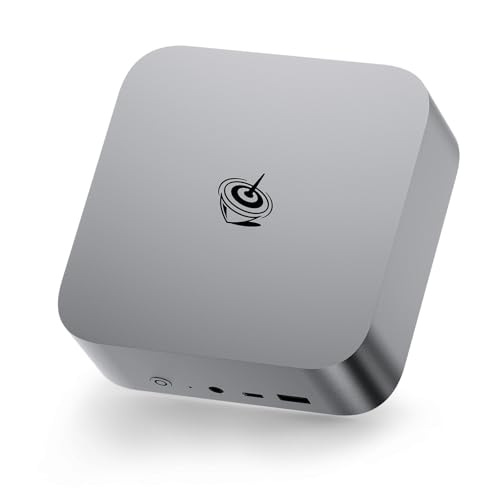
- Ryzen 7 H 255 with 8 cores and 16 threads
- 64GB DDR5, upgradeable to 256GB
- Radeon 780M graphics with triple-display support
Best For: Power users and compact workstation setups
Best Business Setup

- Core i7-12700T with 12 cores and 20 threads
- Windows 11 Pro and 1TB NVMe SSD
- Includes keyboard, mouse, and vertical stand
Best For: Professional offices and multi-monitor productivity
Best Connectivity Value

- Ryzen 7 H 255 with 64GB DDR5 RAM
- Triple-display output via HDMI 2.1, DP 2.1, and USB4
- 10Gbps Ethernet plus dual PCIe 4.0 SSD slots
Best For: Flexible multi-display workstations and media tasks
Top AI Performance Pick – MINISFORUM M1 Pro Ultra 9
For shoppers comparing mini pcs with 64gb ram, the MINISFORUM M1 Pro stands out with an Intel Core Ultra 9 285H, 64GB of DDR5 memory, and a 1TB PCIe 4.0 SSD. Its strong AI specifications, quad-display support, and OCuLink expansion make it a versatile compact workstation.
Best For: AI-assisted creative work, video and photo editing, 3D rendering, live streaming, and demanding multitasking.
Pros:
- Core Ultra 9 processor with up to 5.4GHz and 99 TOPS combined AI performance.
- 64GB DDR5-5600 RAM and dual M.2 PCIe 4.0 slots, with support for up to 128GB RAM.
- Supports up to four displays and includes dual USB4, 2.5GbE, Wi-Fi 7, and OCuLink.
Cons:
- Using OCuLink for an external GPU requires one M.2 SSD slot and is not hot-swappable.
- Its extensive performance features may be more than needed for basic office use.
Choose this model if you want a forward-looking mini workstation with fast connectivity and room to expand. It is particularly compelling for users who can take advantage of local AI processing, multiple displays, or an external GPU.
Integrated Graphics Powerhouse – GMKtec EVO-X2 Ryzen AI Max+
Among mini pcs with 64gb ram, the GMKtec EVO-X2 is aimed at users who want unusually strong integrated graphics in a compact system. Its Ryzen AI Max+ 395 combines 16 Zen 5 cores, 32 threads, a large Radeon 8060S-class integrated GPU, and fast onboard LPDDR5X memory.
Best For: Local LLM workloads, demanding integrated-graphics gaming, video editing, and high-performance creative applications.
Pros:
- Ryzen AI Max+ 395 offers 16 cores, 32 threads, up to 5.1GHz, and 50+ peak NPU TOPS.
- 64GB memory is shared with the powerful integrated GPU, supporting demanding graphics and LLM workloads.
- Eight-channel LPDDR5X reaches up to 8000MT/s, with quad-screen 4K/8K output and Wi-Fi 7.
Cons:
- The LPDDR5X memory is onboard rather than user-replaceable SODIMM memory.
- Integrated graphics performance and system thermals can vary by workload and settings.
This is a strong choice when GPU capability matters as much as memory capacity. The shared 64GB pool and Radeon graphics make it better suited to local AI and gaming than many conventional mini PCs, while the multi-display and networking features support serious desktop setups.
Networking Workstation Pick – MINISFORUM MS-01 Core i9
The MINISFORUM MS-01 is one of the more specialized mini pcs with 64gb ram, combining a Core i9-13900H with workstation-oriented networking and storage expansion. Its pair of 10G SFP+ ports, dual 2.5G LAN ports, and PCIe expansion make it especially suited to advanced home labs and professional network environments.
Best For: Home labs, network storage, servers, virtualization-style workloads, engineering applications, and multi-monitor productivity.
Pros:
- Core i9-13900H provides 14 cores, 20 threads, and speeds up to 5.4GHz.
- Two 10G SFP+ ports, two 2.5G LAN ports, and USB4 support high-speed connectivity.
- Supports multiple M.2 configurations, U.2 storage, RAID 0/1, and a tested RTX 3050 expansion option.
Cons:
- Integrated Iris Xe graphics are less specialized for gaming than newer high-end integrated GPUs.
- Its networking and expansion hardware may be unnecessary for a typical office mini PC.
The MS-01 makes the most sense when connectivity, storage flexibility, and expansion are priorities. It is a practical compact workstation for users building a fast home server or networked professional setup rather than a simple everyday desktop.
Upgradeable AI Value Pick – X8 Ryzen AI 9 HX 470
Although it comes with 48GB rather than 64GB, the X8 is worth considering alongside mini pcs with 64gb ram because its Crucial DDR5 memory is removable and upgradeable to 96GB. It pairs a Ryzen AI 9 HX 470 with Radeon 890M graphics, an 86 TOPS AI specification, OCuLink expansion, and dual M.2 slots.
Best For: Buyers who want upgrade flexibility for AI applications, programming, video editing, 3D rendering, gaming, and home-lab use.
Pros:
- Ryzen AI 9 HX 470 offers 12 cores, 24 threads, up to 5.2GHz, and up to 86 TOPS AI performance.
- Two DDR5 SODIMM slots support expansion from 48GB to up to 96GB.
- OCuLink, dual M.2 slots, quad-display support, Wi-Fi 7, and 2.5GbE provide substantial flexibility.
Cons:
- It ships with 48GB RAM, so reaching 64GB requires a memory upgrade.
- External GPU use requires a separate graphics card and OCuLink setup.
The X8 is a sensible alternative for buyers who value a clear upgrade path over a fixed 64GB configuration. Its removable memory, dual storage slots, and OCuLink port let the system grow with more demanding AI, graphics, and storage needs.
Best Expandable Intel Workhorse – Core i9 Mini PC
For shoppers comparing mini pcs with 64gb ram, this compact Intel system combines an 8-core, 16-thread Core i9-9880H with 64GB of DDR4 memory and a 2TB SSD. Its generous port selection and triple-display support make it a practical choice for demanding office and home setups.
Best For: Multitasking, office work, multi-monitor productivity, and buyers who want flexible storage expansion.
Pros:
- 64GB DDR4 RAM and a 2TB SSD are included.
- Supports triple 4K displays through two HDMI ports and DisplayPort.
- Offers two M.2 NVMe slots plus room for a 2.5-inch SATA drive.
- Includes dual 2.5Gbps LAN, Wi-Fi 6E, Bluetooth 5.3, and Windows 11 Pro.
Cons:
- Uses integrated Intel UHD graphics rather than a dedicated GPU.
- DDR4 memory is an older standard than the DDR5 and LPDDR5X memory used by newer alternatives.
This is a strong value-oriented option when installed memory and storage capacity matter more than the newest platform. VESA mounting, extensive connectivity, and a stated two-year warranty add useful everyday practicality.
Best Balanced Ryzen Upgrade – BOSGAME P3 Lite
The BOSGAME P3 Lite is a sensible starting point for shoppers seeking mini pcs with 64gb ram but who also want the option to upgrade later. It arrives with 32GB of dual-channel DDR5 memory, supports up to 64GB, and pairs an AMD Ryzen 7 6800H with a 1TB PCIe 4.0 SSD.
Best For: Business users, programmers, content creators, and buyers who want modern connectivity with upgrade headroom.
Pros:
- Ryzen 7 6800H provides 8 cores and 16 threads for multitasking.
- DDR5 memory is expandable from 32GB to 64GB.
- USB 4.0 supports high-speed data, display output, PD charging, and eGPU connectivity.
- Dual 2.5G Ethernet, Wi-Fi 6E, and support for triple 4K or one 8K display add flexibility.
Cons:
- It does not include 64GB RAM out of the box; an upgrade is required.
- Its integrated Radeon 680M graphics are not a substitute for a dedicated gaming GPU.
- The listed warranty is one year.
Choose this model if you prefer a newer DDR5 platform and the ability to reach 64GB over a preconfigured 64GB system. Its dual M.2 design and USB 4.0 port make it especially adaptable for storage and external-device upgrades.
Best High-End AI Performance – GMKtec X1 Pro Ryzen AI Mini PC
Among mini pcs with 64gb ram, the GMKtec X1 Pro stands out for its Ryzen AI 9 HX 470 processor, 64GB of fast LPDDR5X memory, and 2TB PCIe 4.0 SSD. Its Radeon 890M graphics, AI acceleration, and eGPU-friendly ports target demanding creative, gaming, and professional workloads.
Best For: AI-assisted work, content creation, advanced multitasking, gaming with an optional eGPU, and professional users seeking current-generation performance.
Pros:
- 12-core, 24-thread Ryzen AI 9 HX 470 reaches up to 5.2GHz.
- Includes 64GB LPDDR5X memory at 6400MT/s and a 2TB SSD.
- Radeon 890M graphics, Oculink, and USB4 provide strong expansion potential.
- Supports HDMI 2.1, DisplayPort 2.1, USB4, and up to 8K at 60Hz output.
Cons:
- LPDDR5X memory is not presented as user-upgradeable.
- The product has a one-year limited warranty.
- Its premium performance features may be more than needed for basic office use.
This is the most performance-focused choice in the group, with the newest processor and fastest listed memory. It makes the most sense for buyers who can use its AI capabilities, integrated Radeon graphics, or high-speed external-GPU connectivity.
Best Performance Pick – Beelink SER9 MAX Ryzen 7 Mini PC
For shoppers seeking mini pcs with 64gb ram, the Beelink SER9 MAX combines an 8-core/16-thread Ryzen 7 H 255 processor with fast DDR5 memory and integrated Radeon 780M graphics. It is built for demanding multitasking, 4K editing and playback, and compact workstation use.
Best For: Power users, creators, multitaskers, and gamers who want strong graphics performance in a small desktop.
Pros:
- Ryzen 7 H 255 processor reaches up to 4.9GHz.
- 64GB DDR5 RAM is upgradeable to 256GB.
- Radeon 780M graphics and three-display support suit 4K workflows.
- 10Gbps Ethernet, Wi-Fi 6, USB4, and a claimed 32dB low-noise operation.
Cons:
- Integrated graphics are not a substitute for a discrete gaming GPU.
- The extensive connectivity may be more than basic office users need.
The SER9 MAX is the strongest all-around choice here for users who value memory capacity, modern connectivity, and capable integrated graphics. Its upgradeable RAM and dual PCIe 4.0 SSD slots also leave room for expansion.
Best Business Setup – HP ProDesk 400 Mini PC
The HP ProDesk 400 is a practical option among mini pcs with 64gb ram, pairing a 12-core Intel Core i7-12700T with a 1TB PCIe NVMe SSD and Windows 11 Pro. Its compact design and included accessories make it ready for professional productivity.
Best For: Offices, finance and programming workflows, video calls, and users who need a ready-to-use multi-monitor business PC.
Pros:
- 12-core, 20-thread Core i7-12700T supports demanding multitasking.
- Windows 11 Pro is preinstalled.
- Supports up to three 4K displays through HDMI 2.1 and dual DisplayPort 1.4.
- Includes a wired keyboard, mouse, and vertical stand.
Cons:
- 64GB is listed as the maximum supported RAM.
- Integrated Intel UHD 770 graphics are aimed at productivity rather than demanding gaming.
- DDR4 memory is less modern than the DDR5 used in the Beelink systems.
This HP stands out as the most office-focused package. It trades newer DDR5 memory and gaming-oriented graphics for business-friendly Windows 11 Pro, included peripherals, quiet operation, and a straightforward three-monitor setup.
Best Connectivity Value – Beelink SER9 MAX Desktop PC
The Beelink SER9 MAX is another capable choice for mini pcs with 64gb ram, featuring a Ryzen 7 H 255 processor, 64GB DDR5 memory, a 1TB PCIe 4.0 SSD, and Radeon 780M graphics. Its display outputs and port selection make it especially flexible for desk setups.
Best For: Personal workstations, video and photo editing, virtualization, 4K media, and users who need multiple high-resolution displays.
Pros:
- Ryzen 7 H 255 offers 8 cores, 16 threads, and speeds up to 4.9GHz.
- 64GB DDR5 RAM and dual M.2 PCIe 4.0 slots support demanding workloads and storage expansion.
- HDMI 2.1, DP 2.1, and USB4 enable triple-display output.
- Includes 10Gbps Ethernet, Wi-Fi 6, and Bluetooth 5.2.
Cons:
- The listing specifies a 128GB maximum RAM capacity.
- It uses integrated Radeon 780M graphics rather than a discrete GPU.
- Its broad port selection may be unnecessary for simple everyday computing.
This model is a strong fit when display flexibility and high-speed connectivity matter. It offers similar core hardware to the other SER9 MAX listing while emphasizing HDMI 2.1, DisplayPort 2.1, USB4, and a rich selection of expansion ports.
How We Picked the Best Mini PCs with 64gb RAM
We evaluated the selected models by looking beyond memory capacity. Processor generation and sustained performance matter for compiling code, editing media, running virtual machines, and local AI applications. We also considered SSD capacity, memory type, cooling design, operating system, display outputs, networking, port selection, and the practical size of each system.
Because the list includes both premium AI-focused models and business-oriented compact desktops, “best” depends on your priorities. Some systems emphasize modern integrated graphics and AI acceleration, while others offer workstation-style networking, familiar business hardware, or more storage for the money.
Quick Comparison
| Best For | What to Prioritize | Notable Features |
|---|---|---|
| AI and creator workloads | New Ryzen AI or Core Ultra processors | Integrated NPU, stronger graphics, fast DDR5 or LPDDR5X |
| Development and multitasking | High core counts and fast SSDs | 64GB memory, efficient cooling, multiple display outputs |
| Networking and home labs | Flexible wired connectivity | 2.5GbE, 10GbE, SFP+ ports, and virtualization support |
| Business deployment | Manageability and Windows Pro | Established enterprise hardware and service-friendly design |
| Value-focused desktop use | Balanced CPU, RAM, and storage | Lower cost without sacrificing everyday responsiveness |
Key Buying Factors for Mini PCs with 64gb RAM
Processor and Sustained Cooling
64GB of RAM prevents memory bottlenecks, but the CPU still determines how quickly demanding jobs finish. Newer Ryzen AI and Intel Core Ultra chips can add better efficiency, graphics, and NPU acceleration. Check cooling reviews when possible, since a small chassis may reduce sustained performance under long workloads.
Memory and Storage Design
Confirm whether the listed 64GB is user-upgradeable DDR5 or soldered LPDDR5X. Soldered memory can be fast but limits future expansion. A 1TB NVMe SSD is a useful starting point, while a 2TB drive is better for media libraries, virtual machines, and large development environments. Also check whether a second M.2 slot or 2.5-inch bay is available.
Ports, Displays, and Networking
Match the port selection to your setup. USB4 can support fast peripherals and compatible docks, while HDMI and DisplayPort outputs simplify multi-monitor use. For servers, storage systems, or advanced home labs, 2.5GbE and 10GbE or SFP+ ports may be more valuable than additional display outputs.
Operating System and Reliability
Windows 11 Pro can be useful for business features, remote management, and virtualization. For a home lab, verify Linux compatibility, driver support, fan behavior, and access to BIOS settings. A compact PC should also have adequate ventilation and a clear warranty policy.
Who Should Buy Which Mini PCs with 64gb RAM?
Choose a modern Ryzen AI or Core Ultra model if you want the best combination of productivity performance, integrated graphics, efficiency, and emerging AI features. These are strong choices for creators, developers, and users who expect to keep the system for several years.
Pick a workstation-style model with high-speed networking if you are building a server, virtualization host, NAS companion, or lab system. A business-oriented HP mini desktop makes more sense when Windows Pro, familiar support channels, and office deployment matter most.
For general productivity, browsing, coding, and heavy multitasking, a well-cooled 64GB system with a 1TB NVMe SSD is usually the practical sweet spot. Prioritize the processor, upgrade path, and connectivity that fit your actual workload rather than paying extra for AI features or ports you will not use.