Running local large language models requires more than a small footprint. The right mini PC combines abundant memory, strong integrated graphics or GPU acceleration, fast storage, and sustained cooling in a compact chassis.
We compared 10 systems and barebones platforms suited to demanding AI workloads, including models with 96GB or 128GB of RAM. Use the guide below to match performance, expandability, and value with the way you plan to run local LLMs.
Best 10 Mini PCs with 96gb RAM for Local LLMs Picks for 2026
Best Overall

- Ryzen AI Max+ 395 with 16 cores and 32 threads
- 128GB unified memory with up to 96GB VRAM allocation
- 2TB SSD, three M.2 slots, and dual 2.5G LAN
Best For: Large local AI workloads and demanding workstation use
Best Barebone Platform
ASUS NUC 15 Pro Core Ultra 7 265H

- Supports up to 96GB DDR5-6400 SODIMM memory
- Intel Core Ultra 7 265H with integrated Arc graphics
- Compact design with Thunderbolt 4 and VESA mounting
Best For: Custom Intel-based mini PC configurations
Best for Large Models

- 128GB unified memory with up to 96GB variable VRAM
- Ryzen AI Max+ 395 with integrated NPU
- Dual USB4, Wi-Fi 7, 2.5G Ethernet, and Linux support
Best For: Developers running large local AI models
Best Ready-to-Use Intel Pick
ASUS NUC 15 Pro Core Ultra 7 255H

- 96GB DDR5 RAM paired with a 4TB Gen 4 NVMe SSD
- Core Ultra 7 255H with AI NPU and Arc 140T graphics
- Wi-Fi 7, 2.5G LAN, Thunderbolt 4, and dual HDMI 2.1
Best For: Preconfigured Windows workstations with ample storage
Best High-Memory AI Powerhouse

- 128GB unified LPDDR5X-8000 memory
- Runs select 4-bit models up to 128B
- Ryzen AI Max+ 395 with Radeon 8060S
Best For: Large local models, multitasking, and creative workloads
Best Upgradeable Intel Option

- Core Ultra 7 155H with Intel Arc graphics
- Tool-less chassis for easier upgrades
- Listing has conflicting RAM and capacity details
Best For: Compact Intel setups requiring configuration verification
Best AMD Value for 32B Models

- Ryzen AI Max+ 395 with 16 cores and 32 threads
- Radeon 8060S integrated graphics with 40 CUs
- Notes cite comfortable DeepSeek 32B use
Best For: 32B local LLMs, integrated graphics, and multitasking
Best Balanced 96GB Mini PC

- Up to 96GB DDR5-6400 memory
- Dual M.2 slots and USB4/Thunderbolt 4
- Quad-display support in a slim chassis
Best For: Compact, upgradeable Intel workstation builds
Best Linux Local-AI Workstation
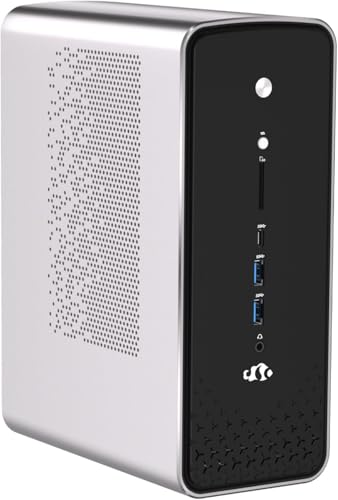
- 128GB LPDDR5X-8000 unified memory
- 50 TOPS NPU and Radeon 8060S graphics
- Dual 2.5GbE, USB4, and M.2 expansion
Best For: Linux developers running memory-intensive local AI workloads
Best Complete 128GB AI Mini PC
- 128GB LPDDR5X-8000 unified memory
- 2TB PCIe 4.0 SSD included
- Windows 11 Pro, Wi-Fi 7, and four displays
Best For: Turnkey Windows local-AI and creator workstation use
Best Overall – ACEMAGIC M1A PRO+ AI Mini PC
For shoppers comparing mini pcs with 96gb ram for local llms, the ACEMAGIC M1A PRO+ stands out with 128GB of fast unified memory and support for allocating up to 96GB to graphics memory. Its Ryzen AI Max+ 395 processor, 2TB SSD, and expansion-friendly design make it suited to demanding local AI and workstation workloads.
Best For: Users who want maximum memory capacity for local LLM experimentation, creative work, and multitasking.
Pros:
- Ryzen AI Max+ 395 offers 16 cores, 32 threads, and up to 5.1GHz.
- 128GB LPDDR5X unified memory can support up to 96GB of allocated VRAM.
- Includes a 2TB PCIe 4.0 SSD and three M.2 storage slots.
- Wi-Fi 7, dual 2.5G LAN, USB4, and multi-display connectivity.
Cons:
- Memory is onboard and not presented as user-upgradable.
- Integrated graphics share system memory rather than using a discrete GPU.
This is the strongest all-around choice in the group when large memory capacity matters more than a conventional upgrade path. The 128GB configuration also gives it useful headroom beyond a strict 96GB requirement.
Best Barebone Platform – ASUS NUC 15 Pro Core Ultra 7 265H
The ASUS NUC 15 Pro is a compact barebone option for buyers seeking mini pcs with 96gb ram for local llms. It supports up to 96GB of DDR5-6400 SODIMM memory and uses Intel’s Core Ultra 7 265H with integrated Arc graphics, making it a flexible platform for a customized setup.
Best For: Buyers who prefer a compact Intel platform and want to configure or verify the memory and storage setup themselves.
Pros:
- Supports up to 96GB of DDR5-6400 SODIMM memory.
- Core Ultra 7 265H provides 64-bit processing and AI-focused features.
- Compact chassis includes Thunderbolt 4, HDMI, USB, Ethernet, and Wi-Fi.
- Includes a VESA mount, keyboard, mouse, and power accessories.
Cons:
- Listed as a barebone system, so configuration details should be confirmed before purchase.
- Its integrated graphics and 96GB ceiling offer less memory headroom than the 128GB alternatives.
This NUC makes sense when size, Intel compatibility, and SODIMM-based memory are priorities. Confirm whether the advertised memory and storage are installed in the specific listing, since the product is identified as barebone.
Best for Large Models – BOSGAME M5 AI PC MAX+ 395
The BOSGAME M5 is designed specifically for local AI workloads, making it a compelling option among mini pcs with 96gb ram for local llms. Its Ryzen AI Max+ 395 processor and 128GB unified memory can allocate up to 96GB as VRAM, while the manufacturer describes support for large quantized models and multi-system expansion.
Best For: Developers running large local models who value high shared memory, Linux support, and fast peripheral connectivity.
Pros:
- 128GB LPDDR5X memory supports up to 96GB of variable graphics memory.
- Ryzen AI Max+ 395 has 16 cores, 32 threads, and an integrated NPU.
- Dual USB4 ports support 40Gbps transfers, display output, and daisy chaining.
- Includes Wi-Fi 7, 2.5G Ethernet, an SD 4.0 card reader, and vapor-chamber cooling.
Cons:
- Onboard memory is not described as upgradeable.
- Large-model performance claims are manufacturer-provided and may vary by software, quantization, and workload.
The M5 is the most explicitly AI-oriented choice here, especially for users planning local model experimentation. Its memory architecture is the key advantage, while Linux support and USB4 expansion add flexibility for technical setups.
Best Ready-to-Use Intel Pick – ASUS NUC 15 Pro Core Ultra 7 255H
This configured ASUS NUC 15 Pro is a practical choice for buyers seeking mini pcs with 96gb ram for local llms in a ready-to-use Windows system. It combines 96GB of DDR5 memory with a 4TB Gen 4 NVMe SSD, Intel Arc 140T graphics, Wi-Fi 7, and a compact chassis.
Best For: Professionals who want substantial memory and storage in a preconfigured Intel mini PC.
Pros:
- Configured with 96GB DDR5 RAM and a spacious 4TB NVMe SSD.
- Core Ultra 7 255H reaches up to 5.1GHz and includes an AI NPU engine.
- Arc 140T graphics and shared memory support up to 7680×4320 output.
- Includes Wi-Fi 7, 2.5G LAN, two Thunderbolt 4 ports, and dual HDMI 2.1.
Cons:
- Integrated graphics use shared memory rather than dedicated GPU memory.
- The listing identifies a one-year manufacturer warranty.
This model is a good fit when you want 96GB installed from the outset and need abundant local storage. It is less expandable in memory than the 128GB unified-memory systems, but its 4TB SSD is useful for model files, datasets, and project assets.
Best High-Memory AI Powerhouse – GEEKOM A9 Mega
For shoppers seeking mini pcs with 96gb ram for local llms, the GEEKOM A9 Mega offers 128GB of unified LPDDR5X-8000 memory—giving compatible local-AI workflows more room than the target capacity. Its Ryzen AI Max+ 395 platform and Radeon 8060S graphics are suited to large-model experiments, document work, coding, and creative workloads.
Best For: Users who want maximum memory headroom for compatible local LLMs, long contexts, multitasking, and demanding creative work.
Pros:
- 128GB unified memory and a 2TB PCIe 4.0 NVMe SSD provide substantial model and project capacity.
- Supports select 4-bit models up to 128B parameters with compatible software and drivers.
- Ryzen AI Max+ 395, 16 cores, 32 threads, and Radeon 8060S graphics handle AI, rendering, and gaming workloads.
- Dual 10GbE, dual USB4, Wi-Fi 7, and support for up to four displays add strong connectivity.
Cons:
- Some local-AI features depend on compatible drivers, software, and initial setup.
- The 2.08L chassis uses active cooling, so fan noise may vary with performance settings and workload.
- Its 128GB memory is onboard rather than described as user-upgradable.
The A9 Mega is the strongest fit here when memory capacity is the priority. It goes beyond 96GB while adding fast storage, high-speed networking, and a compact design, making it a compelling platform for serious local-AI experimentation.
Best Upgradeable Intel Option – ASUS NUC 14 Pro+
The ASUS NUC 14 Pro+ is a compact renewed barebone system for buyers comparing mini pcs with 96gb ram for local llms, but its memory details require careful checking: the listing mentions 96GB storage capacity and also states a 48GB RAM maximum. Its Core Ultra 7 155H combines CPU, GPU, and NPU resources for general AI-ready computing.
Best For: Buyers who prefer a small, tool-less Intel platform and are comfortable verifying the included memory and upgrade configuration before purchase.
Pros:
- Core Ultra 7 155H includes CPU, integrated Intel Arc graphics, and AI-engine capabilities.
- Tool-less chassis access makes upgrades easier to perform.
- Compact 5 x 4-inch aluminum design with Thunderbolt 4, dual HDMI, Ethernet, and Wi-Fi.
- Supports 4K output and dual-display connectivity through its HDMI ports.
Cons:
- The supplied specifications conflict: they list 96GB storage capacity but a 48GB maximum RAM size.
- It is a renewed barebone model, so configuration and included components should be confirmed carefully.
- The listed warranty is a 90-day limited warranty.
This NUC is better viewed as a compact, configurable Intel workstation than a confirmed 96GB local-LLM machine. Verify the actual RAM configuration and upgrade limits before buying, especially if your workflow depends on fitting larger models in memory.
Best AMD Value for 32B Models – GMKtec EVO-X2 AI Mini PC
The GMKtec EVO-X2 is a capable AMD alternative for shoppers researching mini pcs with 96gb ram for local llms. Its Ryzen AI Max+ 395 pairs 16 Zen 5 cores with a 40-CU Radeon 8060S iGPU and fast onboard LPDDR5X, while the supplied notes specifically identify DeepSeek 32B as a comfortable local-LLM workload on this platform.
Best For: Local-AI users focused on models around the 32B range, integrated graphics performance, and high-speed multi-display connectivity.
Pros:
- Ryzen AI Max+ 395 provides 16 cores, 32 threads, up to 5.1GHz boost, and an XDNA 2 NPU.
- Radeon 8060S uses the shared memory pool and is positioned for demanding integrated-graphics workloads.
- LPDDR5X-8000 and support for LM Studio make local model experimentation accessible.
- Supports up to four displays, Wi-Fi 7, Bluetooth 5.4, and 2.5GbE networking.
Cons:
- The supplied notes do not state a specific installed RAM capacity, so confirm the configuration if you require 96GB or more.
- Local-LLM performance depends on model quantization and software configuration.
- Its integrated GPU shares system memory with the CPU.
The EVO-X2 is attractive for buyers who want strong AMD integrated graphics and a practical path into local LLMs, particularly around 32B models. However, confirm the exact memory configuration before treating it as a direct 96GB-class purchase.
Best Balanced 96GB Mini PC – ASRock NUCS BOX-225H
If you are comparing mini pcs with 96gb ram for local llms, the ASRock NUCS BOX-225H is a compact, upgradeable option with support for up to 96GB of DDR5-6400 memory. Its Intel Core Ultra 5 225H processor, integrated Arc graphics, dual M.2 slots, and USB4/Thunderbolt 4 connectivity suit users who want a small workstation for development, business, and general AI experimentation.
Best For: Buyers who want a compact, configurable 96GB Intel mini PC with fast memory, multiple displays, and flexible storage expansion.
Pros:
- Supports up to 96GB of fast DDR5-6400 RAM across two slots.
- Includes dual M.2 Key M slots for PCIe 4.0 storage expansion.
- Offers USB4/Thunderbolt 4, 2.5GbE, Wi-Fi 6E, and up to four displays.
- Very compact 4.63-by-4.33-by-1.50-inch slim chassis.
Cons:
- Supplied configuration details list 48GB of installed memory, so reaching 96GB may require an upgrade.
- Integrated graphics and the Core Ultra 5 platform are less substantial than the Ryzen AI Max+ systems in this roundup.
- Warranty information lists only 90 days.
The NUCS BOX-225H is a sensible choice when size, connectivity, and user-upgradable memory matter more than maximum local-AI throughput. Confirm the installed RAM and storage configuration before purchase if your workload specifically requires 96GB immediately.
Best Linux Local-AI Workstation – NIMO Ryzen AI Max+ 395
For demanding local workloads, this NIMO system goes beyond the 96GB threshold with 128GB of LPDDR5X-8000 unified memory. It pairs the AMD Ryzen AI Max+ 395 with a 50 TOPS NPU, Radeon 8060S graphics, and a Linux installation, making it a strong fit for developers evaluating local LLMs, automation, compilers, and virtualized services.
Best For: Linux-first developers and power users who need very high shared memory capacity, strong integrated graphics, and sustained local-AI workloads.
Pros:
- 128GB of LPDDR5X-8000 unified memory exceeds a 96GB requirement.
- Ryzen AI Max+ 395 provides 16 cores, 32 threads, up to 5.1GHz, and a 50 TOPS NPU.
- Radeon 8060S graphics with 40 compute units supports demanding graphical and compute workloads.
- Dual 2.5GbE ports, dual USB4 ports, dual M.2 PCIe 4.0 slots, and up to four displays.
Cons:
- Memory is integrated LPDDR5X, so it is not presented as user-upgradeable.
- Linux may require more setup for users who depend on Windows-specific software.
- The supplied notes do not specify a pre-installed SSD capacity.
This is one of the strongest choices here for local LLM experimentation when memory capacity and bandwidth are priorities. Its Linux setup and network features also make it practical for homelabs, development environments, and always-on automation, provided the included storage meets your needs.
Best Complete 128GB AI Mini PC – BOSGAME M5 Ryzen AI Max+ 395
The BOSGAME M5 is a ready-to-use alternative to mini pcs with 96gb ram, delivering 128GB of LPDDR5X-8000 unified memory and a pre-installed 2TB PCIe 4.0 SSD. Its Ryzen AI Max+ 395 processor, 50 TOPS NPU, Radeon 8060S graphics, and Windows 11 Pro make it especially attractive for local LLMs, creative applications, virtualization, and demanding multitasking without immediate configuration work.
Best For: Buyers seeking a complete Windows workstation with more than 96GB of memory, substantial built-in storage, and broad display and networking support.
Pros:
- Includes 128GB LPDDR5X-8000 unified memory for large models and projects.
- Ships with a 2TB PCIe 4.0 NVMe SSD and provides a second M.2 slot.
- Ryzen AI Max+ 395 offers 16 cores, 32 threads, a 50 TOPS NPU, and up to 126 TOPS total AI performance.
- Windows 11 Pro, Wi-Fi 7, 2.5GbE, dual USB4, and four-display support provide strong everyday flexibility.
Cons:
- Integrated LPDDR5X memory is not described as replaceable or expandable.
- At 240 watts and 3.8 kg, it is less lightweight than many compact mini PCs.
- The performance claims and shared-memory design may not replace a system with dedicated graphics memory for every workload.
With its generous memory, included 2TB SSD, and Windows 11 Pro installation, the M5 is the most turnkey option in this group. It is a compelling pick for users who want to start testing local models and creative workloads immediately, while retaining a second storage slot for expansion.
How We Picked the Best Mini PCs with 96gb RAM for Local LLMs
We focused on systems that meet or closely support the memory requirements of local AI workloads, prioritizing 96GB and 128GB configurations. We also considered processor performance, integrated graphics architecture, memory bandwidth, storage capacity, cooling design, connectivity, operating system support, and whether the system arrives ready to use or requires additional components.
Because local LLM performance varies by model size, quantization, context length, and software stack, specifications are more useful than a single benchmark. A fast processor and high-bandwidth unified memory can be especially important when a dedicated graphics card is not available.
Quick Comparison
| What to Compare | Why It Matters |
|---|---|
| 96GB or 128GB memory | Allows larger models, longer context windows, and more multitasking headroom. |
| Memory bandwidth | Influences token generation and model-loading performance, particularly with integrated graphics. |
| Ryzen AI Max+ or Core Ultra platform | Determines CPU capability, integrated graphics performance, and AI acceleration features. |
| SSD capacity | Provides room for operating systems, model files, caches, and multiple quantized versions. |
| Cooling and power limits | Help determine whether performance remains stable during long inference sessions. |
| Upgradeability | Matters if you may need more storage, replaceable RAM, or easier maintenance later. |
Key Buying Factors for Mini PCs with 96gb RAM for Local LLMs
Memory Capacity and Architecture
For Mini PCs with 96gb RAM for Local LLMs, capacity is only part of the decision. Systems using fast LPDDR5X may offer excellent bandwidth but usually have memory soldered to the motherboard. DDR5 systems can be easier to service or configure, but their real-world performance depends on the installed modules and platform limits.
Integrated Graphics and Shared Memory
Many compact AI systems use integrated graphics that share system memory. Powerful Radeon or Arc graphics can accelerate supported workloads, but software compatibility varies. Check support for your preferred inference tools, drivers, Vulkan, ROCm, CUDA alternatives, and operating system before buying.
Storage, Ports, and Displays
Model files can consume hundreds of gigabytes, so a 2TB or 4TB SSD is useful for a ready-to-run system. Dual M.2 slots, USB4 or Thunderbolt, 2.5Gb Ethernet, and multiple display outputs add flexibility for storage expansion, networking, and multi-monitor work.
Thermals and Reliability
Local inference can load the CPU and graphics engine continuously. Look for a reputable cooling design, sensible power settings, and user reports describing sustained performance rather than short burst speeds. A quieter system may be preferable if it will run beside you for hours.
Who Should Buy Which Mini PCs with 96gb RAM for Local LLMs?
Choose a Ryzen AI Max+ system if you want the strongest integrated graphics and high-bandwidth unified memory in a compact, preconfigured workstation. These models are attractive for larger quantized models and GPU-assisted workloads.
Choose an ASUS NUC or similar Intel platform if you value established connectivity, compact business-oriented designs, broad peripheral support, or a barebones configuration you can customize. Confirm whether RAM and storage are included before ordering.
Choose a higher-capacity 2TB or 4TB configuration if you plan to keep several models, embeddings, datasets, or development environments locally. A barebones or dual-storage model may be better for buyers who already own compatible memory and SSDs.
Choose a Linux-ready option if your workflow depends on Linux inference tools, containers, or open-source drivers. Verify the exact wireless, graphics, and AI accelerator support for the distribution you plan to use.