When you’re looking to enhance your streaming or podcasting setup, choosing the right audio interface is key to achieving that crystal clear sound. With so many options on the market, it can be overwhelming to find the one that fits your needs. From portability to professional features, some interfaces stand out more than others. Let’s explore the top picks that can elevate your audio experience and keep your audience engaged.
M-AUDIO M-Track Duo USB Audio Interface for Recording and Streaming

If you’re looking for a reliable and versatile audio interface for your streaming and podcasting needs, the M-Audio M-Track Duo is an excellent choice. It features dual XLR, line, and instrument inputs, providing flexibility for various audio sources. With 48kHz audio resolution, you’ll achieve high-quality recordings. Plus, its compact design makes it perfect for on-the-go use. You’ll appreciate zero-latency monitoring through the 1/4″ headphone output, ensuring you hear your audio in real time. Compatible with major DAWs and USB-powered, the M-Track Duo is an essential tool for anyone serious about producing crystal-clear sound in their projects.
Best For: The M-Audio M-Track Duo is best for musicians, podcasters, and streamers seeking a portable and high-quality audio interface for recording and broadcasting.
Pros:
- Versatile Inputs: Features dual XLR/line/instrument inputs with phantom power for a range of audio recording options.
- Compact Design: Lightweight and portable, making it ideal for use on the go.
- Zero-Latency Monitoring: Allows real-time audio monitoring through the headphone output.
Cons:
- Limited Sample Rate: Maximum sample rate of 48kHz may not meet the needs of professional audio engineers seeking higher fidelity.
- Driver Requirement for Windows: Requires M-Audio ASIO Driver for optimal performance on Windows systems.
- Limited Warranty: Only a 1-year manufacturer warranty may be shorter than some competitors offer.
Focusrite Scarlett 2i2 4th Gen USB Audio Interface

The Focusrite Scarlett 2i2 4th Gen USB Audio Interface is an ideal choice for aspiring musicians and podcasters seeking professional-quality sound without the complexity. With a dynamic range of 120dB, it delivers studio-quality audio using the same converters found in major studios. Features like Auto Gain and Clip Safe help you optimize levels and avoid distortion. The Air mode enhances vocals and guitars, adding richness and presence to your recordings. Plus, it comes bundled with industry-leading software like Pro Tools Intro+ and Ableton Live Lite, making it easy to start creating without technical distractions. Get ready to elevate your sound!
Best For: Aspiring musicians and podcasters seeking high-quality sound with user-friendly features.
Pros:
- Delivers studio-quality audio with a dynamic range of 120dB.
- Features like Auto Gain and Clip Safe optimize levels and prevent distortion.
- Includes popular recording software, making it easy to start creating music.
Cons:
- Limited input/output options may not suit larger setups.
- Some users may find the bundled software insufficient for advanced needs.
- Requires a USB connection, which may limit portability for some users.
Synido USB C Audio Interface for Recording Music and Podcasting

For those seeking a reliable and high-quality audio interface for music recording and podcasting, the Synido USB C Audio Interface stands out with its impressive 24-bit depth and 48kHz sampling rate. Its lightweight design and plug-and-play functionality make it perfect for on-the-go creators. You’ll appreciate the three monitoring modes—Stereo, Mix, and USB—allowing for efficient audio management during recordings. With XLR and line input compatibility, it supports a variety of microphones. Plus, the intuitive layout and LED volume indicators help prevent distortion. Backed by a solid warranty and positive customer reviews, it’s a top choice for your audio needs.
Best For: The Synido USB C Audio Interface is best for musicians, podcasters, and content creators looking for a portable and high-quality audio recording solution.
Pros:
- High-fidelity sound quality with 24-bit depth and 48kHz sampling rate for professional recordings.
- Lightweight and compact design makes it easy to transport for on-the-go use.
- Three versatile monitoring modes offer flexibility in audio management during recordings.
Cons:
- Potential need for third-party drivers for optimal performance, which may complicate setup for some users.
- Limited input options with only two channels, which may not suffice for larger setups.
- Price point may be higher compared to basic audio interfaces, potentially deterring budget-conscious buyers.
Focusrite Scarlett Solo 3rd Gen USB Audio Interface

Designed specifically for solo artists and podcasters, the Focusrite Scarlett Solo 3rd Gen USB Audio Interface delivers studio-quality sound in a compact package. With high-performance mic pre-amps and switchable Air mode, your vocals and instruments will shine with clarity. You’ll appreciate the two high-headroom instrument inputs, preventing clipping while recording. Plus, the Gain Halos make setting input levels a breeze. Recording at 24-bit/192kHz guarantees you retain every sonic detail. It connects easily to your Mac or PC with USB, and its low-noise balanced outputs keep audio clean. Enjoy a three-year warranty and stellar reviews, making it a solid choice for your setup.
Best For: Solo artists, podcasters, and producers looking for a compact audio interface that delivers studio-quality sound.
Pros:
- High-performance mic pre-amps with switchable Air mode for enhanced clarity.
- Easy input level setting with Gain Halos and two high-headroom instrument inputs.
- Compact design with USB connectivity, requiring no external power.
Cons:
- Limited to two inputs, which may not be sufficient for larger setups.
- Some users may find the included software limited compared to other options.
- Requires a computer, which may not be ideal for those seeking mobile recording solutions.
M-AUDIO M-Track Solo USB Audio Interface for Recording and Streaming

Perfect for aspiring podcasters and streamers, the M-AUDIO M-Track Solo USB Audio Interface offers a compact and portable solution without sacrificing sound quality. With XLR, Line, and DI inputs, it captures your voice or instruments in stunning 48kHz resolution. You’ll appreciate the zero-latency monitoring through the headphone output, ensuring you hear your performance in real time. It’s USB-powered, so you won’t need extra adapters. Plus, you can easily connect it to your favorite DAWs like Logic Pro and Ableton Live. Weighing just 10.6 ounces, it’s the ideal companion for on-the-go recording and streaming.
Best For: Aspiring podcasters, streamers, and musicians seeking a portable audio interface with high-quality recording capabilities.
Pros:
- Compact and lightweight design, making it easy to transport for on-the-go recording.
- 48kHz audio resolution ensures high-quality sound capture.
- USB-powered, eliminating the need for an external power supply and simplifying setup.
Cons:
- Limited to a single combo preamp, which may restrict recording options for larger setups.
- Only supports two-channel recording, which may not be sufficient for more complex audio projects.
- Some users may find the included software (MPC Beats) lacking advanced features compared to other DAWs.
Audio Interface, 2X2 24-bit/192kHz for Studio Quality Recording

The PIYONE Audio Interface Q2-Alloy Red stands out as an excellent choice for podcasters and streamers seeking studio-quality recording without the hassle of complicated setups. With its 2X2 design and 24-bit/192kHz resolution, you’ll enjoy professional sound quality. The plug-and-play USB C connection makes setup a breeze, while two XLR/TRS combo jacks provide maximum flexibility. You’ll appreciate the zero-latency monitoring and integrated 48V phantom power for your microphones. Plus, its sleek design and built-in headphone jack make it perfect for any home studio. Rated 5.0 out of 5 stars, it’s a top contender for your audio needs.
Best For: The PIYONE Audio Interface Q2-Alloy Red is best for podcasters and streamers seeking high-quality audio recording with a user-friendly setup.
Pros:
- Studio-grade audio quality with 24-bit/192kHz resolution for professional sound.
- Plug-and-play USB C connectivity simplifies the setup process, requiring no additional drivers.
- Integrated 48V phantom power supports a wide range of microphones for versatile recording options.
Cons:
- Limited to two input channels, which may not suffice for larger recording setups.
- No onboard effects or processing, requiring external software for additional enhancements.
- Weight of 0.74 kg might be slightly heavier compared to some portable alternatives.
M-AUDIO M-Track Duo HD Audio Interface
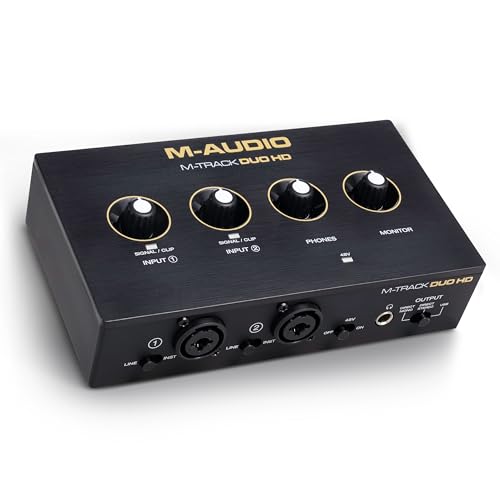
For beginner producers and podcasters seeking an affordable yet high-quality option, the M-AUDIO M-Track Duo HD Audio Interface stands out with its impressive 24-bit/192kHz audio resolution. With two combo inputs, you can easily connect microphones, guitars, or line-level devices. The zero-latency monitoring and independent headphone output guarantee you hear every detail as you record. Plus, the switchable +48V phantom power is perfect for condenser mics. Compact and rugged, it’s portable enough for home or on-the-go use. You also get a solid software bundle, making it a fantastic choice for anyone diving into audio production or streaming.
Best For: Beginner producers, session musicians, and podcasters looking for an affordable and high-quality audio interface.
Pros:
- High audio resolution of 24-bit/192kHz for professional sound quality.
- Compact and portable design makes it easy to use at home or on the go.
- Comprehensive software bundle included, enhancing the audio production experience.
Cons:
- Limited number of inputs/outputs (2-in/2-out) may not meet the needs of larger setups.
- Basic features may not satisfy advanced users looking for more extensive options.
- Plastic build quality might not be as durable as higher-end models.
MAONO Podcast Equipment Bundle: Audio Interface Mixer for Podcast Streaming

If you’re looking to elevate your podcasting or streaming game without a steep learning curve, the MAONO Podcast Equipment Bundle is an excellent choice. This intuitive audio interface mixer features dual XLR inputs and supports connections for computers, smartphones, and tablets. With two premium low-noise preamps, you’ll enjoy crystal-clear audio, while noise reduction technology keeps unwanted sounds at bay. Plus, the eight customizable sound effect buttons let you engage your audience creatively. The one-touch mute button and monitoring feature guarantee seamless recordings, making it perfect for both beginners and seasoned pros. Enjoy up to 8 hours of use with its built-in battery!
Best For: Those looking to enhance their podcasting or streaming experience with user-friendly equipment that delivers high-quality audio.
Pros:
- Intuitive design allows for easy setup and immediate use, making it ideal for beginners.
- Customizable sound effects enhance audience engagement with eight assignable buttons for creativity.
- Built-in battery provides portability with up to 8 hours of use, perfect for on-the-go recording.
Cons:
- Limited battery life may require planning for longer sessions or reliance on external power sources.
- Only two XLR inputs might not suffice for larger podcasting teams or setups.
- Potential learning curve for users unfamiliar with audio mixing interfaces despite its intuitive design.
Podcast Equipment Bundle for 4 with Audio Interface and Dynamic Microphones

Designed specifically for group podcasting, the Podcast Equipment Bundle for 4 with Audio Interface and Dynamic Microphones is perfect for creators who want to elevate their content. This bundle includes everything you need: four dynamic microphones, an audio interface, desktop mic stands, and a DJ mixer. With its portable design and built-in 4000mAh battery, you can easily take it on the go. The plug-and-play setup works seamlessly with various platforms. Plus, enjoy customizable sound effects and real-time monitoring. With intuitive controls and independent volume management, you’ll create professional-quality audio in no time. Take your podcasting game to the next level!
Best For: Creators looking for a comprehensive and portable solution for group podcasting and content creation.
Pros:
- Easy plug-and-play setup compatible with multiple platforms, enhancing accessibility.
- Includes customizable sound effects and real-time monitoring for professional audio quality.
- Portable design with a built-in battery allows for on-the-go recording and streaming.
Cons:
- Limited warranty period of 90 days may not provide sufficient coverage for long-term use.
- Weight of 11.33 pounds may be cumbersome for some users during transport.
- Requires familiarity with audio equipment for optimal setup and operation.
XTUGA USB Audio Interface for PC

The XTUGA USB Audio Interface Q-12 stands out as an excellent choice for students and beginners enthusiastic to set up their first home studio. Weighing only 0.31 kg, its compact design makes it easy to transport. With professional-grade sound at a resolution of 16-Bit/48kHz, you’ll enjoy crystal clear audio without popping noises. It features XLR and 3.5mm microphone inputs, along with 48V phantom power for condenser mics. The USB plug-and-play functionality guarantees quick setup, while zero latency allows for seamless vocal tracking. Compatible with popular software like Audacity and Ableton Live, it’s perfect for your recording needs.
Best For: Students and beginners looking to set up a home studio with professional-grade recording capabilities.
Pros:
- Professional audio quality with 16-Bit/48kHz resolution and no popping noise.
- Easy setup with USB plug-and-play functionality and direct power from the computer.
- Compatibility with popular recording software like Audacity and Ableton Live.
Cons:
- Limited to 2-channel input, which may not meet the needs of more advanced users.
- Phantom power may not be sufficient for all types of condenser microphones.
- No external power adapter means it relies solely on the computer’s power supply, which could be a limitation for some setups.
Factors to Consider When Choosing Audio Interfaces for Streaming and Podcasting
When choosing an audio interface for streaming or podcasting, you need to take into account several key factors. Audio quality standards, input and output options, and portability all play an essential role in your overall experience. Additionally, monitoring features and software compatibility can make or break your setup, so keep those in mind as you make your selection.
Audio Quality Standards
Choosing the right audio interface for streaming and podcasting hinges on understanding audio quality standards. You’ll want a minimum of 16-bit/44.1kHz for decent sound, but consider 24-bit/192kHz for higher fidelity. Aim for a dynamic range of at least 100dB; this captures subtle audio nuances without distortion. Zero-latency monitoring is essential, allowing you to hear yourself in real-time as you record, enhancing your performance. If you’re using condenser microphones, make sure your interface provides phantom power (+48V) to guarantee optimal sound capture. Additionally, check that the frequency response spans from 20Hz to 20kHz to accurately reproduce the full audible spectrum, assuring both low and high frequencies are captured effectively.
Input and Output Options
Selecting the right input and output options is vital for maximizing your audio interface’s performance in streaming and podcasting. First, consider the number and type of inputs, like XLR, line, and instrument inputs, to guarantee compatibility with your microphones and instruments. You’ll want an interface that provides phantom power for condenser microphones, which need extra voltage to operate effectively. Multiple output options, including balanced TRS outputs and headphone outputs, are essential for connecting to studio monitors and real-time monitoring during recordings. Additionally, look for interfaces with zero-latency monitoring capabilities to eliminate delays between input and output, enhancing your live streaming experience. These factors will greatly impact your audio quality and overall streaming or podcasting success.
Portability and Design
After ensuring you have the right input and output options, the next important factor to contemplate is portability and design. For streaming and podcasting, you’ll want an audio interface that’s lightweight and compact, making it easy to transport between locations. Look for USB-powered models that don’t require external power sources, perfect for on-the-go creators. Consider dimensions and weight; a model around 4.4D x 7.5W x 2.1H inches and under 0.5 kg is ideal for travel. A user-friendly layout with intuitive controls allows you to set up quickly, helping you focus on your content rather than technical details. Additionally, durable enclosures enhance longevity, ensuring your gear withstands the rigors of frequent use.
Monitoring Features
When it comes to monitoring features in audio interfaces for streaming and podcasting, making sure you have real-time feedback is vital for a smooth recording experience. Look for interfaces that offer zero-latency monitoring, so you can hear your input without any delay, essential for accuracy. Multiple monitoring modes, like stereo, mix, and USB, cater to various needs, enhancing your sessions. A dedicated headphone output with independent volume control allows for precise monitoring during live recordings. LED indicators displaying input levels help you avoid distortion and maintain ideal gain settings. Finally, choose interfaces that support both direct and playback monitoring, giving you flexibility in audio routing while recording and editing. This combination guarantees a polished, professional sound.
Software Compatibility
As you plunge into streaming or podcasting, ensuring your audio interface is compatible with major digital audio workstations (DAWs) is essential for smooth integration. Look for compatibility with popular DAWs like Logic Pro, ProTools, GarageBand, and Ableton Live. This will streamline your workflow and enhance the quality of your content. It’s also vital to check if the interface supports both Windows and macOS, giving you flexibility with different devices. Opt for plug-and-play models for easy setup without the hassle of extra drivers, especially if you’re a beginner. Additionally, consider interfaces that come with bundled software, offering tools for recording and editing to maximize your value. Finally, verify mobile compatibility for on-the-go recording options.
Phantom Power Availability
Phantom power is a critical feature to take into account when selecting an audio interface for streaming or podcasting, especially if you plan to use condenser microphones. These microphones typically require 48V to deliver high-quality audio. Look for interfaces that offer switchable phantom power, enabling you to activate it depending on your microphone type. This flexibility allows you to use both dynamic and condenser mics, enhancing your recording versatility. Most interfaces indicate phantom power availability with an LED light or a simple switch, making it easy for you to manage your setup. Ensuring your audio interface has phantom power is essential for achieving that professional sound quality you desire in your recordings.
Connectivity Types
Choosing the right connectivity type is vital for your audio interface, especially for streaming and podcasting. USB connections are the most common, offering plug-and-play convenience with no need for extra drivers. Look for models with USB-C, which provide faster data transfer and can power the device, cutting down on cable clutter. If you’re using professional microphones, XLR inputs are essential, as they support balanced audio signals and reduce noise. Additionally, some interfaces include 1/4″ TRS inputs for line-level signals from instruments or mixers, adding versatility to your setup. Finally, guarantee compatibility with various operating systems like Windows, macOS, iOS, and Android, so your interface integrates smoothly with different devices and DAWs.