When it comes to virtual communication, the right microphone can greatly impact your experience. You might be surprised at how a simple upgrade can enhance audio clarity and reduce background noise. With various options available, from versatile USB microphones to specialized conference speakerphones, choosing the best fit for your needs is essential. So, which microphones should you consider to elevate your online meetings? Let’s explore some top contenders that can make a real difference.
Logitech Blue Yeti USB Microphone for PC and Mac

If you’re looking for a microphone that delivers professional-quality sound for online meetings, the Logitech Blue Yeti USB Microphone is an excellent choice. This versatile mic features a custom three-capsule array that guarantees clear, broadcast-quality audio. You can easily switch between four pickup patterns—cardioid, omni, bidirectional, and stereo—making it perfect for various purposes like meetings or podcasts. With onboard controls for volume, pattern selection, and instant mute, you’ll have everything at your fingertips. Plus, its plug-and-play functionality means you’ll be set up and ready to go in no time, whether you’re using a PC or Mac.
Best For: The Logitech Blue Yeti USB Microphone is best for content creators, podcasters, and professionals seeking high-quality audio for streaming and online meetings.
Pros:
- Versatile pickup patterns allow for diverse recording scenarios, from solo vocals to group discussions.
- Onboard controls provide easy access to volume, pattern selection, and mute functions for quick adjustments.
- Plug-and-play compatibility makes setup effortless for both PC and Mac users.
Cons:
- Size and weight may be cumbersome for portable setups or limited desk space.
- Requires USB power, which may restrict mobility if no nearby ports are available.
- Higher price point compared to basic microphones may not suit every budget.
FIFINE USB Microphone (K669B)

The FIFINE USB Microphone (K669B) stands out as an excellent choice for anyone seeking clear and professional audio during online meetings. Its cardioid design effectively captures your voice while minimizing background noise, ensuring you’re heard clearly. The plug-and-play setup makes it easy to connect to your PC or laptop, and the included 5.9-foot USB cable offers flexibility in positioning. With a durable metal construction and a stable tripod stand, this microphone is built to last. Plus, the adjustable volume knob lets you fine-tune your audio effortlessly, making it ideal for platforms like Zoom, Discord, and Twitch.
Best For: The FIFINE USB Microphone (K669B) is best for content creators, streamers, and professionals looking for high-quality audio during recordings and online meetings.
Pros:
- Plug-and-play setup allows for easy connection to various devices without additional software.
- Durable metal construction and stable tripod stand ensure longevity and reliability in different environments.
- Cardioid design effectively reduces background noise, providing clear and focused audio capture.
Cons:
- Not compatible with Xbox and phones, limiting its use with certain gaming and mobile applications.
- Requires disabling sound-activated recording features in some applications for optimal performance.
- Limited to USB-A ports, which may necessitate adapters for newer devices with different port types.
ZealSound Podcast Microphone for PC

For content creators seeking high-quality audio quality during online meetings, the ZealSound K66 Podcast Microphone stands out with its studio-quality sound and intelligent noise reduction mode. This cardioid microphone connects via USB, USB-C, or Lightning, ensuring compatibility across devices. You’ll appreciate the real-time zero-latency monitoring and adjustable echo control for precise audio adjustments. Its plug-and-play functionality makes setup effortless, while the instant mute button provides quick audio control. With included accessories and a sturdy base, it’s perfect for podcasting, streaming, or online classes. Elevate your virtual communication experience with the ZealSound K66 and enjoy clear, professional audio.
Best For: Content creators, podcasters, and gamers who require high-quality audio for streaming, online classes, or professional recordings.
Pros:
- Studio-quality sound ensures clear and professional audio for various applications.
- Plug-and-play functionality allows for easy setup across multiple devices without the need for additional software.
- Intelligent noise reduction mode effectively minimizes background noise for enhanced recording clarity.
Cons:
- Limited to cardioid polar pattern, which may not suit all recording environments or needs.
- Corded electric power source limits mobility and requires proximity to power outlets.
- Maximum frequency response of 20 kHz may not meet the demands of high-fidelity audio enthusiasts.
FIFINE USB/XLR Dynamic Microphone for Podcast Recording

Looking for a microphone that excels in both online meetings and podcast recording? The FIFINE USB/XLR Dynamic Microphone is a fantastic choice. With its cardioid pattern, it captures your voice clearly while minimizing background noise. You can connect via USB for easy plug-and-play or use the XLR option for enhanced audio quality. Its RGB lighting adds a fun touch, and the tap-to-mute feature guarantees your privacy during calls. Plus, the built-in headphone jack lets you monitor your audio in real time. Whether you’re gaming, podcasting, or conducting meetings, this mic delivers versatility and performance you can rely on.
Best For: Those seeking a versatile microphone for online meetings, podcasting, and gaming that offers excellent audio quality and user-friendly features.
Pros:
- High audio clarity with a cardioid pattern that effectively reduces background noise.
- Dual connectivity options (USB and XLR) providing flexibility for various recording setups.
- Customizable RGB lighting and real-time audio monitoring enhance the user experience.
Cons:
- XLR cable not included, requiring an additional purchase for XLR connection.
- Some advanced features, like volume control, are only available via USB connection.
- Portability may be limited by the need for a compatible mic stand or desktop setup.
EMEET Conference Speakerphone M0 Plus with 4 AI Mics

If you’re seeking a reliable solution for virtual meetings, the EMEET Conference Speakerphone M0 Plus with 4 AI mics stands out with its exceptional 360° voice pickup capability. This speakerphone features advanced noise reduction technology and a full duplex audio experience, ensuring clear communication. Its USB-C and Bluetooth connectivity make it compatible with popular platforms like Zoom and Microsoft Teams. Whether you’re in a meeting room or working from home, it accommodates up to 8 participants, expandable with daisy chaining. Plus, with over 10 hours of battery life, you’ll stay connected without interruptions.
Best For: Teams and professionals looking for a versatile and high-quality speakerphone solution for virtual meetings and conference calls.
Pros:
- Exceptional audio quality with 360° voice pickup and advanced noise reduction technology.
- Versatile connectivity options including USB-C and Bluetooth, compatible with popular conferencing software.
- Expandable setup allows for larger meetings by linking multiple devices together.
Cons:
- Limited to 8 participants without daisy chaining additional units.
- Compact size may affect speaker power in larger rooms without additional units.
- Requires charging, which may interrupt usage if not monitored.
Anker PowerConf Speakerphone, Zoom Certified Conference Speaker

The Anker PowerConf Speakerphone stands out as an excellent choice for professionals who need crystal-clear audio in online meetings, thanks to its six microphones arranged in a 360° array. With Voice Radar 3.0 technology, it effectively cancels noise and echoes, ensuring everyone sounds great. Enjoy up to 24 hours of call time with its built-in 5,200mAh battery, and use the integrated Anker PowerIQ to charge your devices. Its Bluetooth 5.3 connectivity and USB-C compatibility make it versatile for any setup. Weighing only 0.75 pounds, it’s ultra-portable, making it perfect for home offices or conference rooms.
Best For: Professionals seeking high-quality audio for online meetings and conference calls.
Pros:
- 360° enhanced voice pickup ensures clear communication from all participants.
- Long battery life of 24 hours allows for extended use without frequent recharging.
- Ultra-portable design makes it easy to transport between home offices and conference rooms.
Cons:
- Limited Bluetooth range of 20 meters may restrict movement during calls.
- Plastic enclosure may not be as durable as other materials.
- Higher price point compared to basic speakerphones on the market.
Microsoft Modern USB-C Speaker for Microsoft Teams
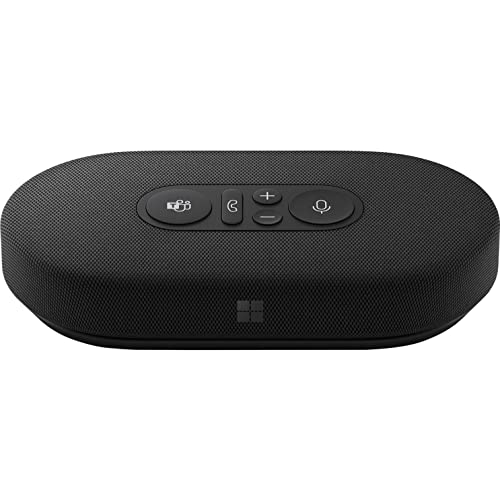
For those who rely heavily on Microsoft Teams for their meetings, the Microsoft Modern USB-C Speaker stands out as an essential tool. This compact stereo speaker not only enhances audio quality with a superior speaker driver but also features a noise-reducing microphone that captures your voice clearly. With plug-and-play USB-C connectivity, you’ll enjoy seamless integration with Teams, allowing easy control through physical buttons. Its sleek design makes it perfect for your desk or on-the-go, complete with clever cable management and a handy pouch for storage. Elevate your virtual communication and make every meeting sound professional with this speaker.
Best For: Professionals who frequently use Microsoft Teams for meetings and require enhanced audio clarity.
Pros:
- High-quality audio with a superior speaker driver, providing a better sound experience than built-in laptop speakers.
- Noise-reducing microphone enhances call clarity, making it easier for others to hear you during meetings.
- Compact and portable design with clever cable management and a storage pouch, ideal for travel and desktop use.
Cons:
- Limited to USB-C connectivity, which may not be compatible with all devices without adapters.
- Not wireless, which could be inconvenient for users who prefer a clutter-free workspace.
- May be less effective in noisy environments, despite the noise-reducing features of the microphone.
TONOR Conference USB Microphone (Omnidirectional Condenser Mic)

Ideal for professionals and educators alike, the TONOR Conference USB Microphone stands out with its omnidirectional pickup pattern, capturing clear audio from all directions. With a simple plug-and-play setup, you won’t need any drivers; just connect it to your Windows or macOS device. Its 11.5 ft pickup distance guarantees everyone in the room is heard, while the mute function adds convenience during online meetings. Constructed from durable metal and equipped with a stable anti-slip mat, this mini microphone is built to last. Plus, with a customer rating of 4.4 stars, it’s clearly a favorite for virtual communication.
Best For: Professionals and educators looking for a reliable microphone for video conferences, online classes, and remote meetings.
Pros:
- Plug & Play: Easy setup with no drivers required, making it user-friendly.
- Omnidirectional Pickup: Captures clear audio from all directions, ensuring everyone is heard.
- Durable Design: Made from sturdy metal with an anti-slip mat for stability during use.
Cons:
- Limited Compatibility: Only works with Windows and macOS, excluding some other operating systems.
- Corded Connection: Requires a USB connection, which may limit mobility compared to wireless options.
- Pickup Distance Limitations: While it has an 11.5 ft pickup distance, larger rooms may require additional microphones for optimal sound capture.
Anker PowerConf S3 Speakerphone for Home Office
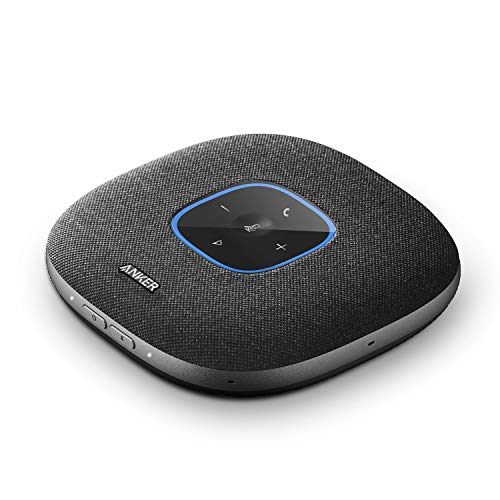
Designed for remote professionals, the Anker PowerConf S3 Speakerphone stands out with its impressive 360° voice pickup, ensuring everyone in the room is heard clearly during online meetings. With six microphones and smart voice enhancement, you’ll enjoy optimized clarity and reduced background noise. Its Bluetooth 5 and USB-C connectivity make it compatible with laptops, PCs, and smartphones, while the 10-meter range keeps you connected. Plus, with a battery life of up to 24 hours, you won’t have to worry about frequent charging. This sleek, portable speakerphone is perfect for elevating your virtual communication experience.
Best For: Remote professionals seeking clear and efficient communication during online meetings.
Pros:
- 360° voice pickup ensures all participants are heard clearly.
- Smart voice enhancement optimizes audio quality and reduces background noise.
- Long battery life of up to 24 hours allows for extended use without frequent charging.
Cons:
- Limited range of Bluetooth connectivity may restrict movement.
- Plastic material may not feel as durable as other premium options.
- Charge time of 24 hours can be inconvenient for quick turnaround between uses.
SENNHEISER USB Cardioid Condenser Microphone with Table Stand

The SENNHEISER USB Cardioid Condenser Microphone with Table Stand stands out as an excellent choice for professionals seeking high-quality audio during online meetings. This plug-and-play mic connects effortlessly to your PC or Mac via USB-C, ensuring a hassle-free setup. You’ll enjoy its natural, warm sound, perfect for capturing your voice. With easily accessible gain, mix, and volume controls, you can adjust settings on the fly. The compact design and adjustable tilt of the table stand make it convenient to position for peak performance. Plus, the built-in headphone jack allows for real-time monitoring, enhancing your communication experience.
Best For: Professionals seeking high-quality audio for online meetings and content creation.
Pros:
- Plug-and-Play functionality allows for easy setup without the need for complex software.
- Natural, warm sound quality is designed specifically for capturing human voice, enhancing clarity during communication.
- Adjustable controls for gain, mix, and volume make it easy to customize audio settings on the fly.
Cons:
- Limited to USB-C connectivity, which may require an adapter for older devices.
- Weight of 717 grams may be slightly heavy for some portable setups.
- Unidirectional polar pattern may not capture sound from multiple directions effectively.
Factors to Consider When Choosing Microphones for Online Meetings
When choosing a microphone for online meetings, you need to evaluate several key factors. The audio quality can make or break your communication, so think about the type and connectivity options that suit your setup. Additionally, the pickup pattern and portability of the microphone can greatly enhance your meeting experience.
Audio Quality Importance
While you might think any microphone will do for online meetings, audio quality plays a critical role in effective communication. Clear sound enhances understanding and reduces misunderstandings among participants. Look for microphones with a high signal-to-noise ratio, ideally above 70 dB, as these minimize background noise for clearer audio. A frequency response range of at least 20 Hz to 20 kHz is essential to capture the full spectrum of human voice sounds accurately. Additionally, choose a microphone with a cardioid polar pattern; it focuses on your voice while reducing ambient noise from other directions. Advanced features like noise reduction technology can also greatly boost audio clarity, making your conversations more engaging and productive.
Microphone Type Selection
Choosing the right microphone type can make a significant difference in your online meeting experience. You’ll want to decide between USB and XLR microphones; USB mics offer easy plug-and-play convenience, while XLR mics provide professional-grade audio control. Next, consider the polar pattern—cardioid mics focus on sound from one direction, minimizing background noise, whereas omnidirectional mics capture sound from all around. Pay attention to audio sensitivity, too; a higher sensitivity means the mic picks up quieter voices and subtle sounds better. Finally, look at the frequency response range, ideally between 20 Hz to 20 kHz, to guarantee clear speech and music reproduction. Each factor plays a crucial role in enhancing your virtual communication.
Connectivity Options Available
Understanding the connectivity options available for microphones is essential for optimizing your online meeting experience. Many microphones offer USB connectivity, making setup a breeze with plug-and-play functionality for both PC and Mac users. If you prefer modern devices, look for models featuring USB-C, which provides faster data transfer and charging. Wireless options like Bluetooth can further enhance your experience, allowing for a clutter-free workspace and greater mobility during meetings. Additionally, some microphones come with both USB and XLR connections, giving you the flexibility to switch between digital and professional audio setups. Finally, verify your microphone is compatible with various conferencing platforms and operating systems to guarantee seamless integration and functionality throughout your online meetings.
Pickup Pattern Considerations
When selecting a microphone for your online meetings, considering the pickup pattern is essential. Cardioid microphones are your best bet, as they primarily capture sound from the front, minimizing background noise. This is particularly beneficial in a home office setting where distractions may abound. If you’re planning group discussions, an omnidirectional microphone can pick up sound evenly from all directions, but be cautious—it might also catch unwanted ambient noise. Bidirectional microphones work well for two-person interviews but aren’t the best choice for general meetings. Finally, stereo microphones offer a wider sound field, providing immersive audio experiences, though they may be overkill for standard voice communication. Choose wisely based on your specific needs to enhance your virtual communication.
Portability and Design
With the right pickup pattern established, the next factor to evaluate is portability and design. You’ll want a microphone that’s lightweight and compact, making it easy to transport and set up in various environments. Opt for plug-and-play functionality, which simplifies installation and enhances your mobility. Look for models with durable construction and stable stands, as these features guarantee your microphone can handle frequent movement during meetings. Additionally, consider designs that offer clever cable management for better organization in different meeting spaces. Finally, microphones with adjustable positions or rotatable designs can capture sound effectively without taking up too much space, making your online meetings more efficient and professional.
Noise Reduction Features
To guarantee your online meetings run smoothly, you’ll want a microphone equipped with effective noise reduction features. These features minimize unwanted background sounds, enhancing the clarity of your voice. Look for microphones with advanced noise reduction technologies, like AI algorithms, that filter out echo and ambient noise. This provides a more professional audio experience for everyone involved. Intelligent noise reduction modes can also effectively cut distractions, such as keyboard clicks or fan noise, allowing for clearer communication. Additionally, a high signal-to-noise ratio (SNR) indicates better performance in isolating your voice. Some microphones even come with dedicated noise-canceling features, letting you focus on speaking while reducing other sounds, which ultimately improves your call quality.
Compatibility With Software
Choosing a microphone that’s compatible with your preferred software can greatly enhance your online meeting experience. Make sure the microphone works seamlessly with popular platforms like Zoom, Microsoft Teams, and Skype to avoid technical hiccups. Look for plug-and-play options that eliminate the need for extra drivers, simplifying your setup. Compatibility with both Windows and macOS is essential, ensuring that you and your colleagues can use it without hassle regardless of your operating system. Additionally, check the microphone’s connectivity options, such as USB-C and Bluetooth, for added flexibility in various meeting environments. Features like noise reduction and multiple pickup patterns further enhance audio quality, making your virtual communication clearer and more professional.
Budget and Value
Selecting the right microphone goes beyond just compatibility; your budget plays a significant role in finding the best fit for online meetings. Start by determining your budget range, as prices can vary widely—entry-level models can be as low as $30, while professional-grade microphones may cost several hundred dollars. Within your budget, consider the value of features like audio quality, pickup patterns, and noise reduction, which can greatly enhance your experience. Evaluate warranty and return policies to protect your investment. Check customer reviews and ratings for insights into performance and reliability. Finally, think about long-term usability; a higher initial investment might be worth it if the microphone meets both your current and future needs.