When you’re looking to perfect your sound setup, choosing the right audio mixer with a USB interface is vital. With so many options available, it’s important to find one that meets your specific needs, whether you’re a musician, podcaster, or content creator. Each mixer offers unique features that can enhance your audio experience. Let’s explore the top choices that can elevate your sound quality and streamline your workflow.
M-AUDIO M-Track Duo USB Audio Interface

If you’re a budding musician or podcaster looking for a reliable and portable solution for your audio needs, the M-Audio M-Track Duo USB Audio Interface is an excellent choice. This compact interface features dual XLR, line, and DI inputs, providing versatile sound recording options. With 48kHz audio resolution, you’ll capture high-quality audio effortlessly. Plus, the zero-latency monitoring through the headphone output guarantees a seamless experience while recording. It’s USB-powered, making it easy to use on the go, and it’s compatible with major DAWs. Whether on Mac or PC, the M-Track Duo is perfect for your creative projects.
Best For: Budding musicians and podcasters seeking a portable and high-quality audio recording solution.
Pros:
- Compact and lightweight design for easy portability.
- Dual combo inputs with phantom power for versatile recording options.
- Zero-latency monitoring for a seamless recording experience.
Cons:
- Limited to 48kHz maximum sample rate, which may not satisfy professional users.
- Requires an external power source if used with devices that do not support USB power.
- Compatibility issues may arise with older operating systems or certain DAW software.
FIFINE Gaming Audio Mixer with XLR Microphone Interface

The FIFINE Gaming Audio Mixer with XLR Microphone Interface is perfect for serious content creators who demand high-quality audio for their streams or podcasts. This mixer features a robust XLR input, built-in 48V phantom power for condenser mics, and four independent channels for precise volume control. Easily mute audio or monitor your sound in real-time with front-facing buttons. You’ll love the four customizable sound effect buttons and six voice-changing modes for added creativity. Designed for intuitive use, it’s compatible with both Mac OS and Windows, making it a versatile choice for any audio setup. Just remember, an XLR cable isn’t included.
Best For: Serious content creators seeking high-quality audio for streaming and podcasting.
Pros:
- Offers four independent channels for precise volume control of different audio sources.
- Features customizable sound effect buttons and voice-changing modes for creative audio enhancements.
- User-friendly design with plug-and-play setup, compatible with both Mac OS and Windows.
Cons:
- Not compatible with USB microphones, limiting microphone options.
- XLR cable is not included, which may require an additional purchase.
- Some users may find the learning curve steep if they are new to audio mixing.
TKLBLS 6 Channel Audio Mixer with USB Interface
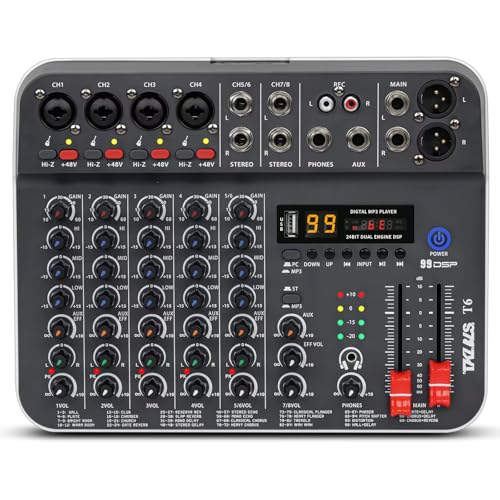
For those looking to elevate their audio experience, the TKLBLS 6 Channel Audio Mixer with USB Interface stands out as an ideal choice. This unpowered mixer features six input sources, perfect for microphones, instruments, and media players. With built-in MP3 support and Bluetooth streaming, you can easily connect your devices. Enjoy precise sound control with independent GAIN and EQ knobs, plus dedicated sliding faders for volume balancing. Whether you’re into karaoke, livestreaming, or podcasting, this mixer’s 48V phantom power and digital delay processor enhance your audio quality. Compact and lightweight, it’s designed for both home and mobile setups.
Best For: Those seeking a versatile audio mixer for karaoke, livestreaming, podcasting, and live performances.
Pros:
- Multiple Input Options: Supports up to 6 input sources, allowing for a variety of devices to be connected simultaneously.
- Sound Control Features: Equipped with independent GAIN and EQ knobs for each channel, providing precise audio adjustments.
- Compact Design: Lightweight and compact, making it ideal for mobile setups and home use.
Cons:
- Unpowered Mixer: Requires an external power source, which may limit portability in some situations.
- Limited Built-in Effects: While it includes a digital delay processor, it may lack more advanced effects compared to higher-end mixers.
- Customer Reviews: Only a moderate rating of 4.3 out of 5 stars based on 12 reviews, indicating some potential concerns from users.
MAONO USB Audio Interface for PC (PS22 Lite Black)

Looking for a versatile audio interface that seamlessly connects to your PC? The MAONO PS22 Lite is your go-to choice. With 24-bit/192kHz resolution and a dynamic range of 106dB, it captures every sound detail. You’ll appreciate its support for both condenser and dynamic microphones and the dedicated guitar input for rich tones. Plus, its ProStudio Routing Software offers low-latency output and intuitive modes for various recordings. Compact and lightweight, it features a dynamic light ring to indicate sound status. With easy plug-and-play capability, you’ll set up quickly and enjoy a fantastic audio experience right away!
Best For: Podcasters, musicians, and content creators looking for an affordable and high-quality audio interface that is easy to use and provides excellent sound clarity.
Pros:
- Supports both condenser and dynamic microphones with phantom power for versatility.
- Compact and lightweight design makes it easy to transport and set up.
- ProStudio Routing Software enhances functionality with low-latency output and user-friendly modes.
Cons:
- Limited to USB connectivity, which may restrict integration with some devices.
- Some users may require additional software knowledge to fully utilize all features.
- The dynamic light ring may be distracting for some users during recording sessions.
YAMAHA MG10XU 10-Input Stereo Mixer with Effects

Yamaha MG10XU stands out as an ideal choice for musicians and content creators seeking a compact mixer with USB connectivity. This 10-channel analog mixer is perfect for studio and stage use, integrating seamlessly into your DAW. With studio-grade Class A D-PRE preamps, it delivers rich bass and smooth highs. You’ll appreciate the 3-band EQ and high-pass filters that let you control your mix effectively. One-knob compressors enhance your instruments and vocals, making them cleaner and livelier. At just 7.7 pounds, it’s portable, and with a 4.6-star rating from users, it’s clear you’ll be making a solid investment.
Best For: Musicians and content creators looking for a compact, high-quality mixer with USB connectivity for studio and stage use.
Pros:
- Studio-grade Class A D-PRE preamps provide exceptional sound quality with rich bass and smooth highs.
- Compact and lightweight design (7.7 pounds) makes it easy to transport for live performances or studio sessions.
- User-friendly features such as one-knob compressors and 3-band EQ allow for effective sound control.
Cons:
- Limited number of channels (10) may not be sufficient for larger setups or more complex productions.
- No built-in recording capabilities; USB connectivity is for integration with DAWs only.
- Onboard effects are basic, which might not satisfy users looking for more advanced sound processing options.
FULUODE 8 Channel Audio Mixer (CT-80S)

The FULUODE 8 Channel Audio Mixer (CT-80S) stands out as an ideal choice for musicians and DJs seeking versatility and connectivity. With features like reverb, an MP3 player, and Bluetooth 5.0, it enhances your sound experience effortlessly. You’ll appreciate the USB recording capabilities for quick and easy sessions. This lightweight mixer, measuring just 1.57 inches thick, fits perfectly in your setup. Whether you’re performing live or hosting karaoke at home, the CT-80S excels. Plus, its 365-day warranty and 30-day return policy via Amazon guarantees you’ve got support when you need it. Your sound setup deserves this quality mixer!
Best For: Musicians, DJs, and home karaoke enthusiasts looking for a versatile and compact audio mixing solution.
Pros:
- Versatile Features: Includes reverb, MP3 player, Bluetooth 5.0, and USB recording capabilities for a comprehensive sound experience.
- Compact Design: Ultra-thin profile at 1.57 inches makes it easy to integrate into any setup.
- Customer Support: Comes with a 365-day warranty and a 30-day return policy for peace of mind.
Cons:
- Limited Channels: Only 8 channels may not suffice for more extensive setups or larger bands.
- Weight: At 3.3 kg, it may be heavier than some ultra-portable mixers.
- Input Type: Monocular input may limit certain types of audio connections or setups.
4 Channel Audio Mixer with Bluetooth and USB Audio Interface

For content creators seeking a versatile solution, the 4 Channel Audio Mixer with Bluetooth and USB Audio Interface stands out with its ability to seamlessly connect to multiple devices. With XLR and 1/4-inch inputs, you can easily plug in microphones, instruments, and other audio sources. The Bluetooth feature lets you stream audio wirelessly, while USB connectivity allows for MP3 playback and recording. Plus, with 99 DSP effects and a 7-band EQ, you can enhance your sound to perfection. This mixer is perfect for podcasting, live streaming, and small performances, delivering studio-quality audio in a compact design.
Best For: Content creators, podcasters, and DJs looking for a compact audio mixer that offers versatility and high-quality sound enhancement.
Pros:
- Versatile connectivity with XLR, 1/4-inch inputs, Bluetooth streaming, and USB playback/recording options.
- 99 DSP effects and a 7-band EQ allow for extensive sound customization and enhancement.
- Compact design makes it ideal for portable use in various settings such as live streaming, karaoke, and small performances.
Cons:
- Limited to 4 channels, which may not be sufficient for larger setups or more complex audio mixing.
- Some users may find the learning curve for utilizing DSP effects and EQ settings a bit challenging.
- The compact size might lead to a more cramped layout for users with multiple connected devices.
SONICAKE Portable USB Mini Sound Board Console

If you’re seeking a compact and portable solution for music recording or live streaming, the SONICAKE Portable USB Mini Sound Board Console stands out with its 2-channel design and USB connectivity. With a stable performance compatible with mainstream audio software, you’ll enjoy fast transmission rates and professional sound quality at 16 BIT, 48KHZ resolution. Weighing just 0.31 kilograms, it’s easy to transport, and its USB-powered feature, along with switchable 48V phantom power, guarantees convenience. Plus, with a 90-day free return policy, you can test it risk-free. This mixer is a reliable choice for your audio setup.
Best For: Individuals seeking a portable audio mixer for music recording, live streaming, or podcasting.
Pros:
- Compact and lightweight design for easy transport and setup.
- High audio resolution of 16 BIT, 48KHZ for professional sound quality.
- USB-powered with switchable 48V phantom power for added convenience.
Cons:
- Limited to 2 channels, which may not be sufficient for larger setups.
- Noise level of 40 decibels, which might affect quieter recordings.
- Customer rating of 3.9 out of 5 stars indicates mixed reviews.
XTUGA USB Audio Interface for PC

Students and beginners setting up a home studio will find the XTUGA USB Audio Interface Q-12 an ideal choice for music recording. Weighing just 0.31 kg, this compact interface features XLR and 3.5mm microphone inputs, delivering professional-grade sound at 16-Bit/48kHz resolution. With switchable 48V phantom power, it’s perfect for condenser microphones. Enjoy zero latency for seamless tracking and plug-and-play functionality via USB, eliminating the need for an external power adapter. Compatible with popular software like Audacity and Ableton Live, the XTUGA guarantees durability for home karaoke and streaming while offering a one-year warranty and a 30-day return policy.
Best For: Students and beginners looking to establish a home studio for music recording.
Pros:
- Professional-grade sound with 16-Bit/48kHz resolution and no popping noise.
- Zero latency ensures seamless vocal tracking for an efficient recording experience.
- Compact and lightweight design makes it easy to transport and set up anywhere.
Cons:
- Limited to 2-channel audio, which may not suffice for advanced recording needs.
- Phantom power may not be compatible with all microphones, potentially limiting options.
- Basic features might not satisfy more experienced users seeking advanced audio interfaces.
Behringer XENYX 802S Premium Analog Mixer

The Behringer XENYX 802S Premium Analog Mixer stands out as a top choice for streamers and podcasters seeking high-quality audio mixing. With its 8-input configuration, you can easily integrate multiple audio sources, ensuring your sound is crystal clear. The ultra-low noise design guarantees that your recordings are free from unwanted hiss or hum. Plus, the stereo USB audio interface makes connecting to your computer or mobile device a breeze. Directly mix PC or gaming sounds into your streaming output for a seamless experience. Whether you’re recording or broadcasting, this mixer enhances your audio setup effortlessly.
Best For: The Behringer XENYX 802S is best for streamers and podcasters looking for an affordable yet high-quality audio mixing solution.
Pros:
- Ultra-low noise design ensures clean recordings without hiss or hum.
- 8-input configuration allows for seamless integration of multiple audio sources.
- Stereo USB audio interface simplifies connection to computers and mobile devices.
Cons:
- Lacks advanced digital features found in some competitors.
- Limited onboard effects for sound enhancement.
- May require additional cables and adapters for certain setups.
Factors to Consider When Choosing Audio Mixers With USB Interface
When choosing an audio mixer with a USB interface, consider factors like input channel configuration and audio quality standards. You’ll also want to think about portability and size, along with the connectivity options available. Finally, sound control features can greatly impact your mixing experience, so keep those in mind as well.
Input Channel Configuration
Choosing the right input channel configuration on an audio mixer with a USB interface is essential for achieving the best sound quality and flexibility in your setup. The number of input channels determines how many audio sources you can connect simultaneously, impacting versatility. Look for mixers with various input types, like XLR, line, and instrument inputs, to expand your recording options. If you’re doing live performances or streaming, having independent control over each channel’s gain, EQ, and effects enhances adaptability and sound quality. Additionally, consider mixers with dedicated channels for specific inputs to optimize signal processing. Don’t forget to check for phantom power support if you plan to use condenser microphones for high-quality vocal recordings.
Audio Quality Standards
Understanding audio quality standards is vital for selecting an audio mixer with a USB interface that meets your needs. Look for mixers with a resolution of 24-bit/192kHz to guarantee high-fidelity recordings. A dynamic range of 106dB or more is ideal, as it allows you to capture both the softest and loudest sounds without distortion. Frequency response matters too; aim for a range of 20 Hz to 20 kHz to cover the full spectrum of human hearing. If you’re working live, zero latency monitoring is essential, enabling you to hear your audio input instantly. Finally, prioritize mixers with high-quality preamps to minimize noise and distortion, ensuring clarity in your recordings. Choose wisely to achieve the best sound experience.
Portability and Size
Portability and size play an essential role in selecting an audio mixer with a USB interface, especially if you often find yourself recording or streaming on the go. You’ll want a lightweight device that’s easy to transport, like the M-Audio M-Track Duo, which weighs only 0.3 kg. Smaller mixers typically offer fewer channels, so if you need multi-channel mixing, you’ll have to balance size with functionality. Compact designs fit easily into standard laptop bags or backpacks, making them perfect for live performances or impromptu recording sessions. Ultimately, consider how often you’ll be moving your mixer and the space you have available. A streamlined, portable mixer can enhance your workflow while ensuring you don’t compromise on essential features.
Connectivity Options Available
When you’re on the move with your audio mixer, connectivity options become a key factor in your decision-making. Look for mixers that support multiple input types, including XLR, 1/4″ TRS, and 3.5mm jacks. This versatility lets you connect various microphones and instruments seamlessly. Verify the mixer has USB connectivity for easy integration with computers and mobile devices, simplifying your recording and streaming processes. Bluetooth capability can enhance your setup, allowing wireless streaming from compatible devices. Additionally, consider mixers with built-in MP3 playback and recording functions via USB drives, which can streamline audio management during live performances. Finally, check that the mixer supports phantom power (+48V) for condenser microphones, guaranteeing you achieve high-quality audio input.
Sound Control Features
To achieve the best sound quality with your audio mixer, you’ll want to contemplate its sound control features carefully. Look for independent gain and EQ knobs for each channel, as these allow you to tailor audio adjustments to your specific needs. Dedicated left/right sliding faders are essential for precise volume balancing, ensuring a well-mixed output during live performances or recordings. High and low EQ controls enable real-time tone adjustments, helping you shape the sound to fit different environments. Built-in effects like digital delay or reverb can enhance vocal clarity and depth, making your audio more engaging. Additionally, customizable sound effect buttons and voice-changing modes offer creative options to elevate your streams or recordings.
Compatibility With Software
After mastering sound control features, the next step is ensuring your audio mixer works seamlessly with your software setup. Start by checking compatibility with major digital audio workstations (DAWs) like Logic Pro, ProTools, GarageBand, and Ableton Live. This compatibility is essential for recording and mixing efficiency. Make sure the mixer supports your operating system, whether it’s Windows (7-10) or macOS (High Sierra to Big Sur), as this impacts installation and performance. Look for plug-and-play functionality to simplify integration without needing extensive setup or extra drivers. Finally, verify that the mixer can handle the necessary audio formats, sample rates, and bit depths, and consider any additional software that enhances audio routing or virtual channels for versatility.
Power Supply Requirements
Power supply requirements are essential factors to evaluate in your search for an audio mixer with a USB interface. Many mixers can draw power directly from USB, making them convenient for connecting to your computer without extra outlets. However, some models require a standard AC outlet, so you’ll want to check the voltage compatibility with your local electrical system. If you plan to use condenser microphones, look for mixers offering +48V phantom power, as these typically need a corded power source. Additionally, consider the mixer’s power consumption; higher wattage devices may demand dedicated outlets. For portability, lightweight designs with compact power options are ideal for on-the-go recording or streaming setups, ensuring you stay powered wherever you are.