Choosing the right mini PC for a Roon server comes down to more than raw speed. You want enough CPU headroom for library management, fast storage, stable networking, and quiet operation that can run all day without hassle.
This roundup focuses on mini PCs for Roon server builds that balance performance, efficiency, and practicality, whether you want a compact music-only endpoint or a more capable home server setup.
Best 9 Mini PCs for Roon Server Picks for 2026
Best for Heavy Roon Libraries
GEEKOM IT15 Intel Ultra 9 Mini PC

- Intel Ultra 9 285H brings plenty of processing headroom
- 32GB DDR5 RAM and 1TB Gen 4 SSD are included
- Wi‑Fi 7, 2.5GbE, and USB4 make it versatile
Best For: Audiophiles who want a powerful, compact Roon server that can also serve as a full desktop.
Best for Plenty of Ports
Intel NUC 10 Performance Kit i7
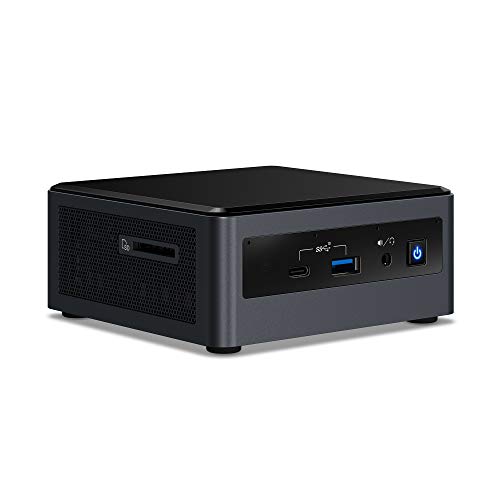
- Core i7-10710U delivers solid everyday performance
- Six USB ports plus HDMI and USB-C for flexible setups
- Works with Windows 10 and many Linux distros
Best For: A compact Roon server PC for users who want strong connectivity and flexible expansion.
Best for Heavy Roon Multitasking

- Ryzen 9 7940HS for strong Roon headroom
- DDR5 memory and 1TB SSD with upgrade room
- USB4, HDMI, and quiet cooling for flexible use
Best For: Audiophiles who want a compact Roon server that can also handle demanding multitasking.
Best DIY Barebones Pick
Intel NUC 8 Mainstream Kit NUC8i3BEH
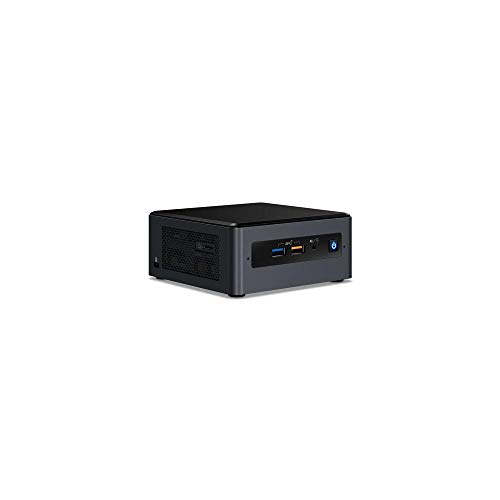
- Core i3-8109U handles light to moderate Roon use
- Tall chassis supports M.2 and 2.5-inch storage
- Barebones kit lets you choose your own RAM and SSD
Best For: DIY buyers building a compact, customizable Roon server.
Best for Expandable Storage
GEEKOM A5 2026 Edition Mini PC

- Upgradeable RAM and storage for long-term flexibility
- Ryzen 5 7430U handles light server and daily desktop tasks
- 3-year warranty makes it a safer buy for always-on use
Best For: Home users who want a compact, upgradeable mini PC for Roon and everyday multitasking.
Best for DIY Expandability
Intel NUC8i7BEH Bean Canyon NUC

- Core i7-8559U gives strong Roon Core performance
- NVMe SSD plus 2.5-inch bay for flexible storage
- Up to 32GB DDR4 RAM support in a tiny chassis
Best For: Audiophiles who want a compact, upgrade-friendly Roon server base.
Best Fanless Option
MeLE Quieter3Q N5105 Fanless Mini PC

- Silent fanless design for listening rooms
- 8GB RAM with expandable M.2 SSD storage
- Ethernet, Wi‑Fi 5, and dual HDMI for flexible setups
Best For: Quiet, compact Roon server or endpoint setups where silence matters most.
Best for Powerful Core i7 Performance

- Core i7 CPU suits Roon server workloads
- Up to 32GB DDR4 for better multitasking
- Compact Intel NUC footprint saves space
Best For: Users who want a compact Roon server with stronger-than-basic processing headroom.
Best for Network-Heavy Setups
Fanless i7-13620H Mini PC with Dual 10G SFP+

- Quad 2.5GbE plus dual 10G SFP+ networking
- 10-core i7-13620H for Roon and multitasking
- Fanless chassis with DDR5/NVMe/SATA expandability
Best For: Audiophiles and power users building a quiet, network-rich Roon server or home lab.
Best for Heavy Roon Libraries – GEEKOM IT15 Intel Ultra 9 Mini PC
If you want a mini PC that can handle Roon plus lots of background tasks, the GEEKOM IT15 is a strong high-end pick among mini PCs for Roon server use. Its Intel Ultra 9 285H, 32GB of DDR5 RAM, and fast 1TB Gen 4 SSD give it plenty of headroom for large libraries, DSP-heavy playback, and other everyday workloads.
Best For: Audiophiles who want a powerful, compact Roon server that can also double as a serious all-purpose desktop.
Pros:
- High-end Intel Ultra 9 CPU with strong multitasking headroom
- 32GB DDR5 RAM and 1TB Gen 4 SSD included
- Quiet, compact design with Wi‑Fi 7 and 2.5GbE
- USB4 and 8K display support add useful expansion
Cons:
- More power than many Roon-only setups need
- Premium specs mean a higher price than basic mini PCs
For buyers comparing mini PCs for Roon server duty, this model stands out if you want extra performance margin for future growth, room correction, and simultaneous desktop use. It is overkill for a simple headless endpoint, but excellent when you want one box to do everything well.
Best for Plenty of Ports – Intel NUC 10 Performance Kit i7
The Intel NUC 10 Performance Kit is a compact but capable option for anyone comparing mini PCs for Roon server use, especially if you want a small system that can also handle home office or media-center duties. Its 10th Gen Core i7-10710U gives it enough headroom for multitasking, while the tall chassis leaves room for a more flexible build with multiple displays and plenty of USB connectivity.
Best For: Buyers who want a compact Roon server PC that also doubles as a flexible media or work machine.
Pros:
- 10th Gen Intel Core i7-10710U offers strong everyday performance
- Supports up to three displays via HDMI 2.0a and USB-C
- Six USB ports make it easy to connect audio gear and accessories
- Compatible with Windows 10 and many Linux distros
Cons:
- Kit requires assembly and your own storage/RAM
- Older platform compared with newer NUC generations
- Integrated graphics are basic for heavier creative workloads
For shoppers narrowing down mini PCs for Roon server use, this NUC stands out for connectivity and solid Core i7 performance rather than cutting-edge specs. It’s a practical choice if you want a small, dependable box that can run music software and still leave room for expansion.
Best for Heavy Roon Multitasking – GEEKOM A7 MAX Ryzen 9 Mini PC
If you want one of the more capable mini PCs for Roon server use, the GEEKOM A7 MAX is built around a Ryzen 9 7940HS, fast DDR5 memory, and a 1TB Gen4 SSD. That gives it plenty of headroom for Roon Core duties, background library management, and other desktop work at the same time, especially if you also plan to run a few extra services.
Best For: Audiophiles and power users who want a compact Roon server that can also handle editing, multitasking, and multi-monitor productivity.
Pros:
- Ryzen 9 7940HS and Radeon 780M provide strong performance headroom for Roon and daily multitasking
- 16GB DDR5 and 1TB Gen4 SSD offer a solid starting point with upgrade room
- Dual USB4 and dual HDMI support up to four displays for a flexible desktop setup
- Quiet cooling and 3-year coverage add peace of mind for long-running use
Cons:
- 16GB RAM may feel limiting for heavier server workloads unless you upgrade it
- More performance than many Roon-only users actually need
- Premium specs can push the price above basic mini PC options
For buyers comparing mini PCs for Roon server use, the A7 MAX makes sense if you want extra CPU muscle and upgrade flexibility rather than the cheapest quiet box. It is a strong fit when Roon is part of a larger workstation or home-media setup.
Best DIY Barebones Pick – Intel NUC 8 Mainstream Kit NUC8i3BEH
Intel NUC 8 Mainstream Kit (NUC8i3BEH) - Core i3, Tall, Add't Components Needed
Check Price On AmazonIf you want one of the more flexible mini PCs for Roon server use, this Intel NUC 8 kit is a solid barebones starting point. The 8th Gen Core i3-8109U gives it enough headroom for a modest Roon Core, while the tall chassis adds room for storage and easier expansion.
Best For: Buyers who want a compact, customizable Roon server build and already have, or don’t mind sourcing, the missing RAM and storage.
Pros:
- Core i3-8109U is capable for light to moderate Roon Core duties
- Tall NUC chassis supports both M.2 SSD and 2.5-inch drive options
- Thunderbolt 3, USB 3.1 Gen 2, and microSD add useful connectivity
- Small footprint fits neatly into a quiet media rack or desk setup
Cons:
- Barebones kit requires you to add RAM, storage, and an operating system
- Not the best choice for heavy DSP or larger multi-zone Roon libraries
- Older platform than newer NUC options, so efficiency is only average
For DIY-focused buyers, this NUC remains a practical choice among mini PCs for Roon server setups because it balances low size with enough storage flexibility and mainstream Intel performance.
Best for Expandable Storage – GEEKOM A5 2026 Edition Mini PC
If you want one of the more flexible mini PCs for Roon server use, the GEEKOM A5 is worth a look because it pairs a Ryzen 5 7430U with upgradeable RAM and storage. That makes it a practical choice for a compact music server, especially if you also want a machine that can handle everyday office work, streaming, and multitasking without feeling cramped.
Best For: Buyers who want a compact, upgrade-friendly mini PC that can double as a Roon server and general-purpose desktop.
Pros:
- Ryzen 5 7430U is a solid fit for lightweight server duties and everyday multitasking
- Upgradeable to 64GB RAM with multiple storage expansion options for future flexibility
- Wi-Fi 6, Bluetooth 5.2, and six USB ports give it strong connectivity for peripherals
- 3-year warranty adds peace of mind for a device you may leave running often
Cons:
- Not the quietest or most specialized choice if you want a dedicated audio-only box
- Integrated Radeon graphics are fine for display output, but not for heavy creative workloads
- Roon performance is good for typical home use, but overkill buyers may want a faster chip
For shoppers comparing mini PCs for Roon server setups, the A5 stands out more for expandability and long-term practicality than raw power. It’s a sensible middle-ground pick if you want enough headroom for Roon, plus room to grow as your storage and multitasking needs increase.
Best for DIY Expandability – Intel NUC8i7BEH Bean Canyon NUC
If you want a compact box that can double as one of the more flexible mini PCs for Roon server duties, this Bean Canyon NUC is a strong pick. Its 8th-gen Core i7-8559U, support for fast NVMe storage, and 2.5-inch drive bay make it easy to build a quiet, responsive music server with room to grow.
Best For: Audiophiles who want a small, upgrade-friendly Roon server platform with strong CPU headroom.
Pros:
- 8th Gen Core i7 offers plenty of performance for Roon Core workloads
- Supports both NVMe SSDs and a 2.5-inch drive for flexible storage setups
- Dual-channel DDR4 memory support up to 32GB helps keep the system responsive
- Very compact NUC form factor makes it easy to tuck into an audio rack
Cons:
- Requires you to add RAM and storage before it’s ready to use
- Older platform than newer low-power mini PCs
- No built-in simplicity of an all-in-one preconfigured server
This NUC makes sense if you value tuning and expandability over an off-the-shelf appliance. For shoppers comparing mini PCs for Roon server use, it stands out as a capable, tiny workstation-style base that can be built into a very solid music server.
Best Fanless Option – MeLE Quieter3Q N5105 Fanless Mini PC
If you want a quiet, always-on box for music playback, this MeLE is a practical pick among mini PCs for Roon server use. The Celeron N5105, 8GB of RAM, and SSD expansion support give it enough headroom for a modest Roon endpoint or lightweight core, while the fanless design helps keep noise out of your listening room.
Best For: Listeners who need a silent, compact mini PC for a basic Roon server setup, endpoint, or low-noise media room.
Pros:
- Fanless cooling keeps operation silent for audio spaces
- 8GB RAM, M.2 SSD support, and microSD expansion offer useful flexibility
- Dual HDMI, Wi‑Fi 5, Gigabit Ethernet, and Bluetooth 5.1 cover versatile connectivity
- Auto power on, Wake-on-LAN, and PXE support suit always-on installs
Cons:
- Celeron-class performance is fine for light use, but not ideal for demanding Roon libraries
- Fanless cases can run warm under sustained load
For mini PCs for Roon server setups that prioritize silence and low power over raw performance, this MeLE hits a sensible middle ground. It makes the most sense if you want a compact, reliable machine for straightforward streaming and always-on audio tasks.
Best for Powerful Core i7 Performance – Intel NUC Kit BOXNUC6I7KYK1
If you want a compact machine with more headroom than most entry-level boxes, this Intel NUC is a strong candidate for mini PCs for Roon server setups. Its 6th-gen Core i7 and support for up to 32GB of DDR4 memory make it a practical choice for running Roon Core, especially if you also plan to handle other light-to-moderate background tasks.
Best For: Buyers who want a small but capable Roon server PC with more CPU overhead than typical budget mini systems.
Pros:
- Core i7 processor offers solid performance for music server workloads
- Compact NUC design fits easily into an audio rack or desk setup
- Supports up to 32GB DDR4 RAM for smoother multitasking
- Linux compatibility gives flexibility for Roon-related installations
Cons:
- Older 6th-gen platform is not as efficient as newer mini PCs
- Kit format means you still need to add RAM, storage, and an OS
- No built-in fanless design, so it may not be the quietest option
For mini PCs for Roon server use, this NUC stands out when you care more about responsive performance and upgrade flexibility than getting the newest platform. It is a sensible pick for users who want a proven Intel box that can handle a dedicated music server without taking up much space.
Best for Network-Heavy Setups – Fanless i7-13620H Mini PC with Dual 10G SFP+
If you want one of the more connectivity-rich mini PCs for Roon server use, this fanless i7-13620H box stands out for its quad 2.5GbE ports, dual 10G SFP+ networking, and flexible storage expansion. It is better suited to advanced home-audio or lab-style setups than a basic plug-and-play music server, but the hardware is strong enough to handle Roon alongside other services.
Best For: Enthusiasts who want a powerful, fanless mini PC with lots of network ports for a Roon server, firewall, or home lab.
Pros:
- 10-core Intel i7-13620H offers plenty of headroom for Roon and multitasking.
- Quad 2.5GbE plus dual 10G SFP+ make it ideal for network-heavy setups.
- Fanless design supports quiet operation for audio-focused systems.
- DDR5, NVMe, and 2.5-inch SATA expansion add storage flexibility.
Cons:
- No RAM or SSD included, so total cost is higher than it first appears.
- The networking features are overkill if you only need a simple Roon endpoint.
- More of a specialist appliance than a compact, beginner-friendly mini PC.
For buyers comparing mini PCs for Roon server duty, this model makes the most sense if you also want strong networking and room to expand storage. It is a capable, quiet platform, but its value is clearest in advanced setups where those extra ports actually get used.
How We Picked These Mini PCs for Roon Server Use
We prioritized models with modern Intel or AMD processors, SSD-based storage, and enough memory to keep Roon responsive under real-world use. We also looked at cooling design, upgrade potential, and network options, since stable playback often depends on more than CPU benchmarks alone.
Because Roon can scale from simple local playback to larger multi-zone libraries, we included both higher-performance systems and lower-power options for lighter installations.
Quick Comparison: What Matters Most
For smaller libraries and one or two zones, a modest mini PC can be sufficient. For larger collections, DSP-heavy use, or additional background tasks, choose a stronger processor and at least 16GB of RAM. If you plan to use the machine as a general-purpose music server, expansion support and strong I/O become especially important.
Key Buying Factors for Mini PCs for Roon Server
Processor Headroom
Roon is sensitive to CPU performance when handling metadata, waveform generation, and DSP processing. A newer Core i5/i7 or Ryzen 5/Ryzen 7-class chip is a safer choice than an entry-level processor if you want long-term flexibility.
Memory and Storage
Look for at least 16GB of RAM if possible, especially if the server will also run other apps. SSD storage is strongly recommended for the operating system and Roon database because it improves responsiveness and reduces delays.
Noise and Cooling
Fanless units are appealing for listening rooms, while well-designed active cooling can support more powerful processors without adding much noise. The right choice depends on whether silence or peak performance matters more.
Networking and Ports
Reliable Ethernet is a must for most setups. Extra USB ports can help with external drives or accessories, while multiple LAN ports may be useful if the mini PC also serves as a small network appliance.
Who Should Buy Which Mini PCs for Roon Server?
If you want the most capable option for a large library or heavier multitasking, choose one of the newer high-performance mini PCs. If your priority is compact, quiet, and efficient operation for a dedicated Roon server, a fanless or lower-power system can be the smarter buy. For buyers who want a balance of price and headroom, midrange Intel NUC-style systems and Ryzen-based GEEKOM models are the most practical middle ground.
In short, the best Mini PCs for Roon Server use are the ones that match your library size, listening habits, and noise tolerance, not just the highest spec sheet numbers.