Acer Wired Gaming Mouse review: this is a feature-heavy wired mouse built for players who want quick access to buttons, adjustable sensitivity, and no battery hassles.
It makes the most sense for budget-conscious gamers and general users who want customization without moving to a more complex mouse.
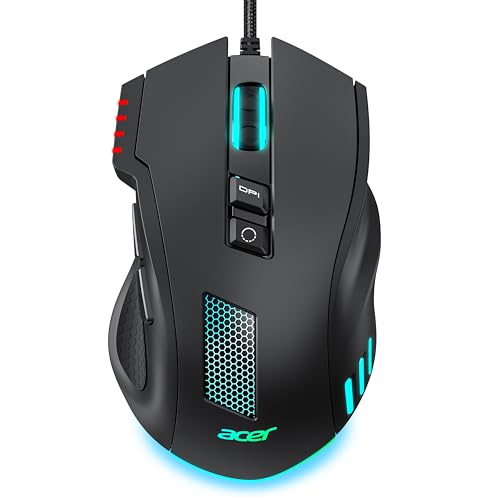
Acer Wired Gaming Mouse Review Summary
The Acer Wired Gaming Mouse is a sensible buy if you want a straightforward USB gaming mouse with real customization options.
Its larger ergonomic shape, 8 programmable buttons, adjustable DPI, and onboard memory make it especially appealing for players who like to tune controls for FPS, MOBA, and daily desktop use.
Best for buyers who want wired reliability, macro support, and RGB flexibility in a simple mouse rather than a premium esports shell.
Less ideal if you prefer ultra-light competitive mice, wireless convenience, or a minimal office-first design.
Review Scorecard
| Category | Score | Why it scores here |
|---|---|---|
| Ergonomics | 8/10 | Larger mid-hand shape is designed for a comfortable grip and stable hand placement. |
| Customization | 9/10 | Eight programmable buttons, DPI remapping, macros, and RGB control through software. |
| Gaming Utility | 8/10 | 1000Hz polling, 20G acceleration, and 7000 FPS scanning support fast input and tracking. |
| Everyday Versatility | 8/10 | The button layout and adjustable sensitivity also suit productivity and general desktop work. |
| Simplicity | 8/10 | USB power, onboard memory, and no batteries keep setup and upkeep simple. |
| Value Appeal | 8/10 | The feature set is broad for a wired mouse, especially if you will use the customization. |
Key Features and Specifications of Acer Wired Gaming Mouse
Acer positions this mouse as a wired, customizable option for gaming and everyday use.
The listing emphasizes a larger ergonomic shape meant for mid-hand comfort, which is a useful clue about the intended grip style and general hand support.
The main control features are:
- 8 programmable buttons with driver-based remapping
- Macro assignment support
- Adjustable DPI settings
- RGB lighting with 12 backlit modes
- Onboard memory for saving settings
- USB-A wired connection
The sensitivity range is another major selling point.
The mouse offers 4 onboard DPI steps at 1200, 2400, 3200, and 6400, with up to 12,800 DPI available through software.
That gives it enough range for low-sensitivity aiming, fast desktop movement, or quick switching between different sensitivity preferences.
Other listed performance details include 1000Hz polling, 20G acceleration, and 7000 FPS scanning.
In plain terms, Acer is clearly aiming this at buyers who care about responsive cursor behavior and consistent tracking rather than just basic office navigation.
The connection is simple: USB-A power with no batteries to charge or replace.
The listing also says the braided cable is designed for durability.
Compatibility is stated for Windows, macOS, and Linux, with an additional note that Mac users may need a USB hub or adapter and should avoid low-power hubs for stable performance.
Pros and Cons of Acer Wired Gaming Mouse
Pros
- Strong customization for the price class. Eight programmable buttons, DPI control, macros, and RGB options give it a lot of utility.
- Useful for both gaming and general work. The button layout and adjustable sensitivity are not limited to one genre.
- Wired simplicity. No charging, no battery replacement, and no wireless pairing issues.
- Good fit for mid-hand comfort. The shape is built around a larger ergonomic profile rather than a cramped, tiny shell.
- Onboard memory helps portability. Saved settings can travel with the mouse.
Cons
- Not a minimalist mouse. If you want a clean, simple two-button design, this is more complicated than necessary.
- Wired cable may not suit everyone. Some buyers will prefer a wireless setup for desk flexibility.
- Software matters here. Several core features, including the 12,800 DPI ceiling and remapping, depend on driver use.
- The shape is specific. Buyers who prefer very small mice or claw-style ultralight designs may not like the larger body.
Who Should Buy Acer Wired Gaming Mouse?
This mouse is a good fit for gamers who want a practical wired option with real control over sensitivity and buttons.
It makes sense for FPS players who like stable wired input, MOBA players who benefit from extra button access, and general users who want one mouse that can cover both work and play.
It also fits buyers who do not want to think about battery life.
If you prefer a mouse that stays plugged in and remembers its settings, this model has a clear advantage.
You should probably skip it if you want a lightweight competitive mouse, a premium wireless model, or a very compact shape.
It is also not the best choice if you do not plan to use the software features, because part of its value comes from the customizable layers the driver unlocks.
How Acer Wired Gaming Mouse Feels in Daily Use
Mid-Hand Ergonomics
The most important design decision here is the larger ergonomic shell.
Acer explicitly says it is built for mid-hand comfort, so this is less about aggressive esports minimalism and more about a stable, relaxed grip.
For buyers who work long sessions at a desk and then jump into games later, that is a useful balance.
Button Layout and Macro Control
Eight programmable buttons is a meaningful amount for a wired mouse in this category.
The listing suggests the buttons are placed for easy reach, which matters because extra buttons only help when they do not require awkward finger stretches.
The macro and remapping support should appeal to players who want quick in-game actions or productivity shortcuts.
DPI and Tracking Behavior
The mouse gives you 4 physical DPI levels and a higher software unlock point up to 12,800 DPI.
That matters less as a headline number than as a sign that Acer expects users to fine-tune sensitivity.
Combined with 1000Hz polling and the listed acceleration and scanning specs, this should be a better fit for responsive cursor control than a generic basic office mouse.
RGB and Everyday Practicality
The RGB system is broad rather than subtle: 12 backlit modes, static colors, dynamic rainbow effects, and even music sync through the driver.
That makes the mouse visually flexible, but the bigger practical point is that you can personalize it without adding extra hardware.
If you like your desk gear to match a setup, the lighting is part of the appeal rather than just decoration.
Alternatives to Acer Wired Gaming Mouse
If you want a comparable wired gaming mouse from a more established gaming brand, look at the Logitech G203 for a simpler, widely known entry-level option.
If you want more buttons and a mouse built around MMO-style control, the Razer Naga line is a more specialized alternative.
If you want a better-known lightweight FPS-focused shape, the SteelSeries Rival series is worth comparing.
If you want a budget wired gaming mouse with strong customization focus, the Redragon gaming mouse range may be the closest value comparison.
Is Acer Wired Gaming Mouse Worth It?
Yes, if you want a wired gaming mouse with customization first and premium positioning second.
The Acer Wired Gaming Mouse is worth considering for buyers who will actually use the extra buttons, DPI tuning, RGB modes, and onboard memory.
It is less compelling if you want a very light competitive mouse or a wireless setup, but as a practical all-around USB gaming mouse, it covers the important bases well.
For most buyers in its lane, the value is in the feature set and the simple wired reliability.