Computer monitors with USB-C make desk setups cleaner and easier by carrying video, data, and power through a single cable. That can be a big upgrade for laptops, home offices, and hybrid workstations.
In this roundup, we focused on models that balance display quality, refresh rate, connectivity, and practical features so you can choose a monitor that fits how you actually work and play.
Best 10 Computer Monitors with USB C Picks for 2026
Color-Accurate USB-C Pick
ASUS ProArt PA247CV 24 Inch 1080p USB-C Professional Monitor

- Factory calibrated IPS panel with Delta E < 2
- 100% sRGB and 100% Rec. 709 color coverage
- USB-C with 65W power delivery and USB hub
Best For: Design work, editing, and tidy single-cable office setups
Balanced 27-Inch Workhorse
Dell S2722DC 27-inch WQHD USB-C Monitor

- 27-inch WQHD panel for sharper everyday productivity
- USB-C with 65W power delivery and single-cable use
- Height, pivot, swivel, and tilt adjustment
Best For: Home office buyers who want a sharp 27-inch USB-C display
Eye-Care Office Pick
BenQ GW2490C 23.8" IPS USB-C Monitor
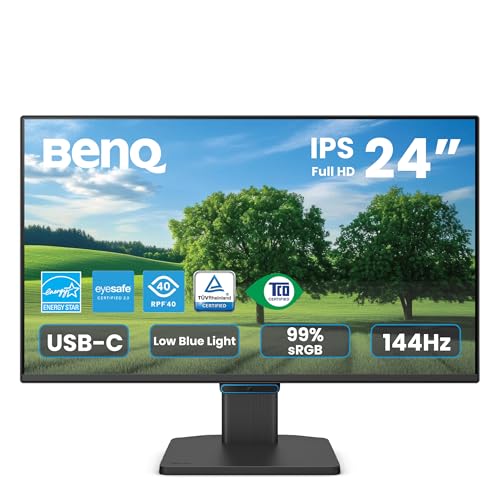
- USB-C one-cable setup for video and data
- 144Hz IPS panel with eye-care features
- TUV-certified flicker-free, low blue light design
Best For: Long work sessions, study desks, and office deployments
Ultrawide USB-C Value
Dell 34 Monitor S3425DW WQHD USB-C

- 34-inch WQHD VA panel with strong contrast
- USB-C up to 65W power delivery
- 120Hz refresh rate with FreeSync Premium
Best For: Multitaskers who want a wide USB-C screen for work and play
UltraWide Productivity Pick
LG 34U530A-W 34-inch UltraWide USB-C Monitor
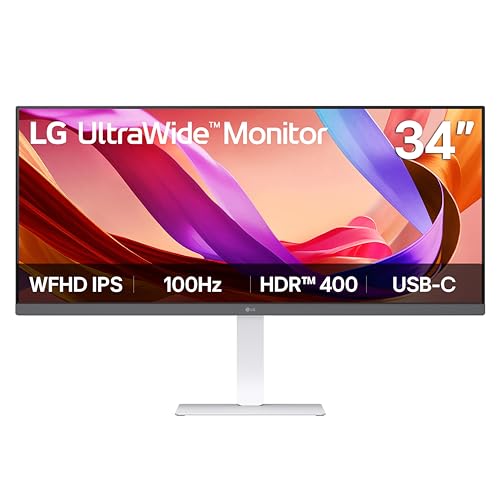
- 34-inch 21:9 display for multitasking
- USB-C for display output and data transfer
- 100Hz, HDR 400, and IPS panel
Best For: Busy desks that need more screen space and simple USB-C connectivity
Compact Office Value
ViewSonic VA2448-MHU 24-Inch USB-C Monitor

- 24-inch IPS display with 1080p resolution
- USB-C for data, audio, and video
- 120Hz refresh rate with eye-care features
Best For: Small desks, schoolwork, and simple daily productivity
Curved Immersion Choice
Philips 34-Inch Curved USB-C PD Monitor
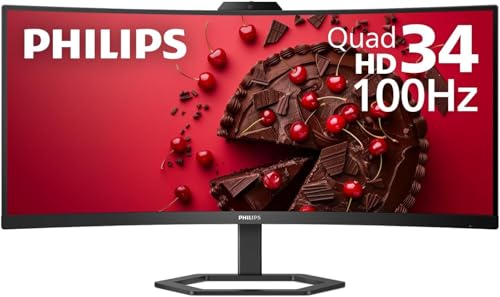
- 3440 x 1440 ultrawide curved display
- USB-C with power delivery support
- 100Hz refresh rate with Adaptive-Sync
Best For: Immersive ultrawide setups with one-cable laptop convenience
Compact Gaming Pick
ViewSonic VX2416A 24" 120Hz USB-C IPS Monitor

- 24-inch IPS panel with 120Hz OC refresh rate
- USB-C plus HDMI and DisplayPort connectivity
- Flicker-Free and Blue Light Filter for comfort
Best For: Compact gaming and simple laptop setups
Desk-Friendly QHD Pick
LG 27U631A-B 27" QHD USB-C Monitor

- 27-inch QHD IPS display with wide viewing angles
- 100Hz refresh and 5ms response for smooth use
- USB-C with up to 15W power delivery
Best For: Productivity, streaming, and casual gaming
Curved Value Pick
SANSUI 27" Curved 120Hz USB-C Monitor
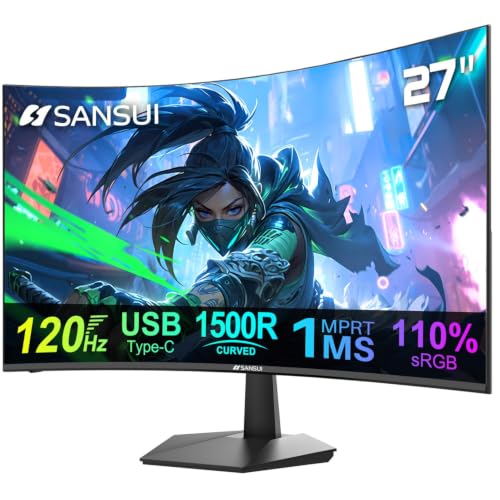
- 27-inch curved 1080p display with 120Hz refresh
- USB-C and HDMI inputs with built-in speakers
- Anti-glare, anti-flicker, and low blue light features
Best For: Curved everyday use with simple connectivity
Color-Accurate USB-C Pick – ASUS ProArt PA247CV 24 Inch 1080p USB-C Professional Monitor
If you want computer monitors with usb c for color-sensitive work, the ASUS ProArt PA247CV focuses on accuracy and practical connectivity. Its 24-inch IPS panel, factory calibration, and USB-C input with power delivery make it a strong fit for clean, efficient desktop setups.
Best For: Designers, editors, and office users who want accurate color plus single-cable USB-C convenience.
Pros:
- 24-inch Full HD IPS panel with 178-degree viewing angles
- 100% sRGB and 100% Rec. 709 wide color gamut
- Factory calibrated with Calman Verified accuracy and Delta E < 2
- USB-C with 65W Power Delivery, plus DisplayPort, HDMI, and USB 3.1 hub
Cons:
- Full HD resolution may feel modest for users who prefer larger 1440p screens
- 24-inch size is less expansive than ultrawide or 27-inch alternatives
Overall, this model stands out when accurate color and clutter-free connectivity matter more than raw screen size. The long warranty and daisy-chain support also add value for professional or multi-monitor workstations.
Balanced 27-Inch Workhorse – Dell S2722DC 27-inch WQHD USB-C Monitor
The Dell S2722DC is a practical choice among computer monitors with usb c if you want a sharper 27-inch QHD panel and a simple one-cable desk setup. It combines USB-C connectivity with 65W power delivery, a 75Hz refresh rate, and flexible ergonomics for everyday work.
Best For: Office users and general buyers who want a 27-inch QHD monitor with USB-C charging and adjustability.
Pros:
- 27-inch WQHD (2560 x 1440) display for more desktop space
- USB-C with 65W power delivery for video, audio, data, and charging
- Height, pivot, swivel, and tilt adjustments for comfortable positioning
- 75Hz refresh rate with AMD FreeSync for smoother everyday use
Cons:
- Not designed as a high-end color-accuracy monitor
- Single USB Type-A port is convenient but limited for heavy peripheral use
This is a well-rounded monitor for work-first users who want better-than-Full-HD sharpness and fewer cables. The built-in speaker and ergonomic stand make it easy to fit into a clean home or office setup.
Eye-Care Office Pick – BenQ GW2490C 23.8" IPS USB-C Monitor
For shoppers comparing computer monitors with usb c for daily productivity, the BenQ GW2490C emphasizes eye comfort and easy laptop connectivity. Its 23.8-inch IPS panel, 144Hz refresh rate, and USB-C one-cable setup make it a practical fit for workstations that stay on for long hours.
Best For: Home office users, study setups, and business deployments that value comfort and simple connectivity.
Pros:
- USB-C one-cable connectivity for video and data
- 24-inch IPS eye-care design for all-day productivity
- 144Hz refresh rate for smoother scrolling and multitasking
- Flicker-free, low blue light, and TUV-certified eye-care features
Cons:
- No USB-C power delivery is listed in the supplied notes
- 1080p resolution may be basic for users seeking more workspace
This model is a strong fit if you care more about comfortable long-session use than premium resolution. It also makes sense for IT or office rollouts thanks to its business-focused design and efficiency claims.
Ultrawide USB-C Value – Dell 34 Monitor S3425DW WQHD USB-C
The Dell S3425DW is aimed at buyers who want computer monitors with usb c and prefer a wider canvas for multitasking and media. Its 34-inch WQHD VA panel, 120Hz refresh rate, and 65W USB-C power delivery combine productivity-friendly features with strong contrast and smooth motion.
Best For: Users who want an ultrawide-style workspace with USB-C, better contrast, and smoother motion.
Pros:
- 34-inch WQHD VA panel with 3000:1 contrast ratio
- USB-C with up to 65W power delivery for a cleaner desk
- 120Hz refresh rate and AMD FreeSync Premium support
- 99% sRGB and 95% DCI-P3 color coverage
Cons:
- VA panel behavior may not suit users who prefer IPS viewing angles
- Large size may be more monitor than some compact desks need
This is a compelling pick if you want a larger, more immersive screen without giving up USB-C convenience. The strong contrast, fast response time, and improved audio make it appealing for both work and entertainment.
UltraWide Productivity Pick – LG 34U530A-W 34-inch UltraWide USB-C Monitor
If you want computer monitors with usb c that make multitasking easier, this 34-inch LG UltraWide is built around a spacious 21:9 layout. The 2560 x 1080 IPS panel gives you room for side-by-side windows, while USB Type-C helps keep a laptop setup simpler with display and data over a single connection.
Best For: Work-from-home users, creative multitaskers, and anyone who wants an ultra-wide desk display with USB-C convenience.
Pros:
- 34-inch 21:9 UltraWide screen creates extra horizontal space for multitasking
- USB Type-C supports display output and data transfer for cleaner laptop connections
- 100Hz refresh rate keeps everyday motion smooth
- DisplayHDR 400 and up to sRGB 99% support vibrant, precise-looking visuals
Cons:
- 2560 x 1080 resolution is less sharp than higher-resolution ultrawide options
- USB-C is included, but the notes do not mention laptop charging support
- At 34 inches, it may take more desk space than a compact monitor
This LG is a practical choice if you want a wider workflow without moving to a higher-priced class of ultrawide panels. It leans strongly toward productivity, with enough visual polish for general media and light creative use.
Compact Office Value – ViewSonic VA2448-MHU 24-Inch USB-C Monitor
Among computer monitors with usb c, this 24-inch ViewSonic is a straightforward pick for smaller desks and everyday office use. It combines a Full HD IPS panel with a 120Hz refresh rate, plus USB-C for single-cable data, audio, and video transfer when paired with the included power adapter.
Best For: Students, home office users, and anyone who wants a compact USB-C monitor with simple everyday versatility.
Pros:
- 24-inch 1080p IPS panel offers consistent color and wide viewing angles
- USB-C handles data, audio, and video over one cable
- 120Hz refresh rate is smoother than standard office displays
- Flicker-Free and Blue Light Filter features help reduce eye strain
Cons:
- USB-C is described with passthrough power, but you still need the included power adapter
- 1080p resolution is solid for productivity, but not ideal if you want lots of screen real estate
- Brightness is rated at 300, which is adequate but not especially high
This ViewSonic focuses on convenience, comfort, and broad compatibility rather than premium extras. It makes sense if you want a clean desktop setup with USB-C and a compact footprint.
Curved Immersion Choice – Philips 34-Inch Curved USB-C PD Monitor
If you are comparing computer monitors with usb c for a bigger immersive workspace, this Philips 34-inch curved model is a strong fit. It uses a 3440 x 1440 UWQHD VA panel with a 1500R curve, and its USB-C connection can power and recharge a compatible notebook with a single cable.
Best For: Users who want an immersive ultrawide display for work or play, plus USB-C power delivery for a cleaner laptop setup.
Pros:
- 3440 x 1440 UWQHD resolution provides a spacious ultrawide workspace
- USB-C with power delivery can power and recharge a compatible notebook
- 1500R curved VA panel adds immersion and wide-viewing comfort
- 100Hz refresh rate and Adaptive-Sync support smoother motion
Cons:
- The notes do not specify the USB-C power delivery wattage
- Curved ultrawide format may be overkill for very tight desks or basic tasks
- VA panels can be a preference-based choice if you strongly favor IPS-style viewing characteristics
This Philips stands out for users who want both a large ultrawide canvas and the convenience of USB-C charging. It offers a more immersive step up than a standard office monitor while staying practical for everyday use.
Compact Gaming Pick – ViewSonic VX2416A 24" 120Hz USB-C IPS Monitor
If you want computer monitors with usb c for a smaller desk and fast everyday gaming, the ViewSonic VX2416A is built around speed and simple connectivity. Its 24-inch IPS panel, 120Hz overclocked refresh rate, and 1ms response time make it a practical fit for competitive play, while USB-C helps keep the connection setup clean.
Best For: Budget-conscious gamers and laptop users who want a compact USB-C monitor with fast motion handling.
Pros:
- 120Hz OC refresh rate with 1ms MPRT for smoother gameplay
- USB-C, HDMI, and DisplayPort inputs for flexible device connections
- IPS panel with 178-degree viewing angles and FreeSync support
- Flicker-Free and Blue Light Filter features for more comfortable long sessions
Cons:
- 24-inch 1080p resolution is less detailed than larger QHD options
- USB-C is streamlined for video, audio, and data, but no power delivery is listed
- Best suited to entry-level and midrange setups rather than premium creator workflows
Overall, this ViewSonic is a straightforward choice if you want a responsive computer monitor with usb c and don’t need a larger resolution. It focuses on core gaming basics and convenient laptop compatibility rather than extra premium features.
Desk-Friendly QHD Pick – LG 27U631A-B 27" QHD USB-C Monitor
For shoppers comparing computer monitors with usb c, the LG 27U631A-B stands out as a balanced 27-inch QHD option. It pairs a sharper 2560 x 1440 IPS display with 100Hz refresh and USB-C connectivity, making it well suited to mixed work, streaming, and casual gaming on a cleaner desk setup.
Best For: Users who want a sharper QHD monitor with USB-C for work and everyday entertainment.
Pros:
- 27-inch QHD IPS panel offers more workspace and sharper detail than 1080p
- 100Hz refresh rate and 5ms response time for smoother motion
- USB-C supports one-cable connection and up to 15W power delivery
- HDR10, 99% sRGB, Reader Mode, and Flicker Safe add versatility
Cons:
- 15W USB-C power delivery is modest for charging larger laptops
- Not positioned as a high-refresh esports monitor
- Some of the extra features are more useful for productivity than pure gaming
In practical terms, this LG is a strong middle-ground pick for anyone who wants a better-than-1080p monitor with USB-C convenience. It offers a clean design, useful comfort features, and enough speed for everyday use without pushing into premium pricing territory.
Curved Value Pick – SANSUI 27" Curved 120Hz USB-C Monitor
If you’re shopping for computer monitors with usb c and want a curved screen at a value-oriented price point, the SANSUI 27-inch model is an easy one to consider. It combines a 120Hz refresh rate, 1ms response time, and built-in speakers with USB-C connectivity for a simple setup for work, casual gaming, or general use.
Best For: Buyers who want a curved USB-C monitor with built-in speakers and a simple all-around feature set.
Pros:
- 27-inch curved display with 120Hz refresh rate and 1ms response time
- USB-C input plus HDMI for flexible connection options
- Built-in speakers included for everyday use
- Anti-glare, anti-flicker, and low blue light features improve comfort
Cons:
- 1080p resolution is standard for the size, not especially sharp
- 90-day manufacturer warranty is shorter than many alternatives
- USB-C compatibility is listed, but power delivery details are not provided
As a curved option, this SANSUI focuses on convenience and approachable gaming-friendly specs rather than high-end image detail. It makes sense if you want a monitor that is easy to connect, comfortable to use, and packed with practical extras.
How We Picked the Best Computer Monitors with USB C
We prioritized models that offer useful USB-C functionality, strong everyday image quality, and a sensible mix of size, resolution, and refresh rate. We also looked at power delivery, panel type, ergonomics, built-in comfort features, and whether the monitor makes sense for office work, content creation, or casual gaming.
Quick Comparison
If you want a compact productivity display, a 24-inch 1080p model can be the most affordable and space-saving choice. For sharper text and more screen room, 27-inch QHD monitors are a sweet spot. If multitasking is your priority, 34-inch ultrawide options provide the most usable desktop space, while higher refresh rate models are better suited to smoother gaming and scrolling.
Key Buying Factors for Computer Monitors with USB-C
USB-C Power Delivery
Check how much power the USB-C port can supply. Some displays are designed mainly for data and video, while others can also charge a laptop with enough wattage for day-to-day use. If you want one-cable convenience, power delivery matters a lot.
Resolution and Screen Size
Match the resolution to the panel size. Full HD works well on 24-inch screens, but 27-inch and larger monitors usually benefit from QHD or ultrawide resolutions for sharper text and better multitasking.
Refresh Rate and Response Time
For office use, 60Hz to 75Hz is usually fine. If you want smoother motion for gaming, creative timelines, or general scrolling, look for 100Hz or higher.
Panel Type and Viewing Comfort
IPS panels generally offer better viewing angles and color consistency, while VA panels often deliver stronger contrast. Eye comfort features such as flicker-free backlighting, low blue light modes, and reader modes can be helpful for long sessions.
Ports and Ergonomics
Even with USB-C, it helps to have HDMI, DisplayPort, or audio support depending on your setup. Adjustable stands, VESA compatibility, and built-in speakers can also make a monitor more practical.
Who Should Buy Which Computer Monitors with USB C?
Choose a 24-inch USB-C monitor if you want a compact, budget-friendly display for work or school. Go with a 27-inch QHD model if you want a more balanced mix of sharpness and productivity. Pick an ultrawide if you routinely juggle multiple windows, spreadsheets, or timelines. If your setup includes gaming, favor a higher refresh rate model so the monitor feels smoother in everyday use, not just in games.
In short, the best option depends less on one spec and more on how you plan to use the screen. The right USB-C monitor should simplify your desk while improving the way you work.