A capture card for 4K 120Hz passthrough lets you play at a high refresh rate while sending a separate feed to your streaming or recording device. That makes it especially useful for PS5, Xbox Series X, and modern gaming PCs.
These 10 picks cover internal and USB models, HDMI 2.1 features, HDR and VRR support, and different capture resolutions. The right choice depends on whether you prioritize uncompromised gameplay, advanced compatibility, simple setup, or value.
Best 10 Capture Card for 4K 120hz Passthrough Picks for 2026
Best Internal Card

- 8K60 HDMI 2.1 passthrough
- 4K60 HDR10 capture
- VRR and dual-PC support
Best For: High-refresh Windows streaming PCs
Best 4K120 Loopout

- 4K120 HDR HDMI loopout
- 4K60 USB-C capture
- VRR, HDR, and headset audio
Best For: 4K120 console and PC gameplay
Best Plug-and-Play Option

- 4K HDR 60Hz passthrough
- 1080p120 and 2K60 capture
- Plug-and-play OBS support
Best For: Simple console and PC streaming
Best Versatile USB Card

- 4K60 HDR and VRR passthrough
- 1440p144 and 1080p240 support
- Ultrawide and multi-platform support
Best For: Flexible PC, console, and ultrawide setups
Best 4K 144Hz Pick

- 4K 144Hz input and loop-out
- HDR and VRR support
- Triple 3.5mm audio connectivity
Best For: Competitive 4K high-refresh gaming and streaming
Best Value 4K60 Option

- 4K60 capture and passthrough
- 1440p120 and 1080p120 support
- Plug-and-play USB 3.0 design
Best For: Budget-conscious 4K60 streaming and 120Hz gaming
Best Portable Pro Design
- Zero-latency HDMI passthrough
- 4K60 capture with 1440p120
- Portable USB-C creator workflow
Best For: Mobile gaming and low-latency 4K60 capture
High-Refresh Versatility

- 4K60 capture and passthrough
- 1440p144 and 1080p240 support
- HDR, VRR, ALLM, and audio mixing
Best For: High-refresh console and PC streaming
Simple 4K60 Streaming

- 4K60 recording and passthrough
- 1080p120 capture for fast gameplay
- Mic, headset, and line-in ports
Best For: Plug-and-play Windows and Mac streaming
Control-Focused Performance

- 4K60 capture and passthrough
- 2K120 and 1080p240 support
- Software controls for VRR and EDID
Best For: Configurable high-refresh 1440p streaming
Best Internal Card – Elgato 4K Pro
If you need a capture card for 4k 120hz passthrough in a dual-PC setup, the Elgato 4K Pro is a powerful internal option. Its HDMI 2.1 inputs and outputs support up to 8K60 passthrough, while capture reaches 4K60 HDR10 and recording can go up to 1080p240.
Best For: Windows users building high-refresh gaming and streaming PCs, especially dual-PC setups.
Pros:
- Supports HDMI 2.1, VRR passthrough, and ultra-low-latency gameplay.
- Provides 8K60 passthrough and 4K60 HDR10 capture.
- Records up to 1080p240 and works with major streaming apps.
Cons:
- Requires a Windows 10 computer with an available PCIe slot.
- Its internal design is less convenient for users seeking a portable capture device.
The Elgato 4K Pro is a strong fit when maximum passthrough bandwidth and internal installation matter more than portability. Confirm your PC has the required PCIe slot before buying.
Best 4K120 Loopout – SIIG HDMI 2.1 Capture Device
The SIIG HDMI 2.1 Capture Device is designed for gamers who want a capture card for 4k 120hz passthrough without sacrificing the display signal. It supports 4K120 HDR on the HDMI loopout while sending 4K60 capture over USB-C.
Best For: Console and PC players who want 4K120 HDR gameplay with simultaneous 4K60 streaming.
Pros:
- Preserves 4K120 HDR gameplay through HDMI loopout.
- Captures up to 4K60 over USB-C and supports 1440p120 or 1080p240 capture modes.
- Includes VRR and HDR support, plus a 3.5mm headset connection.
- Works with Windows, Mac OS, OBS Studio, and VLC.
Cons:
- USB-C capture is limited to 4K60 rather than 4K120.
- SDR colors are specified for some high-refresh capture modes.
For a high-refresh gaming setup, the key advantage is the separation between 4K120 HDR loopout and 4K60 capture. It is a practical choice when smooth local gameplay takes priority over capturing at 120 frames per second.
Best Plug-and-Play Option – ASUS TUF CU4K30
The ASUS TUF Gaming CU4K30 offers a straightforward capture card for 4k 120hz passthrough setup, with passthrough up to 4K HDR at 60Hz and support for 120 FPS at lower resolutions. Its USB 3.2 Type-C UVC design allows plug-and-play streaming without extra drivers.
Best For: Gamers who want simple OBS-compatible capture for PC, PS5, Xbox, or Switch.
Pros:
- Supports up to 4K HDR 60Hz passthrough and 120 FPS at Full HD.
- Offers 4K30 capture, 2K60 capture, and 1080p120 capture.
- Plug-and-play UVC connectivity works with USB 3.2 Type-C.
- Includes controller and headset connections for shared game and team audio.
Cons:
- Does not provide 4K120 passthrough; its listed 4K passthrough limit is 60Hz.
- 4K capture is limited to 30 frames per second.
- Requires a compatible USB 3.2 Type-C port.
This ASUS model is easy to recommend for accessible streaming and recording, but it is not the right match if true 4K120 passthrough is essential. Its strongest use case is high-frame-rate Full HD or 1440p capture with simple setup.
Best Versatile USB Card – AVerMedia Live Gamer Ultra S
The AVerMedia Live Gamer Ultra S is a flexible USB capture card for 4k 120hz passthrough setups that also need broad resolution support. It provides 4K60 HDR and VRR passthrough, with higher-refresh options including 1440p144 and 1080p240.
Best For: Gamers who need 4K60 capture, high-refresh passthrough, ultrawide support, and compatibility across PC, console, Mac, or iPad.
Pros:
- Supports 4K60 HDR and VRR passthrough, plus 1440p144 and 1080p240.
- Captures 4K60 and supports RGB24 full-color capture on Windows.
- Handles ultrawide inputs including 3440×1440 and 2560×1080.
- Supports Windows, macOS, iPadOS, consoles, 5.1 audio, and OBS workflows.
Cons:
- Its listed 4K passthrough limit is 60Hz, not 4K120.
- Some features, including 5.1 audio capture, are specified for Windows workflows.
- VRR recording support is limited to listed 1440p60 or 1080p240 modes.
The Live Gamer Ultra S stands out for flexibility rather than true 4K120 passthrough. Choose it if your setup benefits from HDR, VRR, ultrawide resolutions, and multi-platform compatibility alongside 4K60 capture.
Best 4K 144Hz Pick – UGREEN HDMI 2.1 Capture Card
If you need a capture card for 4K 120Hz passthrough, the UGREEN model is built for high-refresh gaming. Its HDMI 2.1 connections support 4K at up to 144Hz input and loop-out, while HDR, VRR, and USB 3.2 recording support suit competitive gameplay and live content.
Best For: Competitive gamers and creators using 4K 120Hz or 144Hz HDMI 2.1 setups.
Pros:
- Supports 4K 144Hz input, passthrough, and USB-C recording.
- HDMI 2.1, HDR, VRR, and up to 12-bit color support.
- Includes headphone, microphone, and line-in ports with 48kHz/24-bit audio.
- Works with OBS, XSplit, Windows, macOS, Linux, iPadOS, and Android.
Cons:
- PS4 and PS5 gameplay requires HDCP to be turned off.
- Its high-end features may be more than needed for 4K60 recording setups.
For a high-refresh capture card, this UGREEN option offers the strongest specification in the group. The included HDMI and USB-C cables, broad compatibility, and 24-month warranty add practical value for a dedicated streaming setup.
Best Value 4K60 Option – Guermok 4K60 Capture Card
The Guermok is a practical capture card for 4K 120Hz passthrough alternatives when your main target is 4K60. It provides 4K60 HDMI passthrough and capture, plus 1440p120 and 1080p120 support for smoother high-frame-rate gameplay.
Best For: Streamers who want 4K60 capture with flexible 120Hz input support and simple USB 3.0 setup.
Pros:
- Supports 4K60 capture and 4K60 passthrough.
- Handles 1440p120 and 1080p120 input for high-refresh gaming.
- Includes 3.5mm audio input, microphone output, and a USB-A adapter.
- Driver-free compatibility with OBS, Streamlabs, VLC, Zoom, and more.
Cons:
- Passthrough is limited to 4K60 rather than 4K120.
- USB 2.0 connections are limited to up to 1080p.
This lightweight Guermok model is a sensible choice for creators who prioritize easy setup and 4K60 performance. Its 120Hz support is useful for 1440p and 1080p gaming, but it is not the right fit for preserving a 4K120 display signal.
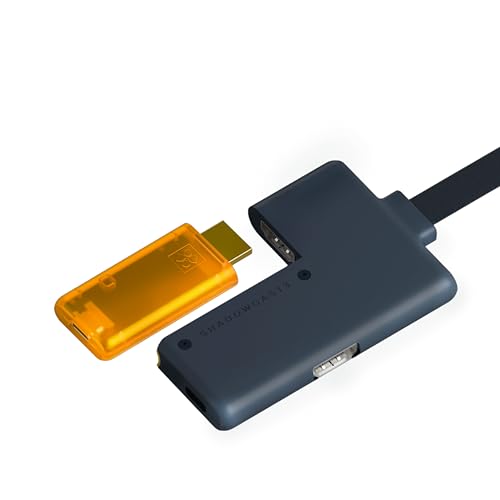
Best Portable Pro Design – GENKI ShadowCast 3 Pro
The GENKI ShadowCast 3 Pro is a compact choice for creators seeking a capture card for 4K 120Hz passthrough-style setups, although its stated passthrough and capture resolution is 4K60. It adds 1440p120 and 1080p240 support, zero-latency HDMI passthrough, and USB-C connectivity for laptops and tablets.
Best For: Portable console gamers and creators who need low-latency passthrough with 4K60 capture.
Pros:
- Provides integrated zero-latency HDMI passthrough.
- Supports 4K60 capture, 1440p120, and 1080p240.
- USB-C connectivity works with laptops and iPads through the Genki Studio app.
- Recognized by OBS, Streamlabs, Zoom, and Discord without bulky software setups.
Cons:
- Its listed maximum 4K capture and passthrough rate is 60Hz.
- Windows system requirements specify a USB 3.0 port and at least 4GB RAM.
ShadowCast 3 Pro stands out for portability and its dedicated passthrough output. It is well suited to mobile gaming and creator workflows, but users specifically requiring 4K120 passthrough should choose a model with explicit HDMI 2.1 4K120 support.
High-Refresh Versatility – BlueAVS 4K Capture Card
If you need a capture card for 4K 120Hz passthrough, the BlueAVS is built for high-refresh gaming setups, although its listed maximum passthrough is 4K at 60Hz. It supports 1440p at 144Hz and 1080p at 240Hz, while HDR, VRR, and ALLM help preserve smooth, responsive gameplay.
Best For: Gamers who stream 4K60 or use 1440p and 1080p high-refresh displays with PS5, Xbox, Switch, or a gaming PC.
Pros:
- Supports capture and passthrough up to 4K60, 1440p144, and 1080p240.
- Includes HDR, VRR, and ALLM support for smoother visuals.
- Offers 3.5mm line-in and headset audio connections.
- Works without additional drivers on Windows, macOS, and Linux.
Cons:
- 4K passthrough and capture are limited to 60Hz rather than 120Hz.
- Requires a USB 5Gbps port for stable operation.
The BlueAVS stands out when flexible refresh-rate support matters more than 4K120. Its combination of high-refresh 1080p and 1440p modes, console compatibility, and audio connections makes it a versatile choice for streaming and recording.
Simple 4K60 Streaming – ezcap333P 4K Capture Card
The ezcap333P is a straightforward option for shoppers comparing a capture card for 4K 120Hz passthrough, with 4K60 passthrough rather than 4K120. It records 4K at 60fps or 1080p at 120fps and adds ultra-low-latency HDMI loop-out for responsive gameplay.
Best For: Windows and Mac creators who want plug-and-play 4K60 recording, 1080p120 capture, and flexible streaming audio.
Pros:
- Records 4K60 and 1080p120 video.
- Provides 4K60 HDMI passthrough with ultra-low latency.
- Includes mic-in, headset, and line-in ports for audio mixing.
- Supports OBS, YouTube, Discord, Twitch, PS5, Xbox, and Switch.
Cons:
- Does not list 4K120 passthrough or capture.
- Operating-system support is limited to Windows and macOS.
- Listed computer requirements are relatively demanding.
Choose the ezcap333P if ease of setup and audio connectivity are priorities. It is a practical 4K60 solution with a useful 1080p120 mode, but shoppers seeking 4K120 passthrough will need to look elsewhere.
Control-Focused Performance – PORTTA DX20R 4K Capture Card
The PORTTA DX20R is aimed at users comparing a capture card for 4K 120Hz passthrough, but its listed 4K mode is 60Hz. It supports 2K at up to 120Hz and 1080p at 240Hz, with HDR, VRR, utility software, and ultra-low latency for a more configurable setup.
Best For: Streamers who want high-refresh 1440p or 1080p passthrough plus software controls for audio, EDID, VRR, and firmware.
Pros:
- Supports 4K60 capture and passthrough, 2K up to 120Hz, and 1080p240.
- Includes HDR and VRR support for smoother gameplay.
- CapHub software provides audio, EDID, VRR, and firmware controls.
- Works with Windows, macOS, and Linux without driver installation.
Cons:
- 4K passthrough is listed at 60Hz, not 120Hz.
- The utility software is specified for Windows and macOS.
- Its listed compatibility does not include every console platform.
The DX20R is a strong fit for high-refresh 1440p gaming and users who value configuration options. Its 4K60 ceiling means it is not a true 4K120 solution, but the software controls and two-year warranty add practical appeal.
How We Picked the Best Capture Card for 4K 120hz Passthrough
We focused on the features that matter most when choosing a Capture Card for 4K 120hz Passthrough: supported HDMI bandwidth, passthrough refresh rates, capture resolution, latency, connection type, software compatibility, and practical console or PC use. The lineup includes internal PCIe cards and external USB models so shoppers can match the hardware to their setup.
We also considered whether each device supports features such as HDR, VRR, ALLM, RGB capture, high-refresh 1440p or 1080p modes, and OBS compatibility. A card advertised as “4K” may only capture at 4K60, so passthrough and recording specifications should be checked separately.
Quick Comparison
| What to Compare | Why It Matters |
|---|---|
| 4K120 passthrough | Preserves smooth gameplay on a compatible TV or monitor. |
| Maximum capture resolution | Determines the quality of your stream or recording. |
| HDMI 2.1 support | Usually necessary for 4K at 120Hz with modern consoles and PCs. |
| USB or PCIe connection | USB is portable; PCIe can provide a more integrated desktop setup. |
| HDR, VRR, and ALLM | Helps retain image quality and gaming features through the capture chain. |
Key Buying Factors for a Capture Card for 4K 120hz Passthrough
Passthrough Versus Capture
Passthrough is the signal sent to your display, while capture is the signal recorded or streamed. A product may pass through 4K120 but capture at 4K60, 1440p, or 1080p. That is normal, but confirm both specifications before buying.
Bandwidth and Compatibility
For 4K120, look for HDMI 2.1 support and suitable cable bandwidth. Your source, capture card, display, and cables must all support the desired resolution and refresh rate. Some setups may also require HDCP-compatible settings or disabling protected-content output.
Latency and Connectivity
Near-zero-latency passthrough is important because you should play from the display output rather than the preview window. External cards should use a fast USB 3.0 or USB 3.2 connection and connect directly to the computer when possible. Internal PCIe cards avoid some USB limitations but require an available desktop slot.
Software and Image Features
OBS compatibility is a practical priority for most streamers. HDR, VRR, ALLM, RGB support, and audio pass-through can improve results, but compatibility may vary by operating system, console, monitor, and recording software.
Who Should Buy Which Capture Card for 4K 120hz Passthrough?
- Competitive console or PC gamers: Choose a model with genuine 4K120 passthrough, low latency, and strong VRR support.
- Streamers seeking maximum quality: Prioritize 4K capture, HDR or RGB support, stable drivers, and a fast USB or PCIe connection.
- Portable creators: An external USB-C capture card is easier to move between a laptop, console, and desktop.
- Desktop power users: An internal card can provide a tidy, permanent installation with fewer external cables.
- Budget buyers: Consider 4K60 capture with high-refresh passthrough if you mainly need smooth gameplay and do not require 4K120 recording.
Before ordering, verify the exact input, output, USB, and operating-system requirements. The best Capture Card for 4K 120hz Passthrough is the one that supports your complete signal path—not just the headline resolution.