The best compact MIDI interfaces make it easier to connect controllers, keyboards, pads, and hardware synths without giving up valuable desk space. The right choice depends on your port needs, workflow, and whether you need MIDI routing, USB hosting, or hands-on control.
We selected 10 compact options spanning traditional MIDI interfaces, USB controllers, pad controllers, and sequencing tools, so you can match your setup to the way you actually make music.
Best 10 Compact Midi Interfaces Picks for 2026
Best Overall Audio Interface

- Audio recording and five-pin MIDI connectivity
- 192 kHz support, loopback, and USB hub
- Five-year warranty with included creative software
Best For: Musicians and creators needing audio plus MIDI in a compact interface
Best Slim Keyboard Controller

- Low-profile 25-key USB-MIDI keyboard
- Velocity-sensitive keys with improved spacing
- Sustain button for piano-style parts
Best For: Laptop-based musicians needing compact note entry
Best for Multi-Device Routing

- Eight adaptable MIDI ports
- Standalone routing and MIDI merging
- Integrated USB 3.0 hub with three connectors
Best For: Multi-device studios and live MIDI rigs
Best Performance Controller
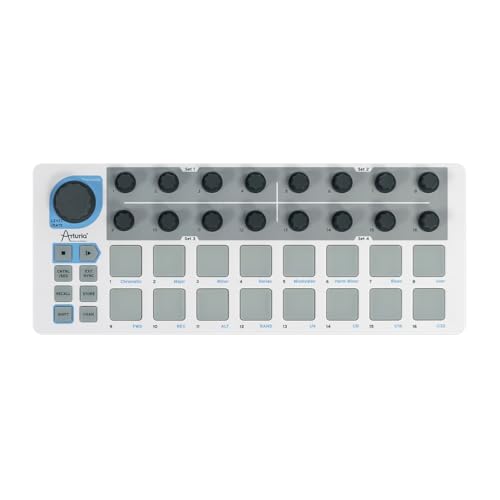
- 16 velocity- and pressure-sensitive pads
- Built-in sequencer with 16 pattern memories
- MIDI, USB, and CV connectivity
Best For: Performers and producers building hybrid hardware/software rigs
Simple MIDI Routing
Midiplus 2x2 USB MIDI Interface

- 2 MIDI inputs and 2 MIDI outputs
- USB powered; no external supply needed
- Mac and Windows compatible without a driver
Best For: Computer-based MIDI setups needing two inputs and two outputs
Hands-On Control
Arturia MiniLab 3 MIDI Controller

- 25 velocity-sensitive keys
- 8 pads and 4 faders for software control
- USB connection with included software suite
Best For: Producers wanting compact keyboard, pad, and fader control
Plug-and-Play Hosting
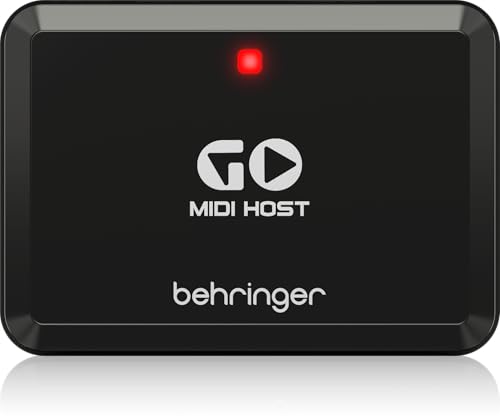
- Compact USB MIDI host interface
- Designed for plug-and-play keyboard connectivity
- Lists Windows support and 192 kHz maximum sample rate
Best For: Keyboard users needing a focused USB MIDI host connection
Portable Pad Control

- Eight RGB-backlit MPC-style pads
- Eight assignable control knobs
- USB-powered and highly portable
Best For: Mobile beat makers and DAW producers
MIDI Signal Distribution

- One MIDI input and six outputs
- Routes standard 16-channel MIDI
- USB-powered plug-and-play design
Best For: Multi-device MIDI routing and performance setups
Mini Keyboard Control

- 32 velocity-sensitive mini keys
- Pitch, modulation, octave, and sustain controls
- Includes MPC Beats and Melodics access
Best For: Portable keyboard performance and laptop production
Best Overall Audio Interface – Arturia MiniFuse 1
The Arturia MiniFuse 1 is a strong pick for anyone seeking compact midi interfaces with audio recording capability. Its compact design supports microphones, instruments, synths, and MIDI hardware, while 192 kHz recording, loopback, and included software make it practical for home studios and mobile setups.
Best For: Musicians, vocalists, guitarists, and creators who need audio recording plus MIDI connectivity in a small interface.
Pros:
- Includes five-pin MIDI input and output connections.
- Offers a combo mic/instrument/line input with 48V phantom power.
- Includes balanced outputs, headphone control, loopback, and a USB hub.
- Backed by a five-year warranty and extensive reliability testing.
Cons:
- Only one main input channel is provided.
- Its audio-focused design may offer more features than users seeking only MIDI control need.
The MiniFuse 1 is the most versatile option here for recording and MIDI work together. Its generous software bundle and long warranty further improve its value for beginners and portable studio users.
Best Slim Keyboard Controller – Korg nanoKEY2
The Korg nanoKEY2 is a low-profile choice for shoppers comparing compact midi interfaces and controllers for laptop-based music making. Its 25 velocity-sensitive keys, USB connection, and sustain button provide a straightforward way to enter notes and piano parts without taking much desk space.
Best For: Laptop musicians who want a slim, portable keyboard for basic note entry and MIDI performance.
Pros:
- Compact 25-key layout suits small workspaces and mobile setups.
- Velocity-sensitive keys are tuned for improved response and accuracy.
- Low-profile design leaves room for other equipment.
- Includes a sustain button for entering piano parts.
Cons:
- Provides a single USB connection and no traditional MIDI DIN ports.
- Its 25-key format is less suitable for extended two-handed playing.
- The supplied notes identify compatibility primarily with laptops and Ableton Live.
The nanoKEY2 is best viewed as a simple USB keyboard rather than a full studio interface. Choose it when portability, low height, and quick note input matter more than extensive controls or connections.
Best for Multi-Device Routing – ESI M4U eX
The ESI M4U eX is designed for setups that need more than a basic controller. Among compact midi interfaces, it stands out with eight adaptable MIDI ports, automatic input/output configuration, standalone routing, and an integrated USB 3.0 hub for connecting multiple devices.
Best For: Home studios, live rigs, and advanced MIDI systems that need multiple ports, merging, and routing flexibility.
Pros:
- Provides eight adaptable MIDI ports for extensive device control.
- Standalone operation supports MIDI routing and merging without a computer.
- Built-in USB 3.0 hub adds three connectors for other devices.
- Works with Windows and macOS and offers plug-and-play operation.
Cons:
- Its expanded routing features may be excessive for simple one-device setups.
- It is larger and heavier than minimalist MIDI controllers.
- The optional Windows driver is needed for complex multi-client operation.
The M4U eX is the practical choice when port count and routing matter most. Its standalone functionality and USB hub can serve as the central connection point for a growing MIDI setup.
Best Performance Controller – Arturia BeatStep
The Arturia BeatStep combines pad control, sequencing, and hardware connectivity in a travel-friendly format. For users comparing compact midi interfaces, its 16 velocity- and pressure-sensitive pads, 16 encoders, MIDI, USB, and CV connections make it a flexible performance tool for software and hardware instruments.
Best For: Performers and producers who want hands-on pad control, step sequencing, and synchronization with MIDI or CV gear.
Pros:
- Combines MIDI controller and step-sequencer modes.
- Offers 16 velocity- and pressure-sensitive pads plus 16 encoders.
- Supports MIDI, USB, and CV connections for varied setups.
- Includes 16 pattern memories and software such as Ableton Live Lite.
Cons:
- It is more specialized for pads and sequencing than piano-style keyboard playing.
- Its listed weight is two pounds, making it less minimal than ultra-slim controllers.
- CV connectivity may be unnecessary for users working entirely in software.
The BeatStep is a strong fit for hands-on creation and live manipulation rather than simple note entry. Its simultaneous controller and sequencer operation gives it useful flexibility for hybrid hardware-and-software rigs.
Simple MIDI Routing – Midiplus 2×2 USB MIDI Interface
The Midiplus 2×2 is a straightforward choice for anyone comparing compact midi interfaces for a computer-based setup. It provides two MIDI inputs and two MIDI outputs, is powered directly over USB, and works with Mac OS X and Windows XP or newer without requiring a separate driver.
Best For: Computer-based MIDI setups needing two inputs and two outputs in a compact, USB-powered interface.
Pros:
- Two MIDI inputs and two MIDI outputs provide 32 MIDI channels in each direction.
- USB-powered design does not require an external power supply.
- Supports Mac OS X and Windows XP or later without a driver.
- Includes a USB cable.
Cons:
- Designed for MIDI connectivity rather than audio input or output.
- Requires a computer with compatible MIDI software for its stated use.
Choose this model when dependable two-way MIDI connectivity matters more than onboard controls or audio features. Its simple USB setup makes it a practical fit for basic Mac and Windows MIDI workflows.
Hands-On Control – Arturia MiniLab 3 MIDI Controller
The Arturia MiniLab 3 is a compact midi interface alternative for producers who want keyboard and performance controls rather than a standalone MIDI port box. Its 25 velocity-sensitive keys, eight drum pads, and four faders provide hands-on control for compatible music-production software over USB.
Best For: Producers and performers who want a compact 25-key controller with pads and faders for computer-based music production.
Pros:
- 25 velocity-sensitive keys support more expressive playing.
- Includes eight pads for drum programming and track control.
- Four faders provide hands-on adjustment of software parameters.
- Includes a USB cable and software suite.
Cons:
- Provides one USB connection rather than multiple dedicated MIDI inputs and outputs.
- Its controller-focused design may not suit users seeking a simple MIDI routing interface.
- At 1 kg, it is less lightweight than the smallest MIDI-only options.
The MiniLab 3 is the better fit when playing keys and controlling a DAW are central to your workflow. It combines a compact 25-key format with pads and faders, making it more interactive than a basic MIDI interface.
Plug-and-Play Hosting – Behringer GO MIDI HOST
Behringer GO MIDI HOST Compact MIDI/USB Host Interface for Plug-and-Play Connectivity
Check Price On AmazonThe Behringer GO MIDI HOST is a compact midi interface aimed at connecting compatible USB MIDI equipment without the broader control layout of a keyboard controller. Its plug-and-play positioning and USB connectivity make it worth considering for streamlined keyboard-based setups.
Best For: Keyboard users seeking a compact USB MIDI host interface for straightforward connectivity.
Pros:
- Compact MIDI/USB host design is intended for plug-and-play connectivity.
- USB connectivity supports compatible keyboard equipment.
- Lists Windows compatibility.
- Specifies a maximum sample rate of 192 kHz.
Cons:
- The supplied specifications list one channel.
- Windows is the only operating system identified in the notes.
- The supplied information does not detail multiple MIDI inputs or outputs.
This model makes the most sense for a focused keyboard connection where minimal hardware is preferred. Buyers needing several independent MIDI ports should compare its single-channel specification carefully with multi-port alternatives.
Portable Pad Control – Akai LPD8
The Akai Professional LPD8 is a practical choice for producers seeking compact midi interfaces for beat making and hands-on DAW control. Its eight RGB-backlit pads and eight assignable knobs provide portable control without requiring an AC adapter or driver installation.
Best For: Beat makers, producers, DJs, and mobile music creators who want pads and knobs in a slim USB controller.
Pros:
- Eight responsive RGB-backlit MPC-style pads for samples, loops, and instruments
- Eight assignable Q-Link knobs for DAW, instrument, and effect control
- Four programmable preset slots for recalling custom mappings
- USB-powered plug-and-play operation with Mac and PC
Cons:
- Provides pads and knobs rather than piano-style keys
- USB connectivity is focused on computer-based use
The LPD8 makes the most sense when portability and tactile beat production matter more than a full keyboard layout. Its compact build and customizable controls suit producers who need quick, flexible input beside a laptop.
MIDI Signal Distribution – MIDI Thru-6 Box
The MIDI Thru-6 Box is a specialized option among compact midi interfaces for routing one MIDI source to multiple devices. It provides one MIDI input and six outputs, sending incoming messages to connected gear through standard five-pin MIDI connections.
Best For: Musicians and performers who need to distribute MIDI from one controller or source to as many as six devices.
Pros:
- One MIDI input feeds six MIDI Thru outputs
- Supports standard MIDI commands across 16 channels
- USB-powered with no batteries required
- Works with MIDI products and major computer platforms
Cons:
- Designed for MIDI routing rather than keyboard or pad performance
- Requires a 5V DC USB power supply
This box is best viewed as a compact MIDI distribution hub, not a general-purpose controller. It is a useful fit for setups where one MIDI stream needs to reach several synthesizers, keyboards, or other compatible devices without delay or interference.
Mini Keyboard Control – M-AUDIO Keystation Mini 32
The M-AUDIO Keystation Mini 32 is a compact midi interface-style controller for players who prefer keys over pads. Its 32 velocity-sensitive mini keys, USB plug-and-play setup, and portable design make it a practical companion for laptop-based music production.
Best For: Keyboard players, traveling producers, and beginners who need a lightweight controller with more than two octaves of range.
Pros:
- 32 velocity-sensitive mini piano-style keys
- Octave controls extend the playable range
- Pitch bend, modulation, volume, and sustain controls add expression
- Includes MPC Beats and access to Melodics lessons
Cons:
- Mini keys may feel less spacious than full-size keys
- USB connection requires a compatible host device
The Keystation Mini 32 is a stronger choice than a pad controller for melodic parts, chords, and basic keyboard practice. Its compact footprint keeps it travel-friendly while retaining useful expressive controls and a 32-key playing range.
How We Picked These Compact Midi Interfaces
We focused on practical features that matter in small music-production setups: connection type, MIDI input and output count, portability, computer compatibility, standalone operation, and ease of use. The selection includes both dedicated interfaces and compact MIDI controllers because many buyers use the terms interchangeably when shopping for a small MIDI solution.
We also considered workflow. A two-in/two-out interface can be ideal for a simple keyboard-and-synth rig, while a multi-port unit or MIDI splitter is better for routing several hardware instruments. Controllers were included for buyers who need keys, pads, knobs, or sequencing rather than traditional five-pin MIDI connectivity.
Quick Comparison
- For basic computer MIDI: Choose a compact 2×2 USB MIDI interface.
- For multiple hardware devices: Look for several MIDI outputs, standalone routing, or MIDI thru functionality.
- For playing software instruments: A mini keyboard such as a 25- or 32-key controller may be more useful than a dedicated interface.
- For beat-making: Pad controllers and compact sequencers offer faster hands-on rhythm control.
- For connecting USB gear without a computer: A MIDI/USB host interface is the key feature to prioritize.
Key Buying Factors for Compact Midi Interfaces
Connections and Port Count
Check whether you need USB MIDI, traditional five-pin DIN MIDI, or both. Count your devices before buying, including keyboards, drum machines, synths, and controllers. One input and one output may be enough for a minimal setup, but additional ports prevent constant cable swapping as your rig grows.
Power and Standalone Use
Some devices draw power from USB, while others can route MIDI without a computer. Standalone functionality is especially useful for hardware-focused musicians, live performers, and anyone who wants to keep a computer out of the signal chain. Confirm the required power source and whether the unit supports the routing modes you need.
Size, Controls, and Portability
Compact hardware saves space, but smaller dimensions can mean fewer keys, pads, or controls. A mini keyboard is convenient for travel, while a pad controller or sequencer may be better for beat production. Consider the controls you will use most rather than choosing solely by footprint.
Compatibility and Setup
Class-compliant, plug-and-play models generally offer the simplest setup with current Mac and Windows systems. Still, check operating-system support, USB requirements, and compatibility with your music software before ordering. If you use an iPad or other mobile device, verify adapter and power needs.
Who Should Buy Which Compact Midi Interfaces?
Choose a dedicated MIDI interface if you already own a keyboard or hardware synth and mainly need dependable computer connectivity. Choose a multi-port or thru interface if you are routing several instruments or need to send the same MIDI signal to multiple devices.
Choose a compact keyboard controller if your priority is playing virtual instruments and entering melodies. Choose a pad controller or sequencer if you make beats, trigger samples, or prefer pattern-based production. Finally, choose a USB host interface when you need to connect USB MIDI equipment directly to hardware without relying on a computer.