Choosing the right display can make color work faster, more accurate, and far less frustrating. The best computer monitors for graphic design balance resolution, panel quality, factory calibration, and connectivity for a smoother creative workflow.
Below, you’ll find 10 strong picks across different budgets and use cases, including compact 24-inch models, spacious 27-inch 4K panels, and ultrawide options for multitasking.
Best 10 Computer Monitors for Graphic Design Picks for 2026
Color-Accurate Creator Pick
ASUS ProArt PA279CRV 27" 4K USB-C Monitor

- 4K IPS panel with 99% DCI-P3 and 99% Adobe RGB
- Factory calibrated, Calman Verified, Delta E < 2
- USB-C with 96W power delivery and daisy-chain support
Best For: Designers and Mac users needing precise color and USB-C convenience
Ultrawide Multitasker
Samsung ViewFinity S50GC 34" Ultra-WQHD

- 34-inch 21:9 Ultra-WQHD screen for extra workspace
- PBP and PIP support side-by-side workflows
- Eye care features reduce strain during long sessions
Best For: Ultrawide workflows and multitasking-heavy creative setups
Compact Budget ProArt
ASUS ProArt PA247CV 24" USB-C Monitor

- 100% sRGB and 100% Rec. 709 coverage
- Factory calibrated, Calman Verified, Delta E < 2
- USB-C 65W plus daisy-chain support and 5-year warranty
Best For: Compact desks and creators who want a calibrated 24-inch monitor
Sharp 4K Workspace Display

- 27-inch 4K IPS panel for crisp detail and sharp text
- 90% DCI-P3 with HDR10 for rich color output
- Borderless design and wide viewing angles
Best For: Designers wanting a simple 27-inch 4K monitor with solid color
Color-Accurate 24-Inch Pick
ASUS ProArt PA248QV 24 Inch WUXGA 16:10 Professional Monitor

- 100% sRGB/Rec.709 coverage with DeltaE < 2
- 24.1-inch IPS panel with 1920 x 1200 resolution
- Tilt, pivot, swivel, and height-adjustable stand
Best For: Designers who need accurate color in a compact, ergonomic display
4K Creative Workspace Choice
LG 27US500-W Ultrafine Monitor 27-Inch 4K UHD

- 3840 x 2160 4K UHD for crisp detail
- Up to 90% DCI-P3 with HDR10 support
- Borderless IPS design with ergonomic tilt stand
Best For: Creators who want a sharp 27-inch 4K display with wide color
Balanced ProArt Workspace Upgrade
ASUS ProArt PA278QV 27 Inch 1440p QHD Professional Monitor

- Calman Verified with Delta E < 2 accuracy
- 27-inch 2560 x 1440 IPS display
- Wide connectivity plus fully adjustable stand
Best For: Designers who want accurate color and a versatile 27-inch workspace
Color-Accurate Everyday Pick
Dell 27 Plus QHD 27-inch 144Hz Monitor

- 27-inch QHD IPS panel for sharp, roomy workspaces
- 99 color gamut coverage and matte finish
- Fully adjustable stand for better ergonomics
Best For: Designers who want a comfortable QHD monitor for everyday creative work
High-Contrast Budget Option
KTC 27 Inch QHD 144Hz HVA Monitor
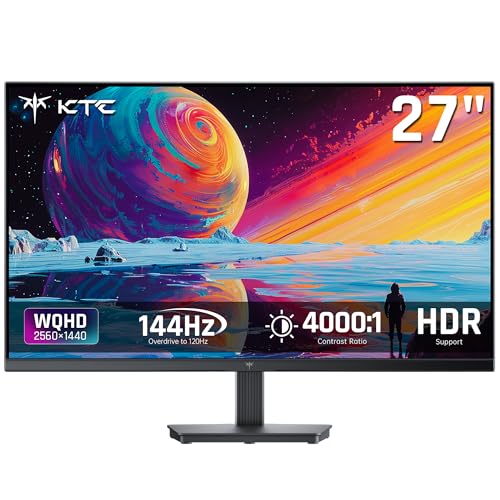
- 4000:1 contrast ratio for deeper blacks and shadow detail
- 129% sRGB and 109% DCI-P3 color coverage
- QHD 1440p with HDMI, DisplayPort, and VESA support
Best For: Budget-conscious creators who want strong contrast and wide color coverage
Creator-Friendly 4K Upgrade
Dell 27 S2725QC 4K USB-C Monitor

- 4K IPS panel for the sharpest detail in this lineup
- 99% sRGB and 1500:1 contrast for creative work
- USB-C with up to 65W power delivery
Best For: Designers and editors who want 4K detail and simple cable management
Color-Accurate Creator Pick – ASUS ProArt PA279CRV 27" 4K USB-C Monitor
If you want computer monitors for graphic design that prioritize accuracy over gimmicks, the ASUS ProArt PA279CRV is built for that workflow. Its 27-inch 4K IPS panel, factory calibration, and wide color coverage make it a strong choice for detailed creative work where color fidelity matters.
Best For: Designers, photographers, and Mac users who want a calibrated 4K creator monitor with strong connectivity.
Pros:
- 99% DCI-P3 and 99% Adobe RGB coverage for wide, vibrant color reproduction
- Factory calibrated and Calman Verified with Delta E < 2 accuracy
- USB-C with 96W power delivery, plus DisplayPort, HDMI, and USB hub
- Adjustable stand and DisplayPort daisy-chain support for flexible setups
Cons:
- 27-inch size may feel small if you prefer an ultrawide workspace
- Designed more for precision work than fast-motion use
For graphic designers who need dependable color and a clean single-cable setup, this ProArt model offers a very practical balance of resolution, calibration, and creator-focused features.
Ultrawide Multitasker – Samsung ViewFinity S50GC 34" Ultra-WQHD
For computer monitors for graphic design where screen space matters as much as resolution, the Samsung ViewFinity S50GC gives you a 34-inch 21:9 ultrawide canvas. Its Ultra-WQHD resolution, PBP/PIP support, and borderless design make it well suited to creative workflows that involve multiple tools, timelines, or reference windows.
Best For: Designers and editors who want an ultrawide display for multitasking and side-by-side work.
Pros:
- 34-inch 21:9 Ultra-WQHD panel creates plenty of working space
- PBP and PIP help you view two sources or tasks at once
- 100Hz refresh rate can make general workflow and motion feel smoother
- Eye Saver Mode, Flicker Free, and ambient light sensor help reduce strain
Cons:
- 72% color gamut is less creator-focused than pro-grade design monitors
- 300 cd/m² brightness is solid but not especially high
This is a smart pick if you value workspace over strict pro color specs. It is especially appealing when your design process depends on multiple windows, comparisons, or a wide timeline layout.
Compact Budget ProArt – ASUS ProArt PA247CV 24" USB-C Monitor
If you need computer monitors for graphic design but want a smaller, more affordable professional display, the ASUS ProArt PA247CV is a practical option. It offers a 24-inch Full HD IPS panel, strong color coverage, and factory calibration in a compact size that works well on tighter desks.
Best For: Entry-level creators, small workspaces, and users who want a calibrated 24-inch design monitor.
Pros:
- 100% sRGB and 100% Rec. 709 for reliable creative color work
- Factory calibrated and Calman Verified with Delta E < 2 accuracy
- USB-C with 65W power delivery plus HDMI, DisplayPort, and USB hub
- DisplayPort daisy-chain support and 5-year warranty
Cons:
- 1080p resolution is lower than 4K alternatives for detailed layouts
- 24-inch size may feel limited for expansive editing workflows
This monitor is a sensible choice when you want creator-grade color behavior without stepping up to a larger, pricier 4K panel. It fits best in focused, compact editing setups.
Sharp 4K Workspace Display – LG UltraFine U7 27" UHD IPS
Among computer monitors for graphic design, the LG UltraFine U7 is aimed at creators who want 4K sharpness and dependable color in a simple 27-inch form factor. Its UHD IPS panel, HDR10 support, and 90% DCI-P3 coverage make it a well-rounded choice for design, photo work, and everyday productivity.
Best For: Creators and professionals who want a sharp 27-inch 4K monitor with solid color coverage.
Pros:
- 27-inch 4K UHD IPS panel delivers crisp text and fine image detail
- 90% DCI-P3 and HDR10 support help produce rich, lifelike color
- Wide 178° viewing angles keep image consistency across the screen
- Three-sided borderless design suits multi-monitor setups
Cons:
- Color coverage is good, but not as wide as top-tier pro creator displays
- Bundle extras may be unnecessary if you only want the monitor itself
This LG model is a straightforward pick for designers who want strong 4K clarity without a lot of setup complexity. It is especially useful if you value a clean workspace and reliable everyday creative performance.
Color-Accurate 24-Inch Pick – ASUS ProArt PA248QV 24 Inch WUXGA 16:10 Professional Monitor
If you want computer monitors for graphic design that prioritize accuracy over flash, the ASUS ProArt PA248QV is a strong fit. Its 100% sRGB/Rec.709 coverage, DeltaE < 2 calibration, and Calman Verified status make it a practical choice for creators who need dependable color in photo and video work.
Best For: Graphic designers, photo editors, and video creators who want a compact, color-accurate monitor with ergonomic flexibility.
Pros:
- 100% sRGB/Rec.709 coverage with DeltaE < 2 for accurate color reproduction.
- WUXGA 1920 x 1200 IPS panel offers extra vertical space for creative workflows.
- Fully adjustable stand with tilt, pivot, swivel, and height adjustment.
- 5-year warranty adds long-term peace of mind.
Cons:
- 24.1-inch size may feel small for users who want a larger canvas.
- 75Hz refresh rate is solid, but not a major selling point for design work.
- Resolution is good for productivity, though not as detailed as 4K options.
Overall, this ProArt model is a dependable budget-conscious choice for design work where color fidelity matters more than screen size. The 16:10 aspect ratio and anti-glare finish make it especially comfortable for long editing sessions.
4K Creative Workspace Choice – LG 27US500-W Ultrafine Monitor 27-Inch 4K UHD
For computer monitors for graphic design, the LG 27US500-W stands out if you want sharp 4K detail and a clean desktop look. Its 3840 x 2160 resolution, HDR10 support, and up to 90% DCI-P3 coverage make it well suited to detailed visual work and color-rich creative projects.
Best For: Designers who want a 27-inch 4K monitor with wide color and a minimalist borderless design.
Pros:
- 4K UHD resolution delivers crisp detail for design and imagery.
- Up to 90% DCI-P3 and HDR10 support help color-rich content stand out.
- IPS panel with wide viewing angles supports consistent creative review.
- Borderless design and ergonomic tilt adjustment keep the setup clean and practical.
Cons:
- No mention of factory calibration or DeltaE rating in the supplied notes.
- Stand adjustment appears limited to tilt only.
- May be more resolution than some users need for everyday office tasks.
This LG UltraFine is a compelling option when you value sharpness and a modern workspace more than pro-level calibration extras. It is a straightforward 4K monitor for creators who want detail, wide color, and simple on-screen control.
Balanced ProArt Workspace Upgrade – ASUS ProArt PA278QV 27 Inch 1440p QHD Professional Monitor
If you’re comparing computer monitors for graphic design and want a balanced 27-inch option, the ASUS ProArt PA278QV is easy to recommend. It combines 100% sRGB and Rec.709 coverage with Delta E < 2 accuracy, plus a 2560 x 1440 IPS panel that gives you more working space without jumping all the way to 4K.
Best For: Graphic designers and content creators who want accurate color, a roomy 27-inch screen, and a flexible workstation setup.
Pros:
- Calman Verified with Delta E < 2 for true-to-life color accuracy.
- 27-inch QHD IPS panel balances detail and desktop space well.
- Extensive connectivity includes HDMI, DisplayPort, Mini DisplayPort, DVI-D, and USB hub support.
- Fully adjustable stand and Eye Care features support longer creative sessions.
Cons:
- Resolution is QHD, so it won’t match the pixel density of a 4K monitor.
- Design-focused strengths matter more than gaming or entertainment extras.
- At 17 pounds, it is a bit heavier than smaller office monitors.
As a middle-ground ProArt display, this model offers a strong mix of color accuracy, comfort, and workflow-friendly connectivity. It is a smart pick when you want a professional panel that stays practical for everyday design work.
Color-Accurate Everyday Pick – Dell 27 Plus QHD 27-inch 144Hz Monitor
If you want computer monitors for graphic design that also handle everyday work and light motion smoothly, this Dell 27-inch QHD model is a practical middle-ground choice. Its 2560 x 1440 IPS panel, 99 color gamut coverage, and matte finish give you a clean workspace for design tasks, while the 144Hz refresh rate makes scrolling and navigation feel responsive.
Best For: Designers who want a sharp QHD display with good color, flexible ergonomics, and a comfortable all-day setup.
Pros:
- 27-inch QHD resolution offers more workspace than 1080p for layouts, timelines, and design tools.
- IPS panel with 99 color gamut coverage supports solid color detail for general creative work.
- Height, tilt, pivot, and swivel adjustments make it easier to dial in an ergonomic viewing angle.
- Matte finish and 4-star TÜV-certified comfort features help reduce distractions during long sessions.
Cons:
- It is positioned more as an all-around monitor than a dedicated color-critical display.
- Built-in speakers are convenient, but they are not a substitute for external audio.
Overall, this Dell is a balanced pick if you need a dependable QHD monitor for graphic design without jumping to a higher-cost 4K panel. It offers enough sharpness and color support for most desktop creative work, plus the adjustability to keep it comfortable through long editing sessions.
High-Contrast Budget Option – KTC 27 Inch QHD 144Hz HVA Monitor
For computer monitors for graphic design on a tighter budget, this KTC 27-inch QHD display stands out for its strong contrast and wide-gamut specs. The HVA panel, 4000:1 contrast ratio, and factory-calibrated 129% sRGB coverage can make images and dark UI elements look rich, while the 1440p resolution keeps text and panels crisp.
Best For: Budget-conscious creators who want strong contrast, sharp QHD detail, and wide color coverage.
Pros:
- 4000:1 contrast ratio helps preserve depth in shadows and darker artwork.
- 129% sRGB, 109% DCI-P3, and 8-bit color depth are strong value features for creative use.
- QHD 1440p resolution gives more room for spreadsheets, timelines, and editing tools.
- Includes HDMI and DisplayPort connections plus tilt adjustment and VESA mounting support.
Cons:
- Color accuracy claims are good on paper, but this is still a gaming-focused monitor first.
- Brightness is listed at 300 cd, which is modest compared with some higher-end panels.
This KTC model is compelling if contrast and price matter more than premium creator features. It gives you a sharp QHD canvas with strong color specs and a three-year warranty, making it a practical entry point for design work.
Creator-Friendly 4K Upgrade – Dell 27 S2725QC 4K USB-C Monitor
If you are shopping computer monitors for graphic design and want a sharper canvas, this Dell 27-inch 4K model is the most resolution-focused option here. The 3840 x 2160 IPS panel, 99% sRGB coverage, and matte finish are a strong fit for detailed photo and video editing, while USB-C connectivity helps keep a desk setup simple.
Best For: Designers and editors who want 4K detail, accurate sRGB coverage, and a cleaner single-cable desk setup.
Pros:
- 4K resolution delivers significantly more detail than QHD for fine visual work.
- 99% sRGB and IPS technology support vibrant, consistent color.
- USB-C with up to 65W power delivery simplifies connectivity and cable management.
- Height, pivot, swivel, and tilt adjustments make it easy to set up ergonomically.
Cons:
- The 4K resolution can be more demanding on your computer than QHD.
- It is a premium choice if you mainly need a basic design monitor.
For creators who value sharpness and a tidy workspace, this Dell is the strongest fit in the group. It combines 4K detail, solid sRGB coverage, and USB-C convenience, making it especially appealing for photo and video editing workflows.
How We Picked These Computer Monitors for Graphic Design
We focused on the features that matter most for visual work: accurate color coverage, reliable panel performance, sharp text rendering, usable screen sizes, and ports that fit modern creative setups. We also looked for monitors that are practical for everyday design tasks, not just impressive on paper.
Quick Comparison
If you want the simplest way to narrow the list, start with resolution and panel size. A 27-inch 4K display is ideal for detailed layout and retouching, while a 27-inch QHD model can be a better value for general design work. A 24-inch 1080p or WUXGA monitor suits smaller desks and lighter editing, and ultrawide screens are useful if you keep many panels open at once.
Key Buying Factors for Computer Monitors for Graphic Design
Resolution and Screen Size
Higher resolution matters when you need crisp lines, fine typography, and room for toolbars. For most designers, 27-inch 4K is a strong premium choice. QHD is a solid middle ground, while 24-inch panels can still work well if you value affordability and a compact footprint.
Color Accuracy and Gamut
Look for strong sRGB coverage at minimum, and wider gamuts if you also handle photography, branding, or print-oriented work. Factory calibration is a plus because it reduces setup time and helps keep colors consistent out of the box.
Panel Type and Viewing Stability
IPS panels are usually preferred for Computer Monitors for Graphic Design because they offer better viewing angles and more consistent color than basic alternatives. That helps when you’re judging subtle tonal shifts or sharing the screen with a client.
Connectivity and Ergonomics
USB-C can simplify laptop setups by carrying display, data, and sometimes power through one cable. Height adjustment, tilt, swivel, and pivot support are also important because an accurate monitor is only useful if you can position it comfortably.
Who Should Buy Which Computer Monitors for Graphic Design?
Choose a 4K 27-inch display if you want the best mix of detail and workspace for professional creative use. Pick a QHD model if you want strong image quality at a lower price. Go with a 24-inch monitor if desk space and budget are top priorities. If you multitask heavily or manage large timelines, an ultrawide can be the most productive option.
For most buyers, the best choice comes down to balancing color needs, resolution, and how much space you actually have on your desk.