If you want background audio that is easy to manage at work, desktop internet radios for office use can be a smarter choice than a cluttered streaming setup. They give you access to stations, podcasts, and alarm features in one compact device.
Below, we focus on options that are practical for desks, reception areas, break rooms, and private offices, with an eye toward sound quality, connectivity, and day-to-day convenience.
Best 10 Desktop Internet Radios for Office Picks for 2026
Best for Station Variety
C. Crane CC WiFi 3 Internet Radio
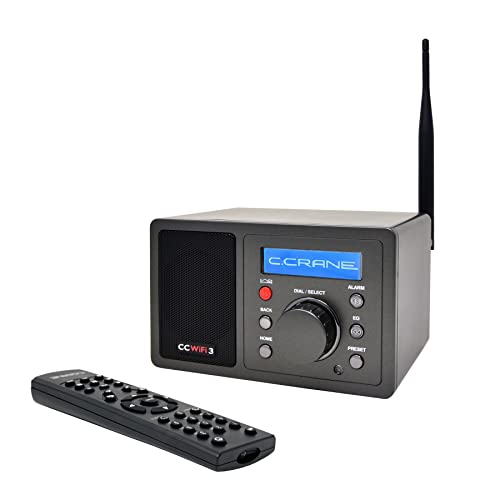
- 25,000+ stations via Skytune
- Bluetooth, clock, dual alarm, and sleep timer
- Compact desk-friendly design with remote control
Best For: Office users who want a compact internet radio with lots of station choice and simple daily controls.
Best for Features
Ocean Digital WR-800 Wi-Fi Internet Radio Speakers

- 30,000+ internet stations
- Stereo speakers with wooden casing
- Micro SD, aux in, and line out
Best For: Office desks and listeners who want a feature-rich internet radio with flexible playback options.
Best for Streaming Control
Majority Touro WiFi & FM Radio

- Spotify Connect and OkTiv app control
- Internet radio, FM, and podcast support
- Multi-alarm and sleep timer features
Best For: Office desks and small shared spaces where easy wireless control matters.
Best for Private Office Listening
Grace Digital Mondo Elite Smart Internet Radio
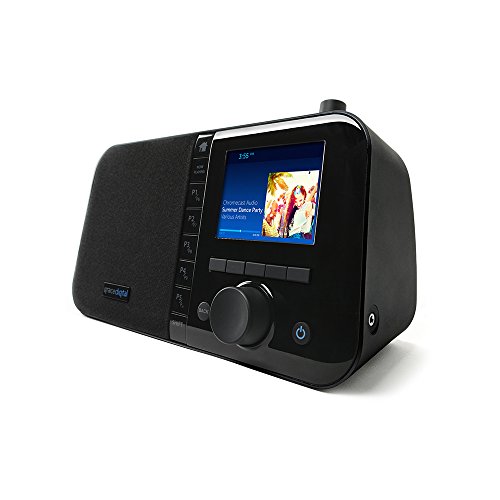
- Microphone-free for privacy-conscious offices
- Wi-Fi, Bluetooth, and Chromecast app support
- 7 alarms, 100 presets, and multi-room audio
Best For: Office workers who want a connected desk radio with privacy-friendly operation and flexible streaming.
Best for Tiny Desks
Ocean Digital WR-18 Portable Internet Radio

- Ultra-compact design fits crowded office desks
- 150 station presets with 5 one-touch buttons
- Internet radio, FM, Bluetooth, and Micro SD support
Best For: Small office setups that need a compact, versatile radio with quick station access.
Best for Feature-Rich Office Listening
Grace Digital Mondo Elite Classic Internet Radio

- Spotify Connect, Pandora, SiriusXM, Bluetooth, and Chromecast support
- Over 100,000 internet AM/FM/HD stations plus podcast access
- Office-friendly alarms, presets, remote/app control, and no mic
Best For: Offices that want a versatile tabletop radio with broad streaming support and easy controls.
Best for Portable Listening
LEMEGA IR1 Portable Internet Radio
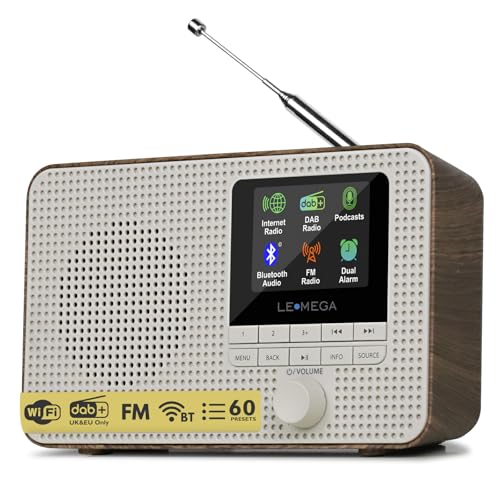
- Wi-Fi internet radio with thousands of stations
- Bluetooth, FM, and podcast playback support
- Battery or mains power for desk-to-portable use
Best For: Offices that want a compact, multi-source radio with easy portability.
Best for Flexible Streaming
Ocean Digital WR-50 Internet Radio Tuner

- Internet radio, FM, podcasts, Bluetooth, UPNP/DLNA, and USB playback
- Up to 150 favorites with browser-based management and 4 front presets
- RCA, optical, coaxial, and 3.5 mm outputs for easy system integration
Best For: Offices or workspaces that want a versatile network tuner with multiple streaming and output options.
Best for All-in-One Audio

- 50,000+ internet stations and podcasts
- True 2.0 stereo with dual speakers
- Bluetooth, AUX-in, FM, and alarm clock
Best For: Office users who want one desktop-friendly radio for streaming, podcasts, and FM.
Best for Audiophile Office Setups
Ocean Digital WR-03M Internet Radio Receiver

- Internet radio, FM, Bluetooth, and podcasts in one component
- Optical and line-out outputs for existing speakers or amps
- Remote, color screen, alarms, and timer functions
Best For: Offices with existing audio gear that want a flexible internet radio component.
Best for Station Variety – C. Crane CC WiFi 3 Internet Radio
If you want desktop internet radios for office use that can pull in a huge mix of stations without much setup, the C. Crane CC WiFi 3 is a strong fit. It focuses on clear voice audio, easy preset access, and practical extras like Bluetooth, a clock, and alarms, making it useful for all-day background listening at a desk.
Best For: Office users who want a compact internet radio with lots of station choice, simple controls, and dependable alarm features.
Pros:
- Access to 25,000+ internet radio stations through Skytune
- Bluetooth input lets you stream from a phone or tablet
- Compact design with clock, dual alarm, sleep timer, and remote control
- Line-out and EQ settings help tailor audio for a desk setup
Cons:
- Designed for Wi-Fi streaming, so it depends on a stable internet connection
- Smaller size means it is not meant for room-filling sound on its own
For desktop internet radios for office listening, this model stands out for station depth and day-to-day convenience more than flashy features. It is a practical choice if you want news, talk, or music on demand and prefer a small radio that stays easy to operate at work.
Best for Features – Ocean Digital WR-800 Wi-Fi Internet Radio Speakers
The Ocean Digital WR-800 is a practical pick for desktop internet radios for office use when you want more than basic AM/FM playback. It combines Wi‑Fi radio access with stereo speakers, a color display, and multiple input options, making it a flexible desktop unit for everyday listening.
Best For: Office desks, shared workspaces, and listeners who want internet stations plus local playback options in one compact radio.
Pros:
- Access to 30,000+ internet stations expands listening options beyond standard radio
- Stereo speakers and wooden casing give it a more substantial desktop-friendly presence
- Micro SD, aux in, and line out add useful connectivity for office setups
- 2.8-inch color display makes station browsing and navigation straightforward
Cons:
- Not as minimalist as a basic plug-and-play radio
- Wooden cabinet and stereo build take up more desk space than ultra-compact models
For buyers comparing desktop internet radios for office use, the WR-800 stands out for its mix of streaming access, input flexibility, and desk-ready styling. It is a stronger fit for users who want an all-in-one listening hub rather than a bare-bones radio.
Best for Streaming Control – Majority Touro WiFi & FM Radio
If you’re comparing desktop internet radios for office use, the Majority Touro is a practical pick for easy streaming, FM listening, and app-based control in a compact tabletop form. It blends internet radio, Spotify Connect, and podcast access with enough everyday features to work well on a desk, shelf, or shared space.
Best For: Office desks, small break areas, and anyone who wants simple wireless control with internet radio and FM in one unit.
Pros:
- Spotify Connect and Frontier OkTiv app control make wireless playback easy.
- Internet radio, FM, and podcasts give you plenty of listening options.
- DSP speaker and bass port help keep sound balanced for everyday use.
- Multi-alarm, sleep timer, and snooze features add useful daily convenience.
Cons:
- Designed more for home or general tabletop use than a dedicated office audio system.
- Sound is practical and balanced, but not aimed at audiophile-grade performance.
For buyers focused on desktop internet radios for office settings, the Touro stands out for its app control and broad streaming support rather than flashy design. It is a sensible choice if you want an all-in-one radio that can handle background music, news, and podcasts without much fuss.
Best for Private Office Listening – Grace Digital Mondo Elite Smart Internet Radio
If you want one of the more versatile desktop internet radios for office use, the Grace Digital Mondo Elite is built around streaming flexibility, strong alarm features, and easy app-based control. It works with Wi-Fi, Bluetooth, and Chromecast-enabled apps, so it can pull in stations, playlists, and podcasts without tying up a computer.
Best For: Offices that want a microphone-free internet radio with multi-room streaming, alarm functions, and broad app support.
Pros:
- Microphone-free design is a plus for privacy-conscious office settings
- Streams from Bluetooth, Wi-Fi, and Chromecast-enabled apps
- 7 alarms, 100 presets, and customizable sleep/snooze settings
- Color display, remote control, and app control make it easy to use
Cons:
- More feature-rich than a basic desk radio, so it may feel complex for simple setups
- Optional battery pack and Ethernet adapter are sold separately
- Sound quality is solid for a desk unit, but not aimed at audiophile listening
For buyers comparing desktop internet radios for office use, this model stands out for privacy, streaming options, and scheduling features that fit a workday routine. It is a strong choice if you want a connected radio that can handle background audio, alarms, and multi-room playback without adding a microphone to your workspace.
Best for Tiny Desks – Ocean Digital WR-18 Portable Internet Radio
If you want one of the most compact desktop internet radios for office use, the Ocean Digital WR-18 is a handy fit for desks where space is limited. It combines internet radio, FM, Bluetooth, Micro SD playback, and preset access in a lightweight unit that’s easy to move between workspaces.
Best For: Office workers who want a small, versatile radio for streaming stations, quick presets, and background audio at a compact desk.
Pros:
- Very compact and rechargeable, so it works well on crowded desks or shared office spaces
- Stores up to 150 favorites with 5 one-touch preset buttons for fast station switching
- Supports internet radio, FM, Bluetooth, and Micro SD playback for flexible listening
- Dimmer and auto-off timer help make it office- and break-friendly
Cons:
- Small size means it is not built for room-filling sound
- Best for personal listening rather than larger conference areas
- Requires Wi-Fi for internet radio features
For desktop internet radios for office setups that need a small footprint and multiple playback options, the WR-18 is a practical pick. It is especially appealing if you want easy preset access, a readable display, and enough flexibility to handle streaming, local FM, and offline media.
Best for Feature-Rich Office Listening – Grace Digital Mondo Elite Classic Internet Radio
If you want desktop internet radios for office use with a lot of playback flexibility, the Grace Digital Mondo Elite Classic is a strong all-in-one option. It supports internet radio, SiriusXM, Spotify Connect, Pandora, Bluetooth, Chromecast, Wi-Fi, and USB playback, so it can handle both talk radio and background music without needing extra gear.
Best For: Offices that want a versatile tabletop radio with streaming app support, alarm features, and easy front-panel or remote control.
Pros:
- Supports a wide mix of services, including Spotify Connect, Pandora, Amazon Music, SiriusXM, and podcasts
- Over 100,000 internet AM/FM/HD stations for talk, news, and music variety
- Useful office-friendly controls like presets, multi-room grouping, alarms, and app-based remote control
- No built-in microphone, which may appeal to privacy-conscious workplaces
Cons:
- SiriusXM requires a separate subscription
- Wired Ethernet needs an optional USB dongle
- Feature set may be more than some users need for a basic office radio
As a pick among desktop internet radios for office setups, this model stands out for sheer source compatibility and flexible control options. It is a practical choice if you want one radio that can cover streaming, radio, and alarms in a single desktop unit.
Best for Portable Listening – LEMEGA IR1 Portable Internet Radio
If you want desktop internet radios for office use that can also leave the desk when needed, the LEMEGA IR1 is a flexible pick. It combines Wi-Fi internet radio, FM, Bluetooth, and podcast playback in a compact unit, so it works well for background audio, news, and casual streaming without taking up much space.
Best For: Offices that want a compact, multi-source radio with easy portability and private listening options.
Pros:
- Wi-Fi internet radio with access to thousands of stations
- Bluetooth and podcast playback add useful office-friendly versatility
- 40 presets and colour display make station access simple
- Battery or mains power supports desk use and portability
Cons:
- Smaller speaker design may not suit larger rooms
- Some features may feel more complex than a basic radio
- Walnut finish may not match every modern office setup
Overall, the IR1 is a strong fit if you need desktop internet radios for office environments where flexibility matters more than a fixed, full-size unit. It offers plenty of listening options and practical extras, making it a solid everyday companion for workspaces.
Best for Flexible Streaming – Ocean Digital WR-50 Internet Radio Tuner
If you want one compact component that can handle internet radio, FM, podcasts, and music streaming, the Ocean Digital WR-50 is a practical pick for desktop internet radios for office setups. It connects over Wi-Fi or Ethernet and adds stereo outputs, Bluetooth receiver support, and USB playback for easy integration with an existing audio system.
Best For: Offices or workspaces that want a versatile radio tuner with wired or wireless networking, preset access, and multiple output options.
Pros:
- Supports internet radio, FM, podcasts, Bluetooth, UPNP/DLNA, and USB playback
- Convenient favorites management with up to 150 presets and browser-based control
- Multiple audio outputs, including RCA, optical, coaxial, and a 3.5 mm jack
- 2.4″ color screen, remote control, alarm, sleep timer, and dimmable display
Cons:
- Designed as a component tuner, so it needs speakers or a hi-fi system to use
- Menu and setup may feel more technical than a simple tabletop radio
For buyers comparing desktop internet radios for office use, the WR-50 stands out for its flexibility and integration features rather than simplicity. It makes the most sense if you already have audio gear and want a network-ready tuner with strong source support and lots of preset control.
Best for All-in-One Audio – Lemega IR6 Internet Radio
The Lemega IR6 is a practical pick for desktop internet radios for office setups if you want one compact unit that covers streaming stations, podcasts, FM, and Bluetooth in a simple interface. Its dual speakers, wooden cabinet, and rechargeable battery make it flexible enough for a desk, shared workspace, or a small break area.
Best For: Office users who want an easy-to-use radio with internet stations, podcasts, and wireless streaming in one desktop-friendly design.
Pros:
- Access to 50,000+ internet stations plus podcast playback
- True 2.0 stereo sound from dual built-in speakers
- Bluetooth, AUX-in, FM, and alarm clock functions
- Rechargeable battery and USB-C charging add portability
Cons:
- Wooden cabinet design takes up more desk space than basic radios
- Not the most minimal option for very tight office setups
For buyers comparing desktop internet radios for office use, the IR6 stands out because it blends broad content access with straightforward controls and fuller stereo sound. It is a strong fit if you want a desk radio that can do more than just play one station.
Best for Audiophile Office Setups – Ocean Digital WR-03M Internet Radio Receiver
If you want one of the more flexible desktop internet radios for office use, the Ocean Digital WR-03M is built like a tuner for a bigger audio system rather than a standalone table radio. It pulls in internet stations over Wi-Fi or LAN, adds Bluetooth, FM, podcasts, and network streaming, then hands everything off to your speakers or amplifier through line-out or optical.
Best For: Offices or workspaces that already have powered speakers, an amp, or a stereo and want internet radio plus streaming in one compact component.
Pros:
- Internet radio, FM, Bluetooth, podcasts, and UPnP/DLNA streaming in one unit
- Optical and stereo line-out make it easy to connect to existing office audio gear
- Remote control, color screen, alarms, sleep timer, and dimmer settings improve day-to-day use
- Supports web control and playlist access from networked PCs or NAS devices
Cons:
- No built-in speaker, so it is not a plug-and-play desktop radio
- Requires external audio gear to be useful in an office
- More of a component tuner than a simple standalone radio
For buyers comparing desktop internet radios for office listening, this model stands out if you already have a sound system and want broad source support with more control than a basic radio offers. It is less convenient for ultra-simple setups, but very appealing for a flexible, better-sounding office audio hub.
How We Picked These Desktop Internet Radios for Office Use
We prioritized models that balance dependable Wi-Fi performance, simple controls, and flexible playback options. For office settings, the best picks are easy to set up, quick to operate, and not overly distracting to use during a busy day.
We also looked for useful extras such as Bluetooth, alarm functions, preset buttons, Ethernet support, and line-out or optical outputs for users who want better integration with existing speakers.
Quick Comparison
For a straightforward desk setup, compact radios with built-in speakers and presets are the easiest fit. For conference rooms, reception counters, or shared spaces, models with stronger connectivity and external-output options tend to be more practical. If you already have a sound system, tuner-style models can offer better flexibility than all-in-one units.
Key Buying Factors for Desktop Internet Radios for Office
Connectivity and Station Access
Look for stable Wi-Fi support, and consider Ethernet if your office network is crowded or if you want a more reliable wired connection. Broad station access is useful, but app-free or remote-based control can be more convenient in a workplace.
Controls and Ease of Use
Presets, physical buttons, and a readable display matter more in an office than flashy features. If multiple people will use the radio, simple controls reduce confusion and keep the device from becoming a distraction.
Sound and Placement
For a personal desk, a compact speaker may be enough. For open offices or break rooms, prioritize fuller sound, stereo output, or the ability to connect to external speakers. If the radio will sit close to a workstation, adjustable volume and dimmable displays are also worth considering.
Workflow-Friendly Features
Alarm clocks, sleep timers, auto-off settings, and Bluetooth can be genuinely useful in office environments. These features help the radio serve as both a background-audio source and a daily utility device.
Who Should Buy Which Desktop Internet Radios for Office?
If you want a simple, everyday desktop radio for a private office, choose a compact model with presets and a built-in speaker. If your priority is shared use in a break room or reception area, look for stronger sound, easier controls, and better connectivity. If you already have quality speakers or a stereo system, a tuner-style internet radio receiver may be the best fit for your setup.
For most buyers, the best Desktop Internet Radios for Office use are the ones that stay easy to run, connect reliably, and fit the space without adding clutter.