Desktop internet radios with aux input make it easy to stream thousands of stations while still keeping a simple wired connection for external audio sources. They’re a smart fit for bedrooms, kitchens, offices, and anywhere you want flexible listening.
In this roundup, we focus on models that balance sound quality, station access, alarm features, and everyday usability so you can choose the right radio without overpaying for features you may never use.
Best 9 Desktop Internet Radios with Aux Input Picks for 2026
Best for Presets & Streaming
Ocean Digital WR-800 Wi‑Fi Radio

- Wi‑Fi access to 30,000+ internet stations
- Aux in, Bluetooth, and microSD playback support
- 99 presets and remote control simplify daily use
Best For: Listeners who want a compact desktop radio with broad streaming options and easy station management.
Best for App-Controlled Streaming

- Spotify Connect and app control for easy wireless listening
- Wi‑Fi internet radio plus FM and podcasts
- Multi-alarm and sleep timer make it bedroom-friendly
Best For: People who want a compact internet radio with modern streaming features and simple app control.
Best for Feature-Rich Streaming
Sangean WFR-32 Internet Radio/AUX/Bluetooth

- Internet radio, Bluetooth, AUX-in, and USB playback
- 255 presets with smart local station management
- Dual alarms, EQ modes, and USB phone charging
Best For: Shoppers who want a versatile desktop radio with streaming, wired input, and extra smart features.
Best for Internet Stations
C. Crane CC WiFi 3 Internet Radio
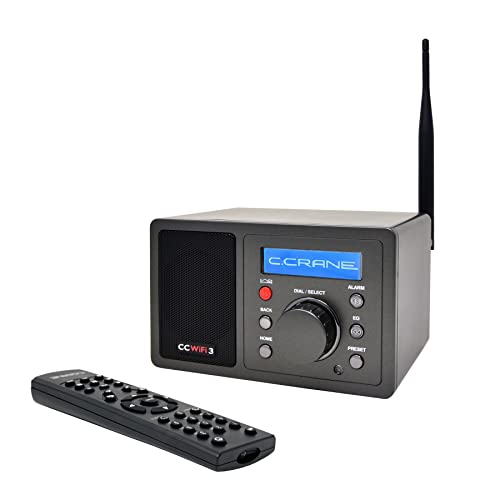
- 25,000+ stations via Skytune
- Bluetooth audio receiving included
- Clock, dual alarms, and remote control
Best For: People who want a compact internet radio for streaming stations, alarms, and simple bedside use.
Best for Streaming and Presets
Ocean Digital WR-860 Wi-Fi Internet Radio

- Wi-Fi internet radio plus FM and Bluetooth support
- Aux input and line out for flexible desktop connections
- Stores up to 150 presets for quick station access
Best For: People who want a feature-rich tabletop radio for streaming, FM, and wired audio inputs.
Best for Voice-Free Streaming
Grace Digital Mondo Elite Internet Radio
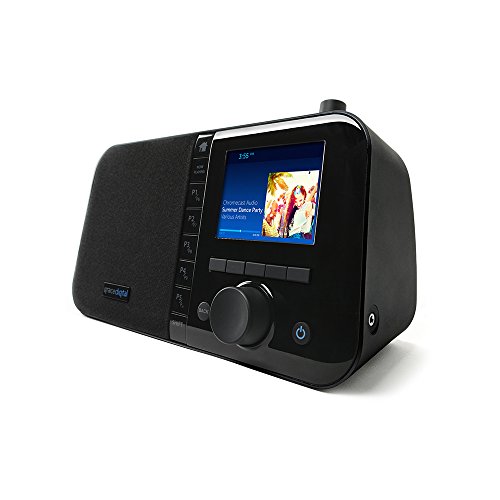
- Bluetooth, Wi‑Fi, and Chromecast-style streaming
- No microphone for a more privacy-friendly design
- Seven alarms and 100 station presets
Best For: People who want a feature-packed desktop internet radio for streaming and alarms without a built-in microphone.
Best for Portable Stereo Listening
Lemega IR6 Internet Radio with Bluetooth

- 50,000+ internet stations plus podcasts
- True 2.0 stereo sound with dual speakers
- Bluetooth and AUX-in for flexible playback
Best For: People who want a stylish desktop radio with stereo sound, AUX-in, and portable use around the home.
Best Networked HiFi Receiver
Ocean Digital WR-03M Internet Radio Receiver

- Wi-Fi/LAN internet radio with Bluetooth and FM
- Line-out and optical output for stereo integration
- UPnP/DLNA streaming plus remote and alarms
Best For: Home audio owners who want an internet radio component for an existing stereo system.
Best for Portable Listening

- Internet radio and podcasts in one compact unit
- 150 presets for quick access to saved stations
- Mains or AA battery power for flexible placement
Best For: People who want a compact, portable internet radio for kitchens, bedrooms, or home offices.
Best for Presets & Streaming – Ocean Digital WR-800 Wi‑Fi Radio
If you want one of the more versatile desktop internet radios with aux input, the Ocean Digital WR-800 is a strong all-rounder. It combines Wi‑Fi station access, FM radio, Bluetooth, microSD playback, and a line out/aux in connection, so it can handle everything from streaming podcasts to playing a wired source through its stereo speakers.
Best For: Buyers who want a compact desktop radio with multiple playback options, saved presets, and a straightforward remote for everyday use.
Pros:
- Wi‑Fi internet radio opens access to 30,000+ stations worldwide
- Aux in, Bluetooth, and microSD support add flexible listening options
- Up to 99 presets make it easy to save favorite stations
- Adjustable backlight and remote control help with bedside or desk use
Cons:
- 2.8-inch display is functional but small compared with larger tabletop radios
- FM radio still depends on local reception
Overall, the WR-800 is a practical pick if you want desktop internet radios with aux input that do more than just stream stations. Its mix of wireless, wired, and local playback features makes it especially useful for bedrooms, home offices, and relaxed listening setups.
Best for App-Controlled Streaming – Majority Touro Internet Radio
If you want one of the more versatile desktop internet radios with aux input-style flexibility for everyday listening, the Majority Touro is a smart pick thanks to Wi‑Fi radio, FM, Spotify Connect, and app control. It’s designed to sit neatly in a bedroom, kitchen, or living room while giving you quick access to stations, playlists, podcasts, and alarms.
Best For: Listeners who want a compact home radio with streaming features, app control, and reliable all-day use in smaller spaces.
Pros:
- Spotify Connect and Frontier OkTiv app control make wireless listening easy
- Wi‑Fi internet radio, FM, and podcast support cover a wide range of content
- DSP speaker with bass port aims for fuller, more balanced sound
- Multi-alarm, sleep timer, and snooze features suit bedside use
Cons:
- No dedicated aux input is listed in the product details
- Best suited to small- to medium-sized rooms rather than large spaces
Overall, the Touro is a strong option if you care more about streaming convenience and station variety than old-school analog inputs. For shoppers comparing desktop internet radios with aux input, it’s worth noting that this model leans heavily into Wi‑Fi, Spotify, and app-based control instead.
Best for Feature-Rich Streaming – Sangean WFR-32 Internet Radio/AUX/Bluetooth
If you want one of the most feature-packed desktop internet radios with aux input, the Sangean WFR-32 stands out for its broad streaming support, Bluetooth, USB playback, and classic AUX-in flexibility. It also adds smart local radio preference management, so it is easier to keep your favorite stations accessible without constantly searching.
Best For: Buyers who want a desktop radio that mixes internet stations, Bluetooth streaming, AUX-in, and extra smart features in one wooden cabinet unit.
Pros:
- Internet radio plus Bluetooth, AUX-in, and USB playback cover most listening sources.
- 255 presets and smart local station management make favorites easy to organize.
- Includes dual alarms, weather info, EQ modes, and USB phone charging.
Cons:
- Feature set may be more complex than buyers who only want basic radio playback need.
- Wooden cabinet design is attractive but less portable than compact travel radios.
For shoppers comparing desktop internet radios with aux input, the WFR-32 is a strong pick if you value versatility and station management over simplicity. It is especially appealing when you want one tabletop unit that can handle streaming, wired sources, and everyday alarm-radio use.
Best for Internet Stations – C. Crane CC WiFi 3 Internet Radio
The C. Crane CC WiFi 3 is a strong fit for shoppers comparing desktop internet radios with aux input, especially if you want easy access to global stations plus a compact bedside-friendly layout. It streams from Skytune, supports Bluetooth audio receiving, and adds useful extras like a clock, alarms, remote control, and clear voice-focused sound.
Best For: Listeners who want a compact desktop internet radio with broad station access, Bluetooth, and simple bedside controls.
Pros:
- Access to 25,000+ internet radio stations with Skytune
- Bluetooth receiving for streaming from a phone or tablet
- Includes clock, dual alarm, sleep timer, and remote control
- Line-out and headphone jack add flexible listening options
Cons:
- No built-in AM/FM tuner for traditional radio listening
- Designed mainly for 2.4 GHz Wi‑Fi networks
- Aux input use is less direct than models with a dedicated line-in port
For buyers focused on desktop internet radios with aux input, this model stands out more for its streaming depth and Bluetooth support than for analog connectivity. It makes the most sense if you value station variety, bedside convenience, and a small footprint over a full-featured legacy radio section.
Best for Streaming and Presets – Ocean Digital WR-860 Wi-Fi Internet Radio
If you want one of the more versatile desktop internet radios with aux input, the Ocean Digital WR-860 is built for everyday use. It combines Wi-Fi internet radio, FM reception, Bluetooth streaming, USB/micro SD playback, and a handy aux-in option in a compact desktop design.
Best For: Listeners who want an all-in-one tabletop radio for internet stations, local FM, and easy wired or wireless audio playback.
Pros:
- Supports internet radio, FM, Bluetooth, USB, micro SD, and UPnP/DLNA playback
- Aux input and line out add flexible connection options for desktop setups
- Stores up to 150 presets for fast access to favorite stations
- Color display, remote control, and dimmable clock screen improve daily usability
Cons:
- 2.4-inch display is functional, but not especially large
- More feature-heavy than a simple plug-and-play radio
- Best suited to tabletop use rather than portable listening
For shoppers comparing desktop internet radios with aux input, the WR-860 stands out because it covers both streaming and traditional radio without feeling basic. It is a strong pick if you want presets, multiple playback sources, and a compact unit that fits easily on a desk or nightstand.
Best for Voice-Free Streaming – Grace Digital Mondo Elite Internet Radio
If you want one of the more feature-rich desktop internet radios with aux input-style flexibility, the Grace Digital Mondo Elite is built for streaming, alarms, and everyday use on a desk or nightstand. It combines internet radio, Bluetooth, Wi‑Fi casting, and a physical remote, making it easy to use without relying on a microphone.
Best For: Buyers who want a compact internet radio for a bedroom, office, or kitchen with strong streaming support and voice-assistant compatibility.
Pros:
- Streams from Bluetooth, Wi‑Fi, Chromecast-enabled apps, and built-in radio services
- No built-in microphone, which is a plus for privacy-focused buyers
- Seven alarms, 100 presets, and customizable sleep/snooze settings
- Remote control, app control, and multi-room grouping add convenience
Cons:
- Aux input is not prominently highlighted, so connectivity may not suit every setup
- Extra battery pack and wired Ethernet dongle are sold separately
For shoppers comparing desktop internet radios with aux input, the Mondo Elite stands out more for streaming versatility and control options than for simple plug-in playback. It’s a strong pick if you want a desktop radio that can handle internet stations, casted audio, and multi-room listening in one unit.
Best for Portable Stereo Listening – Lemega IR6 Internet Radio with Bluetooth
If you want desktop internet radios with aux input that can handle streaming, local FM, and podcast playback in one tidy unit, the Lemega IR6 is an easy all-rounder. It pairs internet radio with Bluetooth and AUX-in support, so you can use it as a bedside, kitchen, or home office radio without relying on your phone for every listen.
Best For: Listeners who want a stylish desktop radio with stereo sound, AUX-in, and flexible everyday use around the home.
Pros:
- Internet radio and podcast access with 50,000+ stations worldwide
- True 2.0 stereo speakers for fuller, room-filling sound
- Bluetooth streaming plus AUX-in for wired or wireless playback
- Rechargeable battery and carry handle add useful portability
Cons:
- Not a tiny tabletop radio, so it takes up more space than basic models
- Premium styling may put it above entry-level desktop radios
The IR6 is a strong fit if you want desktop internet radios with aux input and prefer richer stereo output over the most compact form factor. It combines modern connectivity with a classic wooden cabinet, making it a practical pick for anyone who wants better sound and everyday flexibility.
Best Networked HiFi Receiver – Ocean Digital WR-03M Internet Radio Receiver
If you want one of the more flexible desktop internet radios with aux input-style system integration, the Ocean Digital WR-03M is built as a tuner component rather than a self-contained speaker radio. It connects over Wi-Fi or LAN for internet stations, adds Bluetooth and FM, and feeds an existing stereo through line out or optical output.
Best For: Home audio owners who want an internet radio component to pair with an amplifier, receiver, or powered speaker setup.
Pros:
- Internet radio, podcasts, FM, and Bluetooth in one compact component
- Line-out and optical output make it easy to integrate with home audio systems
- UPnP/DLNA support lets you stream from PCs or NAS libraries
- Remote control, color display, alarms, and timer functions add convenience
Cons:
- No built-in speaker, so it requires external audio equipment
- Not ideal if you want a simple all-in-one tabletop radio
- Setup is more system-focused than plug-and-play portable
The WR-03M stands out among desktop internet radios with aux input needs because it is designed to slot into an existing audio setup instead of replacing one. If you already have speakers or an amp and want broad streaming options plus physical outputs, it is a strong fit.
Best for Portable Listening – Lemega IR1S Internet Radio
If you want one of the more flexible desktop internet radios with aux input-style convenience for everyday use, the Lemega IR1S is built around easy access to internet radio, FM, podcasts, and Bluetooth in a compact footprint. It suits kitchens, bedrooms, and home offices where simple controls, a clear color display, and preset-heavy tuning matter more than advanced hi-fi extras.
Best For: Listeners who want a compact, easy-to-move internet radio for home use, podcasts, and wireless streaming.
Pros:
- Internet radio plus built-in podcast playback without needing a phone
- 150 total presets make it easy to store and switch between stations
- Bluetooth streaming adds flexibility for music and audiobooks
- Mains or AA battery power supports true portable use around the house
Cons:
- No dedicated aux input is listed in the product details
- Battery use requires AA cells, which are not included
For buyers comparing desktop internet radios with aux input, the IR1S stands out more for its internet, podcast, and Bluetooth features than for wired connectivity. If you can live without an aux-in port, it offers a very practical all-in-one setup with strong preset capacity and portable power options.
How We Picked These Desktop Internet Radios with Aux Input
We prioritized models that combine reliable internet radio access with practical desktop-friendly features like aux input, preset memory, clock and alarm functions, and straightforward controls. We also favored units that suit real household use, including compact designs, Bluetooth support, FM fallback, and speaker quality appropriate for bedrooms, kitchens, and home offices.
Because these products serve different setups, we looked for a mix of all-in-one radios and more flexible receivers so shoppers can match the device to their listening habits and available space.
Quick Comparison
If you want an easy all-rounder, look for a desktop internet radio with built-in speakers, alarm functions, and aux input for simple wired playback. If you care more about sound system integration, a receiver-style model with line out or optical output may be a better fit. For bedside use, clock, sleep timer, and remote control support often matter more than advanced networking features.
Key Buying Factors for Desktop Internet Radios with Aux Input
Audio Inputs and Outputs
Aux input is useful when you want to connect a phone, tablet, or music player directly. Some models also include line out, USB playback, Bluetooth, or optical output, which expands how you can use the radio in a larger audio setup.
Station Access and Connectivity
Make sure the radio supports the services and station directories you actually use. Wi-Fi is essential for internet stations, while FM is a helpful backup. If your home network is unstable, a model with LAN support can offer more dependable streaming.
Controls, Presets, and Daily Use
For everyday convenience, preset buttons, a clear display, and easy navigation matter a lot. If multiple people will use the radio, local station preference management or a remote control can make it easier to live with long term.
Bedroom and Kitchen Features
Clock, alarm, and sleep timer features are especially valuable for bedside or wake-up use. In kitchens, a compact footprint, readable screen, and quick access to stations are often more important than advanced audiophile features.
Who Should Buy Which Desktop Internet Radios with Aux Input?
Choose a compact all-in-one model if you want a simple radio for casual listening and alarms. Pick a feature-rich unit with Bluetooth and aux input if you plan to switch between streaming and wired playback. If you already have external speakers or a home audio system, a receiver-style option is the most flexible choice. For shoppers comparing Desktop Internet Radios with Aux Input, the best match is usually the one that fits your space, connection needs, and daily routine—not just the longest feature list.