Looking for desktop laser cutting machines that balance safety, accuracy, and real-world productivity? The right machine can handle everything from custom gifts and signage to small-batch business orders.
Below, we focus on compact models that are easier to place in a home shop, studio, or classroom, while still delivering the power and features most buyers actually need.
Best 10 Desktop Laser Cutting Machines Picks for 2026
Professional High-Power Pick
Creality Falcon2 Pro 60W Desktop Laser Cutter

- 60W output for demanding cutting jobs
- Built-in camera with intelligent focus
- Class 1 enclosed safety design
Best For: Small studios and advanced makers needing fast batch production
Most Versatile Craft System
xTool M2 10W Color Craft Laser
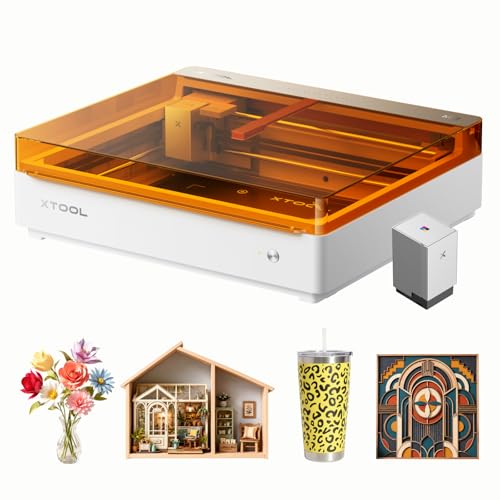
- Laser engraving plus CMYK inkjet in one machine
- Dual cameras for live preview and positioning
- Class 1 enclosed design for home crafting
Best For: DIY crafters making personalized gifts and colorful projects
Best Value Compact Cutter
Twotrees TTS-55 Pro 5.5W Laser Engraver

- 5.5W laser with air-assist support
- Up to 30,000mm/min engraving speed
- Works with LightBurn and LaserGRBL
Best For: Hobbyists wanting a compact, software-friendly cutter
Smart Beginner-Friendly Choice
Creality Falcon A1C 10W Mini Laser

- Smart camera plus auto focus
- 15-second quick-swap laser modules
- Class 1 enclosed safety features
Best For: Beginners and compact-workspace users
Compact 10W Diode Workhorse

- 10W diode laser for wood, acrylic, leather, and coated metal
- 300 x 300mm workspace for small desktop projects
- Supports LightBurn, LaserGRBL, app control, and TF-card offline use
Best For: Hobbyists and small sellers needing a compact engraving-focused machine
Detail-Focused 12W Cutter

- True 12W laser for engraving and cutting across 100+ materials
- 0.01mm positioning accuracy for fine text and detailed artwork
- 300 x 300mm workspace with safety shield and motion protection
Best For: Users who want fine detail and accessory-driven expandability
Beginner-Friendly A4 Creator

- Quick 3-minute assembly with beginner-friendly software and app control
- Compact A4 workbed for everyday desk-sized projects
- Verified 10.36–10.58W output with 300+ material support
Best For: Beginners who want easy setup and a compact, flexible machine
Professional High-Power Pick – Creality Falcon2 Pro 60W Desktop Laser Cutter
For buyers comparing desktop laser cutting machines, the Creality Falcon2 Pro stands out for speed, enclosure safety, and serious cutting power. Its 60W output, built-in camera, and batch-friendly workflow make it a strong fit when you need a machine that can handle larger jobs efficiently on wood, acrylic, and other compatible materials.
Best For: Small studios, sole traders, and advanced makers who want a fully enclosed high-power cutter for faster batch work.
Pros:
- Native 60W output with claims of cutting through 40mm basswood and 60mm black acrylic in a single pass
- Engraving speed over 500mm/s for higher-throughput production
- Built-in camera and intelligent focus help with positioning and reduce manual measuring
- Class 1 enclosed design with flame detector, emergency stop, safety lock, and other protections
Cons:
- More machine than a casual hobbyist may need
- Designed primarily for wood and acrylic, so material fit matters
- Larger, enclosed format may take more dedicated workspace
If you want a desktop laser cutting machine built around output, speed, and safer enclosed operation, this Falcon2 Pro is aimed at users who value production efficiency over entry-level simplicity.
Most Versatile Craft System – xTool M2 10W Color Craft Laser
Among desktop laser cutting machines, the xTool M2 is aimed at creators who want more than basic engraving. It combines a 10W laser with CMYK inkjet printing, dual cameras, and a fully enclosed Class 1 design, making it a flexible option for personalized crafts, gifts, and print-to-cut projects.
Best For: DIY crafters and small gift makers who want laser cutting plus full-color printing in one machine.
Pros:
- Combines CMYK inkjet printing and laser work in a single setup
- Built-in dual cameras support real-time preview and more accurate placement
- Works with 300+ materials, including cardstock, felt, leather, wood, and more
- Class 1 enclosed safety design is suited for home use
Cons:
- 10W output is less powerful than higher-wattage cutters
- Some power options and modules are sold separately
- Best for crafts and personalization, not heavy-duty production cutting
The M2 makes sense if your projects mix cutting, engraving, and color decoration. It is less about brute force and more about an efficient all-in-one workflow for creative work.
Best Value Compact Cutter – Twotrees TTS-55 Pro 5.5W Laser Engraver
If you’re shopping desktop laser cutting machines for a smaller workspace, the Twotrees TTS-55 Pro focuses on precision and affordability-minded features. With 5.5W output, air-assist support, and a compact 300x300mm work area, it suits hobby users who want cleaner cuts and broad software compatibility.
Best For: Hobbyists and small-business users who want an approachable desktop cutter with air-assist support.
Pros:
- 5.5W laser with air-assisted nozzle support for cleaner, deeper cuts
- Fine spot focus and compression laser technology for detailed engraving
- Fast 32-bit control board with up to 30,000mm/min engraving speed
- Compatible with LaserGRBL and LightBurn, plus Wi-Fi and TF card support
Cons:
- Lower power than larger desktop laser cutting machines
- Smaller working area at 300x300mm
- Best for thinner materials rather than heavy cutting tasks
This is a practical pick if you want solid features without moving into higher-powered, more expensive machine categories. It balances usable cutting performance with flexible software and control options.
Smart Beginner-Friendly Choice – Creality Falcon A1C 10W Mini Laser
The Creality Falcon A1C fits well in a desktop laser cutting machines roundup for users who want smart setup features and a compact, portable form factor. Its enclosed Class 1 design, smart camera, auto focus, and modular laser head support make it especially appealing for beginners who want a guided workflow.
Best For: Beginners and space-conscious makers who want an easy-to-use enclosed desktop laser engraver.
Pros:
- Smart camera and auto focus help with positioning and setup
- 15-second quick-swap modular design supports compatible laser heads
- Up to 15,000 mm/min engraving speed with rigid-frame precision
- Class 1 enclosed design with flame detection, tilt protection, and USB safety lock
Cons:
- 10W diode module is not the most powerful option in the category
- Additional compatible modules are sold separately
- Portable design may be better suited to light-to-moderate workloads
For shoppers who want a compact machine that lowers the learning curve, the Falcon A1C offers a strong mix of automation, safety, and material flexibility without feeling overwhelming.
Compact Enclosed Starter – ACMER K1 12W Compact Engraver
If you want a desktop laser cutting machine that feels approachable from day one, the ACMER K1 is built around simplicity, safety, and compact use. It combines a small 150×150mm work area with beginner-friendly software, AI-assisted design tools, and compatible options like LightBurn and LaserGRBL for a smoother start.
Best For: Home crafters, small shops, and beginners who want a compact enclosed diode engraver with easy software support.
Pros:
- Class 1 enclosed design with a built-in exhaust fan for safer home or studio use
- Free Acmerstudio software plus AI tools, with support for LightBurn and LaserGRBL
- 12W output option, 0.08×0.08mm laser spot, and up to 10,000mm/min motion speed
- Lightweight 2.4kg frame that is easy to move and fits small workspaces
Cons:
- 150×150mm work area is limited for larger projects
- Best suited to small-scale jobs rather than high-volume production
Overall, the ACMER K1 is a practical entry point if you value enclosure, portability, and straightforward software more than large-format capacity. It is a strong fit for gifts, signage, and small craft production where compact size matters.
All-in-One Precision Kit – BlazeX M3 10W Precision Kit
The BlazeX M3 is aimed at buyers who want a desktop laser cutting machine with precision, safety features, and a more complete starter bundle. Its 10W laser module, 0.01mm ultra-fine accuracy, and included enclosure, honeycomb bed, and materials make it especially appealing for creative users who want to start quickly.
Best For: Beginners, hobbyists, and small-batch creators who want a feature-rich laser engraver with strong precision and bundled accessories.
Pros:
- 0.01mm ultra-precision and 10W laser module for detailed engraving
- Works across 300+ materials, including wood, leather, glass, and coated metal
- Includes enclosure, tool kit, 13 engraving materials, and a honeycomb laser bed
- Class 1 safety design with fan exhaust and smart tilt/lid stop sensors
Cons:
- Accessory-heavy bundle may be more than some buyers need
- Performance is geared toward desktop DIY and small-batch use rather than large workpieces
In practical terms, the BlazeX M3 stands out when you want to open the box and get to work with fewer add-on purchases. It offers a good balance of precision, safety, and expandability for everyday creative projects.
Upgraded Workhorse – WIZMAKER WAND 12W Desktop Cutter
The WIZMAKER WAND is a solid pick if you’re shopping desktop laser cutting machines for more power and a larger work area. With 12W output, a 300×300mm workspace, and compatibility with LightBurn and LaserGRBL, it is designed to move beyond basic entry-level performance while staying approachable.
Best For: Makers, classrooms, and small businesses that want a larger desktop engraver with stronger cutting performance.
Pros:
- 12W power delivers deeper engraving and faster cutting than typical 5W–6W diode machines
- Large 300×300mm work area supports bigger projects
- 0.01mm positioning accuracy and stable motion for sharp text, logos, and artwork
- LightBurn and LaserGRBL support with WiFi, hotspot, and USB connectivity
Cons:
- Still a diode desktop machine, so it is best for small to mid-sized projects
- Rotary accessories and infrared modules are optional extras
Compared with smaller beginner models, the WAND gives you more room to grow without leaving the desktop category. It is a sensible upgrade if you want more cutting depth, more workspace, and a machine ready for more ambitious maker jobs.
Compact 10W Diode Workhorse – Twotrees TTS-10 Pro
If you’re comparing desktop laser cutting machines for small DIY jobs, the Twotrees TTS-10 Pro is built around a 10W diode laser and a 300 x 300mm work area. It’s aimed at engraving and light cutting on materials like wood, bamboo, acrylic, leather, dark glass, and coated or anodized metal, with offline TF card use and support for LightBurn and LaserGRBL.
Best For: Hobbyists, educators, and small sellers who want a compact desktop laser cutting machine for engraving and small-format projects.
Pros:
- 10W optical power with fast engraving and a fine laser spot.
- 300 x 300mm workspace fits coasters, keychains, phone cases, and small signs.
- Supports online use, app control, WEB control, and TF card offline engraving.
- Full metal frame with dual Y-axis motors and included assembly tools.
Cons:
- Not recommended for bare steel or uncoated metal without marking spray.
- Work area may be too small for larger projects over 12 inches.
- Best suited to engraving and lighter cutting rather than heavy-duty production.
Overall, the TTS-10 Pro is a practical entry point if you want a desktop laser cutting machine with a straightforward feature set, offline flexibility, and enough workspace for everyday personalized projects.
Detail-Focused 12W Cutter – ACMER S2
For buyers weighing desktop laser cutting machines, the ACMER S2 stands out with a true 12W laser module, a 300 x 300mm workspace, and fine-positioning specs aimed at detailed work. It supports ACMER Studio, LightBurn, and LaserGRBL, and it’s designed to handle engraving plus deeper cutting across a wide range of materials.
Best For: Makers who want a detail-oriented desktop laser cutting machine with room to expand into more advanced setups.
Pros:
- True 12W laser with support for engraving and cutting on 100+ materials.
- 0.01mm positioning accuracy and a fine 0.08 x 0.08mm laser spot.
- 300 x 300mm workspace is suitable for signs, layered art, and multi-piece layouts.
- Includes safety goggles and an anti-UV shield, with motion protection for added safety.
Cons:
- Deeper cutting requires multiple passes on thicker materials.
- Best results may depend on optional accessories like air assist or risers.
- Still a desktop-format machine, so it’s not meant for large-format production work.
The S2 is a strong choice if precision matters more than raw size, giving desktop laser cutting machine shoppers a flexible platform that can grow with accessories and project complexity.
Beginner-Friendly A4 Creator – K15 Pro 10W
If you want desktop laser cutting machines that are easy to start with, the K15 Pro is designed around a beginner-friendly workflow. It offers a compact A4 workbed, verified 10.36–10.58W output, TF card offline engraving, app control, and compatibility with LightBurn and LaserGRBL, while also including a full starter kit and quick assembly.
Best For: Beginners and home creators who want a compact desktop laser cutting machine with simple setup and strong software flexibility.
Pros:
- Assembles in about 3 minutes with just 6 screws.
- Free CutLabX software, plus LightBurn and LaserGRBL compatibility.
- Compact A4 workbed suits everyday projects without taking much desk space.
- 10W diode module supports engraving and cutting on 300+ materials.
Cons:
- A4 workspace is compact, so it won’t suit larger-format jobs.
- Bare-metal engraving requires the optional 1W IR laser head.
- Feature set is geared more toward ease of use than high-volume production.
The K15 Pro makes a strong case for first-time buyers who want a desktop laser cutting machine that feels approachable, runs offline, and still leaves room to grow with add-on accessories.
How We Picked These Desktop Laser Cutting Machines
We prioritized practical buying factors: usable workspace, laser power, enclosure and safety features, camera or autofocus tools, material compatibility, and whether the machine looks suited to hobby, maker, or small-business use. We also favored models that offer a better mix of convenience and control rather than raw specs alone.
Quick Comparison
In this group, higher-power enclosed machines are better for faster batch work and thicker materials, while smaller 10W units typically offer a more approachable balance of detail, footprint, and price. Compact open-frame models can be strong value picks, but enclosed designs are usually easier to live with indoors.
Key Buying Factors for Desktop Laser Cutting Machines
Laser Power and Material Goals
Power affects speed and cut depth more than almost any other spec. If you mainly engrave wood, leather, coated metals, or craft blanks, 10W-class machines may be enough. If you want more cutting headroom or plan to run repetitive jobs, a higher-power option can save time.
Work Area and Footprint
Choose a bed size that matches your projects, not just your bench space. A larger work area supports signs, panels, and batch layouts, while smaller machines fit better in apartments, classrooms, and tight studios.
Safety and Enclosure Design
For many buyers, enclosed Desktop Laser Cutting Machines are the smartest choice. A Class 1 design, integrated cover, air assist, and camera monitoring can make everyday operation simpler and more comfortable, especially if children, pets, or coworkers are nearby.
Ease of Use Features
Auto focus, built-in cameras, offline operation, and smart alignment tools reduce setup time and errors. These features matter most if you plan to do frequent short runs, custom orders, or detailed engraving with repeatable placement.
Software and Workflow
Make sure the machine supports the file types and software workflow you already use. A smoother setup often matters more than a small spec difference, especially for first-time buyers.
Who Should Buy Which Desktop Laser Cutting Machines?
If you want maximum versatility for a home business, look at higher-power enclosed machines with batch-friendly features. If you value color customization, classroom-friendly safety, or a polished all-in-one setup, a premium enclosed system may be worth it. If your priority is affordability and learning the basics, a compact 10W or 5.5W unit is often the best entry point.
In short, the best Desktop Laser Cutting Machines are the ones that fit your workspace, your materials, and how often you plan to use them. Match the machine to your real workflow, and you’ll get far better long-term value.