Choosing your first DMX controller can feel complicated, especially when channel counts, scenes, fixtures, MIDI, and wireless control all compete for attention. The right console should match your lights, setup size, and comfort with programming.
We compared 10 DMX controllers for beginners, from compact mini consoles to app-based and higher-capacity options, to help you find a practical starting point for parties, venues, mobile DJs, and small stages.
Best 10 Dmx Controllers for Beginners Picks for 2026
Best Starter Console
14-Channel Mini DMX Controller
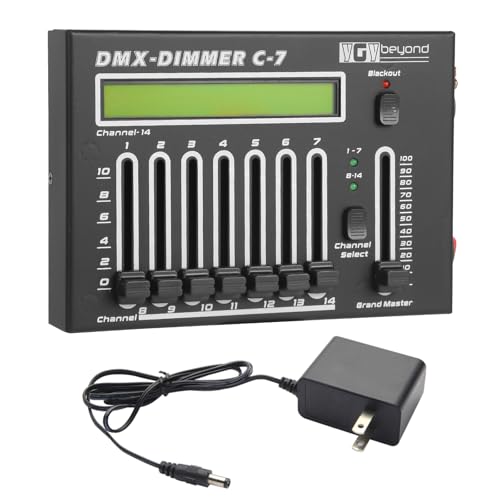
- Simple 14-channel manual control
- LCD, Grand Master, and Blackout controls
- Compact option for small events
Best For: Beginners managing small DMX lighting setups
Best Software-Integrated Pick

- Direct SoundSwitch software control
- Two DMX universe inputs and outputs
- Touch strip, pads, and encoders for live use
Best For: DJs using compatible software or Engine DJ hardware
Best High-Capacity Option

- 384 channels for up to 24 fixtures
- 240 scenes and six programmable chases
- MIDI and music-triggered lighting modes
Best For: Larger DJ, club, and stage lighting systems
Creative Scene Builder

- 384 channels support detailed lighting control
- 30 banks with 8 programmable scenes each
- LED gooseneck light and protective handles
Best For: Growing stage-lighting setups needing hands-on scene control
App-Based Simplicity
ADJ MyDMX Go Wireless Controller

- Tablet-based 256-channel DMX control
- 15,000-plus fixture library
- Presets and automatic effects reduce programming
Best For: Tablet-based control for mobile DJs and quick setups
Beginner-Friendly Essentials

- Controls 12 fixtures with 16 channels each
- Sound-activated, auto, and manual modes
- Includes cable, power cord, and 2-year warranty
Best For: First-time users wanting hands-on and sound-responsive control
Compact Control

- Manual control for up to 12 DMX channels
- Compact aluminum housing for portable setups
- Standard 3-pin XLR DMX output
Best For: Small lighting rigs and simple dimming control
Beginner Programming
192-Channel DMX Stage Controller
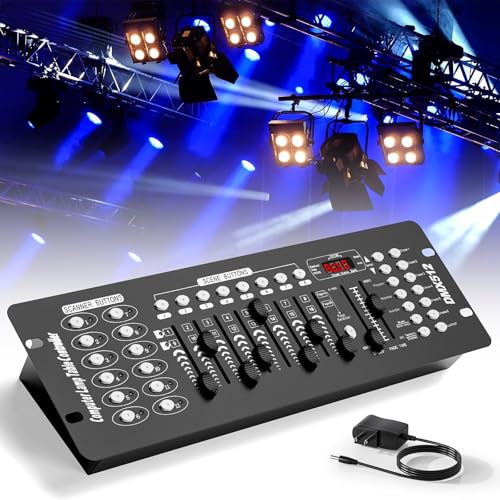
- 192 channels for up to 12 devices
- Programmable scenes and six chases
- Manual sliders plus automatic operation
Best For: Small parties and learning programmed DMX shows
Flexible Stage Control

- 384-channel control for up to 12 lights
- 2.4G wireless and 3-pin wired modes
- Sound, MIDI, auto, and manual control
Best For: DJs and indoor events needing flexible control options
Best Starter Console – 14-Channel Mini DMX Controller
For shoppers comparing dmx controllers for beginners, this compact 14-channel console keeps the essential controls easy to understand. Its dedicated faders, LCD display, grand master, and blackout button make it a practical choice for small lighting setups without requiring complicated programming.
Best For: Beginners running PAR lights, DJ lights, strobes, or other DMX fixtures at parties, weddings, bars, KTV venues, and small performances.
Pros:
- Supports standard DMX512 and works with many common stage and DJ fixtures.
- Seven faders per page switch between channels 1–7 and 8–14.
- Grand Master and one-touch Blackout controls simplify overall brightness and emergency shutoff.
- Compact, lightweight design with a clear LCD display.
Cons:
- Limited to 14 channels, so it may not suit larger or more complex rigs.
- Manual fader-based control offers less automation than programmable consoles.
This is a sensible entry-level option when portability and straightforward manual control matter more than extensive scene programming. It provides the core controls beginners need for small venues and mobile events.
Best Software-Integrated Pick – SoundSwitch Control One
The SoundSwitch Control One is a strong choice for beginners who want hands-on control while building computer- or DJ-based light shows. It integrates directly with SoundSwitch software and compatible Engine DJ hardware, adding tactile pads, encoders, and a touch strip for live adjustments.
Best For: DJs and performers who want software-driven lighting control, music synchronization, and live access to color, brightness, strobes, moving heads, and gobos.
Pros:
- Provides 1:1 control for SoundSwitch software with two DMX universe inputs and outputs.
- Works plug-and-play with compatible Denon DJ and Numark Engine DJ devices.
- Touch strip, encoders, and RGB performance pads support responsive live adjustments.
- Live Audio BPM detection can sync lighting with bands, DAWs, or DJ software audio.
Cons:
- Its main workflow depends on SoundSwitch software for full functionality.
- Some compatibility setups require a computer, including rekordbox PRO DJ LINK Bridge use.
Unlike a basic standalone console, Control One is best understood as a tactile interface for a broader lighting-software ecosystem. It suits users ready to combine hardware control with automated and scripted shows.
Best Expandable Console – MINGJIE 192-Channel DMX Controller
The MINGJIE 192-channel console gives beginners a clear path from basic operation to programmed lighting shows. Its separated control sections are approachable at first, while support for 12 intelligent fixtures, stored scenes, chases, and sound activation provides room to grow.
Best For: New operators who need more capacity for moving heads, PAR lights, strobes, fog machines, parties, clubs, weddings, or small stage productions.
Pros:
- Controls up to 192 channels across as many as 12 intelligent fixtures.
- Stores 240 scenes in 30 banks and supports six programmable chases.
- Offers both sound-activated operation and detailed manual programming.
- Includes a 3-pin DMX cable and supports 100–240V input.
Cons:
- Its larger feature set may require more setup time than a basic mini controller.
- At 20.2 inches long, it is less portable than compact beginner consoles.
This model is a useful middle ground for beginners who expect their lighting system to expand. The structured layout helps with learning, while its scene and chase capacity avoids an immediate upgrade as the setup becomes more involved.
Best High-Capacity Option – Rockville ROCKFORCE 384
For beginners who need substantial fixture capacity, the Rockville ROCKFORCE 384 combines a familiar slider layout with programmable scenes, chases, MIDI, and music mode. It can control up to 24 intelligent lights, making it better suited to larger DJ, club, and stage systems than compact entry-level consoles.
Best For: DJs, clubs, and stage users who need extensive channel control, programmable light shows, MIDI operation, and automatic music-triggered effects.
Pros:
- Offers 384 channels for up to 24 intelligent lights with 16 channels each.
- Stores 240 scenes across 30 banks and six programmable chases.
- Includes MIDI control, a built-in microphone, manual override, and music mode.
- Metal housing, LED display, gooseneck lamp, and power-failure memory support live use.
Cons:
- Its 20.71-inch, 5.3-pound design is less convenient for highly portable setups.
- The extensive controls may feel more complex than necessary for a small beginner rig.
- It is designed for fixtures using up to 16 channels each, which may require planning during setup.
The ROCKFORCE 384 is a forward-looking purchase for beginners who already expect to operate many fixtures. It provides substantial programming capacity and live-control features, though a smaller console may be easier for very simple setups.
Creative Scene Builder – 384-Channel DMX Controller
For beginners shopping for DMX controllers for beginners, this console offers substantial room to grow. Its 384 channels, 24-fixture capacity, and scene-based programming support more detailed stage-lighting setups while remaining a dedicated, hands-on controller.
Best For: Beginners who want a traditional console with extensive scene storage for bar, club, live-show, or stage-lighting use.
Pros:
- Provides 384 DMX channels for detailed fixture control.
- Stores 30 banks with 8 programmable scenes each.
- Includes an LED gooseneck light and protective gel handles.
- Supports DMX512 control and 24 fixtures.
Cons:
- Its larger channel and scene layout may take time for complete beginners to learn.
- It is a corded console rather than an app-based wireless controller.
This is a practical choice when you want physical controls and plenty of programming capacity. It makes more sense for users planning to expand beyond a very small lighting rig.
App-Based Simplicity – ADJ MyDMX Go Wireless Controller
The ADJ MyDMX Go is one of the more approachable DMX controllers for beginners because it moves much of the operation to an iPad or Android tablet. Its app-based interface, fixture library, presets, and automatic effects reduce the need for traditional programming.
Best For: Beginners and mobile DJs who prefer tablet-based control, wireless operation, and quick lighting effects.
Pros:
- Uses a 256-channel DMX lighting-control app.
- Offers a fixture library with more than 15,000 fixtures.
- Includes 50 user presets and 21 automatic effects.
- Supports Wi-Fi and USB connectivity and can connect to two lighting universes.
Cons:
- Requires an iPad or Android tablet for app-based operation.
- Additional upgrades are available separately.
- Its control approach depends on compatible app and fixture support.
Choose this model if avoiding traditional programming is a priority. The combination of presets, automatic effects, and broad fixture-library support makes it especially convenient for quick setup and mobile performances.
Beginner-Friendly Essentials – 192-Channel DMX Console
For shoppers comparing DMX controllers for beginners, this 192-channel console emphasizes straightforward physical operation. Its organized control sections, sound-activated mode, and included cable and power cord make it a practical starting point for small to mid-sized lighting setups.
Best For: First-time users, DJs, bands, clubs, weddings, and church services needing manual, automatic, or sound-responsive control.
Pros:
- Controls up to 12 fixtures with 16 channels each.
- Stores up to 240 programmable scenes.
- Built-in microphone enables sound-activated lighting.
- Includes a DMX cable, power cord, manual, and 2-year warranty.
Cons:
- Its 192-channel capacity is lower than the 384-channel option.
- Physical faders and multiple control sections still require hands-on learning.
This is a sensible entry point for users who want dedicated controls without jumping immediately to a larger console. Sound activation and multiple operating modes also let beginners create effects before mastering detailed programming.
Compact Control – MAD OWL 12-Channel DMX Dimmer
For beginners looking at dmx controllers for beginners, the MAD OWL 12 Channel DMX dimming controller offers a straightforward way to manage smaller DMX512 lighting setups. Its six sub-control faders and one master fader provide hands-on control for up to 12 channels, while the compact aluminum housing is easy to transport.
Best For: Beginners controlling small stage lighting fixtures with 12 or fewer DMX channels.
Pros:
- Simple layout with six sub-control faders, a master fader, and one-key blackout.
- Supports DMX512 fixtures through a standard 3-pin XLR output.
- Lightweight, compact aluminum design suited to travel and quick installation.
Cons:
- Cannot control stage lighting equipment requiring more than 12 channels.
- Designed primarily for dimming and manual control rather than complex programmed shows.
This is a practical entry-level choice when you want tactile, uncomplicated control and your fixtures have modest channel requirements. Check your lights’ DMX channel count before buying.
Beginner Programming – 192-Channel DMX Stage Controller
Among dmx controllers for beginners, this 192-channel console provides a broader introduction to scene and chase programming than a basic dimmer board. It supports up to 12 devices with 16 channels each, includes manual sliders, and offers programmable scenes for parties, shows, and small stage setups.
Best For: Beginners who want to learn scene, chase, and manual control across several DMX fixtures.
Pros:
- Controls up to 12 devices across 192 total channels.
- Provides 23 programmable banks, six chases, and up to 240 scenes.
- Includes eight sliders, automatic speed and fade controls, and a 3-pin cable.
Cons:
- The interface has multiple control sections that may take practice to learn.
- Its listed design is aimed at small gatherings rather than highly complex professional systems.
This controller is a sensible step up for beginners who want programmable lighting effects without moving immediately to a more advanced console. Its 192-channel limit and 16-channel-per-device layout should be matched to your fixtures.
Flexible Stage Control – DMX512 384-Channel Controller
For beginners who expect their lighting setup to grow, this DMX512 controller combines 384-channel wired control with 2.4G wireless operation. It supports up to 12 intelligent lights, includes manual faders and an LED display, and adds sound-activated, automatic, and MIDI control modes.
Best For: Beginners setting up flexible lighting for weddings, bars, DJs, and indoor stages.
Pros:
- Offers 384 DMX512 channels for detailed control of up to 12 intelligent lights.
- Supports both 2.4G wireless transmission and traditional 3-pin XLR wiring.
- Includes sound activation, MIDI, automatic, manual, blackout, and programmable scene functions.
Cons:
- Its larger feature set may require more learning than a basic manual dimmer.
- Wireless operation depends on compatible equipment and setup conditions.
- The product notes specify a 9V battery requirement, so power planning is important.
This is the most flexible option here for a beginner who wants room to experiment with programmed scenes and multiple control methods. It is particularly useful when a venue makes wireless placement convenient, while wired XLR remains available.
How We Picked These Dmx Controllers for Beginners
We focused on the features that matter most when learning DMX lighting: fixture capacity, channel count, scene and bank storage, blackout and master controls, programming workflow, portability, and connection options. The selection includes simple 12- and 14-channel consoles, 192- and 384-channel controllers, MIDI-compatible models, and app-based wireless systems.
Because “beginner-friendly” depends on the setup, we considered both ease of use and room to grow. A compact controller may be ideal for a few fixtures, while a larger console can make more sense if you expect to add moving heads, fog machines, or additional LED effects.
Quick Comparison
- Best for simple party lighting: A compact 12- or 14-channel mini controller with physical faders and blackout control.
- Best for learning traditional DMX programming: A 192-channel console with scenes, banks, and fixture controls.
- Best for larger or expanding setups: A 384-channel controller with more fixture capacity and program storage.
- Best for software-based control: An app-connected system such as a wireless DMX controller.
- Best for hybrid setups: A model with MIDI, sound activation, and wired or wireless DMX options.
Key Buying Factors for Dmx Controllers for Beginners
Channel and Fixture Capacity
Check how many DMX channels each fixture requires before choosing a console. A controller’s advertised channel count is not always the same as the number of lights it can operate. A basic RGB fixture might use a few channels, while a moving head can require many more. Leave spare capacity for future additions.
Programming and Live Operation
Scenes, banks, chases, and fixture buttons help you save and recall lighting looks. Physical faders are useful for learning individual channel control, while app-based interfaces can simplify setup but may require a phone, tablet, or computer. Blackout and grand-master controls are valuable during live events.
Connectivity and Compatibility
Confirm that the controller uses standard DMX connections compatible with your fixtures and that it supports the cable type your equipment requires. Wireless DMX can reduce cable runs, but wired DMX is often easier to troubleshoot. MIDI and sound-activation features are useful if you want lighting to respond to music or external control gear.
Portability and Build
For mobile DJs and small events, prioritize a compact design, clear controls, and a sturdy enclosure. Larger consoles offer more direct control but take up more space. Also check whether the unit includes the necessary power supply, DMX cable, software access, or wireless hardware.
Who Should Buy Which Dmx Controllers for Beginners?
Choose a mini controller if you are controlling a small number of simple fixtures at parties, bars, bedrooms, or small stages. It is usually the least intimidating way to learn basic DMX operation.
Choose a 192-channel console if you want hands-on programming for several fixtures and plan to build scenes and chases without relying on a computer.
Choose a 384-channel or MIDI-capable model if you operate a more varied lighting rig, use fog effects, or want additional control through music software or hardware.
Choose an app-based wireless controller if quick setup, remote operation, and a modern software workflow matter more than traditional faders. Before buying, verify device compatibility and whether the required wireless accessories are included.