Choosing the right rudder pedals can make a huge difference in control, immersion, and landing precision. If you want smoother taxiing, better coordinated turns, and more natural rudder authority, the right set matters.
Below, we’ve narrowed the field to 10 strong options for different budgets, setups, and sim priorities.
Best 10 Flight Simulator Pedals for PC Picks for 2026
Precision Rudder Control
Logitech G Pro Flight Rudder Pedals

- Self-centering rudder feel
- Adjustable tension dial
- Differential toe brakes
Best For: PC sim pilots who want adjustable rudder feel and toe-brake control.
All-in-One Starter Pack
Thrustmaster T16000M FCS Flight Pack

- Precision joystick with H.E.A.R.T technology
- Ambidextrous design with removable parts
- Twist rudder plus 16 buttons and POV hat
Best For: PC flyers who want a precision joystick pack with twist-rudder control.
Modern Cross-Platform Pedals
Turtle Beach VelocityOne Rudder Pedals
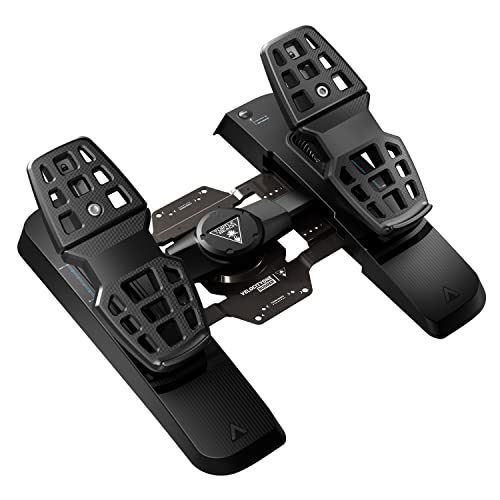
- Ultra-smooth rudder axis
- Hall effect sensors in all axes
- Adjustable brakes and pedal width
Best For: PC sim pilots who want adjustable, sensor-driven pedals with modern hardware features.
Complete Cockpit Bundle
Logitech G Pro Flight Yoke System Bundle

- Includes matching yoke and rudder pedals
- 54+ programmable controls
- Self-centering pedals with toe brakes
Best For: PC sim enthusiasts who want a matched yoke-and-pedal setup.
Best for Easy Setup
Thrustmaster TFRP Flight Sim Pedals

- Long rudder travel for smooth, accurate turns
- Self-centering axis for balanced response
- SMART rail system with four aluminum rails
Best For: PC sim pilots wanting smooth, stable rudder control
Complete Combat Setup
Logitech G X56 + Pro Flight Rudder Pedals Bundle

- Bundle includes HOTAS plus rudder pedals
- Self-centering pedals with adjustable tension
- Differential toe brakes for runway control
Best For: PC sim fans who want a complete control bundle
Premium PC Pedals
Honeycomb Charlie Rudder Pedals
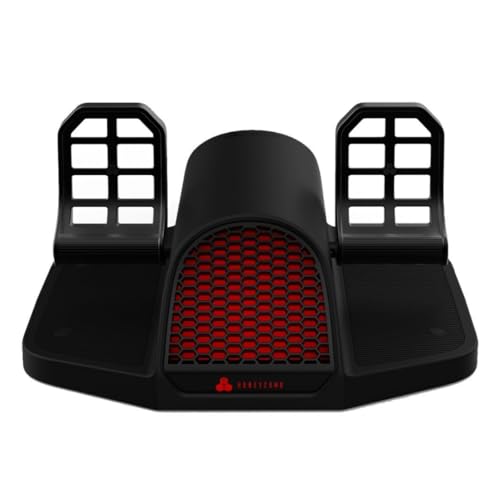
- Durable aluminum build with belt drive system
- Hall Effect sensors for precise control
- Adjustable feet angles and toe brake axes
Best For: PC pilots wanting premium, adjustable rudder pedals
Budget-Friendly Starter Combo
ThrustMaster TFRP Rudder Pedals & T16000M FCS HOTAS for PC

- S.M.A.R.T. slide rails for smooth rudder steering
- Removable heel rests and large differential brake pedals
- PC USB compatibility with bundled HOTAS controls
Best For: PC sim pilots who want an affordable all-in-one entry point
Premium Precision Pedals
Thrustmaster TPR Rudder Pedals for PC

- Pendular mechanism for realistic pedal motion
- H.E.A.R.T HallEffect sensors with frictionless precision
- Adjustable spring resistance for customized feel
Best For: Serious PC flight sim enthusiasts who want realistic feel and long-term precision
Complete Console-and-PC Flight Kit
Thrustmaster T-Flight Full Kit HOTAS with Rudder Pedals

- Includes TFRP pedals with S.M.A.R.T slide rails
- HOTAS setup adds throttle, stick, axes, and programmable buttons
- Official Xbox integration plus PC compatibility
Best For: Sim pilots who want a complete HOTAS-and-pedals package for both PC and Xbox use
Precision Rudder Control – Logitech G Pro Flight Rudder Pedals
If you’re shopping for flight simulator pedals for pc, the Logitech G Pro Flight Rudder Pedals focus on smooth, accurate control with a self-centering feel that suits serious sim setups. The adjustable tension dial lets you tune the resistance for a lighter aircraft response or a heavier jet-like feel, while differential toe brakes add the runway control you expect from dedicated pedals.
Best For: PC sim pilots who want adjustable rudder feel and toe-brake control.
Pros:
- Smooth, accurate self-centering rudder action.
- Adjustable tension dial changes the pedal feel.
- Differential toe brakes improve runway stopping control.
- USB 2.0-compliant with Windows 7, 8, 8.1, and 10 support.
Cons:
- Designed for Windows PCs, not cross-platform use.
- Optional software download requires an internet connection.
These pedals are a strong fit if you want a dedicated rudder set that prioritizes realism and fine adjustment. The technical specs are straightforward, and the overall package is aimed at simmers who want more nuanced pedal control than a twist-axis setup.
All-in-One Starter Pack – Thrustmaster T16000M FCS Flight Pack
For shoppers comparing flight simulator pedals for pc, this Thrustmaster T16000M FCS Flight Pack is really a joystick-focused kit built for precision and flexible control on Windows PCs. The T.16000M FCS uses H.E.A.R.T technology for consistent accuracy, includes an ambidextrous design, and adds twist rudder control, so it covers a lot of flying inputs without needing separate rudder pedals right away.
Best For: PC flyers who want a precision joystick pack with twist-rudder control.
Pros:
- Compatible with PC via USB on Windows 32-bit and 64-bit.
- H.E.A.R.T technology is designed for long-lasting precision.
- Fully ambidextrous with removable components for left- or right-handed use.
- Includes 16 action buttons, POV hat, 4 axes, and twist rudder.
Cons:
- Twist rudder is not the same as dedicated pedal control.
- Best suited to Windows PC use only.
This pack makes sense if you want a compact control solution that still offers a strong set of flight inputs. It is especially appealing for newcomers or players who prefer an all-in-one setup before moving to separate pedals.
Modern Cross-Platform Pedals – Turtle Beach VelocityOne Rudder Pedals
If you want flight simulator pedals for pc with a more modern feature set, the Turtle Beach VelocityOne Universal Rudder Pedals bring smooth rudder movement, adjustable brakes, and customizable pedal width. The hall effect sensors in all axes and swappable springs point to a setup built for consistent, responsive control, while the stable non-slip base helps keep the pedals planted during use.
Best For: PC sim pilots who want adjustable, sensor-driven pedals with modern hardware features.
Pros:
- Ultra-smooth rudder axis with swappable springs.
- Differential brakes and adjustable pedal width.
- Non-contact Hall Effect sensors in all axes.
- Stable, non-slip base for better placement.
Cons:
- Xbox use requires the VelocityOne Flight Control System.
- Cross-platform compatibility may add setup constraints.
This is a compelling option if you want pedals that emphasize adjustability and sensor quality. For PC users, it offers a feature-rich alternative to more basic rudder setups.
Complete Cockpit Bundle – Logitech G Pro Flight Yoke System Bundle
For buyers looking at flight simulator pedals for pc alongside a matching control set, this Logitech G Pro Flight Yoke System + Pro Flight Rudder Pedals Bundle combines the yoke and pedals in one package. The bundle gives you realistic yoke controls, smooth self-centering rudder pedals, and differential toe brakes, making it a practical way to build a more complete flight-sim cockpit without piecing together separate gear.
Best For: PC sim enthusiasts who want a matched yoke-and-pedal setup.
Pros:
- Includes both the Pro Flight Yoke System and Rudder Pedals.
- Self-centering pedals with differential toe brakes.
- Yoke provides 14 buttons, POV hat, and 3-position mode switch.
- Offers at least 54 programmable controls in the bundle.
Cons:
- Bundle may be more than needed if you only want pedals.
- Foot rests are designed to adjust, but the package is still a larger cockpit-style setup.
This bundle is the easiest way to get a coordinated control ecosystem for PC flight sim use. It is best for users who want a more immersive setup and value having both yoke and rudder inputs from the start.
Best for Easy Setup – Thrustmaster TFRP Flight Sim Pedals
If you want flight simulator pedals for pc that focus on smooth, realistic rudder input, the Thrustmaster TFRP is built for coordinated control and long-session comfort. Its long pedal travel, self-centering action, and four-aluminum-rail SMART sliding system are aimed at sim pilots who want precise turns without fighting the hardware.
Best For: PC sim pilots who want an accessible, stable rudder pedal set with smooth travel and consistent control.
Pros:
- Long rudder axis travel supports fine, accurate control inputs.
- Self-centering design helps keep pedal response balanced and predictable.
- SMART rail sliding system uses four aluminum rails for smooth, friction-free motion.
- Ergonomic build and secure mounting help with comfort and stability during long flights.
Cons:
- Toe brake details are not highlighted in the supplied notes.
- Broad platform compatibility may matter less if you only need PC use.
This is a practical choice if you value straightforward realism over extra complexity. For Microsoft Flight Simulator and other top flight sim games, it offers the kind of predictable pedal feel that can make takeoffs, taxiing, and coordinated turns easier to manage.
Complete Combat Setup – Logitech G X56 + Pro Flight Rudder Pedals Bundle
This bundle is a strong pick if you want flight simulator pedals for pc paired with a high-control HOTAS setup. The included Pro Flight Rudder Pedals add self-centering rudder control, an adjustable tension dial, and differential toe brakes, while the X-56 brings the kind of customizable inputs that combat and space sim players often look for.
Best For: PC players building a more complete flight or space sim control setup with rudder pedals included.
Pros:
- Bundle combines the X-56 HOTAS with matching rudder pedals for a fuller setup.
- Rudder pedals are smooth, accurate, and self-centering.
- Adjustable tension dial lets you tune the pedal feel for lighter or heavier aircraft.
- Differential toe brakes add extra runway control.
Cons:
- Best value depends on whether you need both the HOTAS and pedals.
- May be more control than casual sim users need.
If you are assembling a serious sim cockpit on PC, this bundle saves you from piecing together separate controls. The pedals are the standout here for realistic ground handling and rudder work, while the X-56 adds a deep control layer for more demanding flying styles.
Premium PC Pedals – Honeycomb Charlie Rudder Pedals
For flight simulator pedals for pc with a more premium build, the Honeycomb Aeronautical Charlie Rudder Pedals emphasize precision and adjustability. The aluminum construction, belt drive system, magnetic Hall Effect sensors, and left and right toe brake axes make them a compelling fit for simmers who want detailed control and a more planted feel underfoot.
Best For: PC sim pilots who want durable, highly adjustable pedals with precise sensor-based control.
Pros:
- Durable aluminum construction with a new belt drive system.
- Magnetic Hall Effect sensors aim for more precise coordination and reduced correction.
- Left and right toe brake axes add more control options.
- Adjustable feet angles plus high-friction strips and carpet spikes improve fit and stability.
Cons:
- PC and Mac compatibility is listed; Xbox support needs a separate Honeycomb hub.
- Heavier, more substantial design may be less convenient to move around.
These are a strong match for sim pilots who care about precision and setup flexibility. If you want pedals that feel robust and offer adjustable ergonomics, the Charlie Rudder Pedals stand out as a refined PC-focused option for immersive flying.
Budget-Friendly Starter Combo – ThrustMaster TFRP Rudder Pedals & T16000M FCS HOTAS for PC
If you want flight simulator pedals for PC without jumping straight to a premium setup, this Thrustmaster bundle is a practical place to start. The TFRP pedals use the S.M.A.R.T. slide rail system for smooth rudder movement, while the included T.16000M FCS HOTAS adds a precise joystick and throttle setup for a more complete flight-control experience.
Best For: PC sim pilots who want an affordable all-in-one entry point with pedals and HOTAS controls.
Pros:
- S.M.A.R.T. slide rails provide smooth steering for rudder input.
- Ergonomic design includes removable heel rests for different foot positions.
- Large 10-inch differential brake pedals add more control on the ground.
- Compatible with PC via USB and works with a wide range of joysticks.
Cons:
- Designed as a bundled starter solution rather than a dedicated premium pedal set.
- PS4 compatibility depends on specific Thrustmaster joysticks sold separately.
Overall, this combo stands out if you need a straightforward way to add pedals and flight controls at once. It focuses on smooth rudder action, ergonomic comfort, and broad PC compatibility instead of high-end specialization.
Premium Precision Pedals – Thrustmaster TPR Rudder Pedals for PC
For flight simulator pedals for PC, the Thrustmaster TPR is built for users who care most about realism and precision. Its pendular suspended mechanism is designed to mimic natural aircraft pedal motion, while H.E.A.R.T HallEffect magnetic sensors deliver frictionless input with no mechanical wear.
Best For: Serious PC flight sim enthusiasts who want realistic feel, fine control, and long-term precision.
Pros:
- Pendul_r technology creates smooth, realistic rudder movement.
- H.E.A.R.T HallEffect sensors provide precise, frictionless operation.
- Adjustable spring resistance lets you tune pedal feel.
- Built for PC and aimed at demanding flight simulation sessions.
Cons:
- Large and heavy at 20.2 pounds, so it is not a compact option.
- Single-device purchase means you still need separate stick and throttle controls.
This is the most specialized option in the group if realism is the priority. It leans hard into precise yaw control, customizable resistance, and durable sensor technology for committed sim pilots.
Complete Console-and-PC Flight Kit – Thrustmaster T-Flight Full Kit HOTAS with Rudder Pedals
If you want flight simulator pedals for PC along with the rest of the cockpit controls, this full Thrustmaster kit keeps things simple. It combines a HOTAS setup with the TFRP rudder pedals, giving you smooth yaw control, a detachable throttle quadrant, and enough buttons and axes to cover a wide range of flight sims.
Best For: Sim pilots who want a complete HOTAS-and-pedals package for both PC and Xbox use.
Pros:
- Includes TFRP pedals with the S.M.A.R.T slide rail system for smooth steering.
- Full HOTAS controls add a throttle, stick, five axes, and fourteen programmable buttons.
- Ergonomic full-foot pedal design with removable heel rests helps comfort during long sessions.
- Official Xbox integration adds dedicated Guide, View, and Menu buttons.
Cons:
- It is a full kit, so buyers who only need pedals may find it more than they need.
- The feature set is broader than a standalone pedal upgrade.
This kit is the easiest pick if you want a complete control solution instead of piecing parts together. It balances smooth pedal action, cockpit-style controls, and console-friendly integration in one package.
How We Picked the Best Flight Simulator Pedals for PC
For this roundup of Flight Simulator Pedals for PC, we focused on build quality, pedal feel, toe-brake functionality, software support, compatibility, and overall value. We also looked for options that suit both beginner sim pilots and more advanced users who want stronger realism.
Because flight sim hardware varies widely, our selections balance simplicity, precision, and ecosystem fit rather than chasing one “best” answer for everyone.
Quick Comparison
Some pedals are best for entry-level use with straightforward setup, while others are designed for metal construction, adjustable resistance, or more authentic aircraft-style control. Bundles can offer better value if you still need a yoke or HOTAS, while standalone pedals are usually the better choice if you already have your main flight controls.
Key Buying Factors for Flight Simulator Pedals for PC
Compatibility and Setup
Make sure the pedals work cleanly with your PC and your preferred sim platform. USB plug-and-play support is ideal, but software tuning can help with dead zones, sensitivity, and axis response.
Toe Brakes and Axis Precision
If you fly general aviation or smaller aircraft, toe brakes are especially useful for taxiing and runway control. Precise center response and smooth travel matter more than raw force.
Build Quality and Resistance
Plastic pedals can be perfectly fine for casual use, but heavier metal designs usually feel more stable and durable. Adjustable tension or a more refined mechanism can improve comfort over long sessions.
Mounting and Footprint
Check the pedal base size, grip, and floor stability. A set that slides around will be frustrating, especially during landing and braking.
Bundles Vs. Standalone Pedals
If you are building a full cockpit from scratch, a bundle may deliver better value. If you already own a yoke or HOTAS, standalone pedals are usually the smarter upgrade.
Who Should Buy Which Flight Simulator Pedals for PC?
Beginners should look for easy setup and dependable performance. Midrange buyers may want a better balance of realism, toe brakes, and sturdier construction. Enthusiasts and frequent sim pilots should prioritize precision, adjustability, and premium materials, especially if they spend a lot of time flying on PC.
If you mainly want reliable control for a specific aircraft type, choose the pedals that best match your setup and flying style rather than the most expensive option. The right Flight Simulator Pedals for PC are the ones that feel natural under your feet and fit the rest of your controls.