When you’re setting up your home studio, selecting the right audio interface can make all the difference in your recordings. Focusrite offers a range of interfaces that cater to various needs, from solo artists to larger projects. Each model brings something unique to the table, ensuring you get the best sound possible. Curious about which Focusrite interfaces stand out and why they might be the perfect fit for your setup? Let’s explore the top recommendations.
Focusrite Scarlett Solo 3rd Gen USB Audio Interface

The Focusrite Scarlett Solo 3rd Gen USB Audio Interface is perfect for solo musicians, podcasters, and content creators who want to capture studio-quality sound without the hassle. With high-performance mic pre-amps and switchable Air mode, your recordings will shine with clarity. You’ll appreciate the two high-headroom instrument inputs that prevent clipping, while Gain Halos make setting input levels a breeze. Plus, it records at an impressive 24-bit/192kHz, ensuring you retain sonic quality. Its compact design connects directly to your computer via USB, and it comes with essential software like Pro Tools Intro+. Enjoy peace of mind with a three-year warranty!
Best For: Solo musicians, podcasters, and content creators looking for an easy way to capture studio-quality sound.
Pros:
- High-performance mic pre-amps enhance recording clarity.
- Compact design and USB connectivity make it easy to set up and use.
- Includes valuable software like Pro Tools Intro+ for enhanced production capabilities.
Cons:
- Limited to two inputs, which may not suit larger setups.
- No onboard effects processing, requiring reliance on software for effects.
- Some users may find the interface lacking in advanced features compared to higher-end models.
Yamaha USB-C Audio/MIDI Interface (URX22C)

If you’re looking for a reliable and versatile audio interface for your home studio, the Yamaha USB-C Audio/MIDI Interface (URX22C) stands out with its impressive 32-bit integer and 192 kHz sample rate support. It features 2 combo inputs with Class-A D-PRE mic preamps, MIDI I/O, and +48 V phantom power. You’ll appreciate the latency-free DSP-powered monitoring with built-in effects like REV-X reverb. Cross-platform compatibility lets you seamlessly connect with Windows, macOS, and iOS. Plus, the included Steinberg software suite makes mixing a breeze. With a 1-year warranty, Yamaha guarantees you’re covered for any issues.
Best For: Home studio musicians and audio professionals seeking a high-quality, versatile audio interface with robust features.
Pros:
- High-quality audio: Supports 32-bit integer and 192 kHz sample rates for professional sound quality.
- Built-in effects: Offers latency-free DSP monitoring with effects like REV-X reverb, enhancing your recordings.
- Cross-platform compatibility: Works seamlessly with Windows, macOS, and iOS, making it versatile for different setups.
Cons:
- Limited outputs: Only provides 2 outputs, which may not meet the needs of larger setups.
- Weight: The full-metal housing, while durable, may add extra weight for portability.
- Software learning curve: The included Steinberg software suite may take time to learn for beginners.
Focusrite Scarlett 18i16 USB Audio Interface for Music Production and Recording

For musicians and podcasters seeking a versatile audio interface, the Focusrite Scarlett 18i16 stands out with its impressive 18 inputs and 16 outputs. This 4th Gen USB audio interface features four mic preamps and offers 69dB gain, ensuring high-fidelity recordings. With 24-bit, 192kHz converters, you’ll enjoy a dynamic range of 122dB, capturing every detail. The Air modes enhance your sound, mimicking classic studio consoles. Plus, tools like Auto Gain and Clip Safe help maintain ideal recording levels. You’ll also get essential software, including Pro Tools Intro+ and Ableton Live Lite, making it perfect for any home studio setup.
Best For: Musicians and podcasters seeking a high-quality, versatile audio interface for recording and production.
Pros:
- Versatile Connectivity: Offers 18 inputs and 16 outputs, accommodating various recording needs.
- High-Quality Audio: 24-bit, 192kHz converters deliver detailed sound with a dynamic range of 122dB.
- User-Friendly Features: Includes tools like Auto Gain and Clip Safe for optimal recording levels without hassle.
Cons:
- Complexity for Beginners: The range of features may be overwhelming for those new to audio interfaces.
- Power Supply Requirement: Some users may find the need for an external power source inconvenient.
- Limited MIDI Support: MIDI I/O may not suffice for users with extensive MIDI gear.
Universal Audio Volt 2 USB Audio Interface

Offering up to 24-bit/192 kHz audio quality, the Universal Audio Volt 2 USB Audio Interface is perfect for musicians and podcasters who demand professional sound in a compact design. Weighing just 650 grams, it’s portable and compatible with MacOS, Windows, and iOS devices. The Vintage Mode gives you a rich, album-ready sound inspired by UA’s classic 610 preamps. You’ll love the included award-winning LUNA Digital Audio Workstation and UAD plug-ins, which enhance your recording and mixing experience. With a 4.6-star rating from 703 reviews, it’s a reliable choice backed by a one-year warranty and a 30-day return policy.
Best For: Musicians, podcasters, and livestreamers seeking professional audio quality in a compact and portable interface.
Pros:
- High-quality audio recording up to 24-bit/192 kHz.
- Vintage Mode enhances sound with classic UA preamp characteristics.
- Compatible with various devices and includes useful software for recording and mixing.
Cons:
- Requires an external power supply for certain devices.
- Limited input/output options with only 2-in/2-out configuration.
- May require additional adapters for connection with some iOS devices.
Fender Quantum LT 16 USB-C Audio Interface for Music Production

The Fender Quantum LT 16 USB-C Audio Interface stands out for its impressive 16-input and 8-output capabilities, making it an ideal choice for music producers seeking versatility in their home studio setup. With 8 MAX-HD mic preamps providing +75 dB gain, you’ll capture every nuance of your sound. The interface supports a max sample rate of 192 kHz, ensuring high-quality recordings. It’s compatible with Mac and PC, plus it offers advanced modes like Mixer Mode for analog mixing. The included Fender Studio App enhances your experience, providing powerful tools for guitar and bass tones, making it a must-have for your setup.
Best For: Music producers and home studio enthusiasts looking for a versatile audio interface with high-quality mic preamps and extensive input/output options.
Pros:
- High-quality 8 MAX-HD mic preamps with +75 dB gain for clear recordings.
- Supports a max sample rate of 192 kHz for professional-grade audio quality.
- Advanced standalone modes, including Mixer Mode for analog mixing without a computer.
Cons:
- Weighs 4.8 pounds, which may be less portable for on-the-go use.
- May require additional setup time for optimal performance in complex configurations.
- Limited to 8 balanced outputs, which could restrict larger studio setups.
Focusrite Scarlett 2i2 Studio USB Audio Interface and Recording Bundle
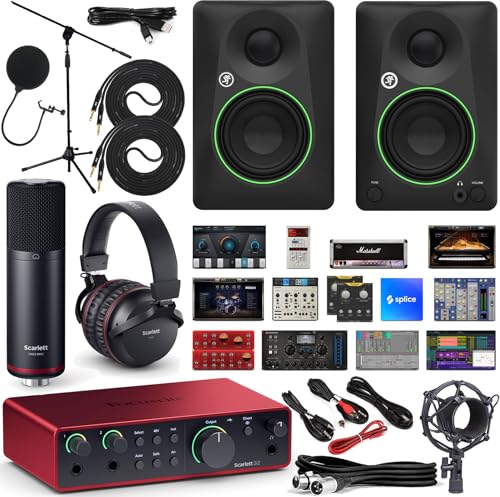
With its 24-bit/192 kHz recording capability, the Focusrite Scarlett 2i2 Studio USB Audio Interface and Recording Bundle is perfect for aspiring musicians and podcasters seeking studio-quality sound. You’ll appreciate the two upgraded preamps with a 56 dB gain range and Air mode, enhancing your recordings. The Mackie CR3-X studio monitors deliver clean, powerful audio, while the included condenser microphone captures vocals with clarity. Plus, the closed-back headphones guarantee strong isolation during mixing. With essential accessories like a boom stand and pop filter, this bundle sets you up for success, making it an ideal choice for your home studio.
Best For: Aspiring musicians and podcasters seeking a comprehensive recording solution with professional-quality sound.
Pros:
- High-quality 24-bit/192 kHz recording capability ensures studio-level audio fidelity.
- Includes essential accessories like a boom stand and pop filter for professional vocal recording.
- Versatile software suite with DAW, virtual instruments, and mixing tools enhances music production.
Cons:
- May require additional investment for more advanced studio equipment or software.
- The limited size of the studio monitors may not be suitable for larger spaces.
- Beginners might need time to fully understand and utilize all features effectively.
Focusrite Scarlett 2i2 Studio USB-C Audio Interface Bundle

For musicians, podcasters, and streamers seeking an all-in-one solution, the Focusrite Scarlett 2i2 Studio USB-C Audio Interface Bundle stands out with its extensive package. This 4th-generation interface offers 24-bit/192 kHz AD/DA conversion, ensuring exceptional audio quality. With features like loopback functionality and Auto-Gain controls, recording becomes seamless. You’ll also receive a CM25 MkIII cardioid condenser microphone, SH-450 closed-back headphones, and essential accessories like a tripod mic stand and pop filter. Plus, it’s compatible with popular software like Ableton and Pro Tools, making it the perfect choice for your home studio setup.
Best For: Those looking for a comprehensive audio solution, including musicians, podcasters, and streamers.
Pros:
- High-quality 24-bit/192 kHz audio conversion ensures professional sound.
- Includes a complete bundle with essential accessories for immediate setup.
- Loopback functionality allows for easy streaming and recording of mixed audio.
Cons:
- USB-C connectivity may require additional adapters for older devices.
- Limited to two microphone inputs, which may not suffice for larger setups.
- Some users may find the software compatibility limited compared to other options.
Universal Audio Apollo Twin X DUO Gen 2 Thunderbolt 3 Audio Interface

Looking to elevate your home studio setup? The Universal Audio Apollo Twin X DUO Gen 2 Thunderbolt 3 audio interface is your go-to choice for premium recording and mixing. With Unison preamps, you can achieve authentic analog tones from iconic brands like Neve and API in real-time. Plus, you’ll gain access to an extensive library of over 200 UAD DSP and Native plug-ins, enhancing your creative possibilities. Its Apollo Monitor Correction guarantees accurate mixing, while the Auto-Gain feature simplifies level adjustments across inputs, making certain you capture every important take effortlessly. Upgrade your sound with this powerful interface today!
Best For: Musicians, producers, and audio engineers seeking a high-quality, versatile audio interface for professional recording and mixing.
Pros:
- Unison preamps provide authentic analog tones from renowned brands for real-time recording.
- Access to a comprehensive library of over 200 UAD DSP and Native plug-ins to enhance creative potential.
- Features like Apollo Monitor Correction and Auto-Gain simplify mixing and ensure optimal recording levels.
Cons:
- Requires a Thunderbolt 3 connection, which may not be available on all devices.
- The price point may be higher than entry-level audio interfaces, making it less accessible for beginners.
- Some users may find the learning curve steep when navigating the vast plug-in library and features.
Focusrite Scarlett 2i2 USB-C Audio Interface Bundle with Headphones and Accessories

The Focusrite Scarlett 2i2 USB-C Audio Interface Bundle is perfect for budding artists enthusiastic to elevate their home studio experience. It features 4th Gen mic pres, allowing you to connect your microphone and guitar effortlessly. The Auto Gain function sets ideal levels, while Clip Safe prevents unwanted clipping. With Air mode, your vocals and instruments gain presence and harmonic drive. Enjoy studio-quality sound with a 120dB dynamic range, using converters derived from Focusrite’s flagship interfaces. Plus, the bundle includes Polsen studio headphones, a pop filter, XLR cable, and industry-leading recording software packed with plugins, ensuring you’re fully equipped for success.
Best For: Budding artists looking to elevate their home studio experience with quality recording equipment.
Pros:
- High-quality sound with a 120dB dynamic range for professional recordings.
- User-friendly features like Auto Gain and Clip Safe for optimal audio levels and prevention of clipping.
- Comprehensive bundle includes headphones, pop filter, XLR cable, and recording software with plugins.
Cons:
- Limited to two inputs, which may not be sufficient for larger recording setups.
- USB-C connectivity may require additional adapters for older devices.
- Learning curve for beginners in using recording software and plugins effectively.
Focusrite Scarlett Solo Studio USB-C Audio Interface Bundle

With its all-in-one bundle, the Focusrite Scarlett Solo Studio USB-C Audio Interface is perfect for singer-songwriters and podcasters keen to elevate their home studio setup. This 4th generation interface includes everything you need: a quality microphone, comfortable headphones, a pop filter, and a mic stand with a boom. You’ll enjoy exceptional audio quality with 24-bit/192 kHz conversion and zero-latency monitoring. Plus, its compatibility with Mac, Windows, and iPadOS makes it versatile. The virtual loopback feature is a game-changer for streaming, letting you capture your creativity effortlessly. You’ll be set to produce professional sounds right from home!
Best For: Singer-songwriters, guitarists, and podcasters looking for a comprehensive home studio setup.
Pros:
- High-quality audio with 24-bit/192 kHz conversion ensures professional sound.
- All-in-one bundle includes essential accessories like a microphone, headphones, and a mic stand, making setup easy.
- Virtual loopback functionality allows seamless streaming and recording, perfect for content creators.
Cons:
- Limited input options with only one XLR mic preamp and one Hi-Z input, which may restrict multi-instrument setups.
- Headphones may not be studio-grade, potentially affecting critical listening during mixing.
- Requires a computer or compatible device for full functionality, limiting portability for mobile recording.
Factors to Consider When Choosing Focusrite Audio Interfaces for Home Studio
When you’re selecting a Focusrite audio interface for your home studio, several key factors come into play. You’ll want to take into account audio quality standards, input and output options, and software compatibility to guarantee it meets your needs. Additionally, design, portability, and performance features can greatly impact your recording experience.
Audio Quality Standards
Choosing a Focusrite audio interface for your home studio hinges on understanding audio quality standards that can elevate your recordings. Look for interfaces supporting at least 24-bit/192 kHz recording to guarantee high-resolution audio and detailed sound reproduction. High-performance mic preamps with low noise levels and a high dynamic range are essential for clearer recordings. Features like “Air mode” can enhance the presence of your acoustic instruments and vocals, giving them a more professional touch. Additionally, check for converters with a wide dynamic range—120 dB or higher—to capture subtle nuances without distortion. Finally, verify the interface offers zero-latency monitoring, allowing you to enjoy real-time audio playback during your recording sessions without any frustrating delays.
Input and Output Options
Selecting the right input and output options is essential for maximizing your recording capabilities with a Focusrite audio interface. Start by considering how many inputs and outputs you need; this affects the number of instruments and microphones you can connect simultaneously. Look for interfaces with combo inputs (XLR/TRS) to give you the versatility of recording both mics and instruments. If you plan to use MIDI controllers, check for MIDI I/O ports to enhance your studio’s functionality. Pay attention to preamp quality, as higher-quality preamps greatly improve audio clarity and richness. Finally, verify the output options include balanced TRS outputs, which help minimize noise when connecting to studio monitors or other audio equipment.
Software Compatibility
Understanding software compatibility is key to getting the most out of your Focusrite audio interface. These interfaces work seamlessly with major digital audio workstations (DAWs) like Pro Tools, Ableton Live, and Cubase, so you can choose the software that fits your recording needs. Whether you’re on Mac OS or Windows OS, you’ll have no trouble integrating your interface into your setup. Many models even come bundled with essential software, offering effects, instruments, and mastering tools that enhance your production experience. Plus, if you’re into streaming or podcasting, some Focusrite interfaces feature loopback functionality, allowing you to record audio from multiple sources simultaneously. This flexibility makes Focusrite a great choice for any audio project.
Design and Portability
When setting up your home studio, the design and portability of your Focusrite audio interface play an essential role in your overall experience. Consider the dimensions and weight; a compact design enhances portability and makes storage easier. Look for USB interfaces that don’t need external power, simplifying setup and reducing clutter in your workspace. Evaluate design features like balanced outputs to eliminate hum and noise, ensuring a cleaner audio signal when connecting to studio monitors. User-friendly elements, such as LED indicators for input levels, can help you monitor and adjust quickly during recording sessions. Finally, check compatibility with various operating systems like Mac, Windows, and iOS for seamless integration into your existing setup.
Performance Features
Choosing the right performance features in a Focusrite audio interface can make a significant difference in your home studio setup. Look for high-performance mic preamps that enhance brightness and clarity in your recordings. Interfaces with switchable Air mode are advantageous, adding presence, especially for acoustic instruments and vocals. Confirm the interface has high-headroom instrument inputs to avoid clipping and distortion when recording guitars or bass. Gain halos or similar indicators are helpful for easily setting input levels, making monitoring and adjustments straightforward. Finally, opt for models that support studio-quality recording specifications, like 24-bit/192kHz, to preserve the sonic qualities of your recordings. These features will elevate your home studio experience and improve your overall sound quality.
Warranty and Support
While selecting a Focusrite audio interface for your home studio, warranty and support are essential factors to take into account. Focusrite typically offers a three-year warranty on manufacturing faults, ensuring you can rely on your gear. Additionally, many retailers, like Amazon, provide a 30-day return policy, giving you the chance to return the product if it doesn’t meet your needs. Customer reviews often reflect high satisfaction, with ratings averaging around 4.7 out of 5 stars, an indication of product quality. You can also find support through Focusrite’s official website, which includes user manuals, FAQs, and technical assistance. Just remember, warranty and support details may vary by retailer, so always check the specific terms before purchasing.