Looking for a simple way to connect SATA drives to your Mac? The best hard drive docking stations for Mac make backups, cloning, and drive swaps fast and straightforward.
Below, we’ve rounded up 10 solid options for different needs, from portable single-bay docks to multi-drive stations built for heavier workflows.
Best 10 Hard Drive Docking Stations for Mac Picks for 2026
Dual-Bay Cloning Dock
SABRENT USB 3.0 Dual Bay Hard Drive Docking Station & Cloner

- Two-bay support for 2.5-inch and 3.5-inch SATA drives
- Offline cloning up to 60Mbps
- Plug-and-play with USB 3.0 speeds up to 5Gbps
Best For: Mac users who want easy SATA drive access plus offline cloning
USB-C Performance Dock
OWC Drive Dock USB 10Gb/s Dual Bay SATA Drive Solution

- USB-C dock with up to 522MB/s speeds
- Reads two 2.5-inch or 3.5-inch drives at once
- Independent power switches and Mac compatibility
Best For: Mac users who want fast USB-C access to multiple bare SATA drives
Budget Single-Bay Dock
SABRENT USB 3.0 to SATA Hard Drive Docking Station

- Supports 2.5-inch and 3.5-inch SATA drives and SSDs
- Plug-and-play on macOS with no drivers
- Includes 12V power adapter for 3.5-inch drives
Best For: Mac users who need a basic single-drive SATA dock
Dual-Bay Clone Dock
WAVLINK USB 3.0 and USB C to SATA Dual-Bay Dock

- Dual-bay dock for 2.5-inch and 3.5-inch SATA drives
- USB-C and USB 3.0 support with UASP up to 6Gbps
- Offline cloning and built-in power control switch
Best For: Mac users who want USB-C connectivity with offline drive cloning
Top Pick
SABRENT USB-C Hard Drive Docking Station

- USB-C dock with up to 10Gbps SATA support
- Works with 2.5-inch and 3.5-inch SATA drives
- Includes USB-A and USB-C cables plus power adapter
Best For: Mac users who want a fast, easy single-bay SATA dock
Best for Cloning
SABRENT Dual-Bay USB-C Dock & Cloner

- Dual-bay dock reads and writes two SATA drives at once
- Offline cloning works without a computer
- Supports 2.5-inch and 3.5-inch SATA HDDs and SSDs
Best For: Mac users who need dual-drive access and offline cloning
Budget Lay-Flat Single-Dock
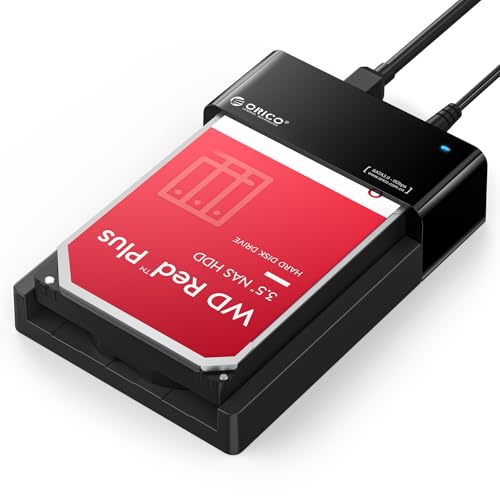
- Supports one 2.5-inch or 3.5-inch SATA drive
- USB 3.0 with UASP for up to 5Gbps transfers
- Tool-free, hot-swappable lay-flat design
Best For: Mac users who want a simple single-drive dock for backups and storage expansion
Four-Bay Clone Dock

- Supports up to four SATA HDDs or SSDs
- Offline cloning works without a computer
- Trayless design with USB 3.0 connectivity
Best For: Mac users who need multi-drive management and offline cloning
Best Simple Pick

- Supports two SATA HDDs or SSDs up to 20TB each
- Offline clone function for direct drive copying
- USB 3.0 with UASP and tool-free operation
Best For: Mac users who want a balanced dual-bay dock for backups and cloning
Dual-Bay Cloning Dock – SABRENT USB 3.0 Dual Bay Hard Drive Docking Station & Cloner
If you want hard drive docking stations for mac that can handle both everyday drive access and simple duplication, this SABRENT dual-bay model is a practical pick. It works with 2.5-inch and 3.5-inch SATA hard drives or SSDs, supports plug-and-play use with no drivers, and offers offline cloning when you need a quick drive copy without opening your Mac.
Best For: Mac users who want a straightforward dual-bay SATA dock with offline cloning support.
Pros:
- Supports two 2.5-inch or 3.5-inch SATA drives or SSDs
- Offline cloning support up to 60Mbps
- USB 3.0 transfers up to 5Gbps, with backward support for USB 2.0 and 1.1
- Plug-and-play design with no drivers needed
Cons:
- Uses USB 3.0 rather than USB-C
- Cloning is offline only, not an online duplicator
Overall, this is a useful choice if you want a simple dock for accessing or duplicating SATA drives on a Mac without a complicated setup. Its dual-bay layout and broad drive support make it especially handy for routine storage tasks.
USB-C Performance Dock – OWC Drive Dock USB 10Gb/s Dual Bay SATA Drive Solution
For hard drive docking stations for mac where speed and USB-C convenience matter, the OWC Drive Dock is built for fast bare-drive access. It supports reading multiple 3.5-inch and/or 2.5-inch drives simultaneously, includes Mac and PC compatibility, and uses USB-C connectivity with speeds up to 522MB/s.
Best For: Mac users who want a fast USB-C dual-bay dock for swappable SATA drives.
Pros:
- USB-C connectivity with up to 522MB/s speeds
- Dual-bay design for simultaneous drive access
- Independent power switches for each bay
- Mac and PC compatible
Cons:
- Designed for bare SATA drives only
- Higher-performance dock may be more than basic users need
This is a strong fit if you regularly swap drives and want a faster, cleaner USB-C workflow on a Mac. The separate power switches and simultaneous operation make it more flexible than a basic single-bay dock.
Budget Single-Bay Dock – SABRENT USB 3.0 to SATA Hard Drive Docking Station
If you need a simple entry point into hard drive docking stations for mac, this SABRENT single-bay dock keeps the basics covered. It supports bare SATA 2.5-inch and 3.5-inch HDDs and SSDs, works plug and play with macOS, and includes the 12V adapter needed for stable 3.5-inch drive use.
Best For: Mac users who want an inexpensive, no-frills dock for one bare SATA drive.
Pros:
- Supports 2.5-inch and 3.5-inch SATA HDDs and SSDs
- Plug-and-play support for macOS with no drivers
- Includes a 12V/2A power adapter for 3.5-inch drives
- Tool-free, hot-swappable single-bay design
Cons:
- Uses USB Type-A, not USB-C
- Does not support IDE/PATA, M.2, SAS, or drives in enclosures
- macOS may require remounting after sleep
This dock makes sense if your workflow is centered on one bare SATA drive at a time and you do not need advanced extras. It is a straightforward, practical option for basic Mac storage tasks.
Dual-Bay Clone Dock – WAVLINK USB 3.0 and USB C to SATA Dual-Bay Dock
Among hard drive docking stations for mac, the WAVLINK dual-bay dock stands out if you want both USB-C support and offline cloning. It works with 2.5-inch and 3.5-inch SATA HDDs or SSDs, uses UASP for transfer speeds up to 6Gbps, and supports tool-free setup with no drivers required.
Best For: Mac users who want a dual-bay SATA dock with USB-C and offline cloning.
Pros:
- Supports two 2.5-inch or 3.5-inch SATA HDDs/SSDs
- USB 3.0 and USB-C support with UASP up to 6Gbps
- Offline cloning support up to 60Mbps
- Built-in power control switch and automatic sleep mode
Cons:
- Not compatible with M1/M2-based Mac systems
- Offline cloning only, not online cloning
This dock is a good match if you want flexible connectivity and occasional drive duplication in one unit. Just make sure your Mac is compatible before buying, since the supplied notes exclude M1/M2-based systems.
Top Pick – SABRENT USB-C Hard Drive Docking Station
If you want one of the most practical hard drive docking stations for mac, this SABRENT USB-C dock keeps things simple: drop in a 2.5-inch or 3.5-inch SATA drive, connect over USB-C, and start moving data. It supports plug-and-play operation with no drivers, and the 10Gbps USB 3.2 Gen 2×1 connection gives it a speed advantage for SATA-based backups and transfers.
Best For: Mac users who want a single-bay SATA dock with USB-C, fast transfer support, and easy hot-swapping for backup or drive access.
Pros:
- Supports both 2.5-inch and 3.5-inch SATA SSDs and HDDs
- USB-C connection with up to 10Gbps transfer support
- Tool-less, hot-swappable dock with a retractable dust cover
- Includes both USB-A and USB-C to USB-C cables plus power adapter
Cons:
- Single-bay design only handles one drive at a time
- Requires external power for 3.5-inch hard drives
This is a straightforward, well-equipped dock for users who mainly need reliable SATA access on a Mac. The included cables and broad drive compatibility make it especially convenient for backup, cloning prep, and general storage work.
Value Choice – ORICO 2.5/3.5 Inch HDD SSD Dock
For shoppers comparing hard drive docking stations for mac on a budget, this ORICO dock covers the basics well. It supports 2.5-inch and 3.5-inch SATA HDDs and SSDs, offers USB 3.0 speeds up to 5Gbps with UASP support, and keeps the setup simple with a tool-less, hot-swap design.
Best For: Mac users who want an affordable, general-purpose SATA dock for backups, transfers, and occasional drive access.
Pros:
- Supports 2.5-inch and 3.5-inch SATA I/II/III drives up to 22TB
- UASP support with up to 5Gbps USB 3.0 transfer speeds
- Tool-less hot-swapping with dust-proof design and anti-skid pad
- Includes a 12V power adapter and 1m USB-A cable
Cons:
- Uses USB-A rather than USB-C
- Slower than 10Gbps docks
- Single-bay design does not read two drives at once
This ORICO model is a practical pick if you want broad SATA support without paying for premium speed. It is especially sensible for simple Mac file transfers, backup jobs, and drive reading tasks where USB 3.0 performance is enough.
Best for Cloning – SABRENT Dual-Bay USB-C Dock & Cloner
If your priority is cloning as well as everyday drive access, this is one of the most useful hard drive docking stations for mac. The dual-bay design lets both SATA drives mount separately over USB, and it can also clone one drive to another offline at the press of a button, without needing a computer.
Best For: Mac users who want a dual-bay dock for two-drive access and offline SATA cloning.
Pros:
- Two-bay dock reads and writes both drives at the same time
- Offline cloning works without a computer connection
- Supports 2.5-inch and 3.5-inch SATA hard drives and SSDs
- Plug and play on Windows and Mac with no drivers needed
Cons:
- Cloning is limited to SATA drives only
- Target drive must be the same size or larger than the source
- Max USB speed is 5Gbps, and mechanical drives will run slower in practice
This dock stands out when you need more than a basic reader. The ability to clone offline makes it especially handy for backup workflows, while the dual-bay setup is useful for moving files between two drives on a Mac.
Budget Lay-Flat Single-Dock – ORICO 24TB USB 3.0 Dock
If you want a straightforward option in hard drive docking stations for mac, this ORICO lay-flat dock is built for quick access to a single SATA drive without extra setup. It supports 2.5-inch and 3.5-inch HDDs and SSDs, works with Mac OS 9.1+ and other major systems, and uses USB 3.0 with UASP for faster transfers than standard USB 3.0.
Best For: Mac users who want a simple, tool-free single-drive dock for backups, cloning, or storage expansion.
Pros:
- Supports up to 24TB on one 2.5-inch or 3.5-inch SATA drive
- USB 3.0 with UASP and up to 5Gbps transfer speed
- Tool-free, hot-swappable design for easy drive changes
- Lay-flat build helps with passive heat dissipation
Cons:
- Single-drive design is less flexible than dual- or multi-bay docks
- Uses USB Type-A, so some Macs may need an adapter
For a basic Mac-friendly docking station, this model focuses on speed, capacity, and ease of use rather than advanced multi-drive features. It is a practical pick if you mainly need quick drive access and dependable everyday storage handling.
Four-Bay Clone Dock – SABRENT 4-Bay USB 3.0 Dock
For buyers comparing hard drive docking stations for mac, this SABRENT four-bay dock stands out when you need to manage several drives from one powered station. It supports up to four 2.5-inch or 3.5-inch SATA HDDs and SSDs, connects over USB 3.0, and adds an offline clone function so you can copy drives without opening software on the computer.
Best For: Mac users who need multi-drive access and occasional offline cloning from a single dock.
Pros:
- Four-bay design supports multiple SATA HDDs and SSDs at once
- Offline clone feature works without a computer
- Trayless insertion makes drive swaps quick and simple
- USB 3.0 connection supports up to 5Gbps and is backward compatible
Cons:
- Larger footprint than single- or dual-bay docks
- Includes external power, so it is less portable
This is the strongest pick here if your workflow involves rotating through several drives, making backups, or duplicating disks directly. It is a practical workstation-style dock rather than a minimalist desktop accessory.
Best Simple Pick – WAVLINK 2x20TB UASP Dock
This WAVLINK option is a solid middle ground in hard drive docking stations for mac if you want two-drive access without moving up to a bulkier four-bay model. It supports 2.5-inch and 3.5-inch SATA I/II/III HDDs and SSDs, handles up to 2x20TB, and includes an offline clone function for direct drive-to-drive copying.
Best For: Mac users who want a dual-bay dock for backups, cloning, and regular drive swaps.
Pros:
- Dual-bay design supports two SATA drives up to 20TB each
- Offline clone feature does not require a computer
- USB 3.0 with UASP supports up to 6Gbps and faster transfers
- Tool-free, hot-swappable setup with Mac compatibility
Cons:
- Clone mode requires the target drive to be the same size or larger
- Not as expandable as a four-bay dock
If you want a practical two-drive station for everyday storage tasks, this dock offers a nice blend of speed, cloning convenience, and compatibility. The fixed bezel design also gives it a more secure feel for repeated use.
How We Picked the Best Hard Drive Docking Stations for Mac
We focused on Mac-friendly Hard Drive Docking Stations for Mac users who want dependable SATA connectivity without extra setup. Priority went to models with broad 2.5-inch and 3.5-inch drive support, modern USB-C or USB 3.0 connections, and useful features like offline cloning, UASP support, and dual-bay or multi-bay flexibility. We also considered build quality, ease of use, and whether the dock fits everyday backup tasks or more frequent drive management.
Quick Comparison
If you want the simplest setup, a single-bay dock is ideal for occasional access to one drive at a time. Dual-bay models are better for cloning, backups, and working with multiple drives. USB-C and 10Gb/s options are the best fit for newer Macs, while USB 3.0 models remain a practical value choice for basic storage access. Four-bay docks make the most sense for power users, editors, and anyone juggling several drives regularly.
Key Buying Factors for Hard Drive Docking Stations for Mac
Connection Type
Check whether your Mac has USB-C, Thunderbolt, or standard USB-A ports. A USB-C docking station may offer a cleaner setup and better compatibility with newer Macs, while USB 3.0 models can still work well with the right adapter.
Drive Support
Make sure the dock supports both 2.5-inch SSDs and 3.5-inch HDDs if you plan to use mixed drive types. Some units also support SATA I/II/III, which helps with older and newer drives alike.
Speed and UASP
For faster transfers, look for UASP and higher bandwidth ratings such as 6Gb/s or 10Gb/s. These features can improve performance, especially with SSDs and large file transfers.
Cloning and Offline Copying
If you want to duplicate drives without using software, choose a dock with offline clone support. That feature is especially useful for upgrades, backups, and drive replacement workflows.
Bay Count and Workflow
Single-bay docks are best for light use, dual-bay models suit most home users, and 4-bay stations are better for advanced storage management. Match the number of bays to how often you swap, copy, or archive drives.
Who Should Buy Which Hard Drive Docking Stations for Mac?
Choose a single-bay dock if you mainly need quick access to one drive for backups or file recovery. Pick a dual-bay dock if you want a versatile balance of speed, cloning, and convenience. Go with a 4-bay model if you manage multiple drives, run frequent cloning jobs, or need a more organized storage workflow. For newer Macs, USB-C and higher-speed models are usually the safest long-term pick.