An HDMI audio extractor can send sound from a streaming box, console, or other HDMI source to an optical-input soundbar or receiver while passing video to your display. The right one depends as much on your video signal as it does on your audio setup.
These 10 options cover basic 4K connections, higher-bandwidth gaming setups, and ARC/eARC use. Before choosing, check where the extractor will sit in your signal chain and which audio formats your equipment accepts.
Best 10 Hdmi Audio Extractors with Optical Output Picks for 2026
High-Refresh Pick
Avedio Links 4K60 HDMI Audio Extractor

- 4K60 and listed 1080p high-refresh pass-through
- Optical stereo PCM, Dolby Digital 5.1, and DTS
- RCA stereo plus included 3.5mm adapter cable
Best For: Gaming and streaming setups needing optical audio without ARC
ARC-Capable Pick
Avedio Links 4K60 ARC Audio Extractor
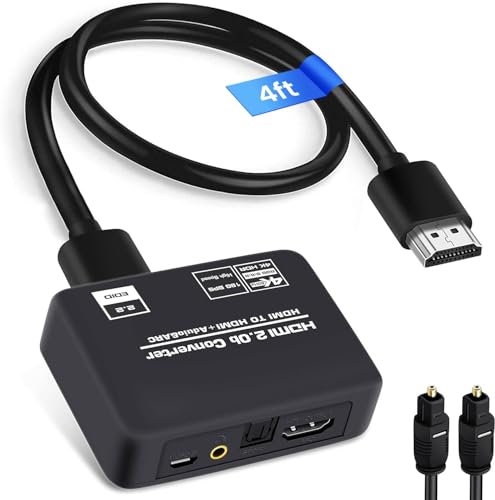
- ARC mode for a compatible TV connection
- 4K60 HDR10 pass-through
- Optical and HDMI cables included
Best For: Optical audio setups that also need TV ARC
Compact Metal Pick
OREI HDA-912 4K60 Audio Extractor

- 4K60 HDR pass-through
- Optical Dolby Digital 5.1 and DTS
- Compact metal housing
Best For: Compact HDMI-source setups with optical surround sound
4K30 Pick
Amazon Basics HDMI Audio Extractor
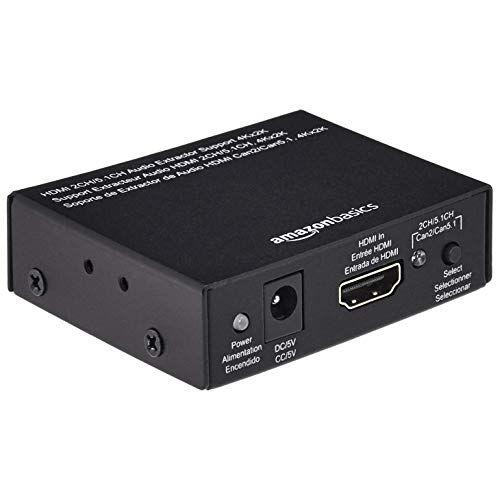
- Toslink optical and stereo outputs
- Up to 4K30 or 1080p60 video
- Compact metal housing
Best For: Basic audio extraction when 4K60 is unnecessary
Best for 8K and 4K/120Hz

- Up to 8K/60Hz or 4K/120Hz passthrough
- Optical S/PDIF and 3.5mm outputs
- ARC supported; eARC not supported
Best For: High-refresh-rate gaming and 8K video setups
Best for Flexible Audio Modes
UGREEN 4K/60Hz HDMI Audio Extractor

- 4K/60Hz and HDR10+ passthrough
- Four selectable audio modes
- Power adapter not included
Best For: 4K/60Hz setups with changing audio needs
Best for Basic 4K/30Hz Sources

- Optical DTS 5.1 and 3.5mm stereo
- 2.0CH, 5.1CH, and PASS modes
- No ARC or eARC; up to 4K/30Hz
Best For: Basic source-to-display audio extraction
Best for 4K 60Hz Sources
J-Tech Digital HDMI Audio Extractor
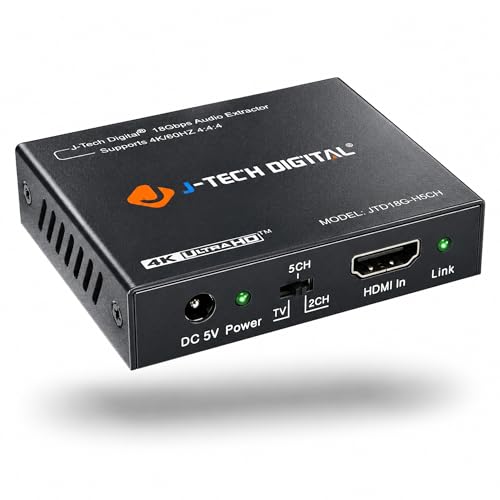
- 4K 60Hz, HDR10, and HDCP 2.2 support
- Optical SPDIF plus 3.5mm output
- Analog audio requires PCM from the source
Best For: Compatible 4K 60Hz sources and optical sound systems
Best for TV ARC Audio
eSynic eARC/ARC to Optical Extractor

- Takes audio from a TV eARC/ARC port
- Optical output for soundbars or headphone bases
- No CEC volume control over optical
Best For: TVs with ARC/eARC and optical-only audio gear
High-Refresh Pick – Avedio Links 4K60 HDMI Audio Extractor
Among HDMI audio extractors with optical output, this Avedio Links model is a practical choice if you want 4K at 60Hz video pass-through and separate sound for a receiver or soundbar. It also lists support for 1080p at 120Hz and 144Hz.
Best For: Gaming or streaming setups that need optical audio without giving up the listed video resolutions.
Pros:
- Optical output supports stereo PCM, Dolby Digital 5.1, and DTS.
- RCA stereo outputs and an included RCA-to-3.5mm cable offer an analog connection option.
- HDMI 2.0b, HDCP 2.2, and 18Gbps HDR pass-through support 4K60 setups.
Cons:
- Does not support ARC.
- CEC-based remote control does not adjust volume.
Choose this one for its mix of optical surround-sound output, analog flexibility, and stated high-refresh 1080p support; look elsewhere if you need audio returned from your TV over ARC.
ARC-Capable Pick – Avedio Links 4K60 ARC Audio Extractor
If your search for HDMI audio extractors with optical output includes TV audio return, this Avedio Links model offers an ARC mode alongside standard HDMI audio extraction. It passes video up to 4K at 60Hz and provides optical and 3.5mm audio outputs.
Best For: Setups that need optical audio from an HDMI source or an ARC-compatible TV connection.
Pros:
- TV, 2.0-channel, and 5.1-channel modes accommodate different audio setups.
- Supports up to 4K60, HDR10, HDCP 2.2, and 18Gbps video bandwidth.
- Includes an optical cable, HDMI cable, and USB power adapter.
Cons:
- ARC use requires an ARC/eARC-compatible TV interface.
- The 3.5mm output is limited to two-channel PCM/LPCM stereo.
This is the more flexible Avedio Links option when ARC matters. Check your TV’s ARC connection before buying, and plan on optical rather than 3.5mm for the listed 5.1-channel output.
Compact Metal Pick – OREI HDA-912 4K60 Audio Extractor
The OREI HDA-912 is one of the HDMI audio extractors with optical output to consider when you want a compact metal unit with 4K60 HDR pass-through. It separates audio to optical or 3.5mm while passing the HDMI video signal to your display.
Best For: Home-theater setups needing optical Dolby Digital or DTS from an HDMI source.
Pros:
- Optical output supports stereo LPCM, Dolby Digital 5.1, and DTS.
- Supports 18Gbps HDMI 2.0b, HDCP 2.2, and 4K60 HDR pass-through.
- Metal housing measures approximately 2.9 by 2.4 inches.
Cons:
- Does not support ARC.
- Does not support 1440p at 120Hz.
Its small footprint and optical surround-sound support suit a straightforward source-to-display setup. Although its notes list additional high-bandwidth audio formats for HDMI pass-through, the stated optical support is stereo LPCM, Dolby Digital 5.1, and DTS.
4K30 Pick – Amazon Basics HDMI Audio Extractor
Amazon Basics 4K@30Hz HDMI to HDMI and Audio (RCA Stereo or Spdif) Extractor Converter, Black
Check Price On AmazonFor less demanding video setups, this Amazon Basics model is a straightforward entry among HDMI audio extractors with optical output. It sends HDMI video onward while providing SPDIF optical or left-right stereo audio from a source without its own audio output.
Best For: Blu-ray, streaming, or older-console setups that do not require 4K at 60Hz.
Pros:
- Provides Toslink optical and left-right stereo audio outputs.
- Supports up to 8-bit 4K at 30Hz or 12-bit 1080p at 60Hz.
- Compact metal housing measures approximately 2.79 by 0.79 by 2.4 inches.
Cons:
- 4K pass-through tops out at 30Hz.
- The supplied notes do not specify which surround-sound formats its optical output supports.
Pick this for a basic HDMI-source-to-display connection with separate audio. For 4K60 video or a particular optical surround format, choose a model whose supplied specifications explicitly confirm it.
Best for 8K and 4K/120Hz – OREI 8K HDMI Audio Extractor
Among HDMI audio extractors with optical output, this OREI model suits setups that need high-bandwidth video passthrough. It sends video up to 8K/60Hz or 4K/120Hz to a display while extracting audio through optical S/PDIF or a 3.5mm stereo output.
Best For: Gaming or home-theater setups that need 4K/120Hz or 8K passthrough alongside a separate optical audio connection.
Pros:
- Supports up to 48Gbps FRL, with HDMI 2.1 features including ALLM and Dolby Vision passthrough.
- Offers optical and 3.5mm outputs, plus standard ARC support.
- Includes a power supply and has a metal enclosure.
Cons:
- Does not support eARC.
- TV remote cannot control volume through the extractor.
- Requires an HDMI 2.1 cable for HDMI 2.1 use.
Choose this one when preserving high-refresh-rate video is the priority; check your audio connection requirements first, since ARC is supported but eARC is not.
Best for Flexible Audio Modes – UGREEN 4K/60Hz HDMI Audio Extractor
This UGREEN option is one of the HDMI audio extractors with optical output worth considering when you want selectable audio modes without giving up 4K/60Hz video. It passes HDMI video to your display and provides optical S/PDIF and 3.5mm stereo connections for external audio equipment.
Best For: 4K/60Hz setups that benefit from switchable stereo, 5.1-channel, bypass, and standard ARC modes.
Pros:
- Supports 4K/60Hz, HDR10+ passthrough, and HDCP 2.3.
- Four DIP-switch modes provide options for different audio setups.
- Optical and 3.5mm outputs can work simultaneously with HDMI.
Cons:
- Does not support eARC.
- Includes a power cable but not a power adapter.
- Manufacturer recommends HDMI cables no longer than 3m for stable 4K/60Hz transmission.
Its mode switch is useful if you alternate between listening configurations. If your setup needs 4K/120Hz or eARC, its stated specifications do not cover those requirements.
Best for Basic 4K/30Hz Sources – VPFET HDMI Audio Extractor
For straightforward HDMI audio extractors with optical output, this VPFET model separates sound from a connected HDMI source and passes video to a display. Its optical connection supports DTS 5.1, while its 3.5mm output handles PCM stereo.
Best For: HDMI source-to-display setups that need optical 5.1 or analog stereo and can work within 4K/30Hz limits.
Pros:
- Provides optical and 3.5mm audio outputs.
- Offers 2.0CH, 5.1CH, and PASS modes.
- Runs from a 5V USB connection or a separate 5V USB power adapter.
Cons:
- Limited to 4K/30Hz passthrough; the notes specify 1080p rather than 4K signals for Fire TV, Apple TV, and PS4/PS5.
- Does not support ARC, eARC, or 7.1-channel audio.
- A TV cannot serve as its HDMI input source.
This is a fit for conventional HDMI sources when its video limits are acceptable. Look elsewhere if you need TV audio returned through ARC or 4K/60Hz passthrough.
Best for 4K 60Hz Sources – J-Tech Digital HDMI Audio Extractor
Among HDMI audio extractors with optical output, this J-Tech Digital model is a practical fit for a 4K 60Hz source paired with a sound system that accepts SPDIF. It also offers a 3.5mm analog output when you need stereo audio.
Best For: Connecting a compatible game console or PC to an optical sound system while passing a 4K 60Hz video signal.
Pros:
- Supports HDMI 2.0, HDCP 2.2, HDR10, and 4K 60Hz video.
- Provides optical SPDIF and 3.5mm audio outputs.
- Passes Dolby Digital and DTS through the digital output.
Cons:
- Does not decode Dolby Digital or DTS for analog output; set the source to PCM when using 3.5mm.
- Not compatible with Apple TV 3rd Generation model A2843, certain Comcast Xfinity boxes, or HDMI 1.2 sources.
Choose it for its stated 4K 60Hz support and optical connection, but check source compatibility before buying—especially if you plan to use the analog jack.
Best for High-Refresh Video – 8K HDMI Audio Extractor
If you need HDMI audio extractors with optical output for a 4K 120Hz setup, this model is specified to pass 4K 120Hz or 8K 60Hz video. Its optical, coaxial, RCA L/R, and 3.5mm outputs provide several ways to connect audio equipment.
Best For: A 4K 120Hz source that needs optical audio for a soundbar or receiver, with additional audio connections available.
Pros:
- Specified for HDMI 2.1 video up to 4K 120Hz or 8K 60Hz.
- Optical and coaxial outputs support DTS 5.1; analog outputs support PCM 2.0.
- Offers eight EDID modes for matching source and display settings.
- Includes a USB power cable for connections that need supplemental power.
Cons:
- Does not support 7.1-channel audio.
- The supplied guidance limits HDMI cable length to 2 meters to avoid signal instability.
- The setup notes advise setting the source audio output to PCM.
Its range of outputs and EDID controls make it flexible, but plan around the stated cable-length limit and audio-format guidance when setting up your system.
Best for TV ARC Audio – eSynic eARC/ARC to Optical Extractor
This eSynic unit fills a specific niche among HDMI audio extractors with optical output: it takes audio from a TV’s eARC or ARC port and sends it to optical-only audio equipment. It is intended for TV audio, not for extracting sound from an ordinary HDMI source connection.
Best For: Connecting a TV with an eARC or ARC port to an older optical-input soundbar or a wireless headphone base.
Pros:
- Converts TV eARC/ARC audio to an optical Toslink output.
- Lists PCM 2.0, Dolby 5.1, and DTS 5.1 audio-format support.
- Includes an HDMI cable, optical cable, and USB power cable.
Cons:
- Requires a TV port labeled eARC or ARC; a standard HDMI port will not work.
- Optical output does not carry CEC volume control, so adjust volume on the audio device.
- Provides optical output only, without analog or coaxial alternatives.
Pick this focused adapter if your goal is getting TV audio into existing optical gear. Confirm your TV’s ARC/eARC settings and port before ordering.
How We Picked the Best Hdmi Audio Extractors with Optical Output
We focused on connections and specifications that affect real setups: HDMI video passthrough, optical audio output, HDCP support, ARC/eARC capability, and available audio controls. The selection spans straightforward HDMI-source extractors, higher-bandwidth 8K-labeled options, and a device intended for extracting audio from a TV’s ARC/eARC connection. Listed specifications are a starting point, not a guarantee that every source, display, and sound system combination will work.
Quick Comparison: Match the Extractor to the Signal
For a streaming device or older console connected to a 4K TV, start with a model whose stated HDMI passthrough and HDCP support match the source. A 4K/30Hz extractor may be enough for 30Hz output, but it is the wrong choice if you need 4K/60Hz passthrough. For 4K/120Hz gaming or other high-bandwidth signals, consider an option that explicitly lists the resolution and refresh rate you need; an “8K” label alone does not confirm every gaming feature.
If the audio originates in TV apps or in several devices connected directly to the TV, look specifically for TV-side ARC/eARC extraction. That is a different job from splitting audio out of an HDMI source on its way to the TV.
Key Buying Factors for Hdmi Audio Extractors with Optical Output
Video and Copy Protection
Check the complete HDMI path: source, extractor, cable, and display. Match the extractor’s stated resolution, refresh rate, and HDCP version to your intended content. If you rely on variable refresh rate, automatic low-latency mode, or HDR, verify those features individually rather than assuming they pass through.
Optical Audio Formats
Toslink optical is useful for stereo PCM and compatible compressed surround formats such as Dolby Digital or DTS 5.1. It does not carry the full range of high-bandwidth audio available over HDMI eARC. Check what your source can output and what your soundbar or receiver can decode. An extractor cannot make an unsupported format playable; switching the source to PCM stereo may resolve silence, though it will remove surround sound.
ARC, EARC, and Setup Controls
ARC and eARC support varies by model and connection direction. Read the port labels and setup instructions before buying, especially if you need audio from the TV rather than from an external HDMI source. EDID switches or audio-mode settings can help you select a compatible output, but their exact behavior differs. Also confirm power requirements and whether you need an optical cable, HDMI cables, or a 3.5mm analog connection.
Who Should Buy Which Hdmi Audio Extractors with Optical Output?
Choose a basic extractor if you have one HDMI source and an optical-only speaker system. Prioritize verified 4K/60Hz passthrough for 60Hz sources; move to a model explicitly rated for your higher refresh rate if gaming performance matters. Choose an ARC/eARC-focused extractor when TV apps or TV-connected sources supply the audio. If your receiver or soundbar already accepts the HDMI signal and formats you need, a separate extractor may be unnecessary.