Long HDMI runs can introduce signal dropouts, limited resolution, and difficult cable routing. The right extender can help connect a projector to a source device across a room, ceiling, or building without sacrificing the viewing experience.
This roundup compares 10 HDMI extenders for projectors, from compact HDMI 2.1 extension cables to Ethernet-based kits with PoC, EDID, IR control, and long-distance support.
Best 10 Hdmi Extenders for Projectors Picks for 2026
Best Long-Run 4K Pick

- Extends 1080p up to 230 feet and 4K@30Hz up to 131 feet
- Includes IR, loop-out, EDID copy, and PoC
- Supports 7.1-channel HD audio
Best For: Long-distance projector installations
Best High-Bandwidth Cable
Silkland HDMI 2.1 Extension Cable
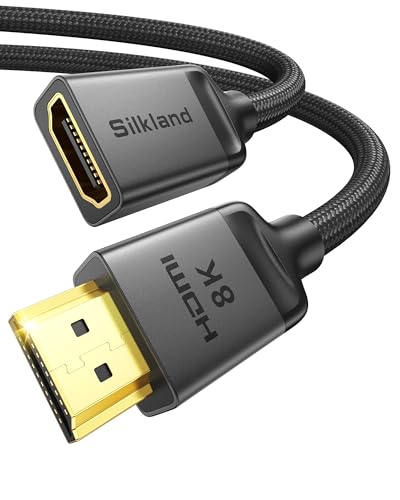
- Supports 8K@60Hz, 4K@120Hz, and 48Gbps
- Male-to-female 3.3-foot extension for tight setups
- Includes HDR, 3D, and eARC support
Best For: Short projector and gaming-cable extensions
Best Value CAT5e/6 System

- Reaches 230 feet at 1080p or 131 feet at 4K@30Hz
- Adds loop-out, IR pass-through, EDID, and PoC
- Uses direct CAT5e, CAT6, or CAT7 cabling
Best For: Budget-conscious long-run projector setups
Best Compact Port-Saver
Highwings HDMI 2.1 Extension Cable
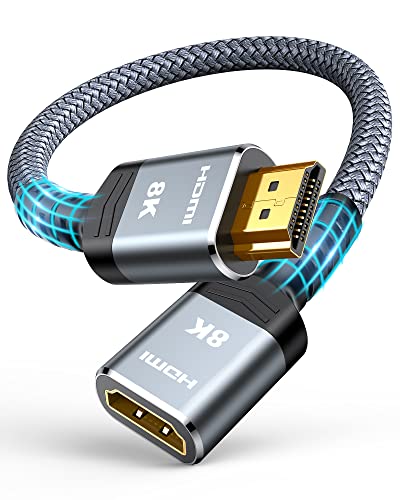
- Supports 8K@60Hz, 4K@120Hz, and 48Gbps
- Compact 1-foot male-to-female design
- Nylon construction and gold-plated connectors
Best For: Nearby projector and streaming-device connections
Best Long-Run Wired Pick

- 1080p at 60Hz up to 492 feet
- HDMI loop out for a local display
- Two-way IR device control
Best For: Long-distance 1080p projector installations
Best 4K Wired Value

- Supports 4K at 60Hz and 3D
- EDID helps match display settings
- PoC uses one 12V power supply
Best For: 4K projector setups needing a wired connection
Best Wireless Setup

- Wireless 4K transmission up to 60 feet
- Plug-and-play with USB power
- Requires direct line of sight
Best For: Short-range projector setups without HDMI cabling
Long-Run 1080p Pick

- 1080p at 60Hz up to 196 feet
- EDID copy for source-display matching
- Supports 3D, HDCP, and multiple audio formats
Best For: Long-distance 1080p projector and home theater connections
Simple PoC Setup

- 1080p at 60Hz up to 164 feet
- Power over Cable with adapter included
- EDID copy and plug-and-play installation
Best For: Classrooms, offices, and projector setups needing fewer power cables
Wall-Mountable Cooling Design

- 1080p at 60Hz up to 197 feet
- PoC uses one 12V power supply
- Wall-mountable aluminum-alloy housing
Best For: Fixed projector installations and long-running 1080p AV systems
Best Long-Run 4K Pick – OREI HDMI Over Cat6 Extender
For installations where a projector sits far from the source, this OREI unit is one of the more capable hdmi extenders for projectors. It sends uncompressed video and audio over one direct CAT5e/CAT6 cable, reaching up to 230 feet at 1080p or 131 feet at 4K@30Hz.
Best For: Home theaters, classrooms, conference rooms, and other projector setups needing long-distance HDMI transmission, local loop-out, and remote source control.
Pros:
- Supports up to 4K@30Hz, 7.1-channel HD audio, HDMI 1.4, and HDCP 1.4.
- HDMI loop-out supports a local display and cascading to another extender.
- One-way IR pass-through, EDID copy, and PoC simplify remote installation.
Cons:
- 4K is limited to 30Hz rather than 4K@60Hz.
- Requires a direct CAT5e/CAT6 connection; it should not run through a network switch or router.
This is a strong choice when distance, installation flexibility, and control features matter more than newer HDMI 2.1 capabilities. Confirm that your projector and source fit its 4K@30Hz limit.
Best High-Bandwidth Cable – Silkland HDMI 2.1 Extension Cable
This short male-to-female cable is a practical option when your projector setup only needs extra reach rather than a dedicated transmitter-and-receiver system. Among hdmi extenders for projectors, it stands out for HDMI 2.1 support, 48Gbps bandwidth, and compatibility with 8K@60Hz and 4K@120Hz equipment.
Best For: Projector, streaming-device, and gaming setups that need a compact 3.3-foot HDMI extension and support for high refresh rates.
Pros:
- Supports 8K@60Hz, 4K@120Hz, dynamic HDR, 3D, eARC, and up to 48Gbps.
- Braided construction, triple shielding, and gold-plated connectors are designed for durability and signal stability.
- Works with projectors and older HDMI 2.0/1.4 devices, with additional length options available.
Cons:
- This 3.3-foot version only extends a nearby connection; it is not a long-distance CAT cable system.
- The product notes warn that thinner standard HDMI cables may cause black screens or compatibility issues.
- It is an extension cable, not a standalone active HDMI transmitter and receiver.
Choose this Silkland cable for a simple port-saving extension behind a projector or in a compact media setup. Use it as directed: connect its male plug to the source or display and attach the existing HDMI cable to its female end.
Best Value CAT5e/6 System – OREI EX-170C HDMI Extender
The OREI EX-170C offers a straightforward way to place a projector away from its HDMI source without installing a very long HDMI cable. It transmits over direct CAT5e, CAT6, or CAT7 cable for up to 230 feet at 1080p or 131 feet at 4K@30Hz.
Best For: Projector installations that need long cable runs, local display monitoring, IR control, and one-adapter PoC power.
Pros:
- Supports 4K@30Hz, 1080p, 10.2Gbps bandwidth, HDMI 1.4, and HDCP 1.4.
- Loop-out allows the source feed to remain available on a local display.
- IR pass-through, EDID copy, metal housing, and one-way PoC support cleaner installations.
Cons:
- It does not support 4K@60Hz.
- It is not compatible with HDMI ARC.
- Performance depends on the connected devices and direct CAT5e/CAT6 cable; it is not IP/network based.
This model is a sensible fit when reliable 1080p or moderate 4K projector extension is the priority. Its limitations are clear, but its loop-out and control features add useful flexibility for classrooms, theaters, and presentations.
Best Compact Port-Saver – Highwings HDMI 2.1 Extension Cable
For a projector system that only needs a little more cable length, this 1-foot Highwings male-to-female cable provides a simple plug-and-play solution. It supports up to 48Gbps, 8K@60Hz, and 4K@120Hz, making it a capable short extension for newer sources and displays.
Best For: Compact home theaters, Roku or streaming-stick installations, and gaming setups where a short HDMI extension can reduce strain on the projector or source port.
Pros:
- Supports 8K@60Hz, 4K@120Hz, 48Gbps, HDR color depth, ARC, and 3D.
- Flexible nylon construction and gold-plated ports are designed for repeated use and signal reliability.
- Helps extend an existing HDMI cable and can act as a port or space saver.
Cons:
- At 1 foot, it is not intended for long-distance projector runs.
- It is a passive male-to-female extension cable rather than an active extender system.
- The supplied notes do not specify support for eARC.
Highwings is a good match for tight projector cabinets, streaming sticks, and nearby gaming equipment. If the projector is across a room, choose a CAT-based transmitter-and-receiver extender instead.
Best Long-Run Wired Pick – OREI 492ft HDMI Extender
For dependable long-distance projector installations, this OREI model is a practical choice among HDMI extenders for projectors. It sends 1080p video and audio up to 492 feet over a direct CAT6, CAT6a, or CAT7 cable and adds useful local-display and IR-control features.
Best For: Home theaters, classrooms, conference rooms, and commercial AV setups needing reliable 1080p transmission over a long cable run.
Pros:
- Extends 1080p at 60Hz up to 492 feet over a direct Ethernet cable connection.
- HDMI loop out supports a local TV, monitor, or projector alongside the remote display.
- Bi-directional IR enables control from either end of the setup.
- Includes transmitter, receiver, IR accessories, power adapters, warranty, and lifetime technical support.
Cons:
- Limited to resolutions up to 1080p at 60Hz.
- Requires a direct CAT6/6a/7 connection and is not compatible with network switches.
- Supports PCM 2.0 audio rather than higher-channel audio formats.
This is a strong wired option when distance and installation flexibility matter more than 4K resolution. The loop-out and two-way IR features make it especially useful for setups with displays in two locations.
Best 4K Wired Value – CENMATE 4K HDMI Extender
This CENMATE unit is worth considering if you want 4K capability in HDMI extenders for projectors without using a wireless link. It supports 4K at 60Hz, includes EDID matching for display compatibility, and uses PoC so a single 12V power supply can power the connection.
Best For: 4K projector systems, conference rooms, classrooms, home theaters, and installations where wall mounting and simplified power delivery are useful.
Pros:
- Supports 4K at 60Hz, 1080p at 60Hz, and 3D video.
- EDID function matches display parameters to help select a suitable resolution.
- PoC transfers power through the connecting cable with one 12V supply.
- Aluminum-alloy housing is designed for heat dissipation and long-term stability.
Cons:
- Its stated transmission range varies by source material, with 197 feet specifically noted for 1080p and up to 230 feet in the product title.
- Mounting bolts are not included.
- Requires a suitable CAT5e, CAT6, or CAT7 cable.
With 4K support, EDID, and PoC, this model offers a feature-rich wired setup for modern projectors. Verify the expected resolution and distance for your installation before buying, since range can depend on the signal format and cable.
Best Wireless Setup – OREI Wireless HDMI Extender
When running a long HDMI cable is inconvenient, this wireless OREI kit provides a simple alternative among HDMI extenders for projectors. The transmitter and receiver support wireless 4K signals, plug into HDMI ports, and can be powered through USB cables or a power bank.
Best For: Short, direct-line-of-sight projector connections in homes, offices, churches, conference spaces, and restaurants.
Pros:
- Wireless transmission supports 4K at 60Hz and 4K at 30Hz, along with several lower resolutions.
- Plug-and-play setup requires no software installation.
- Switchable 5.1–5.2GHz channels can help accommodate the wireless installation.
- USB power allows use with a laptop or power bank.
Cons:
- Does not transmit through walls and requires a direct signal path.
- Introduces latency, with approximately a 0.06-second delay noted for real-time gaming.
- Wireless range is listed as up to 60 feet.
This kit is convenient for temporary or clean-looking installations where the projector and source have a clear path between them. For wall-separated rooms or latency-sensitive gaming, a wired extender is likely the more practical choice.
Long-Run 1080p Pick – HDMI Extender Over CAT6
For shoppers comparing hdmi extenders for projectors, this plug-and-play HDMI-over-Cat6 kit is built for longer point-to-point runs. It supports 1080p at 60Hz over up to 196 feet when used with recommended oxygen-free copper Cat6 cable, while EDID copy helps the source and display negotiate compatible picture and sound settings.
Best For: Indoor or outdoor projector setups, video conferencing, home theater, and other 1080p installations needing extended cable distance.
Pros:
- Supports 1080p at 60Hz and transmission distances up to 196 feet.
- EDID copy helps match the source and display for stable image and audio output.
- Supports 3D, HDCP, and multiple audio formats, with built-in ESD protection.
- Includes a one-year free warranty and works with PCs, game consoles, Blu-ray players, and media players.
Cons:
- Network switches and routers are not supported.
- For best results, the long run requires a suitable oxygen-free copper Cat6 cable.
- Resolution is limited to 1080p rather than 4K.
This is a strong choice when distance is the priority and your projector system is based on 1080p equipment. Just plan a direct cable run and use the recommended cable type for the most reliable results.
Simple PoC Setup – Steetek HT202P HDMI Extender
This Steetek kit is a practical option for anyone choosing hdmi extenders for projectors and wanting fewer power cables. It carries uncompressed 1080p video and audio at 60Hz up to 164 feet over one Cat5e, Cat6, or Cat7 cable, with PoC sending power to the receiver through the cable.
Best For: Home, office, classroom, and commercial AV installations with wall-mounted projectors or remote displays.
Pros:
- Extends 1080p at 60Hz and 3D content up to 164 feet.
- PoC requires only one power adapter, which is included.
- EDID copy helps establish the correct resolution for the connected display.
- Plug-and-play design works with projectors, PCs, laptops, DVD players, monitors, and TVs.
Cons:
- Maximum stated distance is shorter than some comparable models.
- It is designed for Full HD rather than 4K output.
- The connection is point-to-point and uses a single cable rather than a network switch.
Its main advantage is installation convenience: one Ethernet cable handles the long connection, while PoC reduces power-cord clutter near the projector. It fits best where 1080p performance is sufficient and straightforward setup matters.
Wall-Mountable Cooling Design – CENMATE 1080p HDMI Extender
For projector installations where mounting and extended operation matter, this CENMATE model combines 1080p at 60Hz transmission with a wall-mountable design. It sends HDMI over Cat5e, Cat6, or Cat7 cable for up to 197 feet, and its aluminum-alloy housing is intended to dissipate heat during prolonged use.
Best For: Permanently installed projectors, education spaces, video conferencing, LED displays, and home theaters requiring a mountable 1080p extender.
Pros:
- Supports 1080p at 60Hz, 3D, and transmission distances up to 197 feet.
- PoC allows one 12V DC power supply to power the connected transmitter and receiver.
- EDID automatically matches display parameters to improve compatibility.
- Wall-mountable aluminum-alloy housing supports installation flexibility and heat dissipation.
Cons:
- Mounting bolts are not included.
- Resolution is limited to 1080p.
- High-quality Cat5e, Cat6, or Cat7 cable is recommended for the stated distance.
This model stands out for fixed installations that benefit from wall mounting and a metal housing. Choose it when a long 1080p run, PoC convenience, and installation flexibility are more important than 4K support.
How We Picked the Best Hdmi Extenders for Projectors
We evaluated these Hdmi Extenders for Projectors by comparing their supported resolution and refresh rates, transmission distance, connection type, installation features, and likely use case. We also considered practical details such as Power over Cable (PoC), EDID management, HDR support, infrared control, loop-out connections, and compatibility with common HDMI standards.
Because projector systems vary widely, the list includes short HDMI 2.1 extension cables, wired HDMI-over-Ethernet kits, long-distance solutions, and a wireless option. Specifications should be matched to the source, projector, cable category, and desired resolution rather than judged by distance alone.
Quick Comparison
| Type | Typical Strength | Best For |
|---|---|---|
| HDMI 2.1 extension cable | High bandwidth over short runs | 8K, 4K high-refresh gaming, and nearby devices |
| HDMI over Cat5e/6/7 | Longer cable runs using structured wiring | Ceiling-mounted or distant projectors |
| Wireless HDMI | Flexible installation without a long signal cable | Temporary setups and rooms where cabling is difficult |
| 1080p Ethernet extender | Affordable, straightforward distribution | Older projectors, classrooms, and basic home theater |
Key Buying Factors for Hdmi Extenders for Projectors
Resolution and Refresh Rate
Choose an extender that supports the signal you actually plan to send. A 1080p projector does not require an 8K-rated device, while a 4K gaming projector may need 4K at 120Hz or higher. Check both resolution and refresh rate, since a product advertised as 8K may support that resolution only at a specific frequency.
Distance and Cable Category
For long runs, Ethernet-based extenders commonly use Cat5e, Cat6, or Cat7 cable. Cat6 is often a practical choice for new installations, but cable quality, termination, interference, and wall construction can affect real-world performance. Leave some distance margin instead of operating at the advertised maximum.
EDID, HDR, IR, and PoC
EDID support can help the source and projector agree on a compatible video mode. HDR matters for supported home-theater equipment, while IR pass-through lets you control a source remotely. PoC can reduce the number of power adapters, but confirm which unit receives power and whether the included accessories meet your installation needs.
Connection and Compatibility
Verify HDMI version, HDCP support, audio format, connector direction, and whether the system requires direct point-to-point wiring. Wireless models also depend on line of sight, local interference, and placement.
Who Should Buy Which Hdmi Extenders for Projectors?
Choose a short HDMI 2.1 extension cable for a nearby source and a modern 4K or 8K projector. Select a Cat5e/6/7 extender for permanent ceiling runs or distances beyond a conventional HDMI cable. A 1080p Ethernet model is suitable for basic presentations and older projectors. Pick a wireless extender when installation flexibility matters most, but use a wired solution for the most predictable performance. For gaming or premium cinema systems, prioritize bandwidth, refresh rate, HDR, and HDCP compatibility before maximum distance.