Choosing your first streaming encoder can feel complicated when product listings mix HDMI passthrough, H.265 compression, RTMP, SRT, and network protocols. The right model depends mainly on your source resolution, streaming platform, connection type, and how much setup you want to manage.
We selected 10 streaming encoders for beginners across compact HDMI-to-IP units, gaming capture devices, 4K-capable models, and multi-output hardware. Use the guide below to narrow the options by compatibility, ease of use, video quality, and budget.
Best 10 Streaming Encoders for Beginners Picks for 2026
Most Versatile

- 1080p60 H.265/H.264 encoding
- Up to four protocol-based streams
- Text, logos, captions, and timestamps
Best For: Multi-platform streaming and IPTV setups
Best for 4K Gameplay

- 4K60 recording and streaming support
- HDR10 and VRR passthrough
- UVC plug-and-play setup
Best For: Console gaming and high-resolution gameplay streams
Best Standalone Option

- Standalone 1080p60 network encoding
- Main stream plus three secondary streams
- Supports RTMP, SRT, WebRTC, and HLS
Best For: PC-free broadcasts and institutional streaming
Best Plug-and-Play Value

- Driver-free USB3.0 setup
- Up to 1080p60 capture listed
- Independent microphone input
Best For: Portable OBS streaming and beginner recording setups
Most Portable
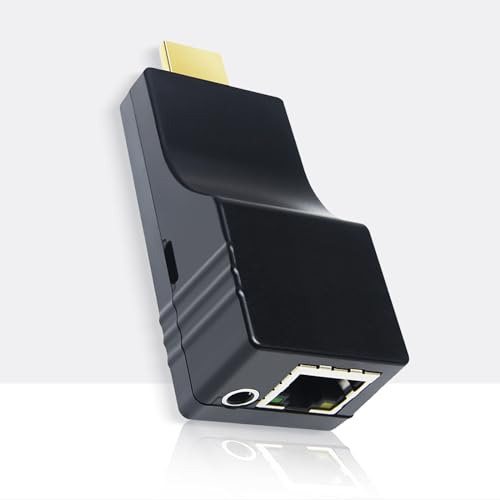
- Ultra-small, 32g HDMI encoder
- Streams up to 1080p60
- USB-powered with broad protocol support
Best For: Mobile and space-constrained streaming setups
Best for Everyday Use
Zowietek ZowieBox 4K Encoder/Decoder

- Encodes and decodes HDMI and network streams
- Supports UVC, SRT, RTMP(S), and RTSP
- Standalone operation with PoE and tripod support
Best For: Flexible streaming, monitoring, and remote-production setups
Best for Multi-Output Streaming

- Outputs one 4K30 or four 1080p30 streams
- OLED status display and HDMI loop-out
- Broad protocol and software compatibility
Best For: Multi-stream production and flexible 4K-capable workflows
Best PoE Option

- Single-cable PoE power and data
- 4K60 input with lossless loop-out
- 1080p60 H.265/H.264 streaming
Best For: Clean installations and flexible LAN or online streaming
Best for Multi-Stream Control

- Dual streams per HDMI input
- Broad protocol and platform support
- Built-in overlays and video adjustments
Best For: Multi-platform and customized streaming workflows
Best for 4K Input Flexibility

- 4K input at up to 30fps
- Up to four protocol-specific streams
- Overlays, audio controls, and image adjustments
Best For: Growing setups needing 4K source compatibility
Most Versatile – URayCoder HDMI-to-IP Encoder
For beginners comparing streaming encoders for beginners, the URayCoder is a flexible hardware option for turning an HDMI source into a network stream. It supports 1080p at up to 60fps, several streaming protocols, and browser-based management without requiring a dedicated PC for encoding.
Best For: Multi-platform streaming, IPTV, churches, and users who want extensive protocol and customization options.
Pros:
- Supports 1080p60 encoding with H.265/H.264 and HDMI audio or 3.5mm line-in audio.
- Works with RTMP(S), RTSP, SRT, HLS, UDP, WebRTC-compatible workflows, and other listed protocols.
- Can output up to four streams and add text, logos, scrolling captions, and timestamps.
- Includes lifetime free warranty and technical support according to the supplied notes.
Cons:
- The broad settings and network configuration may be more than a first-time streamer needs.
- It requires an HDMI source and Ethernet/network setup rather than a simple USB connection.
This is the strongest choice when flexibility matters more than a minimal plug-and-play setup. Its many protocols and branding controls offer room to grow, although beginners should expect to spend some time with the interface and instructions.
Best for 4K Gameplay – Zopsc 4K60 Game Capture Card
The Zopsc capture card is aimed at gamers who want high-resolution passthrough and recording. For beginners exploring streaming encoders for beginners, its UVC plug-and-play design and USB Type-C connection can make starting with compatible computers and consoles straightforward.
Best For: Gaming streams that need 4K60 recording, HDR10/VRR passthrough, and low-latency interaction.
Pros:
- Supports 4K at 60fps recording and streaming according to the product listing.
- Provides HDR10 and variable refresh rate passthrough for smoother gameplay display.
- Uses UVC technology and requires no driver installation.
- Lists latency as low as 50ms and compatibility with macOS computers and gaming consoles.
Cons:
- The supplied specifications list the capture resolution as 1080p, so buyers should verify the exact recording mode.
- The listed manufacturer warranty is only 90 days.
- It is a capture card rather than a standalone network encoder, so a computer is part of the typical setup.
This is a sensible beginner gaming pick when easy USB setup and advanced passthrough features are priorities. Verify the detailed 4K recording specifications before purchase if native 4K capture is essential.
Best Standalone Option – Wilxisum 1080p60 HDMI Encoder
The Wilxisum HDMI encoder sends a 1080p60 HDMI signal over a network and can stream without a PC. For beginners searching for streaming encoders for beginners, its web-based controls and support for common live platforms make it a practical choice for continuous broadcasts.
Best For: Standalone YouTube, Twitch, Facebook, campus, hotel, church, and IPTV broadcasting.
Pros:
- Encodes 1080p video at 60fps and supports H.265/H.264 workflows.
- Supports RTMP, RTMPS, RTSP, SRT, WebRTC, HLS, TS, FLV, and MP4 outputs.
- Can provide one main stream plus three secondary streams and simultaneous RTMP broadcasts to three platforms.
- Supports LAN playback through VLC or PotPlayer and IPTV equipment.
Cons:
- Initial setup may require changing the device IP if it is not on the same network segment.
- The supplied warranty information is inconsistent, listing a two-year limited warranty in the notes and a one-year description in the details.
- It uses HDMI and RJ45 connections, so it is less convenient than a basic USB capture device.
This encoder stands out for PC-free, long-running broadcasts and broad protocol support. It is beginner-friendly once network addressing is understood, but the IP setup is an important consideration for first-time users.
Best Plug-and-Play Value – Pwshymi USB3.0 Capture Card
The Pwshymi recording card is a compact USB3.0 option for beginners who want to capture gameplay or camera video in software such as OBS Studio and VLC. Its no-driver setup, lightweight aluminum design, and separate microphone support make it approachable for basic streaming setups.
Best For: Beginners building a portable OBS-based gaming or recording setup.
Pros:
- Offers plug-and-play operation without driver installation.
- Supports up to 4K at 30fps and 1080p at 60fps according to the listing.
- Compatible with multiple operating systems and software including OBS Studio and VLC.
- Includes independent microphone input and LPCM audio support.
Cons:
- The supplied details identify the video capture resolution as 1080p, so buyers should confirm the 4K mode and compatibility.
- It is a USB capture device, not a standalone HDMI-to-IP encoder.
- The listed manufacturer warranty is 90 days.
This is a straightforward entry point for software-based streaming, especially if portability and simple USB installation matter. It offers useful audio features, but users seeking PC-free network streaming should choose a dedicated hardware encoder instead.
Most Portable – DDMALL CEV-2K HDMI Encoder
For beginners comparing streaming encoders, the DDMALL CEV-2K is a compact way to send HDMI video to services such as YouTube, Facebook, Twitch, IPTV, or compatible streaming servers. Its USB-powered design and web-based controls help simplify mobile or space-constrained setups.
Best For: Beginners who need a lightweight, portable 1080p HDMI encoder for mobile streaming.
Pros:
- Ultra-small, 32g design measuring approximately 75 x 32 x 22mm.
- Supports up to 1080p60 input and encoding with H.264 or H.265.
- Offers RTMP, RTMPS, RTSP, SRT, TCP, and UDP protocol support.
- USB-powered operation and remote monitoring through the DDMALL Cloud System.
Cons:
- Limited to 1080p rather than 4K video.
- Requires some network and protocol setup for advanced streaming workflows.
The CEV-2K is a practical starter encoder when portability and low power use matter more than 4K resolution. Its broad protocol support also leaves room to expand beyond basic platform streaming.
Best for Everyday Use – Zowietek ZowieBox 4K Encoder/Decoder
The Zowietek ZowieBox is a versatile choice for beginners who want more than a basic streaming encoder. It can encode HDMI to SRT, RTMP(S), or RTSP, decode network streams to HDMI, and connect HDMI equipment to computers through UVC.
Best For: Beginners building flexible camera, gaming, education, or remote-production workflows.
Pros:
- Works as an HDMI encoder, network decoder, HDMI-to-UVC converter, and UVC-to-HDMI decoder.
- Supports H.264/H.265 hardware encoding and standalone PC-free streaming.
- Supports SRT, RTMP(S), and RTSP for online broadcasting and remote production.
- Compact aluminum housing includes tripod mounting, tally light, NDI HX4, and PoE support.
Cons:
- Its many operating modes may require more setup than a single-purpose encoder.
- The supplied details do not specify a maximum HDMI input resolution.
ZowieBox is a strong fit if your streaming setup may grow into monitoring, remote contribution, or computer-based video calls. Its bidirectional conversion makes it more adaptable than a conventional one-way encoder.
Best for Multi-Output Streaming – ORIVISION 4K HDMI Encoder
For beginners who need several simultaneous streams, this ORIVISION encoder offers a choice between one 4K30 output and four 1080p30 outputs. An OLED status display, HDMI loop-out, and compatibility with OBS, VLC, and vMix make it easier to monitor and integrate into a growing setup.
Best For: Beginners and small production teams that need multi-output streaming or 4K input support.
Pros:
- Selectable 1x 4K30 or 4x 1080p30 streaming modes.
- OLED display shows the IP address, resolution, and encoding status.
- Supports H.265, H.264, MJPEG, RTMP, RTMPS, SRT, RTSP, HTTP, and UDP.
- Includes HDMI loop-out, customizable OSD overlays, and audio-only encoding.
Cons:
- 4K input must be enabled through the web interface because the factory EDID defaults to 1080p.
- It uses a 12-volt input and is less portable than mini USB-powered encoders.
- Its advanced output options may be more than a basic single-stream setup requires.
This ORIVISION model is a useful step up for users who want visible status information and multiple output streams. It offers considerable flexibility, though beginners should expect to spend time configuring the desired EDID and output mode.
Best PoE Option – 4K60 HDMI PoE Encoder
For beginners comparing streaming encoders for beginners, this UNISHEEN model offers a practical single-cable setup. It accepts 4K60 HDMI, provides lossless loop-out, and creates a 1080p60 stream through a browser-based interface.
Best For: Beginners who want cleaner installations, smooth 1080p streaming, and flexible LAN or online distribution.
Pros:
- PoE carries power and data over one Ethernet cable.
- 4K60 input and lossless HDMI loop-out support monitoring without sacrificing the encoded stream.
- Supports H.265/H.264 plus RTMP, RTSP, SRT, HLS, WebRTC, and other protocols.
- ONVIF compatibility allows use with compatible NVR systems.
Cons:
- The encoded output is limited to 1080p60 despite the 4K60 input.
- PoE requires compatible network hardware or an appropriate injector.
- The supplied details list both a 3-year warranty claim and a 1-year manufacturer warranty, so coverage should be verified.
This is a strong choice when simple cabling and 4K monitoring matter more than native 4K streaming. Its broad protocol support also gives beginners room to expand into LAN, surveillance, or multiple streaming workflows.
Best for Multi-Stream Control – Compact Multi-Channel Encoder
This URayCoder is a capable pick for beginners who need more than a basic one-platform feed. It can produce two streams from each HDMI input, use different protocols for each, and adjust overlays, bitrate, framing, and audio through its configuration tools.
Best For: Beginners building multi-platform, IPTV, NVR, or customized HDMI streaming workflows.
Pros:
- Supports dual video streams per HDMI input with different protocols.
- Works with RTMPS, RTSP, SRT, HLS, UDP, MP4, FLV, WebRTC, ONVIF, and more.
- Allows text, logos, timestamps, cropping, rotation, flipping, and mirroring.
- Includes free lifetime technical support and warranty according to the supplied notes.
Cons:
- Its many settings may be more involved than necessary for a simple first stream.
- The supplied details do not clearly state the maximum encoded output resolution.
- It uses a 12-volt power input rather than the single-cable PoE approach of some alternatives.
The UHE265-8 stands out for flexibility rather than minimalism. Choose it if you expect to send different feeds to multiple destinations or want built-in branding and video adjustments as your setup develops.
Best for 4K Input Flexibility – 4K HDMI Network Encoder
For streaming encoders for beginners, this URayCoder combines 4K HDMI input with a broad set of network protocols and a detailed control interface. It can output up to four streams using different protocols, while offering audio, overlay, and image-adjustment controls.
Best For: Beginners who want 4K source compatibility, multi-platform output, and room for more advanced configuration.
Pros:
- Accepts 4K video at up to 30fps and supports up to 120fps at 2K and lower resolutions.
- Can output four video streams with different protocols simultaneously.
- Supports RTMP(S), RTSP, SRT, HLS, WebRTC, ONVIF, UDP, and other formats.
- Offers overlays, cropping, audio-source selection, and browser-based management.
Cons:
- 4K input is limited to 30fps.
- The extensive settings may be more than a beginner needs for a single-platform broadcast.
- The supplied product details are truncated, so some specifications such as dimensions and exact output limits are unclear.
This model is a good bridge between a beginner-friendly encoder and a more adaptable production tool. Its 4K input support and four-stream capability make it especially useful if your equipment or distribution needs are likely to grow.
How We Picked the Best Streaming Encoders for Beginners
We compared these encoders by looking at the features that matter most to first-time broadcasters: supported input resolution, maximum frame rate, codec options, streaming protocols, connection requirements, passthrough or loop-out functionality, and likely setup complexity. We also considered whether a model is better suited to gaming, camera streaming, IPTV, remote production, or general HDMI-to-network broadcasting.
Specifications can vary by firmware, source device, and streaming platform. Before buying, confirm that the encoder supports your exact HDMI source and destination workflow.
Quick Comparison
- Best for simple network streaming: A compact 1080p HDMI-to-IP encoder with RTMP, RTSP, or SRT support.
- Best for gaming: A capture card with USB 3.0, low-latency passthrough, and support for your console or PC resolution.
- Best for 4K sources: A 4K HDMI encoder that can downscale or pass through video to a compatible display.
- Best for multiple destinations: A model offering several outputs or simultaneous protocol support.
- Best for advanced setups: Hardware with PoE, WebRTC, OLED status information, or broader routing options.
Key Buying Factors for Streaming Encoders for Beginners
Input and Output Resolution
Match the encoder to your source device. A 1080p60 model is sufficient for many webcams, cameras, and consoles, while 4K input support is useful if you want to preserve detail or downscale to a 1080p stream. Check whether 4K support applies to encoding, passthrough, or only the input signal.
Protocol and Platform Compatibility
RTMP is widely used by services such as YouTube and Facebook, while SRT can be valuable for more resilient contribution links. RTSP, HLS, and WebRTC are useful for local networks, websites, monitoring, and specialized workflows. Beginners should prioritize a device that clearly supports the protocol their chosen platform requires.
Connection and Setup
Most network encoders need Ethernet or Wi-Fi access, a stable upload connection, and configuration through a browser or companion interface. Wired Ethernet is generally preferable for reliability. USB capture cards are often easier for computer-based streaming, but they require streaming software such as OBS.
Passthrough, Latency, and Audio
For gaming, HDMI loop-out can send a clean signal to a TV or monitor while the encoder captures the stream. Look for low latency and verify audio support, especially when using consoles, mixers, or separate microphones.
Who Should Buy Which Streaming Encoders for Beginners?
New livestreamers: Choose a straightforward 1080p HDMI-to-IP encoder with RTMP support and a simple web interface. Gamers: Favor USB 3.0 capture hardware or an encoder with HDMI passthrough and low-latency monitoring. 4K users: Select a 4K-capable unit, but confirm the desired frame rate and whether HDR is supported end to end.
Mobile or event operators: Consider compact hardware with SRT, multiple protocol options, or PoE when cabling and reliability matter. Advanced users: Multi-channel, multi-output, WebRTC, and routing features can justify a more complex encoder if you manage several sources or destinations. For most beginners, however, dependable 1080p performance and clear platform compatibility are more valuable than a long specification list.