Schools often need to prepare bootable drives, distribute course materials, restore lab systems, or sanitize USB media between users. The right duplicator can make those tasks faster and more consistent than copying files one drive at a time.
This roundup compares 10 standalone USB duplicators across compact two-target models and higher-capacity units designed for IT departments, media labs, and school-wide deployment.
Best 10 USB Duplicators for Schools Picks for 2026
Best for IT Verification

- Standalone two-drive duplication and erasing
- Copy-and-Compare verification
- LCD error and bad-sector scanning
Best For: Small school IT teams managing boot drives
Best for Seven-Drive Batches

- Duplicates up to seven drives
- Standalone, computer-free operation
- Synchronous and asynchronous modes
Best For: Campus IT teams preparing medium-size drive batches
Best Portable Option
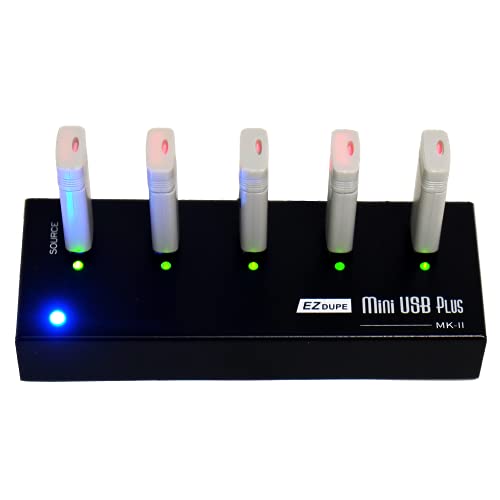
- Copies up to four drives simultaneously
- Compact and lightweight design
- Can use a power bank for supply
Best For: Mobile school staff and small copying jobs
Best for Large Deployments

- Duplicates up to fifteen drives
- Standalone computer-free workflow
- Synchronous and asynchronous copying
Best For: District-scale USB deployment projects
Best Touchscreen Pick
EZ Dupe SOHO Touch 1-to-10 USB Duplicator
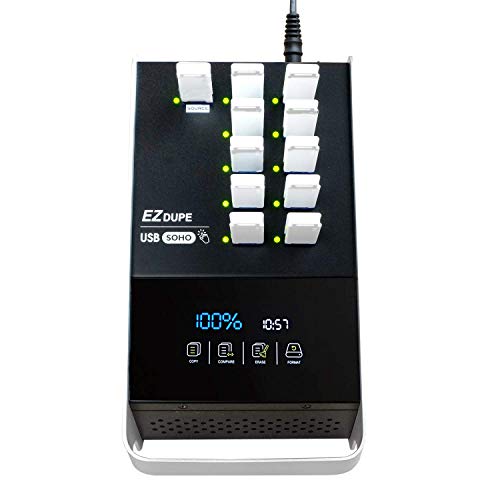
- Touchscreen controls for copying, comparing, formatting, and erasing
- Up to 35MB/s duplication speed
- Supports USB 2.0, 3.0, and 3.1 flash media
Best For: School IT teams wanting straightforward daily operation
Best Seven-Drive Value
Acumen Disc 1-to-7 USB Duplicator

- Copies to seven Type-A drives at up to 35MB/s
- Standalone design needs no computer
- Includes DoD 3-pass and 7-pass erase modes
Best For: Schools distributing files to multiple standard USB drives
Best IT-Focused Option
StarTech 1:7 Standalone USB Duplicator

- Seven-port USB 2.0/3.0 duplication and erasing
- LCD displays drive status and error information
- Includes Copy-and-Compare and sector-by-sector modes
Best For: School technicians managing, checking, and sanitizing USB media
Best Compact Pick
BestDuplicator UB300 1:2 USB Duplicator

- Copies one drive to two targets without a computer
- Supports Quick Copy and bit-for-bit cloning
- Includes media testing and erase functions
Best For: Small school IT deployments and portable use
Best High-Volume Pick
Vinpower USBDBL 15-Target Duplicator

- Duplicates to 15 USB drives simultaneously
- Uses independent asynchronous copying
- Offers Smart Copy, Raw Mode, and secure erase
Best For: District-wide and large-batch drive deployments
Best Versatile Workstation Pick
StarTech 1:5 USB Duplicator and Eraser

- Copies to five drives without a computer
- Supports file, sector-by-sector, and erase modes
- Adds testing, scanning, and copy verification tools
Best For: School technicians handling deployment and sanitization
Best for IT Verification – StarTech 1:2 USB Duplicator
For schools comparing USB duplicators for schools, the StarTech 1:2 model is a practical choice for smaller batches of boot drives, classroom media, or sanitized USB storage. It works without a computer and supports both duplication and erasing.
Best For: School IT teams that need two-at-a-time copying, drive verification, and secure erase options.
Pros:
- Copies to two USB drives without a computer.
- Supports system/file copying and sector-by-sector duplication.
- Includes quick erase plus single- and three-pass overwrite modes.
- Copy-and-Compare helps verify completed clones.
Cons:
- Limited to two target drives at a time.
- Asynchronous copying requires source content under 64 MB.
- Some external USB devices may need their own power source.
Its LCD menu, activity indicators, error scanning, and upgradeable firmware make it especially useful where staff need visibility and repeatable drive-management workflows.
Best for Seven-Drive Batches – Systor 1 to 7 USB Duplicator
The Systor 1-to-7 gives schools a larger batch workflow for USB duplicators for schools, copying one source drive to up to seven targets without requiring a computer or software. Its stated transfer rate remains the same as the number of loaded drives increases.
Best For: District or campus IT staff preparing several identical USB drives for labs, testing, or deployment.
Pros:
- Copies to up to seven USB drives simultaneously.
- Standalone operation requires no computer or software.
- Supports synchronous and asynchronous copy modes.
- Performs bit-by-bit duplication from the source drive.
Cons:
- Copy speed is listed at up to 2GB per minute, or 33MB per second.
- USB Type-C drives require an adapter.
- The unit weighs 10 pounds.
This model balances useful classroom-scale capacity with straightforward operation, while its hot-swappable feature can help simplify repeated drive-loading tasks.
Best Portable Option – EZ Dupe 1 to 4 Mini USB Plus
The compact EZ Dupe Mini USB Plus MK II is a convenient option for schools seeking portable USB duplicators for schools. It copies to up to four USB flash drives at once and can operate from a power bank or another USB power source.
Best For: Teachers, technicians, and smaller IT teams that need a lightweight duplicator for flexible, on-site copying.
Pros:
- Supports up to four simultaneous USB copies.
- Compact 12.8-ounce design is easy to move between rooms.
- Asynchronous copying lets users replace finished drives without waiting for a full set.
- Supports USB 1.0, 2.0, and 3.0 flash media.
Cons:
- Capacity is smaller than the seven- and fifteen-port alternatives.
- Maximum speed depends on the connected drives.
- External USB storage requires its own power source.
With updated compatibility, support for capacities above 2TB, and flexible power options, this is a strong fit when portability matters more than maximum batch size.
Best for Large Deployments – Systor 1 to 15 USB Duplicator
For large rollouts, the Systor 1-to-15 is built for schools that need USB duplicators for schools with substantial batch capacity. It duplicates one source drive to as many as fifteen targets and operates without a computer or software.
Best For: District technology departments preparing many matching USB drives for labs, assessments, or school-wide deployments.
Pros:
- Supports up to fifteen target drives at once.
- Standalone operation reduces dependence on a computer.
- Offers synchronous and asynchronous copy modes.
- Uses bit-by-bit duplication for source-drive copying.
Cons:
- Transfer speed is listed at up to 2GB per minute, or 33MB per second.
- USB Type-C drives need an adapter.
- The larger port count may be unnecessary for small school batches.
Its fifteen-drive capacity is the main advantage: schools can prepare more identical media per cycle while retaining the same stated copy speed as the load count increases.
Best Touchscreen Pick – EZ Dupe SOHO Touch 1-to-10 USB Duplicator
For schools seeking usb duplicators for schools that staff can operate without extensive training, the EZ Dupe SOHO Touch stands out with its touchscreen controls and support for USB 2.0, 3.0, and 3.1 media. It handles copying, comparison, formatting, and erasing from a standalone unit.
Best For: School IT departments and media labs that prioritize simple touchscreen operation and frequent daily use.
Pros:
- Touchscreen interface simplifies Copy, Compare, Format, and Erase tasks.
- Duplicates USB flash drives at up to 35MB per second.
- Supports all file formats, file sizes, and USB flash-drive capacities.
- Designed with lightweight, heavy-duty construction for daily operation.
Cons:
- Its listed 1-to-10 configuration may be more capacity than smaller school teams need.
- The touchscreen-focused design may be unnecessary for buyers who prefer basic button controls.
The SOHO Touch is a practical choice when ease of use matters as much as throughput. Its Smart Copy, comparison, formatting, and one-touch erase features give school staff a broad set of routine media-management tools.
Best Seven-Drive Value – Acumen Disc 1-to-7 USB Duplicator
Schools needing usb duplicators for schools with a straightforward, computer-free workflow can consider the Acumen Disc AD07-USB. It copies to up to seven USB Type-A flash drives at once and adds several erase modes, including DoD 3-pass and 7-pass options.
Best For: School IT staff distributing the same files to several standard USB Type-A drives while also needing media-erasing tools.
Pros:
- Copies to up to seven drives at speeds of up to 35MB per second.
- Standalone operation requires no computer, operating system, or warm-up period.
- Offers quick, full, DoD 3-pass, and DoD 7-pass erase modes.
- Copy-and-compare technology helps verify completed duplications.
Cons:
- Supports standard USB Type-A media only; USB-C drives require a separately purchased adapter.
- May not work with hardware-encrypted or protected USB memory devices.
- Formatting options are limited to FAT32 and exFAT.
This model balances multi-drive output with useful sanitization features. Its seven slots and simple four-key interface suit repeatable school distribution tasks, provided the media is USB-IF-compliant Type-A storage.
Best IT-Focused Option – StarTech 1:7 Standalone USB Duplicator
For schools comparing usb duplicators for schools with a focus on drive management, the StarTech USBDUPE17 combines seven-port duplication with cloning, erasing, and drive-checking functions. Its LCD and push-button controls provide status information without requiring a computer.
Best For: School technicians who need to create multiple USB drives, verify copies, and perform routine drive sanitization.
Pros:
- Standalone 1-to-7 duplicator supports USB 3.0 and 2.0 flash media.
- Provides system-and-file copying, sector-by-sector copying, and multiple erase modes.
- LCD menu can show drive information, performance, errors, and bad-sector scans.
- Copy-and-Compare mode helps verify cloned drives.
Cons:
- System-and-file copy speed is listed at 1.5GB per minute, slower than some alternatives here.
- Asynchronous copying is limited to source content under 128MB.
- External USB storage devices may require their own power source.
The StarTech is especially useful when verification and sanitization are part of the workflow, not just duplication. Its firmware is upgradeable and its two-year warranty adds support for longer-term school deployment.
Best Compact Pick – BestDuplicator UB300 1:2 USB Duplicator
For schools that need a simple way to prepare a few drives at a time, the BestDuplicator UB300 is a compact option among USB duplicators for schools. It copies one USB drive to two targets without a computer and supports both file-based Quick Copy and bit-for-bit Whole Media Copy modes.
Best For: Small IT teams, classroom deployments, software distribution, and occasional backup or cloning tasks.
Pros:
- Duplicates one source drive to two targets simultaneously without a PC.
- Offers Quick Copy and Whole Media Copy modes for different deployment needs.
- Includes capacity checks, device information, speed tests, and erase functions.
- Compact LCD-and-button design is portable and straightforward to operate.
Cons:
- Only supports two target drives at once.
- Designed primarily for USB 1.1 and USB 2.0 media.
- Additional flash-card formats require a compatible USB card reader.
The UB300 is a practical fit when portability and uncomplicated operation matter more than high-volume duplication. Its verification tools are useful for checking media before distributing drives to students or staff.
Best High-Volume Pick – Vinpower USBDBL 15-Target Duplicator
Schools preparing large batches of identical drives may benefit from the Vinpower USBDBL, a 15-target standalone unit built for higher-volume duplication. Its asynchronous operation lets target drives copy independently, so completed drives can be replaced while other jobs continue.
Best For: District IT departments, lab rollouts, and recurring deployments that require many USB copies.
Pros:
- Copies to up to 15 USB drives at once without a PC.
- Asynchronous duplication supports different source data sizes and independent target progress.
- Smart Copy and Raw Mode provide fast file copying or bit-by-bit duplication.
- Secure erase is designed to remove drive contents and prevent data recovery.
Cons:
- Its 11-pound form factor is less convenient for mobile or classroom use.
- Alternative formats such as SD, microSD, and CompactFlash require interface adaptor modules.
- The larger capacity is likely unnecessary for schools with only occasional duplication needs.
With its high target count and asynchronous workflow, the USBDBL is best suited to centralized school or district operations. It is a substantial investment, but it can reduce the time required for large drive batches.
Best Versatile Workstation Pick – StarTech 1:5 USB Duplicator and Eraser
The StarTech 1:5 is a flexible choice for schools that need to duplicate, verify, and erase several USB drives from one standalone workstation. It supports USB 3.0, 2.0, and 1.1 media, with file-system copying, sector-by-sector cloning, and multiple erase options.
Best For: School technicians managing boot drives, shared software media, drive sanitization, and routine verification.
Pros:
- Copies one source to five target drives without requiring a computer.
- Supports system/file copy and sector-by-sector duplication across varied file formats.
- Provides Quick Erase, single-pass, and three-pass overwrite options.
- LCD controls, drive tests, bad-sector scanning, and Copy & Compare support verification.
Cons:
- Asynchronous copying is limited to source content under 64 MB.
- External USB storage devices may need their own power source.
- Its standalone workflow may be more capability than occasional users need.
The StarTech model balances five-port productivity with useful maintenance and verification tools. It is especially compelling for school IT staff who need one device for both deployment and secure drive cleanup.
How We Picked These USB Duplicators for Schools
We focused on standalone duplicators that can copy or erase USB media without requiring a connected computer. The selected models cover different deployment sizes, from 1:2 units suited to occasional office use to 1:15 systems built for larger rollouts. We also considered stated transfer speed, target count, USB compatibility, display and controls, portability, and sanitization features.
Because school workflows vary, no single model is best for every campus. A small school may value a compact duplicator and lower upfront cost, while a district technology department may prioritize throughput, simultaneous targets, and dependable erasure functions.
Quick Comparison
| Best for | What to prioritize | Suitable configuration |
|---|---|---|
| Occasional classroom or office use | Compact size, simple controls, low cost | 1:2 or 1:4 |
| Routine IT deployments | Balanced speed and target capacity | 1:5 or 1:7 |
| Large-scale distribution | Maximum simultaneous copies | 1:10 or 1:15 |
| Shared or recycled USB drives | Dedicated erase and sanitization modes | Duplicator with sanitizer functions |
Key Buying Factors for USB Duplicators for Schools
Target Count and Daily Workload
The number of target ports determines how many drives can be processed per cycle. A 1:2 model is easier to store and may be sufficient for a teacher or small support team. For imaging computer labs or preparing event materials, a 1:7, 1:10, or 1:15 unit can reduce repetitive handling and staff time.
Copy Speed and Media Limitations
Advertised speeds are usually maximum rates and depend on the source drive, target drives, file size, USB generation, and data quality. Large files and slower flash media can reduce real-world throughput. Matching drives with similar performance can make batches more predictable.
USB Compatibility
Check whether the unit supports the USB formats and capacities your school already uses. Some models emphasize USB 2.0 compatibility, while others accommodate newer USB 3.x media. Compatibility does not necessarily mean every drive will transfer at the fastest available rate.
Sanitization and Data Security
Schools that reuse drives should look for erase or sanitizer modes, especially when media may contain student records, assessment files, credentials, or other sensitive information. Confirm the available erase standard and document the process if the device will support formal IT or compliance procedures.
Controls, Feedback, and Support
LCDs or touchscreen menus can make batch status, errors, and selected modes easier to verify. Also consider warranty coverage, replacement parts, vendor documentation, and whether staff can operate the unit without specialized training.
Who Should Buy Which USB Duplicators for Schools?
Choose a compact 1:2 or 1:4 duplicator if one person handles occasional drive preparation, classroom projects, or small software deployments. These models are typically easier to move and store.
Choose a 1:5 or 1:7 model for school IT teams that regularly prepare lab images, instructional media, or recovery drives. This range offers a practical balance between batch size and workspace requirements.
Choose a 1:10 or 1:15 duplicator when the priority is processing many drives in fewer cycles. These units make the most sense for district offices, large campuses, and centralized technology departments with recurring deployment workloads.
Choose a model with dedicated sanitization features when drives are shared, returned by students, or repurposed across departments. For any model, test it with your actual USB media before committing to a large rollout, and keep verified master drives separate from ordinary working copies.