High-resolution VR can make cockpit instruments, distant scenery, and in-game text easier to see, but display quality is only part of the buying decision. Tracking, comfort, field of view, connectivity, and PC requirements matter just as much.
We’ve gathered 10 standout options ranging from standalone mixed-reality headsets to enthusiast-focused PC VR systems, including models designed for flight simulators, racing, and demanding SteamVR games.
Best 10 Vr Headsets with 4K Resolution Picks for 2026
Best Ultra-High-Resolution PCVR

- 3840x3840 resolution per eye with 57 PPD
- QLED+MiniLED display with local dimming
- Eye tracking and automatic 58–72mm IPD adjustment
Best For: PCVR users seeking maximum visual detail
Best Standalone Bundle
Meta Quest 3 512GB Gorilla Tag Bundle

- Standalone wireless VR with 512GB storage
- 2064x2208 resolution per eye and 120Hz support
- Includes Gorilla Tag-themed items and 2,000 Shiny Rocks
Best For: Wireless gaming and mixed-reality users
Best Comfort-Focused PCVR
Pimax Crystal Super with Studioform Face Pad

- 3840x3840 resolution per eye and 57 PPD
- Glass aspheric lenses with a large sweet spot
- Includes Studioform VR Face Pad Kit
Best For: High-resolution PCVR sessions with added face comfort
Best Mixed-Reality Value
Meta Quest 3 512GB Batman Bundle
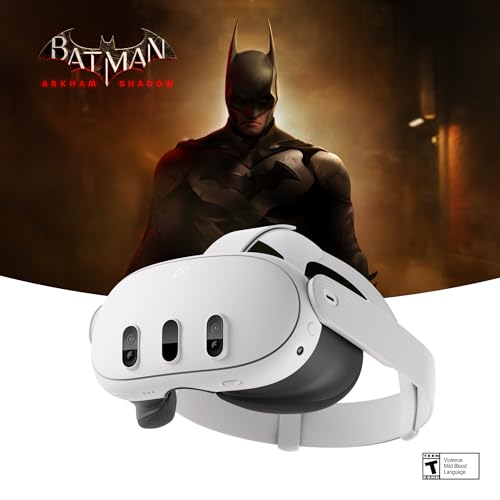
- Wireless standalone headset with 512GB storage
- 2064x2208 resolution per eye and pancake lenses
- Dual RGB cameras for full-color passthrough
Best For: Everyday VR, fitness, and mixed-reality use
Best for Sim Racing

- 3840x3840 resolution per eye with 50 PPD clarity
- Wide 140° field of view for simulator awareness
- Eye tracking, Mini-LED display, and up to 90Hz refresh
Best For: Flight and racing simulator enthusiasts using a Windows PC
Best Mixed-Reality Option

- 3840x2160 high-resolution display
- Eye, hand, and passthrough tracking
- Wireless Android XR design with spatial audio
Best For: Mixed-reality gaming, media, productivity, and collaboration
Best for PC VR Streaming

- 2448x2448 resolution per eye with 90Hz refresh
- DisplayPort mode for high-fidelity PC VR
- Standalone XR, mixed reality, and hot-swappable battery
Best For: PC VR players wanting wired and standalone flexibility
Best for Visual Clarity
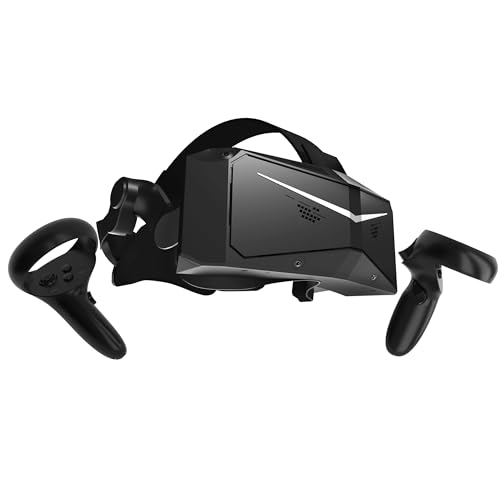
- 2880 x 2880 resolution per eye
- QLED with local dimming and HDR
- Up to 120Hz with SteamVR support
Best For: PC flight simulators, iRacing, and sharp visual detail
Best for Wide-View PC VR

- 3840 x 2160 resolution per eye
- 200-degree field of view
- 90Hz SteamVR-compatible LCD display
Best For: PC VR gaming and panoramic 360-degree media
Best Complete PC VR Package
Pimax Crystal Light with Controllers
- 2880 x 2880 resolution per eye
- QLED with local dimming and 35 PPD
- Controllers and flexible tracking options included
Best For: PC gaming and simulation users wanting a ready-to-use bundle
Best Ultra-High-Resolution PCVR – Pimax Crystal Super
For shoppers comparing VR headsets with 4k resolution, the Pimax Crystal Super stands out with 3840×3840 pixels per eye and a 57 PPD QLED+MiniLED display. It is designed for Windows PCVR and pairs sharp visuals with eye tracking, adjustable IPD, and variable refresh rates for demanding games and flight simulators.
Best For: PC gamers and flight-simulation enthusiasts who prioritize image clarity, wide viewing angles, and customizable fit.
Pros:
- 3840×3840 resolution per eye and 57 PPD for highly detailed imagery.
- QLED+MiniLED display with local dimming for enhanced contrast.
- Automatic 58–72mm IPD adjustment, eye tracking, and 72Hz/90Hz refresh rates.
- Supports Lighthouse tracking and includes spatial-audio speakers and a high-fidelity microphone.
Cons:
- Requires a Windows gaming PC and a wired USB connection.
- Designed for PCVR rather than standalone use.
- Buyers should verify the seller is an official Amazon brand store to protect warranty coverage and authenticity.
This is the most display-focused option in the group, particularly for users willing to build a capable PCVR setup around exceptional per-eye resolution. Its adjustable fit and tracking options add flexibility, while the PC requirement makes it less convenient than standalone alternatives.
Best Standalone Bundle – Meta Quest 3 512GB Gorilla Tag Bundle
The Meta Quest 3 Gorilla Tag bundle is a convenient pick for shoppers seeking VR headsets with 4k resolution without a PC. Its 2064×2208 resolution per eye, standalone operation, 512GB of storage, and full-color passthrough support gaming, fitness, and mixed-reality experiences.
Best For: Standalone VR users who want generous storage, wireless play, mixed reality, and Gorilla Tag-themed extras.
Pros:
- Standalone design works without wires or a gaming computer.
- 512GB of storage and 8GB of RAM support a large game library and responsive performance.
- Snapdragon XR2 Gen 2 processor provides upgraded graphics and load times.
- Dual RGB cameras enable full-color passthrough for mixed reality.
Cons:
- Battery life is rated at approximately 2.2 hours.
- The supplied resolution is lower per eye than the Pimax models in this roundup.
- The Gorilla Tag extras may be less useful to shoppers who do not play that game.
With wireless convenience and substantial storage, this bundle is an accessible all-purpose choice. It trades the Pimax headsets’ higher per-eye resolution for standalone simplicity and a broader mix of gaming, fitness, and mixed-reality features.
Best Comfort-Focused PCVR – Pimax Crystal Super with Studioform Face Pad
This Pimax Crystal Super package is a strong contender among VR headsets with 4k resolution, combining 3840×3840 pixels per eye with a Studioform VR Face Pad Kit. Its glass aspheric lenses, large sweet spot, and variable 72Hz/90Hz refresh rates are suited to detailed PCVR gaming.
Best For: PCVR players who want very high resolution along with an included comfort accessory for longer sessions.
Pros:
- 3840×3840 resolution per eye delivers an ultra-sharp image.
- 57 PPD and glass aspheric lenses provide a large viewing sweet spot.
- Studioform face pad kit is included for a tailored fit and added comfort.
- Variable 72Hz and 90Hz refresh rates support smooth gameplay.
Cons:
- Requires a compatible PCVR setup rather than standalone operation.
- Supplied specifications vary between 106° and 127° horizontal field of view depending on the stated mode or listing detail.
- The package focuses on the headset and face pad kit, with fewer included features specified than the other products.
This version makes the most sense when comfort customization is a priority alongside extremely high display resolution. It offers the same core visual appeal as the Crystal Super while adding a purpose-built face pad, but it still requires a Windows PCVR environment.
Best Mixed-Reality Value – Meta Quest 3 512GB Batman Bundle
The Meta Quest 3 Batman bundle offers a practical standalone route for shoppers interested in VR headsets with 4k resolution. It combines 512GB of storage, 2064×2208 resolution per eye, pancake lenses, wireless operation, and dual RGB cameras for full-color mixed reality.
Best For: Users who want a wireless headset for gaming, fitness, mixed reality, and included Batman-themed content.
Pros:
- Standalone operation eliminates the need for a gaming PC or cable during play.
- 512GB storage provides room for games and applications.
- Snapdragon XR2 Gen 2 and 8GB of RAM support improved graphics and performance.
- Dual RGB passthrough cameras help blend virtual objects with the physical environment.
Cons:
- Battery life is listed at approximately 2.4 hours.
- Its per-eye resolution is below the Pimax Crystal Super models.
- The included Batman content may not appeal to every buyer.
This bundle is a flexible everyday option rather than a specialist PCVR display. Its wireless design, storage capacity, pancake lenses, and mixed-reality cameras make it easy to recommend for general use, while resolution-focused enthusiasts may prefer the Pimax alternatives.
Best for Sim Racing – Pimax Crystal Super
For shoppers comparing VR headsets with 4k resolution, the Pimax Crystal Super stands out with 3840×3840 pixels per eye, a wide 140-degree field of view, and a wired DisplayPort connection for PC VR. Its high-resolution QLED and Mini-LED display is especially suited to detailed simulators and demanding gaming.
Best For: Flight and racing simulator enthusiasts who prioritize visual clarity, peripheral awareness, and smooth PC performance.
Pros:
- 3840×3840 resolution per eye and 50 PPD aspherical lenses support exceptionally sharp imagery.
- 140-degree field of view provides greater peripheral vision in simulator environments.
- Eye tracking, inside-out tracking, up to 90Hz refresh, and dynamic FOV optimization offer flexible performance.
- Integrated spatial audio, a noise-canceling microphone, and replaceable facial interfaces support longer sessions.
Cons:
- Requires a Windows PC and uses a wired DisplayPort connection.
- Its advanced display and simulator-focused features may be more than casual VR users need.
The Crystal Super is a strong choice when fine cockpit details and a broad view matter more than standalone convenience. Make sure your PC and available DisplayPort and USB connections are suitable for the headset.
Best Mixed-Reality Option – Galaxy XR
The Galaxy XR is a versatile option among VR headsets with 4k resolution, offering a 3840×2160 display, Android XR software, and mixed-reality features such as passthrough video, eye tracking, and hand tracking. Its wireless design is built for gaming, media, productivity, and collaboration.
Best For: Users who want one headset for mixed reality, entertainment, virtual meetings, productivity, education, or fitness.
Pros:
- 3840×2160 high-resolution display delivers detailed visuals for games, movies, and applications.
- Eye tracking, hand tracking, passthrough video, and advanced sensors support intuitive interaction.
- Wireless Wi-Fi connectivity and Android XR provide a flexible standalone experience.
- Adjustable comfort fit, spatial audio, and a 545-gram design support varied use cases.
Cons:
- Battery life is listed at approximately two hours.
- Its 109-degree field of view is narrower than the Pimax and HTC options here.
- The supplied details identify smartphone compatibility rather than Windows PC compatibility.
The Galaxy XR makes the most sense for buyers seeking a broadly useful mixed-reality headset rather than a dedicated wired simulator display. Its short listed battery life is worth considering for extended sessions.
Best for PC VR Streaming – HTC VIVE Focus Vision
HTC Vive Focus Vision Wired Bundle — XR Headset with DisplayPort PC VR Streaming Kit
Check Price On AmazonThe HTC VIVE Focus Vision is a flexible pick among VR headsets with 4k resolution, combining standalone XR use with a DisplayPort mode for lossless PC VR visuals. Its 2448×2448-per-eye display, 120-degree field of view, and 90Hz refresh rate balance detail with smooth gameplay.
Best For: PC VR players who want both wired DisplayPort performance and standalone mixed-reality capabilities.
Pros:
- 2448×2448 resolution per eye, up to 120-degree field of view, and 90Hz refresh support immersive PC VR.
- DisplayPort mode provides direct, high-fidelity visuals from a compatible PC.
- Eye, hand, low-light, and expanded camera tracking support natural interaction.
- Auto-IPD adjustment, spatial audio, and a hot-swappable battery improve usability during longer sessions.
Cons:
- DisplayPort PC VR requires a compatible computer and setup, including a wired connection.
- The display resolution is lower per eye than the Pimax Crystal Super.
- The supplied details list 128GB of storage, which may limit local content capacity.
The Focus Vision is a practical middle ground for users who want PC-grade connectivity without giving up standalone and mixed-reality features. Its replaceable battery and auto-IPD adjustment add useful flexibility for frequent VR sessions.
Best for Visual Clarity – Pimax Crystal Light 8K QLED
For shoppers comparing vr headsets with 4k resolution, the Pimax Crystal Light stands out with 2880 x 2880 resolution per eye, a QLED panel, and local dimming. Its PC-focused design is particularly suited to detailed simulation environments.
Best For: PC flight simulators, iRacing, and users prioritizing sharp visuals.
Pros:
- 2880 x 2880 resolution per eye and 16.6 million pixels.
- QLED display with local dimming and HDR support.
- Glass aspheric lenses provide edge-to-edge clarity.
- Supports refresh rates up to 120Hz and SteamVR compatibility.
Cons:
- At approximately 815 grams, it may feel substantial during long sessions.
- Designed for Windows PC VR rather than standalone use.
This is a strong choice when resolution and contrast matter more than portability. Inside-out tracking simplifies setup, while SteamVR support keeps it compatible with established PC VR equipment.
Best for Wide-View PC VR – Vision 8K Plus Dual 4K
The Vision 8K Plus is a PC VR option for shoppers seeking vr headsets with 4k resolution in each eye. Its 3840 x 2160-per-eye LCD displays and 200-degree field of view emphasize panoramic immersion in SteamVR content.
Best For: Desktop or laptop PC users who want a very wide field of view for games and 360-degree media.
Pros:
- 3840 x 2160 resolution per eye for detailed PC VR visuals.
- Very wide 200-degree field of view.
- SteamVR compatibility and 90Hz refresh rate.
- Adjustable fitting design and an ergonomically balanced frame.
Cons:
- The supplied specifications identify an LCD display rather than QLED.
- Requires a desktop or laptop computer for compatible PC VR use.
- Tracking depends on SteamVR sensor technology.
Its defining advantage is the expansive field of view, which can make panoramic scenes feel more enveloping. Consider it when broad visual coverage is a higher priority than standalone convenience or a higher refresh rate.
Best Complete PC VR Package – Pimax Crystal Light with Controllers
This Crystal Light bundle combines 2880 x 2880-per-eye visuals with included controllers, making it a practical pick among vr headsets with 4k resolution. Local dimming, multiple refresh-rate options, and SteamVR compatibility suit demanding PC gaming and simulation.
Best For: PC gamers and sim users who want high-resolution visuals with controllers included.
Pros:
- 2880 x 2880 resolution per eye with 35 PPD.
- QLED display and local dimming improve contrast in dark scenes.
- 72Hz, 90Hz, and 120Hz refresh-rate options.
- Includes VR controllers and supports inside-out or Lighthouse tracking.
Cons:
- Requires a Windows PC and wired HDMI/USB connections.
- At approximately 815 grams, it is not an especially light headset.
- Its 130-degree field of view is narrower than the Vision 8K Plus listing.
Choose this version if you want the Crystal Light’s detailed display and contrast features without sourcing controllers separately. The flexible tracking options also make it easier to fit into an existing PC VR setup.
How We Picked These Vr Headsets with 4K Resolution
We focused on headsets that offer 4K-class detail through per-eye resolution, dual-display specifications, or exceptionally high pixel density. We also considered whether each model’s resolution is useful in practice, accounting for lens clarity, field of view, refresh-rate support, tracking, comfort, and connection method.
The selection covers different priorities rather than one universal winner. Standalone headsets are easier to use and support mixed reality, while PC-tethered models generally provide higher visual fidelity and more consistent performance for simulators. We also considered included accessories, controllers, face interfaces, and compatibility with platforms such as SteamVR.
Quick Comparison
| Best For | What to Look For | Typical Trade-Off |
|---|---|---|
| Standalone VR and mixed reality | Built-in processing, inside-out tracking, wireless access | Less graphical power than a high-end gaming PC |
| Flight and racing simulators | High pixel density, wide FOV, DisplayPort or strong PC streaming | Higher cost and more demanding hardware |
| SteamVR gaming | Reliable tracking, controller support, broad PC compatibility | Cable management or setup complexity |
| Long sessions | Balanced weight, adjustable fit, effective ventilation | Some comfort features add cost or bulk |
Key Buying Factors for Vr Headsets with 4K Resolution
Resolution and Lens Quality
Check whether the stated resolution is per eye or combined across both displays. Per-eye figures are more useful for comparison. Pixel density, often listed as PPD, can indicate how clearly small text and distant objects appear, while lens design affects edge-to-edge clarity and glare.
PC Connection and Performance
High-resolution VR demands substantial graphics performance. Confirm your GPU, CPU, available ports, and software compatibility before buying. DisplayPort connections can reduce compression and latency, while wireless or USB streaming offers greater freedom but may depend heavily on network quality.
Field of View, Refresh Rate, and Tracking
A wider field of view can feel more immersive, especially in racing and flight games, but it may increase rendering demands. Higher refresh rates can improve motion smoothness. Inside-out tracking is convenient, whereas external or enhanced tracking may better suit precision-focused PC VR setups.
Comfort and Adjustability
Look for adjustable head straps, lens spacing or eye relief, balanced weight, and a face gasket that seals without creating pressure. If you wear glasses, verify eye-relief options and accessory compatibility. A lighter or better-balanced headset may be preferable to a sharper model for long sessions.
Who Should Buy Which Vr Headsets with 4K Resolution?
Choose a standalone headset if you want quick setup, room-scale play, mixed reality, and access to VR without a gaming PC. These models are also practical for families and casual users.
Choose a high-resolution PC headset if you play flight simulators, racing titles, or cockpit games where readable gauges and distant detail are priorities. Confirm that your computer can drive the chosen resolution at an acceptable frame rate.
Choose a wide-FOV enthusiast model if immersion and peripheral vision matter more than portability. These headsets can be excellent for simulation, but their larger rendering workload and setup requirements make them less convenient for casual gaming.
Before purchasing, compare the complete package rather than the headset alone. Controllers, tracking hardware, cables, face interfaces, and included software can substantially change the overall value.