A wider field of view can make virtual reality feel more natural by expanding your peripheral vision and reducing the sensation of looking through narrow binoculars. The right choice depends on whether you prioritize simulation detail, standalone convenience, high refresh rates, or affordable smartphone viewing.
We’ve selected 10 VR headsets with wide FOV across PC, standalone, wired, and mobile categories. Use the guide below to compare display quality, tracking, comfort, compatibility, and the features that matter most before you buy.
Best 10 Vr Headsets with Wide Fov Picks for 2026
Widest Premium FOV

- 140° field of view for broad peripheral awareness
- 3840×3840 resolution per eye with 50 PPD
- QLED/Mini-LED display with eye tracking
Best For: Serious PC sim racers and flight simulator enthusiasts
Best Standalone Option

- Wireless standalone VR with no PC required
- 512GB storage and Snapdragon XR2 Gen 2
- Full-color passthrough for mixed reality
Best For: Wireless gaming, fitness, and mixed-reality use
High-Resolution Sim Value
- 2880×2880 resolution per eye
- QLED with local dimming and HDR
- Up to 120Hz with SteamVR compatibility
Best For: PC flight sims, iRacing, and clarity-focused VR users
Lightweight Wide-View PC Pick

- Up to 116° field of view
- Lightweight 285g design with adjustable IPD
- Up to 120Hz and flip-up visor
Best For: PC gaming, VR arcades, training, and extended sessions
Premium PC VR Pick

- 120-degree FOV with 5K-class resolution
- DisplayPort PC VR and standalone support
- Advanced tracking and hot-swappable battery
Best For: PC VR gamers and mixed-reality users
Lightweight Phone VR Pick

- 120-degree FOV for mobile VR content
- Works with iPhone and Android phones
- Lightweight, glasses-friendly design
Best For: Families and beginners using smartphone VR
Immersive Smartphone Bundle
- 120-degree FOV and aspherical lenses
- Built-in headphones with 42mm drivers
- Fits smartphones from 4.7 to 7.2 inches
Best For: Phone-based 3D movies and casual gaming
Budget Wide-FOV Pick

- 100° wide-angle lens
- Fits 4.7–7.2-inch smartphones
- Adjustable lenses with remote
Best For: Affordable smartphone VR movies and casual gaming
Comfort-Focused Choice

- 90°–110° adjustable FOV
- Bluetooth controller included
- Lightweight 268g design
Best For: Extended smartphone VR viewing and family use
Widest Premium FOV – Pimax Crystal Super
For shoppers comparing VR headsets with wide FOV, the Pimax Crystal Super stands out with a 140° field of view and exceptionally high per-eye resolution. Its wired PC design, eye tracking, and simulation-focused features make it a compelling choice for users prioritizing visual detail and peripheral awareness.
Best For: Serious PC sim racers, flight simulator enthusiasts, and demanding VR gamers.
Pros:
- 140° wide field of view helps reduce tunnel vision in simulations.
- 3840×3840 resolution per eye and 50 PPD support highly detailed imagery.
- QLED and Mini-LED display technology provides local dimming, high brightness, and strong contrast.
- Supports up to 90Hz, inside-out tracking, eye tracking, and dynamic FOV performance optimization.
Cons:
- Requires a Windows PC and wired DisplayPort/USB connection.
- Its advanced features and simulation-focused design may be more than casual VR users need.
The Crystal Super is a premium, PC-tethered option for buyers who want one of the broadest viewing experiences in this roundup. Make sure your computer can support its demanding resolution and performance requirements.
Best Standalone Option – Meta Quest 3 512GB
The Meta Quest 3 is a versatile standalone headset for buyers who want immersive VR without a PC cable. While its supplied specifications do not identify it as an ultrawide-FOV model, its 4K+ display, 120Hz support, mixed-reality cameras, and wireless design make it a practical all-around alternative among VR headsets with wide FOV.
Best For: Wireless gaming, fitness, mixed reality, and households seeking a large standalone game library.
Pros:
- Standalone operation eliminates the need for a gaming PC or wired connection.
- 512GB of storage and 8GB of RAM provide room for games and responsive performance.
- Snapdragon XR2 Gen 2 processor supports improved graphics and faster loading.
- Dual RGB cameras enable full-color passthrough for mixed-reality experiences.
Cons:
- Battery life is rated at about 2.2 hours.
- The supplied specifications do not provide a conventional wide-FOV figure for comparison.
- Its strongest advantages are convenience and versatility rather than maximum per-eye resolution.
Choose the Quest 3 if wireless convenience and mixed reality matter more than the widest possible viewing angle. The included storage and standalone software ecosystem make it easier to use across gaming and fitness.
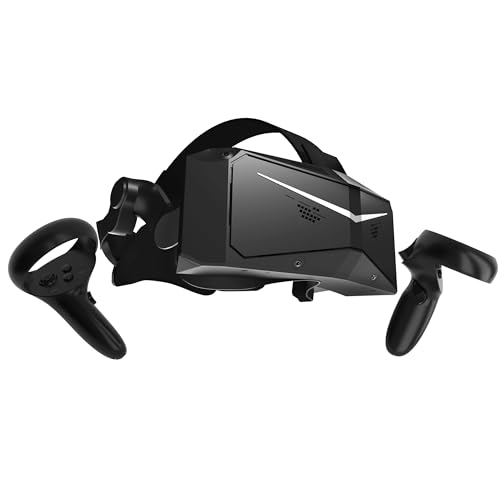
High-Resolution Sim Value – Pimax Crystal Light
The Pimax Crystal Light is built for PC users who want sharp visuals and smooth simulation performance. Its 2880×2880-per-eye QLED display, glass aspheric lenses, and SteamVR compatibility make it a strong candidate for shoppers evaluating VR headsets with wide FOV for flight sims and iRacing.
Best For: PC-based flight simulation, iRacing, and SteamVR users who prioritize clarity.
Pros:
- 2880×2880 resolution per eye provides a detailed image for cockpit and instrument viewing.
- QLED, local dimming, and HDR support are designed for vivid colors and strong contrast.
- Glass aspheric lenses aim to provide edge-to-edge clarity with reduced distortion.
- Refresh rates up to 120Hz and inside-out tracking support fluid, responsive play.
Cons:
- At approximately 815 grams, it is heavier than some competing headsets.
- Designed for Windows PC and SteamVR rather than standalone use.
- The supplied notes do not specify a field-of-view angle.
Crystal Light makes the most sense for sim enthusiasts who value resolution and lens clarity over wireless freedom. Its fixed foveated rendering feature can also help balance image detail and PC performance.
Lightweight Wide-View PC Pick – DPVR E4 PC VR Headset
The DPVR E4 is a lightweight PC VR headset with a listed Fresnel-lens field of view of up to 116°. For shoppers seeking VR headsets with wide FOV without a particularly heavy design, it combines SteamVR access, 120Hz refresh support, inside-out 6DoF tracking, and a flip-up visor.
Best For: PC gamers, VR arcades, training environments, and users who value a lightweight headset.
Pros:
- Up to 116° FOV offers a broad viewing experience for PC VR.
- 285g headset weight and adjustable IPD support longer sessions.
- Adjustable 72Hz, 90Hz, and 120Hz refresh rates accommodate different performance needs.
- Flip-up design makes it quick to check the real world without removing the headset.
Cons:
- Requires a compatible Windows PC, DisplayPort connection, and USB 3.0 port.
- Its 3664×1920 total display resolution is lower per eye than the Pimax models in this roundup.
- The supplied details list approximately 96° horizontal and vertical binocular overlap, which is narrower than its maximum stated FOV.
The E4 is a sensible pick when comfort, easy real-world access, and broad PC VR coverage matter more than maximum resolution. Check the stated PC requirements before purchasing, especially the GPU and DisplayPort requirements.
Premium PC VR Pick – HTC VIVE Focus Vision
HTC Vive Focus Vision Wired Bundle — XR Headset with DisplayPort PC VR Streaming Kit
Check Price On AmazonFor shoppers comparing VR headsets with wide FOV, the HTC VIVE Focus Vision stands out as a high-resolution option with a claimed 120-degree field of view. It supports standalone use and PC VR, including a DisplayPort mode for lossless, high-fidelity visuals.
Best For: PC VR gamers and mixed-reality users who want detailed displays, advanced tracking, and flexible connectivity.
Pros:
- 5K display with 2448 x 2448 pixels per eye and a 120-degree FOV
- DisplayPort PC VR mode, plus standalone and wireless capabilities
- Eye, hand, face, body, and low-light tracking support
- Auto-IPD adjustment, spatial audio, depth sensing, and a hot-swappable battery
Cons:
- Its advanced features make it a more specialized choice than phone-based headsets
- DisplayPort mode requires a compatible PC connection and setup
The Focus Vision is the strongest fit here for users prioritizing display quality and a broad viewing angle over simplicity. Its feature set is particularly suited to dedicated PC VR and mixed-reality setups.
Lightweight Phone VR Pick – BrobiDerleta 120° VR Headset
3D Anti-Blue Eyes Protected HD Lenses, 120° FOV Virtual Reality Headsets, VR Headset for Phone Combo
Check Price On AmazonThis phone-based model is an accessible choice among VR headsets with wide FOV, offering a claimed 120-degree view for 360-degree videos and mobile games. Its lightweight construction, glasses-friendly design, and built-in button keep the experience simple.
Best For: Families, beginners, and phone users who want an inexpensive headset for casual VR movies and mobile entertainment.
Pros:
- 120-degree FOV with aspheric anti-distortion lenses
- Compatible with iPhone and Android smartphones
- Lightweight 13.6-ounce design with adjustable headband
- Glasses-friendly space, focus adjustment, and built-in interactive button
Cons:
- Requires a compatible smartphone and relies on phone-based VR content
- Not a standalone or PC VR headset
This headset makes the most sense when portability and low-complexity phone viewing matter more than high-end tracking or independent processing. The wide FOV and comfort-oriented design add appeal for casual sessions.
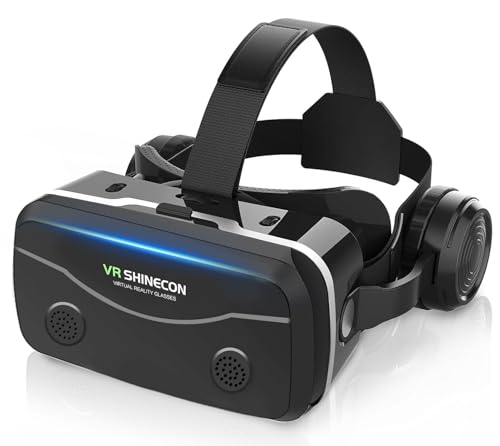
Immersive Smartphone Bundle – VR COCERKET 120° VR Headset
For shoppers seeking VR headsets with wide FOV for phone-based entertainment, this VR COCERKET model combines a claimed 120-degree viewing angle with built-in headphones. It supports smartphones from 4.7 to 7.2 inches and includes adjustable controls for a more personalized fit.
Best For: Smartphone users who want an all-in-one setup for 3D movies and mobile gaming without buying a standalone headset.
Pros:
- 120-degree FOV with aspherical lenses and stated 1920 x 1080 resolution per eye
- Built-in stereo headphones with 42mm drivers
- Compatible with many Android and iOS phones from 4.7 to 7.2 inches
- Adjustable headband, lens focus, viewing angle, and heat-dissipating front cover
Cons:
- Requires a compatible smartphone for its display and processing
- Designed for smartphone VR rather than standalone or PC VR use
- Bluetooth controller is not included
The built-in audio makes this a convenient option for movie viewing and casual gaming, while the wide FOV supports a more spacious presentation. It is best considered a phone accessory rather than a full standalone VR platform.
Budget Wide-FOV Pick – Saycker 100° Phone VR Goggles
For shoppers seeking VR headsets with wide fov, the Saycker offers a 100-degree viewing angle, adjustable lenses, and smartphone compatibility at a straightforward entry-level price point. It is designed for watching 3D movies and playing compatible mobile VR games.
Best For: Smartphone users who want an affordable wide-angle headset for movies and casual VR gaming.
Pros:
- 100-degree wide-angle lens helps create a more immersive view.
- Supports smartphones from 4.7 to 7.2 inches.
- Adjustable pupil distance and object distance accommodate different viewing needs.
- Includes a remote control and supports Android and iOS phones.
Cons:
- Requires a compatible smartphone and does not operate as a standalone VR headset.
- 3D content depends on compatible apps, games, or videos.
- The supplied specifications list a 60Hz refresh rate.
This is a practical choice for basic smartphone VR, especially if a wide field of view and simple setup matter more than standalone features or advanced tracking.
Comfort-Focused Choice – TECKNET 110° Phone VR Headset
The TECKNET is one of the more versatile VR headsets with wide fov for smartphone users, offering a selectable 90- to 110-degree field of view. Its Bluetooth controller, adjustable lenses, and lightweight construction make it suited to longer movie, game, and virtual-tour sessions.
Best For: Families and smartphone users who want a wider view, included controls, and a comfort-oriented design.
Pros:
- 90°–110° field of view supports an expansive visual experience.
- Includes a Bluetooth controller for interaction in compatible apps and games.
- Lightweight 268g design includes an adjustable headband and soft nose rest.
- Blue-light protection lenses and adjustable focal settings support viewing comfort.
Cons:
- Requires a smartphone and compatible 3D or panoramic content.
- It does not automatically convert ordinary images into 3D.
- The included controller adds another device to charge and pair.
Choose this model if comfort and easier interaction are priorities. Its broad compatibility and included controller give it a more complete smartphone-VR setup than a basic viewer.
Maximum FOV Pick – VR COCERKET 120° Headphone VR Headset
Among these VR headsets with wide fov, the VR COCERKET stands out with a claimed 120-degree viewing angle and built-in stereo headphones. It is aimed at smartphone users who want a more theater-like experience for compatible 3D movies and mobile games.
Best For: Beginners who prioritize the widest stated field of view and integrated audio for smartphone VR.
Pros:
- 120-degree ultra-wide viewing angle is the broadest listed here.
- Built-in headphones use 42mm drivers for stereo audio.
- Fits smartphones from 4.7 to 7.2 inches and supports Android and iOS.
- Adjustable headband, face cushioning, and front ventilation support longer sessions.
Cons:
- It is a wired smartphone headset rather than a standalone VR device.
- A Bluetooth controller is not included; controls use the headset button.
- Actual VR functionality depends on compatible phone apps and 3D content.
This model makes the most sense for buyers who want a wide, cinema-style view without purchasing a standalone headset. The integrated headphones add immersion, while the built-in button keeps operation simple.
How We Picked These Vr Headsets with Wide Fov
We focused on headsets that advertise a wider-than-basic viewing angle or use an ultrawide design, while also considering resolution, refresh rate, tracking, platform compatibility, comfort, and intended use. The selection includes premium PC headsets for flight and racing simulators, standalone hardware for flexible gaming, wired PC options, and smartphone viewers for movies and simple mobile VR.
Because field-of-view figures can vary by facial interface, eye position, lens design, and manufacturer testing methods, FOV should not be judged in isolation. A sharp display, good lens clarity, and a secure fit can make a headset feel more immersive than its headline specification suggests.
Quick Comparison
| Best For | What to Prioritize | Typical Trade-Off |
|---|---|---|
| Flight and racing simulation | High resolution, wide horizontal FOV, PC compatibility | Higher cost and more demanding hardware |
| Standalone gaming | Inside-out tracking, battery life, game library | Less upgradeable than a dedicated PC headset |
| PC VR value | SteamVR support, refresh rate, connection options | May require cables, base stations, or setup time |
| Phone-based VR | Phone fit, lens adjustment, comfort, content support | Limited tracking and image quality |
Key Buying Factors for Vr Headsets with Wide Fov
Field of View and Lens Clarity
Look for a wider horizontal FOV if peripheral awareness is important, particularly in cockpit games and fast-moving experiences. Pancake, aspherical, and other lens designs can affect edge clarity, glare, distortion, and the size of the usable viewing area. Adjustable eye relief or lens spacing can help more users find a clear image.
Resolution and Display Quality
Higher per-eye resolution helps reduce screen-door effects and keeps instrument panels, text, and distant objects clearer. QLED panels, local dimming, and strong contrast can improve dark scenes, but they may increase price and PC performance requirements.
Tracking, Connectivity, and Compatibility
Standalone models are simpler to use, while PC headsets can deliver more demanding graphics through SteamVR or DisplayPort. Confirm your computer’s graphics capability, available ports, operating-system support, and whether external tracking hardware is required. For phone viewers, verify screen size, device dimensions, operating-system compatibility, and whether your preferred apps support mobile VR.
Comfort and Practical Use
A wide FOV is only useful if you can wear the headset comfortably. Check weight distribution, face padding, head-strap adjustment, glasses clearance, ventilation, cable placement, and battery life. Built-in headphones can simplify setup, but they may add weight or reduce flexibility.
Who Should Buy Which Vr Headsets with Wide Fov?
Choose a premium PC headset if you want maximum clarity and immersion for flight or racing simulators and have a powerful gaming PC. Choose a standalone headset if convenience, room-scale tracking, and access to a broad library matter more than a wired connection.
Choose a wired PC model if you want SteamVR performance at a potentially lower price and do not mind cable management. Choose a smartphone headset for inexpensive 3D movies or casual mobile experiences, but keep expectations realistic: these viewers generally lack the positional tracking, rendering quality, and software ecosystem of modern standalone and PC headsets.