Find console gaming Christmas gift ideas for players who love a more comfortable, immersive, or organized setup. This list pairs everyday gaming gear with gifts tailored to racing, fighting games, multiplayer, and travel.
Check the recipient’s console, available space, and preferred genres before choosing. The right fit can make a useful upgrade feel personal.
Console Gaming Gifts for Christmas 2026
1. KTC 27-Inch Curved QHD Gaming Monitor
A Desk Setup Display Upgrade
KTC 27-Inch Curved QHD Gaming Monitor

- 27-inch curved screen with 2560 × 1440 QHD resolution.
- 144Hz refresh rate and HDR400 support.
- Two HDMI 2.0 ports and DisplayPort 1.4 for console or PC connections.
Best For: A desk-based player who wants a sharper, smoother display.
2. COMHOMA Big and Tall Ergonomic Gaming Chair
A More Comfortable Gaming Seat
COMHOMA Big and Tall Ergonomic Gaming Chair

- Wide seat and backrest with thick padding and built-in lumbar support.
- Height-adjustable armrests and a reclining tilt function.
- Includes an integrated footrest; assembly is required.
Best For: A player who spends long sessions gaming at a desk.
3. OREI 5-Input HDMI 2.1 Switch
A Cleaner Multi-Device Setup

- Connects up to five HDMI sources to one display output.
- Includes an IR remote, front-panel controls, and auto switching.
- Supports gaming features such as VRR and ALLM with compatible devices.
Best For: Someone who shares a display among consoles and media devices.
4. GDNasist PS5 Console Backpack
A Travel Bag for Console Players

- Four compartments fit a PS5 console, laptop, headset, controllers, and accessories.
- Padded main compartment includes a removable base pad and securing straps.
- Padded shoulder straps and a luggage strap support carrying on trips.
Best For: A PS5 owner who takes their console to friends’ homes or travels.
5. Valorise Wireless Gaming Headset
Wireless Audio for Multiplayer Nights
Valorise Wireless Gaming Headset

- Offers 2.4GHz wireless, Bluetooth, and 3.5mm wired connections.
- Retractable microphone includes a one-touch mute function.
- The product notes list compatibility with PS5, PS4, PC, Mac, and Switch.
Best For: A multiplayer player who wants a headset with several connection options.
6. NEWDERY Dual PS5 Controller Charging Dock
A Tidy Controller Charging Spot
NEWDERY Dual PS5 Controller Charging Dock

- Charges two PS5 or DualSense Edge controllers simultaneously.
- LED indicators show charging and fully charged or standby status.
- Includes a USB cable and four anti-slip mats.
Best For: A PS5 household that regularly uses two controllers.
7. TCL S55H Soundbar with Wireless Subwoofer
Room-Filling Sound for Game Nights
TCL S55H Soundbar with Wireless Subwoofer

- 2.1 soundbar system includes a wireless subwoofer.
- Supports Dolby Atmos and DTS Virtual:X audio formats.
- Connects by HDMI eARC/ARC, optical, Bluetooth, or AUX.
Best For: A player who prefers TV audio over wearing a headset.
8. Optoma GT1080HDR Short-Throw Projector
Big-Screen Gaming at Home
Optoma GT1080HDR Short-Throw Projector

- Projects a 1080p Full HD image and accepts 4K HDR input.
- Short-throw design can project a 100-inch image from just over three feet away.
- Includes dual HDMI inputs for connecting consoles and other devices.
Best For: A player with a suitable wall or screen and room for projection.
9. MAYFLASH Arcade Stick F700
Arcade Controls for Fighting Games

- Supports fighting games on PS5 and works with listed PS4, Switch, PC, and other platforms.
- Offers Bluetooth, 2.4G receiver, and wired USB connections.
- Buttons and joystick are compatible with Sanwa Denshi parts for customization.
Best For: A fighting-game fan who enjoys arcade-style controls.
10. Logitech G29 Racing Wheel and Pedals
A Racing Setup with Wheel Control
Logitech G29 Racing Wheel and Pedals

- Wheel and pedal set is listed for PS5, PS4, and PC gaming titles.
- Features force feedback and 900-degree lock-to-lock rotation.
- Pressure-sensitive brake pedals have adjustable pedal faces.
Best For: A racing-game player with space for a dedicated setup.
11. PlayStation DualSense Edge Wireless Controller
Personalized PS5 Controls
PlayStation DualSense Edge Wireless Controller

- Swappable back buttons can be mapped to other button inputs.
- Adjustable trigger lengths and remappable buttons support custom setups.
- Save control settings to profiles and switch between them.
Best For: A PS5 player who likes tailoring controls to different games.
12. Seagate 2TB Game Drive for PS4 and PS5
Extra Room for a Growing Game Library
Seagate 2TB Game Drive for PS4 and PS5
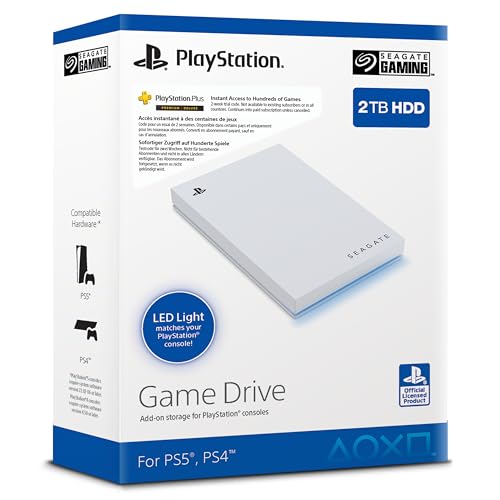
- Provides 2TB of external storage over USB 3.0.
- Product notes list compatibility with PS4 and PS5 models.
- Compact drive includes blue LED lighting and a USB cable.
Best For: A PlayStation player who wants portable space for more games.
How to Choose for a Console Player
Start with how the recipient actually plays. A desk player may appreciate the curved monitor or chair, while someone who plays in a shared living room might get more use from the HDMI switch or soundbar. For a gamer who travels with a PS5, the backpack addresses a practical need: carrying the console, controllers, headset, and cables together. A racing wheel or arcade stick can feel especially personal because it suits a particular genre; those gifts are strongest when you already know the recipient enjoys racing or fighting games.
Think about what currently interrupts their play. Frequent controller charging points toward a dual charging dock. A crowded game library suggests external storage. Online multiplayer makes a headset relevant, while a player who dislikes wearing headphones may prefer room audio. If you are unsure about their favorite games or setup, choose a broadly useful item that fits what you know about their routine.
Match the Gift to Your Budget
Set a comfortable budget before comparing products. A gift does not need to transform the entire gaming room: a charging dock, headset, or storage drive can be useful as a focused accessory. Larger setup pieces, such as the chair, monitor, projector, or soundbar, may need more planning because they take up space and affect how the player uses the room.
Consider what else the gift requires. A projector needs a suitable surface and placement distance. A wheel and pedals need room to mount or position them. A monitor works best when the recipient has a desk setup and compatible output from their console or PC. The HDMI switch is most relevant when there are several devices to connect to one display. Account for these practical needs as part of the gift’s value, not just its feature list.
Check Compatibility and Personalization
Confirm the platform before buying. The DualSense Edge, charging dock, and Seagate drive are PlayStation-oriented, while the MAYFLASH F700 is designed for fighting games and has platform limitations. Its notes specifically say it does not support Xbox consoles. The G29 is listed for PS5, PS4, and PC, and the headset lists PS5, PS4, PC, Mac, and Switch. When a gift depends on a specific console model or game type, verify that detail against the recipient’s setup.
Personalization can also mean choosing for a play style. The DualSense Edge offers profiles and remappable controls for someone who likes adjusting inputs. The F700 allows compatible button and joystick customization. A monitor, soundbar, or projector changes the feel of the room instead; consider screen placement, audio preferences, and whether others share the space. For the backpack, think about whether the player actually takes a console out of the home.
Timing and Last-Minute Decisions
For a Christmas gift, make the decision early enough to confirm compatibility and any setup needs. Larger equipment deserves extra planning: measure the desk or room, check available connections, and consider where cables and accessories will go. For items like a chair, projector, or wheel, the recipient may need time and space to assemble or arrange the setup.
When time is short, pick the option that fits known facts. If you know they own a PS5 and use two controllers, the dock is easy to connect to a clear need. If you know they play fighting games, the arcade stick has a defined audience. Avoid guessing about screen dimensions, room layout, or preferred genres when those details determine whether a larger gift makes sense. A practical accessory that suits their current setup can be a thoughtful Christmas present without requiring a complete upgrade.