Desk gifts can make a workspace more comfortable, organized, or ready for creative projects. This guide brings together useful accessories for people who work, game, read, or record at a desk.
Desk Accessory Christmas Gifts
1. Ergonomic Office Chair with Adjustable Lumbar Support
A More Adjustable Desk Seat
Ergonomic Office Chair with Adjustable Lumbar Support

- Adjustable lumbar support, headrest, and 3-way armrests let the recipient personalize the fit.
- The chair reclines from 90° to 120° and offers tilt-lock positions at 90°, 110°, and 135°.
- Mesh back, foam seat, swivel base, and wheels suit home office or gaming setups.
Best For: Someone who spends long sessions working or gaming at a desk
2. MAONO PD200W Hybrid Wireless Podcast Microphone
A Flexible Mic for Creators
MAONO PD200W Hybrid Wireless Podcast Microphone

- Offers wireless, USB, and XLR connection options for different recording setups.
- The included desktop stand and USB cable make it a practical desk gift for podcasting or calls.
- Its app offers preset sound modes and adjustments including EQ and reverb.
Best For: A podcaster, streamer, or remote worker who records audio
3. Acer 13-in-1 USB-C Laptop Docking Station
A Hub for a Laptop Workstation
Acer 13-in-1 USB-C Laptop Docking Station

- Includes two HDMI ports, one DisplayPort, USB ports, Gigabit Ethernet, audio, and SD/TF readers.
- The dock supports up to three independent screens on compatible Windows laptops; Mac supports mirroring across multiple displays.
- Its included power adapter can deliver up to 100W to a compatible host laptop through USB-C PD.
Best For: A laptop user building a multi-device desk setup
4. Quntis Curved Monitor Light Bar
Lighting for a Wide Monitor
Quntis Curved Monitor Light Bar

- Designed for 34-inch-plus curved monitors or large flat screens, with a light bar that extends up to 26 inches.
- The front light has stepless brightness and color temperature adjustment from 3000K to 6500K.
- Its foldable dual-light design and RGB backlight modes offer different desk and ambient lighting.
Best For: A desk worker or gamer with a large curved monitor
5. HUANUO Adjustable Single Monitor Arm
A Moveable Screen Upgrade
HUANUO Adjustable Single Monitor Arm

- Fits monitors from 13 to 32 inches weighing 4.4 to 19.8 pounds, with 75x75mm or 100x100mm VESA patterns.
- Offers tilt, swivel, and rotation adjustments, with the screen able to rise up to 39.6cm from the desktop.
- Includes both C-clamp and grommet mounting options.
Best For: Someone who wants adjustable screen positioning and a less crowded desk
6. BASIC CONCEPTS Adjustable Foot Hammock, 2 Pack
7. Redragon K668 Hot-Swap Wired RGB Keyboard
A Customizable Keyboard Gift
Redragon K668 Hot-Swap Wired RGB Keyboard

- The full-size keyboard has 108 keys and four shortcut keys for mute, calculator, screen lock, and desktop.
- Its sockets accept many 3-pin or 5-pin switches, which can be swapped without soldering.
- Includes two mixed-color keycap sets and adjustable two-stage feet.
Best For: A writer, programmer, or keyboard enthusiast who likes customization
8. Solid Wood Desktop Bookshelf with Movable Divider
A Shelf for Desk-Side Reading
Solid Wood Desktop Bookshelf with Movable Divider

- The tabletop organizer is made from pine wood and has a sliding divider that can also support books as a bookend.
- Its two sections can hold books alongside smaller items such as pens, sticky notes, or photo frames.
- Side handles make it easier to lift and move around a workspace.
Best For: A reader or collector who keeps books and small items nearby
9. LiTY Acacia Wood Cable Management Box
A Cord-Hiding Desk Organizer
LiTY Acacia Wood Cable Management Box
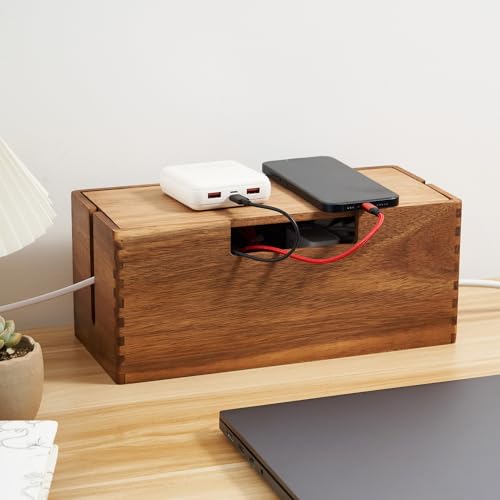
- The acacia wood box has a magnetic lid and ventilation slots.
- Side cable slots help route cords, and the listed 12-inch length is intended to fit power strips and chargers.
- It can be placed on desks, floors, or shelves.
Best For: Someone who wants to tidy visible desk or charging cables
10. FULMINARE Compact Air Purifier with Night Light
A Small Addition to the Desk
FULMINARE Compact Air Purifier with Night Light

- The compact purifier uses an H13 HEPA filter and has three speeds and a timer.
- Its 360° air outlet is listed for rooms up to 1,086 square feet, based on five air changes per hour.
- The purifier also includes a night light and sleep mode.
Best For: A desk worker looking for a compact purifier for a personal workspace
11. 7-Inch Digital Calendar Clock
A Clear Calendar for the Desk

- The display shows time, date, day of the week, and periods of the day in large text.
- It supports up to 20 alarms and 20 reminders, plus adjustable brightness and display themes.
- The included power adapter is required; two AA batteries, sold separately, provide settings backup during an outage.
Best For: Someone who likes seeing the date and schedule at a glance
Choosing a Gift for This Recipient
Start with the way the recipient uses the desk. A remote worker who spends the day on calls may value a microphone, while a writer or programmer might appreciate a customizable keyboard. For someone who sits for hours, consider the chair or foot hammock. Readers and collectors may make better use of the small desktop bookshelf, and a cable box suits anyone whose power strip and chargers are always in view.
Think about the space as well as the person. A monitor light bar, purifier, clock, or cable organizer can make a modest change without requiring a full workstation redesign. Larger or more setup-dependent gifts, such as a chair, monitor arm, or docking station, can be rewarding when you know the recipient’s desk and equipment. These are practical Christmas gifts; they do not need seasonal styling to feel thoughtful.
Set a Budget That Matches the Use
For a smaller, simple desk refresh, look at the foot hammock, clock, or cable box. They serve a defined purpose and do not call for replacing a major piece of equipment. The keyboard, microphone, light bar, and bookshelf are more specialized choices: consider whether the recipient will use their particular features, such as switch customization, multiple microphone connections, adjustable lighting, or a movable divider.
A chair, monitor arm, or docking station affects the whole workstation, so check fit and compatibility before choosing. The gift’s usefulness depends on more than its category. A dock with ports the recipient does not need, or a chair that does not suit the room, is less helpful than a modest accessory matched to their habits.
Check Compatibility and Personalization
For the docking station, confirm that the laptop has a compatible USB-C port and that its system and graphics support the display setup the recipient wants. The listing notes that Mac supports mirroring rather than extended desktops across multiple displays, and triple 4K on Windows depends on DSC support. This makes the dock a strong choice when you can check the laptop’s specifications first.
For the monitor arm, compare the display’s size, weight, and VESA mounting pattern with the stated fit range. Check the desk edge or grommet area for a suitable mounting point. For the light bar, verify monitor size and shape: it is intended for 34-inch-plus curved screens or large flat screens. For the keyboard, consider whether the recipient prefers a wired connection and uses a compatible computer. Personal details matter, too: a reader might prefer space for books, while someone who likes a clean surface may value cable organization.
The microphone offers wireless, USB, and XLR connections, but the recipient’s recording setup determines which is useful. Its app support is listed for Mac and Windows. For the chair, check available floor and desk space and whether its adjustable features suit the recipient. A little advance checking can make a tech gift feel considered rather than complicated.
Timing and Last-Minute Decisions
Begin with gifts that need compatibility checks or room measurements if you have time. A docking station, monitor arm, light bar, and chair are easier to choose when you can verify the laptop, monitor, or workspace details. When those details are unknown, choose based on what the recipient has already mentioned wanting, or favor a simpler accessory that fits their everyday routine.
For a late decision, focus on a clear use case: a clock for schedule visibility, a bookshelf for desk-side reading, or a cable box for visible cords. Check current retailer details for delivery timing and included components before ordering; those details can change. A useful desk accessory Christmas gift idea is one that fits the recipient’s real setup and will earn a place on their desk after the holiday.