The best tech gifts fit naturally into how someone creates, works, travels, or spends time at home. This guide pairs practical upgrades with creative gear, with compatibility and setup needs to check before choosing.
15 Tech Christmas Gift Ideas for 2026
1. Deco 7 Pro Wi-Fi 7 Mesh System
A Whole-Home Connectivity Upgrade
Deco 7 Pro Wi-Fi 7 Mesh System

- Three-unit mesh system is listed to cover up to 7,600 sq. ft. and support over 200 devices.
- Tri-band Wi-Fi 7, four 2.5G WAN/LAN ports, and a 10G WAN/LAN port support a feature-rich home network.
- Requires a separate modem; setup and management use the Deco app.
Best For: A household with Wi-Fi dead zones, many devices, or demanding streaming and gaming.
2. XPPen Artist 13.3 Pro V2 Drawing Tablet
A Screen for Digital Sketching
XPPen Artist 13.3 Pro V2 Drawing Tablet
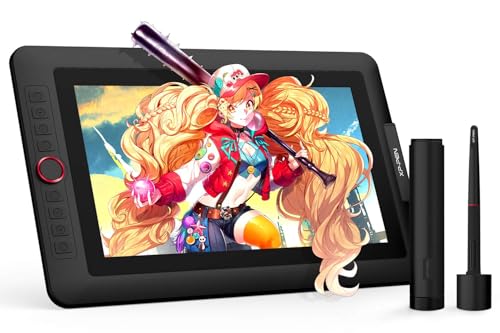
- The 13.3-inch full-laminated FHD display supports tilt and is designed to reduce visible parallax.
- Includes a battery-free stylus with 16,384 pressure levels, a red dial, and eight customizable shortcut keys.
- Must connect to a computer; listed support includes Windows, Mac, ChromeOS, and Linux.
Best For: A digital artist, design hobbyist, or art student with a compatible computer.
3. DJI Osmo Action 4 Standard Combo
A Camera for Active Days
DJI Osmo Action 4 Standard Combo

- Records video in 4K at up to 120 fps with a 155-degree field of view.
- Waterproofing is listed up to 18 meters, with operation down to -20°C in the supplied notes.
- Three stabilization modes and a magnetic quick-release system support varied shooting setups.
Best For: An outdoorsy tech fan who records rides, hikes, or trips.
4. Anker Prime 14-in-1 Docking Station
A More Connected Laptop Desk
Anker Prime 14-in-1 Docking Station

- Offers 14-in-1 connectivity, including dual HDMI, USB-C, USB-A, audio, and Ethernet options.
- Provides up to 160W total output and data transfer speeds up to 10 Gbps.
- Check laptop support: it requires USB-C, USB4, or Thunderbolt with DP Alt Mode and Power Delivery; macOS mirrors the two external displays.
Best For: A compatible laptop owner building a more connected desk setup.
5. AEEZO 10.1-Inch Digital Picture Frame
A Shared Stream of Family Photos
AEEZO 10.1-Inch Digital Picture Frame
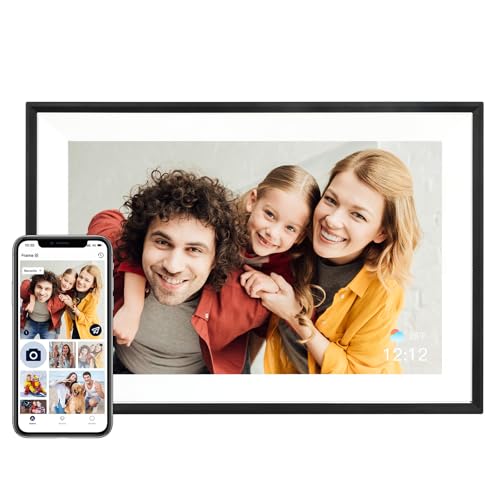
- A 10.1-inch IPS touchscreen displays photos at 1280 × 800 resolution.
- Built-in 32GB storage and Wi-Fi sharing through the AiMOR app let family members send photos remotely.
- Auto-rotate adjusts orientation; photos from an SD card must first be imported to the frame.
Best For: A relative who enjoys seeing shared family photos around the home.
6. Redragon K689 PRO Wireless Keyboard
A Customizable Typing Upgrade
Redragon K689 PRO Wireless Keyboard

- Full-size 108-key layout includes four shortcut keys and adjustable RGB lighting.
- Connects via USB-C, Bluetooth, or 2.4GHz wireless and supports switching among devices.
- Gasket-mounted construction, noise dampening, and PBT keycaps shape the typing setup.
Best For: A PC user, programmer, or frequent typist who likes a customizable keyboard.
7. Orfeika 20,000mAh Power Bank
A Ready-to-Go Charging Kit

- 20,000mAh capacity and four built-in cables help reduce the need to pack separate cords.
- Six outputs are listed for charging multiple devices at once, with up to 20W USB-C charging.
- An LED display shows remaining battery percentage; the included items list a travel pouch.
Best For: A commuter or traveler who carries several devices.
8. Foldable 3-in-1 Wireless Charging Station
A Compact Multi-Device Charging Spot
Foldable 3-in-1 Wireless Charging Station

- Designed to charge compatible iPhone, Apple Watch, and AirPods devices together.
- Foldable design has adjustable phone and watch charging angles for desk or travel use.
- Includes a 20W USB-C PD adapter and cable; check the listed compatibility for specific device models.
Best For: Someone with compatible Apple devices who wants a shared charging station.
9. Portable Bluetooth Speaker with 20W HD Sound
Music for Home and Outdoors
Portable Bluetooth Speaker with 20W HD Sound
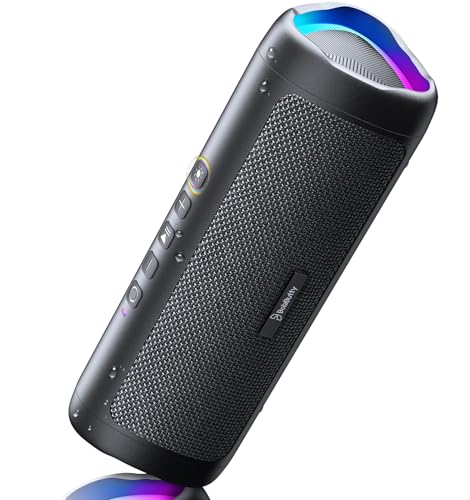
- Portable speaker includes Bluetooth 5.3, a built-in microphone, and an AUX input.
- IPX5 rating is listed for protection against water splashes and spills.
- Battery life is listed up to 24 hours at 50% volume with lights off; playtime varies with use.
Best For: Someone who likes to share music at home, gatherings, or outdoors.
10. Uineer Vertical Ergonomic Wireless Mouse
A Different Feel at the Desk
Uineer Vertical Ergonomic Wireless Mouse

- Vertical shape is designed for a natural handshake grip; the listing recommends it for small-to-medium hands.
- Connects with dual Bluetooth and 2.4GHz modes and can pair with up to three devices.
- Four DPI settings range from 800 to 2400; side buttons are listed as nonfunctional on macOS.
Best For: A regular computer user with small-to-medium hands who wants a vertical mouse.
11. Dell 27-Inch 4K USB-C Monitor
A Clearer View for Work and Play

- 27-inch IPS display has 4K UHD resolution and 99% sRGB color coverage.
- Supports refresh rates up to 120Hz with AMD FreeSync Premium.
- USB-C connection provides up to 65W power delivery; the monitor also includes two HDMI ports and built-in speakers.
Best For: A remote worker, creator, or multitasker with space for a desk monitor.
12. Philips Hue Smart Light Starter Kit
Color and Control for a Room
Philips Hue Smart Light Starter Kit

- Kit includes one Hue Bridge and four A19 E26 White and Color Ambiance bulbs.
- The Hue app offers presets, schedules, and customizable color and brightness effects.
- Voice control is listed for Alexa and Google Assistant; the system also supports Apple HomeKit and Matter.
Best For: Someone who enjoys customizing room lighting or exploring smart-home setups.
13. Bambu Lab A1 FDM 3D Printer
A Workshop for Small Creations

- FDM printer includes automatic calibration features and a touchscreen interface.
- Active flow-rate compensation and active motor noise canceling are listed features.
- Multi-color printing requires AMS lite, sold separately or included with the A1 Combo.
Best For: A hands-on maker interested in designing and printing objects.
14. VSD N4 Pro Stream Controller
One-Tap Controls for Busy Workflows

- Includes 10 customizable LCD keys, four RGB knobs, and an interactive touch bar.
- Supports single commands, multi-step macros, and scene presets for tasks such as streaming or editing.
- USB-C plug-and-play design is listed for Windows 10+ and macOS 11.0+; it sends audio controls but has no built-in speakers.
Best For: A streamer, editor, or power user who repeats computer workflows.
15. SanDisk 1TB Portable SSD
Pocketable Space for Large Files
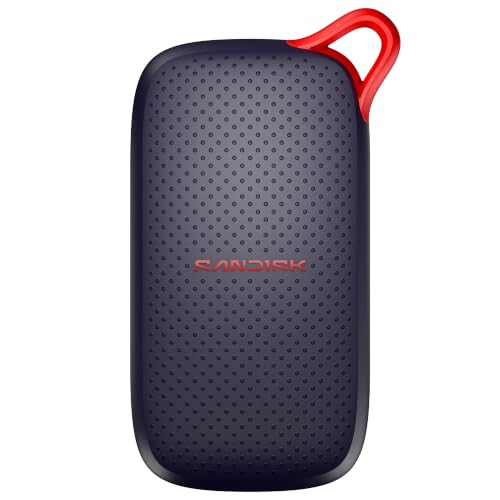
- Stores up to 1TB of files and lists read speeds up to 1,000 MB/s.
- Pocket-sized USB-C drive is listed for desktops, laptops, smartphones, and tablets.
- No moving parts and drop protection up to 2 meters are listed for portable use.
Best For: A photographer, student, or anyone who manages large files on the go.
Choosing a Gift for This Tech Fan
Start with what the recipient already does. A gift that removes a daily friction point is more likely to get used than a device chosen only for an impressive spec. For a desk worker, consider the monitor, docking station, mouse, keyboard, or macro pad. A docking station can simplify a multi-device workspace, while the monitor suits someone who has room for a larger display. The macro pad makes the most sense for a person who repeats shortcuts or streaming and editing actions; its controls need a computer to trigger them.
For a creative hobby, match the tool to the medium. The XPPen drawing display is aimed at digital drawing but needs a computer connection. The 3D printer suits someone who wants to make physical objects and explore a hands-on process. A portable SSD can complement either kind of creative work by holding files, though the recipient should have a compatible USB-C connection. For someone who records activities, the action camera is a more natural pick; the speaker and power bank work for broader travel and everyday use.
Set a Budget That Includes the Setup
Think beyond the main device. Some gifts are useful right away, while others may call for compatible equipment or follow-up purchases. The docking station needs a laptop with supported video and power features. The mesh system requires a separate modem. The drawing tablet depends on a computer and creative software. Multi-color printing on the Bambu Lab A1 requires AMS lite, which the notes say is separate unless choosing the Combo. Those details can change the total spend and the gift’s immediate usefulness.
For lower-commitment presents, the portable speaker, power bank, smart light kit, or SSD may fit into an existing routine without asking the recipient to learn a major new system. A monitor, mesh network, 3D printer, or drawing display is a more substantial choice: consider their available space, current gear, and interest in setup before buying.
Check Compatibility and Personalization
Compatibility is one of the most useful checks for tech Christmas gift ideas. For the charging station, verify the recipient’s exact iPhone, Watch, and AirPods model against the listed compatibility; the magnetic alignment feature applies only to specified models. For a docking station, confirm the laptop has USB-C, USB4, or Thunderbolt with DisplayPort Alt Mode and Power Delivery. Mac users should know the two external displays mirror each other according to the notes, while Linux is not supported.
Personalization can be practical rather than decorative. A keyboard’s shortcut keys and lighting can be customized. The stream controller supports custom icons, macros, and scene presets. The photo frame can receive images through the app, so family members might prepare a starter collection before gifting it. The Hue kit offers scenes and color adjustments, while a digital drawing display lets its owner tailor shortcuts to familiar software. A small amount of preparation can make a device feel chosen for that person.
Timing and Last-Minute Decisions
For a planned gift, allow time to confirm compatibility and consider whether setup help would be welcome. A mesh system, smart lighting kit, drawing tablet, or printer may be more appreciated when someone can help connect, configure, or learn it. For the frame, adding a few shared photos can make the first use more personal, if you can do that ahead of time.
When time is short, prioritize gifts that match known devices and habits. A power bank, portable speaker, or SSD may be easier to choose if you know what they carry and how they connect. Avoid guessing on phone and wearable models, computer ports, or available desk space. If you are uncertain, focus on a use case you have seen firsthand: frequent travel, a crowded desk, lots of photos, or a creative hobby. That keeps the choice grounded and makes these tech Christmas gift ideas feel useful beyond the holiday.