Choosing the right 4K HDMI converter depends on more than resolution. The source and display ports, refresh rate, HDCP support, audio requirements, and cable distance all affect whether your setup works reliably.
This roundup covers practical options for converting DisplayPort, scaling 4K video to 1080p, extracting audio, connecting component displays, splitting signals, and extending HDMI over longer runs.
Best 10 4K Hdmi Converters Picks for 2026
Best Passive Adapter

- 4K at 30Hz with synchronized audio
- One-way DisplayPort-to-HDMI conversion
- Durable, latch-free nylon design
Best For: DisplayPort computers connecting to HDMI displays
Best Legacy TV Converter

- Accepts HDMI up to 4K at 60Hz
- Converts to YPbPr and stereo audio
- Includes scaling, zoom, and OSD controls
Best For: Modern HDMI sources and older component-input displays
Best Cable-Style Option

- 4K at 30Hz and 1080p at 60Hz
- Passes multichannel uncompressed audio
- Braided cable with 18-month warranty
Best For: DisplayPort computers and HDMI monitors
Best 4K Downscaler

- Converts 4K input to 1080p output
- Supports 4K at 60Hz and 18Gbps HDMI 2.0
- Includes EDID, HDCP, and CEC controls
Best For: Connecting 4K sources to older 1080p displays
Best Value 2-Pack
BENFEI 4K DisplayPort to HDMI Adapter

- Two-pack for flexible setups
- Supports 4K at 30Hz
- Plug-and-play aluminum design
Best For: DisplayPort computers needing one or two HDMI connections
Best for Multi-Display Distribution
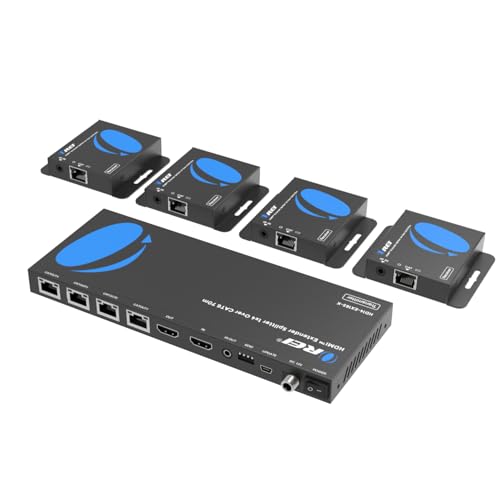
- Distributes one source to four displays
- Uses Cat6-family network cables
- Includes IR passback and local loop-out
Best For: Meetings, exhibitions, and installations with multiple screens
Best for Long-Run 4K Extension

- Extends 4K@30Hz up to 131 feet over CAT5e/6/7.
- Includes HDMI loop out, EDID, and one-way IR.
- PoC uses one power adapter for a cleaner installation.
Best For: Remote 4K@30Hz displays, CCTV, and presentations
Best Budget Audio Splitter

- Extracts HDMI audio through optical or 3.5mm AUX.
- Provides 2.0CH, 5.1CH, and PASS modes.
- Supports 4K@30Hz video and HDCP 1.4.
Best For: Adding optical or stereo audio to HDMI source devices
Best for 4K60 Home Theater Audio
OREI 4K60 HDMI Audio Extractor

- Passes 4K@50/60Hz with 18Gbps bandwidth and HDR.
- Outputs audio through SPDIF optical and 3.5mm stereo.
- Supports HDCP 2.2, CEC bypass, Dolby, and DTS formats.
Best For: 4K@60Hz home theater systems with separate audio equipment
Best Passive Adapter – Highwings DisplayPort to HDMI
If you need a straightforward option among 4k hdmi converters, this Highwings adapter connects a DisplayPort computer or graphics card to an HDMI monitor, TV, or projector. It supports up to 4K at 30Hz and is designed for one-way DisplayPort-to-HDMI use.
Best For: Connecting a DisplayPort desktop or laptop to an HDMI display for 4K video and synchronized audio.
Pros:
- Supports up to 4K at 30Hz, plus 1440p/2K at 60Hz and 1080p.
- Supports synchronized high-definition audio and video.
- Durable nylon construction, gold-plated ports, and a latch-free connector.
Cons:
- Uni-directional; it does not convert HDMI output to DisplayPort.
- Passive design does not support docking stations or HDMI-output devices such as Fire TV Stick and Xbox.
- It cannot connect one monitor directly to another.
This is a practical choice when the source has a DisplayPort output and the display has HDMI input. Confirm the source and display requirements before buying, especially if you need a dock, HDMI source compatibility, or a refresh rate above 30Hz at 4K.
Best Legacy TV Converter – HDMI to Component Scaler
This HDMI-to-component unit is a specialized pick among 4k hdmi converters for sending a modern HDMI source to an older television or projector. It accepts up to 4K at 60Hz and converts the signal to analog YPbPr video with stereo left/right audio output.
Best For: Using Blu-ray players, game consoles, streaming devices, or PCs with traditional component-input TVs and projectors.
Pros:
- Accepts HDMI input up to 4K at 60Hz.
- Provides multiple component output resolutions, including 480i and 576i.
- Built-in scaling, zoom modes, and on-screen input/output resolution information.
Cons:
- Outputs analog component video rather than 4K video.
- Requires a display with YPbPr component and stereo audio inputs.
- The notes do not specify included component or audio cables.
Choose this converter when compatibility with an older component-equipped display matters more than preserving 4K output. Its scaling controls can help match the source to the display, but check the television or projector’s available inputs first.
Best Cable-Style Option – BENFEI DisplayPort to HDMI
For a simple computer-to-display connection, the BENFEI cable is a compact entry in the 4k hdmi converters category. It carries video and audio from a DisplayPort source to an HDMI monitor, supporting up to 3840×2160 at 30Hz and 1080p at 60Hz.
Best For: Connecting a DisplayPort-equipped computer to a single HDMI monitor with dependable everyday audio and video transmission.
Pros:
- Supports 4K at 30Hz and 1080p at 60Hz.
- Passes uncompressed 7.1, 5.1, or two-channel audio.
- Braided nylon cable, aluminum casing, gold-plated connector, and molded strain relief improve durability.
- Includes an unconditional 18-month BENFEI warranty.
Cons:
- Uni-directional; it does not support HDMI-to-DisplayPort conversion.
- It is a DisplayPort cable, not a USB adapter.
- It is limited to 30Hz at 4K.
The BENFEI is a good fit when you want a cable-style solution rather than a separate adapter. Verify that the computer has DisplayPort output and that the monitor accepts HDMI before ordering.
Best 4K Downscaler – OREI HDMI 4K to 1080p
The OREI XD-3000 addresses a common compatibility problem in 4k hdmi converters: connecting a 4K source to a 1080p display. It downscales HDMI signals up to 4K at 60Hz to 1080p, while supporting HDMI 2.0 bandwidth, HDCP 2.2, EDID management, and CEC blocking.
Best For: Using 4K Blu-ray players, consoles, streaming devices, or PCs with older 1080p TVs, monitors, and projectors.
Pros:
- Downscales 4K signals to 1080p for compatibility with older displays.
- Supports 4K at 60Hz, 4:4:4 video, and 18Gbps HDMI 2.0 bandwidth.
- EDID and HDCP management help stabilize communication between devices.
- Can receive power through HDMI or USB-C and includes a compact design.
Cons:
- It outputs 1080p rather than preserving 4K resolution on the display.
- The product supports HDMI connections only.
- CEC blocking may prevent unwanted device-control interactions, but it also means CEC behavior should be considered during setup.
This is the most suitable option here when a 4K source must work with a 1080p screen. Its resolution-management features make it more specialized than a basic cable, particularly for home theater, gaming, and conference-room setups.
Best Value 2-Pack – BENFEI 4K DisplayPort to HDMI Adapter
For buyers comparing 4k hdmi converters for a DisplayPort-equipped computer, this BENFEI two-pack offers a straightforward way to connect to HDMI monitors, projectors, or HDTVs. It supports up to 4K at 30Hz and requires no drivers or external power.
Best For: Connecting DisplayPort PCs, laptops, or AMD/NVIDIA graphics cards to HDMI displays, especially when a spare adapter is useful.
Pros:
- Two adapters are included for multi-display setups or backup use.
- Supports 4K at 30Hz, 2K at 60Hz, and 1080p at 120Hz.
- Plug-and-play design supports mirror or extended displays and uncompressed multichannel audio.
- Aluminum housing and an 18-month warranty add durability and support.
Cons:
- Unidirectional design works only from DisplayPort source to HDMI display.
- It does not support HDMI sources such as MacBook, PlayStation, Switch, or Xbox.
- 4K output is limited to 30Hz.
This is a practical, cost-conscious choice when you need two reliable DP-to-HDMI connections rather than a bidirectional converter or a higher-refresh 4K solution.
Best for Multi-Display Distribution – OREI HDMI 1×4 Extender
This OREI unit is a specialized option among 4k hdmi converters, distributing one HDMI source to four remote HDMI displays through Cat6, Cat6a, or Cat7 cable. It also provides a local HDMI loop-out and IR passback for remote source control.
Best For: Meeting rooms, video conferences, exhibitions, bars, and other installations that need one HDMI source shown across several displays.
Pros:
- Sends one HDMI source to four displays simultaneously over network cable.
- Supports 4K at 30Hz over distances up to 165 feet, with a stated maximum reach of 230 feet.
- Power over cable lets the receivers operate without individual power adapters.
- Includes a local HDMI output, IR remote control features, and plug-and-play setup.
Cons:
- This is a one-way distribution system, not a general-purpose bidirectional converter.
- Requires Cat6, Cat6a, or Cat7 cabling and an AC power adapter for the transmitter.
- 4K support is limited to 30Hz.
Choose this OREI when the main goal is long-distance, multi-screen HDMI distribution. It is considerably more specialized than a simple computer-to-monitor adapter but better suited to fixed installations.
Best 4K60 Performance – SWITCHFLUX Active DisplayPort Adapter
For users seeking 4k hdmi converters with smoother high-resolution output, this active SWITCHFLUX adapter supports 4K at 60Hz from a DisplayPort 1.2 source to an HDMI 2.0 display. It is driver-free, externally unpowered, and designed for direct connections.
Best For: Desktop or laptop users with DisplayPort outputs who want 4K at 60Hz for compatible HDMI monitors, TVs, or projectors.
Pros:
- Supports 3840×2160 at 60Hz, plus several 1440p and 1080p high-refresh modes.
- Includes Dynamic HDR and 10-bit color depth processing according to the supplied specifications.
- Plug-and-play operation supports hot swapping without rebooting.
- Aluminum construction, gold-plated contacts, and a two-year warranty support long-term use.
Cons:
- Unidirectional: it only converts DisplayPort sources to HDMI displays.
- Not compatible with MacBook/macOS, hubs, docking stations, consoles, or certain listed TV models.
- Compatibility should be checked carefully before purchase because the adapter is limited to direct DP-source connections.
This is the stronger fit for a direct DP-to-HDMI setup where 4K 60Hz matters. Its broad stated exclusions make source and display compatibility especially important to verify first.
Best for Long-Run 4K Extension – OREI HDMI Extender Over Cat5
If you need 4k hdmi converters for a home theater, classroom, conference room, or CCTV installation, the OREI EX-170C extends an HDMI signal over a direct CAT5e/6/7 cable. It supports up to 4K at 30Hz over 131 feet and 1080p up to 230 feet, while also providing local monitoring and IR control.
Best For: Extending a 4K@30Hz HDMI source to a remote display without running a long HDMI cable.
Pros:
- Transmits uncompressed video and audio over a single Ethernet cable.
- HDMI loop out supports local display monitoring.
- EDID copying helps improve display compatibility.
- One-way IR pass-through and PoC simplify remote-control and power setup.
Cons:
- Supports 4K only at 30Hz, not 4K@60Hz.
- Requires a direct CAT5e/6/7 connection; it is not IP/network based.
- Does not support HDMI ARC.
This is a practical choice when distance is the main challenge. Confirm that your source and display only require 4K@30Hz, and avoid connecting the extender through a network switch or router.
Best Budget Audio Splitter – VPFET 4K HDMI Audio Extractor
Among 4k hdmi converters, this VPFET model is aimed at separating HDMI audio for equipment that lacks a dedicated audio output. It passes video up to 4K@30Hz and sends sound through optical or 3.5mm AUX, with selectable 2.0CH, 5.1CH, and pass-through modes.
Best For: Adding optical or stereo audio output to compatible HDMI source devices such as Blu-ray players, consoles, PCs, and streaming devices.
Pros:
- Offers optical and 3.5mm audio outputs.
- Supports selectable 2.0CH, 5.1CH, and PASS modes.
- Handles 4K@30Hz video with 10.2Gbps bandwidth and HDCP 1.4.
- Low-power design works from a 5V USB connection.
Cons:
- Does not support ARC or eARC, and a TV cannot be used as the input source.
- Does not support 7.1-channel audio.
- Some listed devices, including Fire TV and PS4/PS5, are limited to 1080p with this product.
Choose this extractor when basic audio separation is more important than high-refresh-rate video. Set the audio mode to match the output—2.0CH for 3.5mm stereo, 5.1CH for optical, or PASS when troubleshooting signal output.
Best for 4K60 Home Theater Audio – OREI 4K60 HDMI Audio Extractor
For systems that need higher refresh-rate video, this OREI extractor stands out among 4k hdmi converters with 4K@50/60Hz pass-through, 18Gbps bandwidth, HDR support, and optical plus stereo audio outputs. It is designed to separate HDMI audio without sacrificing supported 4K video quality.
Best For: Home theater setups using 4K@60Hz sources with optical or stereo audio equipment.
Pros:
- Passes through 4K@50/60Hz with YUV4:4:4 and 10-bit HDR support.
- Supports Dolby Digital, DTS 5.1, Dolby Atmos, DTS:X, and other listed formats.
- Provides SPDIF optical and 3.5mm stereo outputs.
- HDMI 2.0b, HDCP 2.2, CEC bypass, and metal housing suit home or commercial AV use.
Cons:
- Does not support ARC.
- Does not support 1440p@120Hz, 4K@30Hz, 1080p@120Hz, or 1080p 3D@60Hz.
- Optical output has the stated Dolby Digital and DTS limitations compared with the full pass-through audio support.
This is the strongest fit of the three for a 4K@60Hz entertainment system. Check your display and source formats carefully, especially if you use high-refresh-rate 1440p or 1080p signals.
How We Picked These 4K Hdmi Converters
We selected products for distinct conversion and distribution needs rather than treating every adapter as interchangeable. The lineup includes simple DisplayPort-to-HDMI adapters, 4K downscalers, HDMI-to-component hardware, audio extractors, splitters, and extenders. We considered supported resolutions and refresh rates, directional limits, HDCP and EDID features, audio outputs, power requirements, installation complexity, and the kind of equipment each device is designed to connect.
Before buying, confirm the exact input and output direction. A DisplayPort-to-HDMI adapter generally cannot convert HDMI to DisplayPort, while an audio extractor is designed to separate sound rather than change video connections.
Quick Comparison
| Need | Best fit | Important check |
|---|---|---|
| Connect a DisplayPort computer to HDMI | Uni-directional DisplayPort-to-HDMI adapter | Source port, refresh rate, and active/passive design |
| Use a 4K source with a 1080p display | HDMI downscaler | 4K input support and HDCP compatibility |
| Connect HDMI to an older component display | HDMI-to-component converter | Component output resolution and analog audio needs |
| Send video to multiple screens | HDMI splitter or extender | Output count, cable distance, and EDID behavior |
| Send HDMI audio to speakers or headphones | HDMI audio extractor | Optical, 3.5mm, surround-format, and ARC support |
Key Buying Factors for 4K Hdmi Converters
Resolution and Refresh Rate
“4K” does not always mean 4K at 60Hz. Some devices support 4K at 30Hz, while others accept 4K input but output 1080p or lower. Match the converter to your source and display, especially for gaming, desktop use, and smooth video playback.
Ports, Direction, and Compatibility
Check whether the product converts from HDMI to another format or from another format to HDMI. Also verify connector gender, HDMI version, DisplayPort version, and whether the source provides enough power. Devices with USB power may be more dependable in demanding installations.
HDCP, EDID, and Audio Support
HDCP compatibility matters for protected streaming content and modern media devices. EDID management can help a source recognize the display correctly, while CEC support may preserve basic control functions. For audio extractors, confirm the desired output—optical SPDIF, 3.5mm analog, or both—and check supported PCM or surround formats.
Distance and Signal Distribution
Standard HDMI cables are not ideal for every long run. Extenders using Cat5 or Cat6 can cover greater distances, but performance depends on cable quality, termination, interference, and the supported refresh rate. For multi-display setups, confirm whether all screens can share the same resolution and whether the splitter supports loop-out or EDID controls.
Who Should Buy Which 4K Hdmi Converters?
Choose a compact DisplayPort-to-HDMI adapter for a computer with DisplayPort and an HDMI monitor or television. Pick the two-pack when you need multiple workstations or a spare. A downscaler is the better choice when a newer 4K source must feed an older 1080p display.
Use an HDMI-to-component converter for legacy televisions, projectors, or capture equipment with YPbPr inputs. Choose an HDMI audio extractor when your video display works but your sound system needs optical or analog audio. For several screens, select a splitter; for installations across rooms or long cable paths, choose an HDMI extender and verify the advertised distance against your resolution and refresh-rate requirements.