If you want your AV system to perform at its best, choosing the right ventilation fan is essential. With so many options available, it can feel overwhelming to decide which one suits your needs. The top contenders offer impressive airflow and quiet operation, ensuring your equipment stays cool without the distraction of noise. Let’s explore the best options and what key features you should consider for peak performance in your setup.
AC Infinity AIRCOM S7 Quiet Cooling Fan System for AV Cabinet Components

If you’re looking to protect your AV components from overheating, the AC Infinity AIRCOM S7 Quiet Cooling Fan System is an excellent choice. This system’s designed specifically for devices like routers, modems, and receivers. It features two thermal trigger modes that activate cooling based on temperature, helping prevent performance issues and extending your equipment’s lifespan. With two dual-ball bearing fans and PWM-controlled motors, you’ll enjoy minimal noise at just 19 dBA. Plus, its four speed control options let you customize airflow. Compact at 11.6 x 6.3 x 1.5 inches, it efficiently exhausts heat to keep your setup running smoothly.
Best For: Those seeking to maintain optimal temperatures for their AV components, including routers, modems, and game consoles.
Pros:
- Quiet Operation: Runs at only 19 dBA, ensuring minimal noise disruption in your environment.
- Customizable Airflow: Offers four speed control options for tailored cooling performance.
- Thermal Trigger Modes: Activates cooling based on temperature, protecting equipment from overheating.
Cons:
- Size Limitations: While compact, larger setups may require multiple units for effective cooling.
- Installation Complexity: Some users may find it challenging to integrate into existing AV setups.
- Price Point: Higher price compared to basic fan systems may not fit all budgets.
AC Infinity AIRPLATE S5 Quiet Cooling Fan System
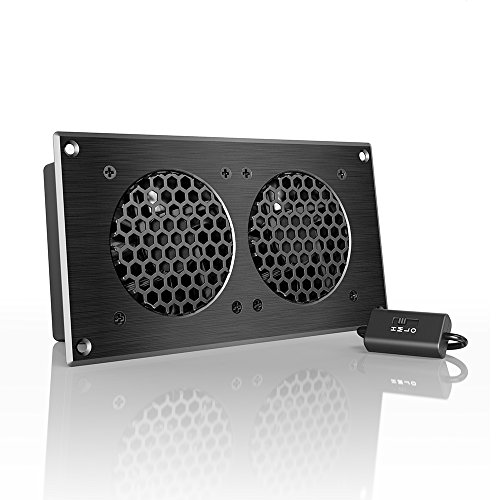
The AC Infinity AIRPLATE S5 Quiet Cooling Fan System is ideal for anyone seeking a reliable and efficient solution to keep their AV equipment cool. With an airflow capacity of 52 CFM and an ultra-quiet operation at just 18 dBa, you’ll barely notice it’s there. Its sleek brushed black aluminum design fits perfectly in any setup, measuring 8.5 x 4.4 x 1.3 inches and weighing only 1 pound. Powered by a wall outlet or USB, it’s easy to install. Plus, the turbo adapter boosts performance by 25%. With a customer rating of 4.7 out of 5 stars, it’s a top choice for cooling.
Best For: Those looking for a quiet and efficient cooling solution for their AV equipment, desktops, or gaming consoles.
Pros:
- Ultra-quiet operation with a noise level of just 18 dBa, ensuring minimal disruption.
- Compact design that fits easily into various setups while maintaining a modern aesthetic.
- Turbo adapter available to increase performance by an additional 25%.
Cons:
- Corded-electric power source may limit placement options if a nearby outlet is not available.
- Single fan unit might not be sufficient for larger setups requiring more airflow.
- No battery option, making it dependent on a power source at all times.
AC Infinity AIRPLATE T7 Quiet Cooling Fan System for Home Theater AV Cabinets

For home theater enthusiasts seeking a quiet yet effective cooling solution, the AC Infinity AIRPLATE T7 Quiet Cooling Fan System stands out with its ultra-quiet operation and high-performance airflow. Measuring 12 inches, this fan system features CNC machined aluminum frames in a sleek brushed black finish. With an impressive 104 CFM airflow and a noise level of just 19 dBA, it guarantees minimal disturbance in your viewing space. The onboard processor offers digital temperature readout and thermostat control, while the dual ball bearings enhance durability. Its energy-saving mode makes it an efficient choice for cooling your AV cabinets.
Best For: Home theater enthusiasts looking for an ultra-quiet and efficient cooling solution for their AV cabinets.
Pros:
- Ultra-quiet operation at just 19 dBA, ensuring minimal disturbance during movie viewing.
- High-performance airflow of 104 CFM, effectively cooling AV equipment.
- Smart energy-saving mode and thermostat control for efficient operation.
Cons:
- May be overkill for small or less complex AV setups.
- The sleek design may not match all home theater aesthetics.
- Requires installation, which may not be suitable for all users.
AC Infinity MULTIFAN S2 USB Blower Fan with Speed Control

Designed specifically for tight spaces, the AC Infinity MULTIFAN S2 USB Blower Fan with Speed Control is an excellent choice for anyone looking to cool their AV equipment, including receivers and game consoles. With a low profile of just 4.7 x 4.7 x 1 inches, it easily fits into congested areas. The fan delivers an impressive airflow of 35 CFM while maintaining a quiet operation at only 17 dBA. Thanks to its dual ball bearings and multi-speed controller, you can adjust the fan’s speed to achieve the perfect balance between cooling and noise. Plus, it conveniently connects via USB.
Best For: The AC Infinity MULTIFAN S2 USB Blower Fan is best for individuals seeking a compact and efficient cooling solution for their AV equipment and gaming consoles in tight spaces.
Pros:
- Quiet Operation: Maintains a noise level of only 17 dBA, making it suitable for quiet environments.
- Adjustable Speed: Features a multi-speed controller for customizable airflow and noise levels.
- Compact Design: Low profile (4.7 x 4.7 x 1 in.) allows it to fit easily in limited spaces.
Cons:
- Limited Power Source: Requires a USB connection, which may limit placement options if USB ports are not accessible.
- Airflow Capacity: While 35 CFM is decent, it may not suffice for larger or heavily loaded equipment.
- Lack of Remote Control: Does not include a remote control for speed adjustments, requiring manual operation.
GDSTIME Quiet 120mm USB Blower Fan with 3 Speed Control

Looking for an effective cooling solution for your AV equipment? The GDSTIME Quiet 120mm USB Blower Fan is your answer. This low-profile fan measures just 4.72 inches square, fitting perfectly in tight spaces. With three speed settings and an airflow of 17.5 CFM, it efficiently cools your devices while maintaining a quiet 32 dBA noise level. Powered by a 5V USB plug, it’s compatible with various electronics, from receivers to gaming consoles. Constructed with durable, flammable-resistant materials, this fan is designed to last. Keep your AV system cool and quiet with the GDSTIME fan today!
Best For: Those seeking a compact and quiet cooling solution for their AV equipment and electronic devices.
Pros:
- Low profile design allows for installation in tight spaces.
- Three speed settings provide customizable airflow to meet different cooling needs.
- Durable construction with flame-resistant materials ensures long-lasting performance.
Cons:
- Limited airflow of 17.5 CFM may not be sufficient for larger setups.
- USB power source may restrict placement options if outlets are limited.
- Noise level of 32 dBA, while quiet, may still be noticeable in extremely quiet environments.
AC Infinity AIRPLATE T9 Quiet Cooling Fan System for Home Theater AV Cabinets
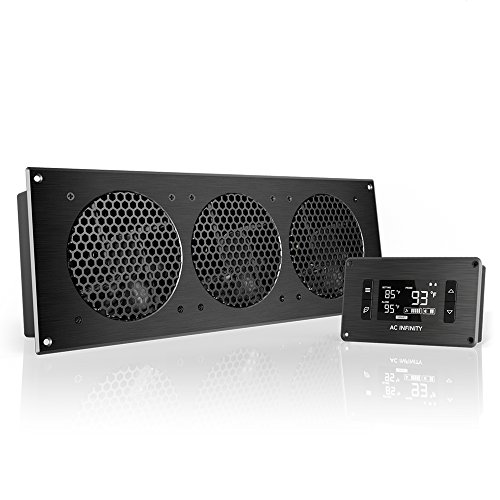
If you want to keep your home theater AV equipment cool and running efficiently, the AC Infinity AIRPLATE T9 is an excellent choice. This ultra-quiet cooling fan system features automated programming that adjusts based on temperature changes, ensuring ideal airflow. With an impressive airflow of 156 CFM and a noise level of just 21 dBA, it won’t disturb your viewing experience. The sleek CNC machined aluminum design adds a modern touch to your cabinet. Plus, the LCD display offers six fan speeds and a memory function for easy use. Keep your system cool and quiet with this reliable fan system.
Best For: Individuals looking to maintain optimal cooling for their home theater AV systems without sacrificing noise levels.
Pros:
- Automated temperature-based adjustments ensure efficient cooling.
- Ultra-quiet operation at just 21 dBA for minimal disruption during usage.
- Sleek design with CNC machined aluminum that enhances the aesthetic of AV cabinets.
Cons:
- Initial setup may require adjustment for optimal performance based on specific equipment.
- Higher price point compared to standard cooling fans.
- Requires power source, which may limit placement options in some setups.
120mm AC Powered Fan with Variable Speed Controller

The 120mm AC Powered Fan with Variable Speed Controller is perfect for anyone seeking efficient cooling solutions for their AV equipment, such as receivers and gaming consoles. Operating at 3000 RPM, it delivers a strong airflow of 95 CFM while maintaining a low noise level of just 38 decibels. With a variable speed controller, you can adjust the fan’s speed from 3V to 12V, ensuring it meets your cooling needs without excess noise. Built with durable dual ball bearings, this fan is designed to last up to 65,000 hours. It’s an ideal choice for any DIY cooling setup.
Best For: Those looking for an efficient and adjustable cooling solution for their AV equipment, gaming consoles, and DIY projects.
Pros:
- Variable speed control allows for customized airflow and noise levels.
- Durable design with dual ball bearings ensures long-lasting performance (up to 65,000 hours).
- Versatile applications suitable for a wide range of devices including gaming setups, amplifiers, and plant growth.
Cons:
- AC powered may limit portability compared to battery-operated fans.
- Noise level at 38 decibels may still be noticeable in very quiet environments.
- Size may not fit all setups, requiring careful consideration of available space.
AC Infinity Rack Roof Fan Kit for 19” Racks

For anyone managing a standard 19” rack setup, the AC Infinity Rack Roof Fan Kit stands out as an excellent solution for maintaining ideal airflow and temperature. This kit features two 120mm dual-ball bearing fans, delivering an impressive airflow of 200 CFM while operating at a quiet 26 dBA. You’ll appreciate the PWM speed controller, allowing you to adjust fan speed seamlessly. Constructed from heavy-duty steel with spiral fan guards, it’s built to last and includes all necessary mounting hardware. Plus, it’s easy to install and can link with other compatible fans for enhanced cooling efficiency.
Best For: The AC Infinity Rack Roof Fan Kit is best for IT professionals and hobbyists looking to optimize cooling in standard 19” rack setups.
Pros:
- Impressive airflow of 200 CFM ensures efficient cooling for equipment.
- Quiet operation at 26 dBA makes it suitable for noise-sensitive environments.
- Durable construction with heavy-duty steel and spiral fan guards ensures longevity.
Cons:
- Limited to standard 19” racks, which may not fit other rack sizes.
- Requires installation, which may not be ideal for users looking for plug-and-play solutions.
- PWM speed controller may not be necessary for all users, adding complexity.
AC Infinity Ventilation Grille for PC Cabinets

Designed specifically for PC computer and AV electronic cabinets, the AC Infinity Ventilation Grille is ideal for enthusiasts seeking efficient airflow management. This grille can be installed into cabinets or walls, acting as either an intake or exhaust vent when paired with a fan system. It supports superior airflow for your electronic equipment, ensuring they stay cool. With provisions to mount two 120mm fans, it greatly enhances cooling efficiency. Constructed from CNC machined aluminum with a sleek brushed black finish and a honeycomb grill insert, it’s both functional and visually appealing. Installation is straightforward with included mounting screws and fan guards.
Best For: PC enthusiasts and AV equipment users looking for enhanced airflow management in their cabinets.
Pros:
- Enhances cooling efficiency with the ability to mount two 120mm fans.
- Constructed from durable CNC machined aluminum with an attractive brushed black finish.
- Easy installation with all necessary mounting components included.
Cons:
- May require additional fans for optimal performance, which are sold separately.
- Limited to specific fan sizes (120mm), restricting compatibility with other fan types.
- Installation may not be suitable for all cabinet designs without modification.
GDSTIME Dual 80mm Computer Fan with AC Plug

Looking for a versatile cooling solution? The GDSTIME Dual 80mm Computer Fan with AC Plug is your answer. Designed for various electronics, it cools external hard drives, AV receivers, and gaming consoles effortlessly. With a variable speed controller, you can adjust its performance from 1400 RPM to 3500 RPM, providing up to 50.2 CFM airflow while maintaining a noise level of only 43.2 dBA. Installation is a breeze—just plug it in and use the included mounting options. With a dual ball bearing design ensuring 50,000 hours of lifespan, this fan keeps your system cool and quiet for years to come.
Best For: The GDSTIME Dual 80mm Computer Fan is best for tech enthusiasts and professionals looking to efficiently cool various electronic devices such as gaming consoles, AV equipment, and external hard drives.
Pros:
- Adjustable Speed: Offers variable speed control from 1400 RPM to 3500 RPM to suit different cooling needs.
- Versatile Applications: Suitable for a wide range of devices, including external hard drives, routers, and even terrariums.
- Easy Installation: Quick setup with no special wiring required, plus multiple mounting options included.
Cons:
- Noise Level: Maximum noise output of 43.2 dBA may not be suitable for noise-sensitive environments.
- Size Limitation: The 80mm fan size may not fit all setups, particularly in larger systems requiring more airflow.
- Power Dependency: Requires AC power for operation, limiting portability compared to battery-operated fans.
Factors to Consider When Choosing Av Receiver Ventilation Fans
When you’re choosing AV receiver ventilation fans, there are several key factors to keep in mind. You’ll want to contemplate airflow capacity, noise levels, and compatibility with your setup. Also, think about power source options and whether speed control features are important for your needs.
Airflow Capacity Importance
Selecting the right airflow capacity for your AV receiver ventilation fans is essential for maintaining ideal performance and preventing overheating. Airflow capacity, measured in cubic feet per minute (CFM), plays a vital role in effectively cooling your AV receiver. Fans with higher CFM ratings, like the AC Infinity AIRCOM S7 with 140 CFM, offer better cooling efficiency, especially in densely packed setups. For peak performance, consider fans that can adjust their airflow based on temperature, ensuring a consistent environment for your sensitive electronics. Additionally, choosing fans with dual-ball bearing designs enhances longevity and reliability, helping to sustain airflow capacity over time. Prioritizing airflow capacity will ultimately protect your equipment and enhance your home theater experience.
Noise Level Considerations
While ensuring ideal cooling for your AV receiver, it is crucial to take into account the noise level of ventilation fans, as excessive sound can disrupt your viewing or listening experience. Fans are typically rated in decibels (dBA), and those around 18-19 dBA are perfect for quiet environments like home theaters. Avoid fans over 30 dBA, which can be distracting. Consider the type of bearings; dual ball bearings usually run quieter than sleeve bearings. PWM (Pulse Width Modulation) fans can adjust speeds based on temperature, minimizing noise when cooling demand is low. Finally, selecting a fan with lower airflow capacity (CFM) may decrease noise but balance it with your cooling needs for optimal performance.
Size and Compatibility
Ideal noise levels are only part of the equation for effective AV receiver ventilation fans; size and compatibility play a notable role in your setup. First, measure the available space in your AV cabinet or rack, as fans come in various sizes, like 120mm and 80mm models. Next, verify the fan’s airflow and noise specifications align with your cooling needs without affecting the performance of your other devices. Additionally, consider how many fans you’ll need based on the heat output of your AV components, calculating the necessary airflow capacity in CFM. Finally, choose a fan design that facilitates proper air intake or exhaust, as this will considerably enhance your overall cooling efficiency.
Power Source Options
When considering power source options for your AV receiver ventilation fans, it’s essential to evaluate how each type aligns with your setup’s needs. Corded-electric fans deliver higher airflow capacities and consistent power, making them ideal for demanding cooling applications. If portability and convenience are priorities, USB-powered fans connect easily to devices like game consoles and computers, eliminating the need for extra outlets. On the other hand, battery-operated fans offer a wireless solution for temporary or mobile setups, though you’ll need to manage battery replacements or recharging. Ultimately, your choice should depend on your specific installation requirements and whether you value consistent power, mobility, or convenience in maintaining your AV system’s temperature.
Speed Control Features
Many enthusiasts find that speed control features are an essential consideration when selecting AV receiver ventilation fans. These features let you customize airflow levels, optimizing cooling performance while keeping noise to a minimum. Some fans offer multiple speed settings, giving you flexibility for different situations. Advanced systems may even include automatic temperature-based adjustments, ensuring the fan runs only at necessary speeds based on heat generated by your AV components. PWM (Pulse Width Modulation) technology allows for precise speed control, resulting in quieter operation and improved energy efficiency. Additionally, fan systems with digital controls let you monitor real-time temperature readings and easily adjust speeds, ultimately enhancing the longevity of your AV receivers by preventing overheating.
Build Quality and Durability
While selecting AV receiver ventilation fans, you can’t overlook build quality and durability. Look for fans made from high-quality materials like CNC machined aluminum or heavy-duty steel, as these enhance longevity and resist wear. Opt for dual ball bearing designs, which can last over 50,000 hours, guaranteeing reliable performance during continuous use. Protective features like grills or guards are essential too, preventing debris from damaging internal components. Additionally, consider fans with UL certification, which guarantees they meet safety and performance standards for dependable operation. By focusing on these aspects, you’ll assure that your ventilation fans not only keep your system cool but also withstand the test of time, making them a smart investment for your AV setup.
Installation Ease
Choosing the right AV receiver ventilation fans isn’t just about build quality; installation ease is equally important. First, consider the dimensions of the fan to guarantee it fits comfortably within your AV cabinet. Some fans have specific size requirements that you don’t want to overlook. Check if the fan includes all necessary mounting hardware and clear installation instructions to make the setup smoother. Opt for designs that allow versatile mounting options, like top or side installation, to suit your layout. Make certain the fan’s power source—whether USB, AC, or DC—matches your existing setup to avoid complications. Finally, assess the fan’s weight and build quality, as heavier fans may need extra support to stay securely mounted.
Temperature Management Technology
When selecting AV receiver ventilation fans, effective temperature management technology is essential for maintaining ideal performance and longevity of your equipment. Look for fans with thermal trigger modes that activate cooling based on temperature readings, preventing overheating. Advanced systems often feature onboard processors with digital displays, letting you monitor real-time temperature changes and adjust settings as needed. SMART energy-saving modes can optimize fan speed according to ambient temperature, which saves energy while ensuring effective cooling. Additionally, customizable speed control options allow you to fine-tune airflow based on your specific needs and noise preferences. Automated programming enhances efficiency by self-adjusting the fan’s operation, responding to temperature fluctuations and extending the lifespan of your electronic components.