Choosing the right rudder pedals can make a cockpit setup feel far more natural, even if you do not have much room to work with.
This roundup focuses on flight simulator pedals for small spaces, with compact designs, practical mounting options, and features that matter most for desk-based sim rigs.
Best 10 Flight Simulator Pedals for Small Spaces Picks for 2026
Compact, Console-Friendly Rudder Control
Thrustmaster TFRP Precision Flight Sim Rudder Pedals

- Long rudder travel supports accurate turns.
- Self-centering axis feels smooth and responsive.
- Works with PS5, Xbox Series X|S, and PC.
Best For: Sim pilots who want console compatibility and steady control in a tighter setup.
Desk-Mounted Control Bundle
Logitech Pro Flight Rudder Pedals & Flight Throttle Quadrant

- Self-centering pedals with adjustable tension.
- Toe brakes add more runway control.
- Quadrant can mount on top of or in front of your desk.
Best For: Desktop users who want a flexible rudder-and-throttle setup.
Adjustable Fit for Tight Cockpits
Turtle Beach VelocityOne Universal Rudder Pedals
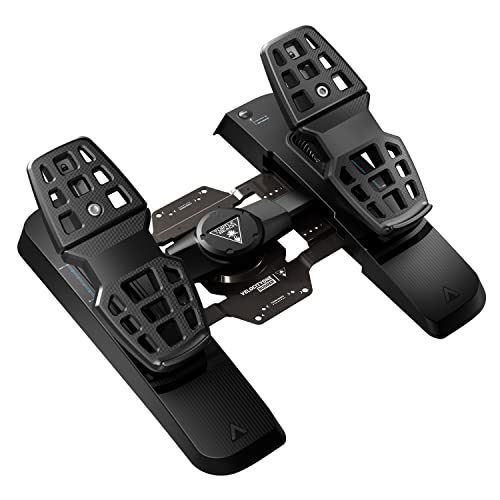
- Adjustable pedal width helps with tighter setups.
- Swappable springs and pedals add flexibility.
- Stable, non-slip base supports consistent use.
Best For: PC and Xbox sim pilots who need a configurable pedal set for limited space.
Premium PC Rudder Precision
Thrustmaster TPR Rudder Pedals

- Pendul_r design delivers fluid, realistic motion.
- Magnetic sensors aim for ultra-precise inputs.
- Adjustable spring system customizes pedal resistance.
Best For: Serious PC pilots who want premium precision and have room for a dedicated setup.
Compact Precision Pick
Honeycomb Charlie Rudder Pedals
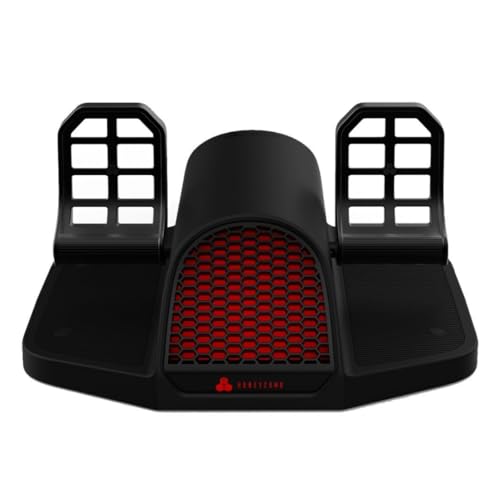
- Aluminum construction with belt drive
- Hall Effect sensors for precise control
- Carpet spikes and grip strips help prevent slipping
Best For: Pilots wanting adjustable, stable pedals for tight setups
Space-Saving Starter Bundle

- S.M.A.R.T. slide rails for smooth steering
- Removable heel rests for flexible positioning
- PC compatible; console use depends on joystick
Best For: PC users who want an ergonomic, compact pedal option
Premium Compact Control
Logitech G Pro Flight Rudder Pedals

- Self-centering pedals with adjustable tension
- Differential toe brakes for finer control
- USB PC-compatible design
Best For: PC sim pilots who want adjustable, premium rudder feel
Compact HOTAS Bundle
Thrustmaster T-Flight Full Kit with Rudder Pedals

- Includes TFRP rudder pedals with smooth slide rail action
- Full HOTAS controls add throttle, stick, and many inputs
- Official Xbox integration plus PC support
Best For: Pilots who want a compact all-in-one HOTAS setup with pedals
Premium Adjustable Pedals
Honeycomb Charlie Rudder Pedals

- Aluminum build with belt drive and Hall sensors
- Toe brake axes plus adjustable foot angles
- Grip strips and carpet spikes reduce sliding
Best For: PC flyers who want precise standalone pedals with adjustable fit
Space-Efficient Metal Pedals

- Metal frame with steel swing arms and pedal plates
- Hall sensors on rudder and brake axes
- Stepless angle adjustment and USB PC support
Best For: PC pilots wanting durable pedals that adapt well to tighter setups
Compact, Console-Friendly Rudder Control – Thrustmaster TFRP Precision Flight Sim Rudder Pedals
If you want flight simulator pedals for small spaces, the Thrustmaster TFRP is a practical pick because it keeps the control experience focused without adding unnecessary complexity. It offers long rudder travel, smooth self-centering action, and a sliding rail design that aims to stay precise and stable in a compact gaming setup.
Best For: Sim pilots who need a console-compatible pedal set with smooth control and a stable footprint for a tighter setup.
Pros:
- Long rudder travel helps with smooth, accurate turns.
- Self-centering axis provides balanced, responsive control.
- Four aluminum rails are designed for friction-free motion and rigidity.
- Compatible with PS5, Xbox Series X|S, and PC.
Cons:
- It still needs enough floor space for a full pedal set.
- Not the most minimal option if you want an ultra-compact profile.
- Focuses on rudder control rather than extra multi-function features.
The TFRP is a solid middle ground for pilots who want realistic rudder response in a space-conscious setup. Its smooth sliding system and stable construction make it easier to live with in a smaller sim area than bulkier, more complicated gear.
Desk-Mounted Control Bundle – Logitech Pro Flight Rudder Pedals & Flight Throttle Quadrant
For flight simulator pedals for small spaces, this Logitech bundle makes sense if you want to add controls without spreading out too many separate devices. The pedals include a self-centering feel, adjustable tension, and toe brakes, while the throttle quadrant can be mounted on top of or in front of your desk to fit your layout.
Best For: Desktop sim pilots who want rudder pedals plus a flexible throttle quadrant in a compact arrangement.
Pros:
- Self-centering rudder pedals add realistic control.
- Adjustable tension dial lets you tune the feel.
- Toe brakes give runway control.
- Throttle quadrant can be mounted on top of or in front of your desk.
Cons:
- The bundle takes more space than pedals alone.
- Only listed for Windows compatibility.
- Best if you have a desk setup that can support multiple components.
This bundle is appealing if you want a more complete sim control layout but still need some placement flexibility. The mounting options for the quadrant help it adapt to smaller desks better than a fixed, one-size-fits-all layout.
Adjustable Fit for Tight Cockpits – Turtle Beach VelocityOne Universal Rudder Pedals
If you are comparing flight simulator pedals for small spaces, the Turtle Beach VelocityOne stands out for adjustability. It offers an adjustable pedal width, swappable springs, and a stable non-slip base, which can help you fit the pedals more cleanly into a cramped PC or console area.
Best For: PC and Xbox sim pilots who want adjustable pedals that can be tuned to their space and preference.
Pros:
- Adjustable pedal width helps with fit.
- Ultra-smooth rudder axis uses swappable springs.
- Differential brakes improve ground control.
- Non-contact Hall Effect sensors are used in all axes.
Cons:
- Xbox use requires the VelocityOne Flight Control System.
- It is still a full pedal unit, so it is not ultra-minimal.
- Best value depends on whether you need the adjustability features.
The main advantage here is fit. If your floor space is limited, being able to adjust pedal width and swap setup parts can make the difference between a cluttered layout and a workable one.
Premium PC Rudder Precision – Thrustmaster TPR Rudder Pedals
For flight simulator pedals for small spaces, the Thrustmaster TPR is less about saving every inch and more about delivering high-end rudder control in a dedicated PC setup. Its suspended pendular mechanism and magnetic sensors are aimed at fluid, precise inputs, while the adjustable spring system lets you tailor resistance to your style.
Best For: Serious PC sim pilots who want premium rudder precision and are willing to dedicate the space.
Pros:
- Pendul_r technology provides smooth, realistic motion.
- H.E.A.R.T HallEffect sensors are designed for precise, frictionless input.
- Adjustable spring system offers customizable resistance.
- Built for demanding long-haul and combat flying sessions.
Cons:
- PC only, so it is not for console users.
- Not the most space-saving option in this group.
- Best suited to users who can dedicate room to a premium pedal setup.
This is the strongest choice if precision matters more than footprint. It is a specialized, serious rudder solution that rewards a permanent or semi-permanent sim area rather than a tiny, easily stowed setup.
Compact Precision Pick – Honeycomb Charlie Rudder Pedals
If you want flight simulator pedals for small spaces without giving up precision, the Honeycomb Aeronautical Charlie Rudder Pedals are built for a clean, controllable setup. The aluminum construction, belt drive system, and Hall Effect sensors are aimed at smooth rudder input, while the high-friction strips and deployable carpet spikes help keep them planted.
Best For: Sim pilots who want durable, adjustable pedals with stable placement in tighter spaces.
Pros:
- Durable aluminum construction with a new belt drive system
- Hall Effect magnetic sensors for more precise rudder coordination
- High-friction surface strips and deployable carpet spikes reduce slipping
- Fully adjustable to fit different pilot preferences
Cons:
- Xbox Series X/S use requires the Honeycomb Xbox Hub
- Compatibility depends on using supported software and platforms
Overall, this is a strong pick if you value accuracy and stability in a compact home setup. It is especially appealing for pilots who want adjustment and grip support rather than a bare-bones pedal set.
Space-Saving Starter Bundle – ThrustMaster TFRP & T16000M
For flight simulator pedals for small spaces, the ThrustMaster TFRP set stands out because it uses sliding rails instead of a bulkier pedal frame. The S.M.A.R.T. slide-rail system is designed for smooth steering, and the removable heel rests let you adapt the foot position to your setup.
Best For: PC simmers who want an ergonomic pedal option that can fit into a compact desk area.
Pros:
- S.M.A.R.T. sliding rails for smooth rudder movement
- Removable heel rests for flexible foot placement
- Large 10-inch pedals with differential braking
- Compatible with PC and select console setups depending on the joystick used
Cons:
- Console compatibility depends on a separate compatible joystick
- The bundle may be more than needed if you only want pedals
This is a practical choice if you want a smaller-feeling rudder setup with ergonomic options. It trades the traditional pedal base for a rail design that can be easier to manage on a crowded desk.
Premium Compact Control – Logitech G Pro Flight Rudder Pedals
If you are comparing flight simulator pedals for small spaces, the Logitech G Pro Flight Rudder Pedals bring a refined control feel in a relatively manageable footprint. They offer a self-centering rudder action, an adjustable tension dial, and differential toe brakes for pilots who want more precise runway handling.
Best For: Sim pilots who want premium-feeling rudder control and adjustable resistance in a PC setup.
Pros:
- Self-centering rudder pedals for realistic control
- Adjustable tension dial changes the pedal feel
- Differential toe brakes add extra runway control
- USB 2.0-compliant and PC compatible
Cons:
- Windows-only compatibility limits platform flexibility
- Footprint may still matter in very tight desks despite the compact class
These pedals make sense if your priority is control quality over bundled extras. The adjustable tension and toe brakes give them a more serious sim feel, especially for PC users who want fine-tuned rudder input.
Compact HOTAS Bundle – Thrustmaster T-Flight Full Kit with Rudder Pedals
If you want flight simulator pedals for small spaces and prefer an all-in-one setup, this Thrustmaster bundle keeps the footprint focused while still giving you a full HOTAS control layout. It pairs a throttle and stick with included rudder pedals, so you can add yaw control without building a large desktop rig.
Best For: Sim pilots who want a compact entry into HOTAS flying with included pedals and Xbox/PC support.
Pros:
- Includes TFRP rudder pedals with Thrustmaster’s S.M.A.R.T slide rail system for smooth yaw control.
- Full foot pedal design with removable heel rests helps support longer sessions comfortably.
- Complete HOTAS layout adds a throttle quadrant, 5 axes, 14 buttons, trigger, and hat switch.
- Official Xbox integration makes it easy to use on Xbox Series X|S and PC.
Cons:
- The full HOTAS bundle may take more desk space than standalone pedals alone.
- It is built as a combo package, so buyers focused only on pedals may not need the extra controls.
For small-space setups, this is a practical way to get rudder pedals without sacrificing immersion. The bundled design gives you the key flight controls in one purchase, which can be easier to place and manage than separate components.
Premium Adjustable Pedals – Honeycomb Charlie Rudder Pedals
For flight simulator pedals for small spaces, the Honeycomb Charlie focuses on a clean standalone pedal setup with adjustable fit rather than extra controls. The aluminum construction, Hall effect sensors, and toe brakes make it a strong choice if you already have a desk setup and want precise rudder control in a more dedicated form.
Best For: PC sim pilots who want durable standalone pedals with toe brakes and adjustable positioning.
Pros:
- Durable aluminum construction with a belt drive system for solid-feeling use.
- Hall effect sensors provide precise coordination and minimize correction.
- Adjustable feet angles help tailor the pedals to different seating positions.
- High-friction strips and deployable carpet spikes help keep the pedals in place.
Cons:
- They are PC- and Mac-focused, with Xbox use requiring the Honeycomb Xbox Hub.
- At 19.17 x 19.45 inches, they still need meaningful floor space for a standalone pedal unit.
This is a good pick if you want premium pedal accuracy without buying a larger cockpit system. The adjustable angles and grip features make it easier to fit into a home setup, even when space is limited.
Space-Efficient Metal Pedals – MOZA MRP Rudder Pedals
If you’re comparing flight simulator pedals for small spaces, the MOZA MRP is appealing because it keeps the layout simple while still offering a durable metal build and adjustable motion. The swing-arm design, Hall sensors, and stepless pedal angle adjustment make it a flexible PC option for users who want control without an oversized cockpit footprint.
Best For: PC sim pilots who want a compact-feeling metal pedal set with adjustable motion and universal USB support.
Pros:
- Aluminum alloy frame with steel swing arms and pedal plates for durability.
- Hall effect sensors on rudder and brake axes support precision and durability.
- Stepless pedal angle adjustment helps fit different seating positions.
- USB support offers straightforward PC compatibility.
Cons:
- It is designed for PC, so it is not the broadest platform option here.
- Pedal travel and rotation are still substantial, so some desk areas may feel tight.
For a small-space setup, this is a sensible choice if you want a rugged pedal set that can be tuned to your position. Its adjustable geometry helps it adapt to your space rather than forcing a one-size-fits-all layout.
How We Picked These Flight Simulator Pedals for Small Spaces
We prioritized footprint, pedal spacing, adjustability, mounting stability, and overall compatibility. For cramped desks and shared workspaces, a smaller base and sensible cable routing can matter just as much as premium sensors or metal construction. We also considered whether each set is easy to store, simple to position, and suitable for casual flyers as well as more serious sim pilots.
Quick Comparison
In this category, the best choice usually depends on how you fly. Entry-level pedal sets tend to be lighter and easier to tuck away, while premium models often offer smoother resistance, stronger build quality, and more precise rudder control. If you need a tidy desk-friendly setup, look first at overall width and depth; if realism matters most, prioritize adjustable tension and toe brakes.
Key Buying Factors for Flight Simulator Pedals for Small Spaces
Footprint and Storage
Measure the space under your desk and the room in front of your chair before buying. Some pedals are slim enough for tight setups, while others need extra clearance for full range of motion. A smaller footprint is helpful, but it should not come at the cost of awkward pedal travel.
Mounting and Stability
Small-space users often benefit from pedals that stay put without elaborate hardware. Rubberized feet, weight, and compatibility with carpet or hard floors can improve comfort and control. If you plan to move the pedals often, look for a design that is easy to reposition and store.
Adjustability and Control Feel
Rudder sensitivity, pedal spacing, and toe brake behavior can affect how easy the pedals are to use in tight quarters. Adjustable tension or angle settings can help you fit the controls to your seating position and flying style.
Platform and Ecosystem Compatibility
Match the pedals to your PC or console setup before you buy. If you fly across multiple platforms, confirm support for your preferred sim software and accessories so you do not end up with extra clutter or unnecessary adapters.
Who Should Buy Which Flight Simulator Pedals for Small Spaces?
Budget-minded flyers should choose a compact set that balances size and basic control. If you want a cleaner, more immersive desk rig, midrange pedals with toe brakes and stronger build quality are often the sweet spot. Advanced sim pilots with dedicated space should look at heavier, more adjustable models that deliver a more realistic feel, even if they take up more room. For most buyers searching for Flight Simulator Pedals for Small Spaces, the best option is the one that fits both your floor plan and your flying goals.