Choosing the right flight simulator yoke can make a home cockpit feel dramatically more authentic, whether you fly light aircraft, airliners, or a mix of both.
This roundup focuses on the best options for realism, platform support, control layout, and overall value so you can match the hardware to your flying style.
Best 10 Flight Simulator Yoke Picks for 2026
Premium Full-Feature Pick
Honeycomb Alpha Flight Controls Yoke & Switch Panel

- 180° rotation with steel shaft and dual ball bearings
- Built-in switch panel adds master, avionics, and ignition controls
- Includes clamp mounting or Micro-Suction Pad option
Best For: Serious simmers wanting a realistic yoke with integrated cockpit controls
All-in-One Control Bundle
Logitech G Pro Flight Yoke System + Rudder Pedals Bundle

- Bundle includes both a yoke system and rudder pedals
- Yoke has 14 buttons, POV hat, and 3-position mode switch
- Pedals add self-centering control and differential toe brakes
Best For: Sim pilots who want a matched yoke-and-pedals package
Best Entry-Level Choice

- 180° rotation with self-centering and minimal dead zone
- Simplified layout with rocker switches and programmable buttons
- Compatible with MSFS 20 & 24 on PC
Best For: New sim users who want a simple, realistic yoke
Feature-Rich PC Pick
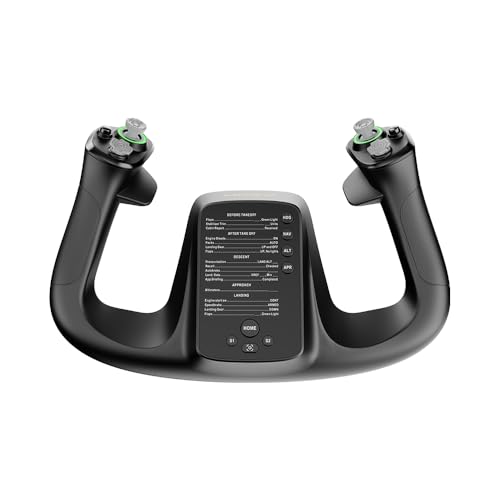
- 34 configurable inputs for extensive mapping
- Hall effect control for drift-free precision
- PA66 composite build with aluminum quick-release
Best For: PC simmers who want deep customization and modern controls
Premium All-in-One Flight Yoke Bundle
Honeycomb Alpha + Bravo Controls

- Includes Alpha yoke and Bravo throttle quadrant
- Configurable from GA to four-engine aircraft
- Adds autopilot, trim wheel, and gear/flap controls
Best For: Sim pilots wanting a bundled yoke-and-throttle cockpit system
Boeing-Inspired Yoke Bundle
Thrustmaster TCA Boeing + MSFS 2024
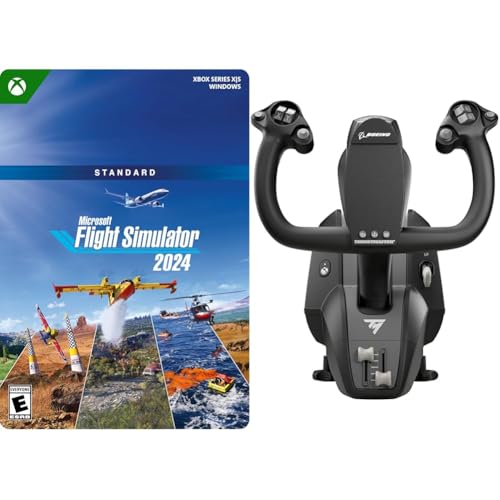
- Licensed Boeing 787-inspired 1:1 yoke
- Pendular motion with adjustable springs
- Includes Microsoft Flight Simulator 2024 Standard
Best For: Xbox Series X|S and PC users who want Boeing-style control plus the game
Professional PC Yoke System
Logitech G PRO Flight Yoke System

- 75 programmable controls with mode switching
- Stainless steel yoke shaft and clamp
- Includes separate three-axis throttle quadrant
Best For: PC sim pilots wanting a versatile yoke with lots of mapped controls
Flagship FFB Yoke
MOZA AY210 Force Feedback YOKE Base

- Dual high-torque servo motors for smooth feedback
- 15-bit magnetic encoder and 280 MHz processor
- 150mm travel and 9Nm torque for precision control
Best For: Pilots wanting detailed force feedback and premium control precision
All-in-One Console Yoke
Turtle Beach VelocityOne Flight

- Includes yoke, throttle quadrant, trim wheel, and rudder controls
- 180° rotation with hall effect sensor for true-to-life input
- Made for Xbox and Windows flight sim setups
Best For: Xbox and PC players wanting an integrated, all-in-one control system
PC Sim Classic Yoke
Logitech G PRO Flight Yoke System

- Steel yoke shaft for smooth, accurate control
- Throttle quadrant plus 54+ programmable controls
- Secure desk clamp for flexible mounting
Best For: PC flyers who want a traditional yoke with extensive programmable controls
Premium Full-Feature Pick – Honeycomb Alpha Flight Controls Yoke & Switch Panel
If you want a flight simulator yoke that feels more like real cockpit hardware, the Honeycomb Alpha Flight Controls Yoke & Switch Panel is built for serious simmers. Its 180° rotation, steel shaft, and dual ball bearings are designed for smooth, precise control, while the integrated switch panel adds useful aircraft-style controls for a more complete setup.
Best For: Simmers, flight students, and pilots who want a highly realistic yoke with built-in switch controls.
Pros:
- 180° yoke rotation with a solid steel shaft and dual linear ball bearings
- Dampened, self-centering mechanism with minimal dead zone
- Integrated switch panel with master, alternator, avionics, light, and ignition controls
- Dual mounting options include heavy-duty clamps or a 3M Micro-Suction Pad
Cons:
- More elaborate than a basic starter yoke
- Likely better suited to users who want a full control panel experience
This is the most feature-rich option in the group, and its focus on realistic motion and cockpit-style switches makes it stand out for immersive PC flying. If you want one device that goes beyond simple pitch and roll control, this is the strongest all-around premium pick.
All-in-One Control Bundle – Logitech G Pro Flight Yoke System + Rudder Pedals Bundle
This flight simulator yoke bundle is a practical way to add both hands-on and feet-on control to a sim setup. The Logitech G PRO Flight Yoke System brings a POV hat, 14 buttons, and a 3-position mode switch, while the included rudder pedals add self-centering action and differential toe brakes for more complete aircraft control.
Best For: Buyers who want a yoke-and-pedals bundle for a more complete desktop flight sim setup.
Pros:
- Includes both the yoke system and rudder pedals
- Yoke offers 14 buttons, a POV hat, and a 3-position mode switch
- Pedals feature self-centering movement and differential toe brakes
- Adjustable foot rests with non-slip materials
Cons:
- Bundle is more gear than a simple yoke-only setup
- Better suited to users who want full rudder control from day one
If you are building a more complete sim cockpit, this bundle covers the core controls in one purchase. It is especially appealing if you want the yoke and pedals to feel matched without having to shop each piece separately.
Best Entry-Level Choice – Honeycomb Alpha LITE
The Honeycomb Alpha LITE is a streamlined flight simulator yoke for users who want the essentials without extra complexity. It keeps the important realism cues, including 180° rotation and a self-centering mechanism, while focusing on the most-used controls for an easier first setup in PC flight sims.
Best For: Entry-level users who want a straightforward yoke focused on the essentials.
Pros:
- 180° yoke rotation with self-centering and minimal dead zone
- Simplified control layout with POV switch, rocker switches, and programmable buttons
- Designed for PC flight simulators and compatible with MSFS 20 & 24
- High-quality materials and precision components for long-term use
Cons:
- Fewer controls than more advanced yoke systems
- Best for users who do not need a full-feature cockpit panel
This is a sensible pick if you want to get flying quickly and concentrate on core handling rather than extra switches. It offers the feel and build focus of a more serious device, but in a cleaner, more approachable package.
Feature-Rich PC Pick – MOZA Flight Controls MFY YOKE
The MOZA Flight Controls MFY YOKE is aimed at PC simmers who want a modern flight simulator yoke with a high level of customization. It combines a durable composite-and-aluminum build with 34 configurable inputs, Hall effect control, and RGB lighting, making it a flexible choice for dialing in a personal cockpit layout.
Best For: PC users who want a customizable yoke with lots of programmable inputs.
Pros:
- 34 configurable inputs for broad control mapping
- Hall effect joystick and drift-free control for precision
- Durable PA66 composite materials with aluminum alloy quick-release
- Customizable RGB lighting for a personalized setup
Cons:
- PC-only compatibility may limit some setups
- More customization may be more than casual users need
If your priority is control depth and personalization, this model brings a modern feature set that stands out from simpler yokes. It is a strong match for simmers who like to map functions carefully and want a compact but capable controller.
Premium All-in-One Flight Yoke Bundle – Honeycomb Alpha + Bravo Controls
Honeycomb Alpha Flight Controls Yoke Bundle | Bravo throttle quadrant, (2 items)
Check Price On AmazonIf you want a flight simulator yoke setup that covers more of the cockpit in one purchase, this Honeycomb bundle pairs the Alpha yoke with the Bravo throttle quadrant. It is built for sim pilots who want a versatile control solution, from general aviation flying to multi-engine and commercial-style setups.
Best For: Sim pilots who want a bundled yoke and throttle system with broad cockpit control coverage.
Pros:
- Includes both the Honeycomb Alpha Flight Controls Yoke & Switch Panel and Bravo Throttle Quadrant.
- Bravo throttle supports configurable setups, from single-engine general aviation to four-engine commercial aircraft.
- Includes multiple cockpit components like autopilot, annunciator panel, gear and flap lever, and trim wheel.
- Gear lever includes LED landing gear indicator lights.
Cons:
- Bundle is more complex than a basic yoke-only setup.
- Designed as a full cockpit system, so it may be more than some casual users need.
This is a strong choice if you want a flight simulator yoke package that expands beyond basic pitch-and-roll control. The added throttle and panel features make it especially useful for users looking for a more complete cockpit feel.
Boeing-Inspired Yoke Bundle – Thrustmaster TCA Boeing + MSFS 2024
This flight simulator yoke bundle is aimed at Boeing-style control feel and includes Microsoft Flight Simulator 2024 Standard Edition. The yoke is an officially licensed 1:1 scale replica inspired by the Boeing 787, with a pendular mechanism and smooth adjustable spring resistance for precise control.
Best For: Xbox Series X|S and PC pilots who want a Boeing-inspired yoke plus the MSFS 2024 game bundle.
Pros:
- Officially licensed Boeing yoke inspired by the Boeing 787 airliner.
- 1:1 scale ergonomic replica with an 8.3-inch travel range.
- Pendular mechanism is designed to replicate the sensation of genuine Boeing Dreamliner airliners.
- Includes Microsoft Flight Simulator 2024 Standard Edition for Xbox Series X|S and Windows PC.
Cons:
- Bundle content is not playable until 6AM PST on Nov-19-2024.
- Focused on Boeing-style control, so it is less universal than a generic yoke.
For buyers who want a flight simulator yoke with a Boeing-inspired feel, this bundle stands out for its licensed design and pendular motion. The included simulator code also makes it a convenient all-in-one entry point for Xbox and PC users.
Professional PC Yoke System – Logitech G PRO Flight Yoke System
If you are shopping for a flight simulator yoke with a more traditional PC-focused layout, the Logitech G PRO Flight Yoke System offers a professional control set with a separate throttle quadrant. It includes a stainless steel yoke shaft, multiple modes, and a wide set of programmable controls for sim users who want flexibility.
Best For: PC sim pilots who want a feature-rich yoke and throttle system with lots of programmable controls.
Pros:
- Includes a separate three-axis lever throttle quadrant.
- Offers 75 programmable controls across a POV hat, 14 button controls, and a 3-position mode switch.
- Uses a stainless steel yoke shaft and a 2-position clamp for a solid build.
- Includes an integrated USB 2.0 port hub.
Cons:
- Designed for Windows PCs only.
- Does not include the broader cockpit-style panel features found on some bundled systems.
This is a practical pick for users who want a dependable flight simulator yoke with plenty of programmable input options. The separate throttle and steel shaft help it feel like a serious PC sim controller without going into full cockpit-bundle territory.
Flagship FFB Yoke – MOZA AY210 Force Feedback YOKE Base
If you want a flight simulator yoke built for highly detailed control, the MOZA AY210 focuses on force feedback realism and precision. Its dual high-torque servo motors, 15-bit magnetic encoder, and 150mm travel are aimed at sim pilots who want a more dynamic, responsive feel from the yoke base.
Best For: Sim pilots who want a force feedback yoke base with detailed, customizable control.
Pros:
- Dual high-torque servo motors provide smooth force feedback
- 15-bit magnetic encoder and 280 MHz processor support precise control
- 150mm travel distance helps with finer aircraft handling input
- Aircraft-grade aluminum body and quick-release system add a premium feel
Cons:
- Base-only design means you are buying a yoke system centerpiece, not an all-in-one setup
- Higher-end performance may be more than casual users need
Overall, this is the most specialized option in the group, with a clear emphasis on fidelity, torque, and customization. If realism and force feedback matter most in your sim setup, the AY210 stands out as a serious hardware foundation.
All-in-One Console Yoke – Turtle Beach VelocityOne Flight
The Turtle Beach VelocityOne Flight is a practical flight simulator yoke system if you want an all-in-one setup with fewer separate parts to manage. It combines a yoke handle, throttle quadrant, trim wheel, and rudder/brake controls, making it a strong fit for players who want a broad control layout right out of the box.
Best For: Xbox and PC sim pilots who want an integrated yoke system with throttle and trim controls.
Pros:
- All-in-one design includes throttle quadrant, trim wheel, and yoke
- 180° yoke rotation with non-contact hall effect sensor
- Built-in rudder and brake controls keep key inputs close at hand
- Full-color flight management display and status indicator panel support setup and learning
Cons:
- Large footprint may require more desk space
- Best suited to Xbox and Windows flight titles, so platform focus is narrower
For sim pilots who want one controller to cover a lot of cockpit functions, this package is easy to justify. The broad control set and secure clamping system make it especially appealing for home setups where convenience matters.
PC Sim Classic Yoke – Logitech G PRO Flight Yoke System
The Logitech G PRO Flight Yoke System is a straightforward flight simulator yoke option for PC users who want a more traditional control layout. With a steel yoke shaft, throttle quadrant, and a wide set of programmable controls, it is designed to help translate real-world flying habits into sim use.
Best For: PC sim pilots looking for a traditional yoke and throttle setup with lots of programmable controls.
Pros:
- Steel yoke shaft is built for robust, smooth, accurate control
- Includes a throttle quadrant for a more complete cockpit feel
- POV hat, 14 buttons, and 3-position mode switch support broad programmability
- Desk clamp adds flexible mounting and secure placement
Cons:
- PC-only compatibility limits use for console sim pilots
- Renewed listing may not appeal to buyers who want brand-new hardware
This is a good fit if you want a familiar yoke-and-throttle layout without overcomplicating the setup. The strong control count and sturdy shaft make it a practical choice for building muscle memory in flight sims.
How We Picked These Flight Simulator Yokes
We looked at build quality, sensor and control feel, compatibility with PC and consoles, throttle and switch integration, and how well each Flight Simulator Yoke fits different types of sim pilots. We also weighed setup complexity, desk or cockpit mounting needs, and whether a model offers enough controls to reduce reliance on the keyboard.
Quick Comparison
If you want the most authentic feel, prioritize higher-end models with stronger construction, better centering, and advanced features such as programmable buttons or force feedback. If you are newer to flight sim, a simpler yoke bundle may offer the best value because it includes the basics you need without extra add-ons.
Key Buying Factors for a Flight Simulator Yoke
Compatibility
Check whether the yoke works with your platform before buying. Some models are PC-only, while others support Xbox or bundle software and aircraft content. If you fly on multiple systems, confirm both hardware and driver support.
Control Feel and Realism
A good Flight Simulator Yoke should offer smooth pitch and roll movement with predictable centering. More premium systems may add stronger resistance, higher fidelity sensors, or force feedback for a more immersive experience.
Included Controls
Buttons, switches, hats, and throttle inputs can make a major difference. More built-in controls mean fewer separate peripherals and a cleaner desk or cockpit layout, especially for general aviation and IFR training practice.
Mounting and Ergonomics
Consider desk depth, clamp design, and where your throttles or rudder pedals will sit. A large yoke can feel great in a sim chair, but only if you have the space to position it comfortably for long sessions.
Software and Customization
Programmable inputs and profile support help you tailor the hardware to different aircraft. If you fly everything from Cessnas to Boeings, flexibility matters as much as raw build quality.
Who Should Buy Which Flight Simulator Yoke?
Choose a premium Flight Simulator Yoke if you want maximum realism, more controls, and a cockpit-like experience. Pick a midrange bundle if you want a balanced setup with fewer separate purchases. If you are just getting started, a simpler yoke can be the easiest way to learn the basics without overcomplicating your rig. For console flyers, platform support should be your first filter; for serious PC pilots, customization and feel should come first.