If your projector has great picture but weak audio options, an HDMI audio extractor can make the whole setup far more usable. It splits audio from the HDMI signal so you can send video to the projector and sound to speakers or a receiver.
For movie nights, presentations, and gaming, the right model depends on resolution support, output types, and how your system is wired. Below, we focus on practical choices that help you get better sound without complicating the setup.
Best 10 HDMI Audio Extractors for Projectors Picks for 2026
Best for 4K + ARC TVs
J-Tech Digital HDMI Audio Extractor

- 4K passthrough with EDID mode switching
- Optical and RCA audio outputs
- ARC support for smart displays
Best For: Projector setups that need 4K video passthrough plus flexible audio extraction.
Best for Simple HDMI-to-Audio Setup

- 4K@30Hz HDMI passthrough with 3.5mm and R/L audio out
- Plug-and-play design with optional USB power for low-power sources
- Works with many consoles, streamers, and media players
Best For: Projector users who want an easy HDMI audio breakout for external speakers or a sound system.
Best for Large-Scale Projection Routing

- 8 inputs and up to 24 outputs for complex AV routing
- 4K@60Hz over CAT6/7 with 8 loop-outs for local monitoring
- Audio embedding/de-embedding plus web, IR, RS-232, and app control
Best For: Installations that need long-distance HDMI distribution, local monitoring, and flexible audio routing.
Best for 5.1 Audio Output
J-Tech Digital 4K HDMI Audio Extractor
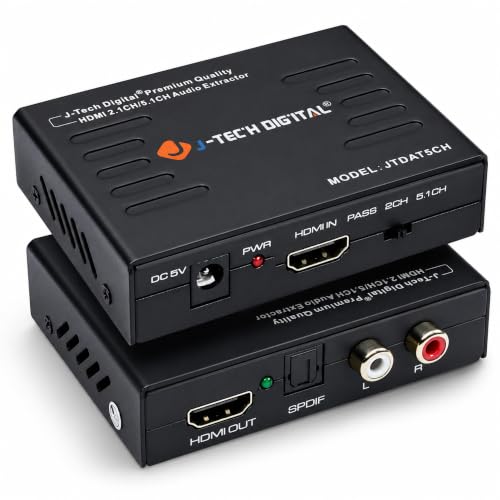
- SPDIF and RCA outputs for flexible audio hookups
- Supports 2CH, 5.1CH, and Pass EDID modes
- 4K@30Hz passthrough with HDCP support
Best For: Projector setups that need both 2-channel and 5.1 audio extraction from HDMI sources.
Best for Multi-Source Projection Rigs

- Routes any of 8 HDMI sources to any of 8 displays
- Supports 4K@60Hz 4:4:4 with HDMI 2.0 and HDCP 2.2
- 3.5mm audio embed/de-embed plus web and RS-232 control
Best For: AV installs and projector setups that need flexible source routing with audio control.
Best for 8K Gaming Pass-Through
J-Tech Digital 8K HDMI Audio Extractor

- 8K@60Hz and 4K@120Hz pass-through
- Optical, L/R, and HDMI audio outputs
- Supports eARC/ARC, CEC, EDID, and HDCP 2.3
Best For: Home theater and gaming projector owners who need high-bandwidth video pass-through with external audio routing.
Best for Large AV Rigs
4K HDMI Matrix 16x16 w/Web & AUX Audio

- 16x16 routing for multi-display projector systems
- AUX output extracts audio from the selected HDMI route
- Web, IR, RS232, LAN, app, and button control
Best For: Large projector or AV installations that need matrix switching plus audio extraction.
Best for Optical 5.1
VPFET HDMI Audio Extractor 4K to Optical/AUX

- Optical output with DTS 5.1 support
- 3.5mm AUX stereo for simple speaker setups
- Easy USB-powered plug-and-play installation
Best For: Projector users who want a simple HDMI audio breakout with optical surround or AUX stereo output.
Best for AV Control
4x4 HDMI Matrix Seamless Switch

- 4x4 routing with seamless switching and splitter modes
- Custom video-wall layouts with 180º rotation
- WEB, LAN, RS-232, IR, app, and button control
Best For: Installers and advanced users who need a rack-friendly HDMI matrix with video wall functions.
Best for 4K HDR Projector Setups
J-Tech Digital 4K 60Hz HDMI Audio Extractor
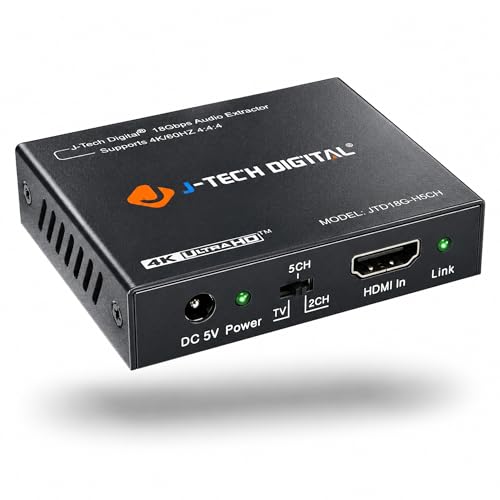
- 4K 60Hz, HDR10, HDMI 2.0, and HDCP 2.2 support
- SPDIF and 3.5mm outputs for flexible audio hookups
- EDID settings for 2-channel or 5.1-channel audio
Best For: Users connecting modern 4K sources to a projector who need dependable audio extraction and HDR passthrough.
Best for 4K + ARC TVs – J-Tech Digital HDMI Audio Extractor
If you need one of the more versatile HDMI audio extractors for projectors, this J-Tech Digital unit is built for setups that mix modern sources with older sound gear. It handles 4K passthrough at 60Hz in 4:2:0 or 4K at 30Hz in 4:4:4, outputs audio over RCA or optical, and adds ARC support for smart displays when you want to pull sound back to an external system.
Best For: Projector owners connecting laptops, Blu-ray players, or game consoles who need HDMI audio extraction with both optical and RCA output options.
Pros:
- Supports 4K passthrough plus EDID modes for easier compatibility tuning
- Offers optical and RCA audio extraction for different speaker setups
- Includes ARC support for smart TV or display audio routing
- Backed by lifetime technical support and a replacement warranty
Cons:
- RCA output is stereo only and does not downmix 5.1 audio
- Does not support eARC
- 4K support depends on the source output format
For buyers comparing HDMI audio extractors for projectors, this model stands out more for flexibility than simplicity: it’s a strong fit if you want 4K compatibility, multiple audio outputs, and ARC support in one compact box.
Best for Simple HDMI-to-Audio Setup – HDMI Audio Extractor Splitter
If you need one of the more straightforward HDMI audio extractors for projectors, this compact splitter is a practical way to pull sound from an HDMI source while still passing video through to a display. It supports up to 4K@30Hz, works with common streaming devices and game consoles, and adds 3.5mm/RL analog audio output for external speakers or a sound system.
Best For: Projector setups that need simple HDMI passthrough plus easy analog audio extraction for speakers or a receiver.
Pros:
- Supports HDMI input/output with audio extraction to 3.5mm and R/L analog.
- Compact, plug-and-play design with USB power support for low-power devices.
- Compatible with many HDMI sources, including consoles, streaming sticks, and players.
- Handles 4K@30Hz and 3D formats for flexible home theater use.
Cons:
- Does not support ARC or eARC.
- TVs cannot be used as the input source.
- Best for basic audio breakout, not advanced digital surround setups.
This is a solid pick if you want a no-fuss adapter for projector audio without overcomplicating the setup. For buyers comparing HDMI audio extractors for projectors, it stands out for its wide device compatibility and simple analog output options rather than premium feature depth.
Best for Large-Scale Projection Routing – 4K 8×16 HDMI Matrix Extender
If you need more than a simple audio breakaway, this matrix extender is a strong fit for HDMI audio extractors for projectors in complex AV setups. It can route 4K/60 video over CAT6/7, mirror content to multiple displays, and handle audio embedding/de-embedding so you can feed projectors, monitors, and external speakers from one system.
Best For: Installations that need long-distance HDMI distribution, local monitoring, and flexible audio routing in schools, offices, or entertainment spaces.
Pros:
- Supports 8 inputs and up to 24 total outputs with 8 local loop outs for monitoring
- 4K@60Hz, HDMI 2.0, HDCP 2.2 support with EDID management for smoother compatibility
- Multiple control options including web GUI, LAN, RS-232, IR, app, and panel buttons
- Built-in audio embedding/de-embedding helps sync audio with projector and display feeds
Cons:
- Overkill if you only need a simple single-projector audio extractor
- Requires CAT6/7 cabling and a more involved setup than compact adapters
- Higher complexity may be excessive for basic home theater use
For buyers comparing HDMI audio extractors for projectors, this is really a distribution hub first and an extractor second—but that makes it especially useful when you need both long-run video delivery and controllable audio routing in one package.
Best for 5.1 Audio Output – J-Tech Digital 4K HDMI Audio Extractor
If you need one of the more flexible HDMI audio extractors for projectors, this J-Tech Digital model is built to pull audio from an HDMI source while passing video through to your display. It supports up to 4K at 30Hz, gives you analog stereo or digital SPDIF output, and includes EDID options that make it easier to match different source devices and speaker setups.
Best For: Projector setups that need both 2-channel and 5.1 audio extraction from HDMI sources.
Pros:
- Outputs both SPDIF digital audio and RCA stereo for versatile speaker connections
- Supports 4K@30Hz video passthrough with HDCP and EDID support
- Offers 2CH, 5.1CH, and Pass audio EDID modes for compatibility tuning
- Works with common sources like Apple TV, Blu-ray players, and satellite receivers
Cons:
- No ARC support, so it is not ideal for TV-return-audio setups
- Limited to 4K at 30Hz, not 60Hz
- Best suited to audio extraction, not advanced home theater switching
For buyers comparing HDMI audio extractors for projectors, this unit stands out for its mix of analog and digital outputs plus broad audio format support. It is a practical pick if your projector setup needs simple audio separation without sacrificing 4K compatibility.
Best for Multi-Source Projection Rigs – 8×8 HDMI Matrix Switch
If you need to route multiple sources to multiple screens, this HDMI matrix is a practical option to consider alongside HDMI audio extractors for projectors. It combines 8×8 switching, 4K/60Hz support, EDID management, and 3.5mm audio embed/de-embed features, so it works well in setups where video and sound both need to be controlled from one rack-mounted hub.
Best For: AV installs, classrooms, conference rooms, and home theater setups that need flexible source-to-display routing with audio handling.
Pros:
- Routes any of 8 HDMI sources to any of 8 displays
- Supports up to 4K@60Hz 4:4:4 with HDMI 2.0 and HDCP 2.2
- 3.5mm audio embed/de-embed adds useful audio flexibility
- Multiple control options: web, RS-232, IR, LAN, app, and panel buttons
Cons:
- More complex than a simple extractor if you only need one projector
- Requires rack space and a more involved setup
- Overkill for basic single-source audio extraction
For users comparing HDMI audio extractors for projectors, this model stands out because it goes beyond basic audio breakouts and adds full matrix switching for larger AV systems. If your projector setup needs both audio flexibility and multi-display routing, it offers a lot of control in one unit.
Best for 8K Gaming Pass-Through – J-Tech Digital 8K HDMI Audio Extractor
If you need one of the most capable HDMI audio extractors for projectors, this J-Tech Digital unit is built for modern 8K and 4K setups where you want to keep video on the display and route sound to a separate system. It supports HDMI 2.1 features like 8K@60Hz, 4K@120Hz, HDR formats, and flexible audio output options, making it a strong fit for projector installs with soundbars, AV receivers, or analog speakers.
Best For: Home theater and gaming projector owners who need high-bandwidth video pass-through with reliable audio extraction.
Pros:
- Passes up to 8K@60Hz and 4K@120Hz with HDR, HDR10+, Dolby Vision, and HLG support
- Offers optical, analog L/R, and HDMI audio outputs for different audio systems
- Supports eARC/ARC audio extraction plus CEC and EDID controls for easier setup
- HDCP 2.3 compliance helps avoid compatibility issues with newer sources
Cons:
- Analog L/R output is limited to stereo
- Optical output tops out at standard Dolby Digital 5.1
- Setup can take some tweaking if your source and display use different audio formats
For projector owners who want a future-ready option, this is a strong pick among HDMI audio extractors for projectors because it combines high-resolution pass-through with multiple audio output paths.
Best for Large AV Rigs – 4K HDMI Matrix 16×16 w/Web & AUX Audio
This is a full-scale option for anyone comparing HDMI audio extractors for projectors in a larger AV setup. With 16 inputs and 16 outputs, it can route sources independently, mirror feeds across multiple displays, and pull audio from the selected output through the 3.5mm AUX connection.
Best For: Installations that need multi-source switching, projector audio extraction, and centralized control in a rack-mount AV system.
Pros:
- 16×16 matrix routing is ideal for complex projector and display systems
- Includes AUX audio output for extracting sound from the selected HDMI route
- Multiple control options: web, IR, RS232, LAN, app, and front panel
- Rack-ready 2U design suits permanent AV installs
Cons:
- Much larger and more expensive than a basic extractor
- Only supports up to 4K at 30Hz, not 4K at 60Hz
For projector setups that need more than simple audio breakouts, this matrix switcher adds serious routing flexibility. It makes sense when HDMI audio extractors for projectors need to feed multiple rooms, switch sources often, or live inside a more advanced AV rack.
Best for Optical 5.1 – VPFET HDMI Audio Extractor 4K to Optical/AUX
If you need HDMI audio extractors for projectors that can peel audio off a source device and send it to speakers or a receiver, this VPFET adapter is a practical, low-cost option. It adds optical and 3.5mm output, supports 2.0CH, 5.1CH, and pass-through modes, and is simple to power and set up.
Best For: Projector setups that need a straightforward HDMI-to-audio breakout for optical 5.1 or stereo AUX output.
Pros:
- Optical output supports DTS 5.1 for surround sound setups
- 3.5mm AUX output is handy for simple stereo speakers or soundbars
- Plug-and-play design with USB power keeps installation easy
- Works with many HDMI sources, including PCs, consoles, and streaming boxes
Cons:
- Does not support ARC or eARC
- 4K support is limited to 30Hz and HDMI 1.4-class devices
- Not ideal if you need 7.1 audio or TV-as-input use
For buyers comparing HDMI audio extractors for projectors, this model makes the most sense when you want reliable optical audio output and don’t need advanced HDMI features. It’s a solid match for budget-conscious home theater and presentation rigs.
Best for AV Control – 4×4 HDMI Matrix Seamless Switch
If you’re comparing HDMI audio extractors for projectors, this 4×4 HDMI matrix is a better fit when your setup also needs routing, splitting, and video-wall control from one box. It supports 4K@60Hz, multiple display modes, and flexible control options, making it useful for meeting rooms, signage installs, and projector-based AV systems.
Best For: Installers and advanced users who need a rack-friendly HDMI matrix with video wall functions, scene presets, and remote control options.
Pros:
- Routes 4 inputs to 4 outputs with matrix, splitter, and seamless switching modes
- Supports custom video-wall layouts like 2×2, 1×3, and 4×1, plus 180º rotation
- Offers WEB, LAN, RS-232, IR, app, and button control for flexible integration
- Fits a 1U 19-inch rack, which is handy for structured AV setups
Cons:
- More complex than a simple audio extractor for basic projector use
- Likely overkill if you only need one source-to-projector audio breakout
- Requires setup time to take advantage of the advanced scene and wall features
This is not a dedicated audio extractor, but it can serve projector installations where HDMI audio extractors for projectors need to be paired with matrix switching and multi-display control. If you want a scalable AV hub rather than a simple audio-only device, it’s a strong fit.
Best for 4K HDR Projector Setups – J-Tech Digital 4K 60Hz HDMI Audio Extractor
If you need one of the more capable HDMI audio extractors for projectors, this J-Tech Digital model is a strong fit for modern 4K sources and projector setups. It separates HDMI video from audio while keeping HDMI 2.0, HDCP 2.2, HDR10, and high refresh-rate support intact, so it works well when you want clean sound without giving up picture quality.
Best For: Home theater or presentation users who need 4K HDR passthrough plus optical or analog audio extraction for a projector.
Pros:
- Supports 4K 60Hz, HDR10, and HDMI 2.0 with HDCP 2.2
- Offers both SPDIF and 3.5mm audio outputs for flexible hookups
- Can pass Dolby Digital/DTS over optical for compatible audio gear
- Includes EDID modes for 2-channel or 5.1-channel output selection
Cons:
- Analog output requires the source to be set to PCM audio
- Does not decode Dolby Digital/DTS for the 3.5mm output
- Not compatible with some older HDMI sources and certain TV boxes
This is a practical pick if you want a projector-friendly extractor that balances video performance with straightforward audio breakout. Among HDMI audio extractors for projectors, it stands out for users who need modern 4K support and multiple audio output options in one box.
How We Picked the Best HDMI Audio Extractors for Projectors
We prioritized extractors that match real projector use: stable HDMI passthrough, common audio outputs such as optical, RCA, or 3.5mm, and support for modern sources like streaming boxes, consoles, and laptops. We also considered 4K compatibility, HDCP support, ARC/eARC features where useful, and whether the device makes sense for simple home setups or more advanced AV systems.
Quick Comparison
Most buyers can narrow the field quickly. If you need a straightforward audio breakout for a single projector and speakers, a compact HDMI audio extractor is usually the easiest choice. If your setup includes multiple sources, displays, or distributed rooms, a matrix or switcher may be a better fit. For newer systems with enhanced audio return needs, ARC/eARC support can be important.
Key Buying Factors for HDMI Audio Extractors for Projectors
Resolution and Refresh Rate
Match the extractor to your source and projector. For standard movie setups, 4K at 60Hz is the safest benchmark. Gamers and newer devices may benefit from higher refresh-rate support, but only if the projector and source can use it.
Audio Outputs
Choose the output that fits your speakers or receiver. Optical is common for soundbars and AV receivers, RCA works well for older stereo gear, and 3.5mm is handy for powered speakers. If you want the cleanest signal over longer runs, optical is often the best choice.
Compatibility and Handshake Support
HDCP, EDID, Dolby Digital, and DTS support can make or break performance. Good HDMI Audio Extractors for Projectors should avoid black screens, audio dropouts, and format conflicts when switching sources.
Setup Simplicity
Look for a model with clear input/output labeling and minimal configuration if you want plug-and-play use. If you are integrating multiple rooms or sources, control options like remote, IR, web, or RS-232 may be worth the added complexity.
Who Should Buy Which HDMI Audio Extractors for Projectors?
Choose a compact audio extractor if you only need to add speakers to one projector. Pick a higher-end unit if you want better format support, more reliable handshakes, or ARC/eARC for a modern living-room setup. If you are building a conference room, classroom, or multi-display system, a matrix switcher may be more appropriate than a basic extractor.
In short, the best choice depends on how many sources you have, what kind of audio gear you already own, and whether you want the simplest possible path from HDMI source to projector sound.