Long HDMI runs can introduce signal dropouts, flickering, handshake failures, and audio problems—especially at 4K or higher refresh rates. The right extender depends on distance, resolution, installation conditions, and whether you can run Ethernet cable between displays.
This roundup compares 10 HDMI extension solutions, including powered Cat5e/Cat6 extender kits and shorter HDMI 2.0 and HDMI 2.1 extension cables for home theaters, gaming setups, conference rooms, and commercial installations.
Best 10 Hdmi Extenders for Long Cable Runs Picks for 2026
Best Long-Range 4K Pick

- 4K60Hz 4:4:4 HDR support
- Up to 492ft over Cat5e/6
- IR, CEC, RS-232, EDID, and PoC
Best For: Advanced 4K home theater and commercial AV installations
Best Simple Cable Extension

- 4K60Hz, 3D, and HDR support
- No external power required
- Braided cable with gold-plated connectors
Best For: Short, simple extensions for TVs, monitors, and game consoles
Best 1080p Multi-Display Option
Cable Matters Wall Mount HDMI Extender

- 300-foot range over Cat6
- 1080p video with digital audio
- IR control and surface-mount hardware
Best For: Long 1080p projector, monitor, and multi-display installations
Best Budget 1080p PoC Kit

- 1080p60 and 3D up to 164ft
- PoC uses one included adapter
- EDID copy and plug-and-play setup
Best For: Straightforward Full HD home, classroom, and office installations
Best Direct-Run Extension
30-Foot 4K HDMI Extension Cable

- 4K at 60Hz with 18Gbps bandwidth
- Male-to-female design for existing HDMI cables
- Braided construction and broad device compatibility
Best For: Simple indoor extensions for TVs, projectors, consoles, and meeting setups
Best for High-Refresh Video

- 8K60 and 4K120 support
- 48Gbps bandwidth with HDMI 2.1 features
- Braided design rated for 25,000 flex cycles
Best For: Gaming setups and high-resolution displays needing direct HDMI connectivity
Best for Extra-Long Runs
165-Foot HDMI over Ethernet Extender

- Extends 1080p video up to 165 feet
- Runs over Cat6, Cat7, or Cat5e cable
- Includes transmitter, receiver, and USB power cable
Best For: Conference rooms, home theaters, and large venues needing long-distance 1080p transmission
Best for Next-Gen Gaming

- 48Gbps HDMI 2.1 bandwidth
- Supports 8K@60Hz and 4K@240Hz
- Durable braided, shielded design
Best For: High-refresh gaming and wall-mounted TV setups
Best Overall Long Extension
Silkland 8K HDMI Extension Cable
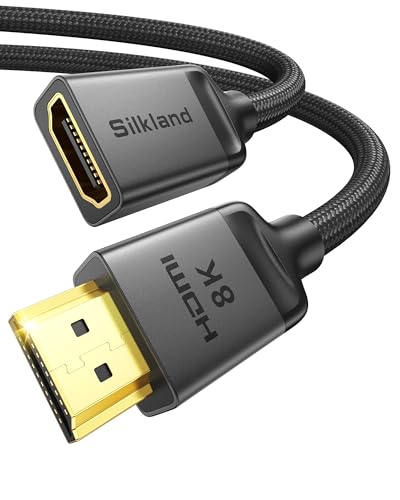
- 10-foot male-to-female extension
- 48Gbps and 8K@60Hz support
- Braided, shielded construction
Best For: Home theaters, projectors, and gaming setups
Best for 4K Setups
VENTION 15FT HDMI Extension Cable

- 15-foot extension length
- Supports 4K@60Hz and 2K@120Hz
- Five-fold shielding and copper conductors
Best For: Longer 4K TV, projector, and gaming connections
Best Long-Range 4K Pick – J-Tech Digital UHDT150
For demanding HDMI extenders for long cable runs, the J-Tech Digital UHDT150 combines 4K60Hz video, HDBaseT transmission, and control-signal passthrough. It can send 4K video up to 394 feet or 1080p up to 492 feet over one Cat5e/6 cable.
Best For: Home theaters, commercial AV systems, and installations needing 4K HDR with remote control features.
Pros:
- Supports 4K60Hz 4:4:4, HDR, HDR10, and Dolby Vision.
- Reaches up to 150m/492ft for 1080p and 120m/394ft for 4K.
- Includes bidirectional IR, CEC, RS-232, EDID passthrough, and PoC.
- Transmitter loop-out supports a local display.
Cons:
- More capability than needed for basic 1080p connections.
- Requires Cat5e/6 cabling and separate installation planning.
This is the strongest choice when long distance and high-bandwidth 4K performance matter. Its control and compatibility features also make it more suitable for advanced installations than simple point-to-point extenders.
Best Simple Cable Extension – Twozoh 10-Foot HDMI Extension
The Twozoh HDMI extension cable is a straightforward option for shorter HDMI runs. Unlike powered HDMI extenders for long cable runs, it uses a male-to-female cable connection and is intended to add 10 feet between a source and display.
Best For: Extending a nearby TV, monitor, projector, game console, or streaming device without adding transmitter and receiver boxes.
Pros:
- Supports 4K at 60Hz, 3D, and HDR.
- Simple male-to-female design needs no external power.
- Braided nylon construction and gold-plated connectors support durability.
- Works with common devices including PCs, TVs, game consoles, and streaming players.
Cons:
- At 10 feet, it is not intended for very long-distance runs.
- Provides no IR, EDID, or signal-management features.
Choose this cable when the distance is modest and convenience matters most. For runs beyond a simple room-scale extension, a Cat6-based transmitter-and-receiver system will be more appropriate.
Best 1080p Multi-Display Option – Cable Matters Wall Mount HDMI Extender
The Cable Matters extender set is designed for 1080p HDMI extenders for long cable runs, carrying video and audio up to 300 feet over a dedicated Cat6 cable. Its surface-mountable metal boxes and included IR cables suit organized home, office, and commercial installations.
Best For: 1080p connections to remote TVs, projectors, or monitors where IR control and optional multi-display expansion are useful.
Pros:
- Extends HDMI up to 300 feet over Cat6 UTP/STP cable.
- Supports 1080p video and LPCM, DTS Digital, and Dolby Digital audio.
- Includes IR cables for remote source control.
- Surface-mount brackets, screws, and two HDMI cables are included.
Cons:
- Maximum listed video resolution is 1080p rather than 4K.
- Requires a dedicated connection and should not share a regular LAN with other traffic.
- Additional receiver boxes are sold separately for multi-display expansion.
This set is a practical fit for long 1080p installations that benefit from sturdy mounting and remote control. Its dedicated-network requirement is important to account for during setup.
Best Budget 1080p PoC Kit – Steetek HT202P
The Steetek HT202P offers a simple way to handle HDMI extenders for long cable runs up to 164 feet. It sends uncompressed 1080p video and audio over one Cat5e, Cat6, or Cat7 cable and uses PoC so only one included power adapter is required.
Best For: Home, classroom, office, and commercial setups needing dependable Full HD extension without 4K requirements.
Pros:
- Extends 1080p60 and 3D signals up to 164 feet.
- Works with Cat5e, Cat6, or Cat7 cable.
- Power over Cable reduces power-cord clutter at the receiver.
- EDID copy helps establish compatible display settings.
Cons:
- Limited to 1080p rather than 4K resolution.
- Shorter stated range than the longest-range options in this roundup.
For a basic Full HD point-to-point installation, the HT202P keeps setup uncomplicated while adding useful EDID and PoC features. It is a sensible choice when 164 feet is sufficient and 4K is not required.
Best Direct-Run Extension – 30-Foot 4K HDMI Extension Cable
This 30-foot male-to-female cable is a straightforward option among HDMI extenders for long cable runs when you want to extend an existing HDMI connection without adding a separate transmitter and receiver. It supports up to 4K at 60Hz and is suited to indoor home theater, gaming, meeting, and temporary setups.
Best For: Extending an existing HDMI cable between nearby rooms, displays, projectors, or entertainment devices.
Pros:
- Supports 4K at 60Hz, 18Gbps bandwidth, ARC, 3D, and HDCP 2.2.
- Works with devices including streaming sticks, laptops, TVs, projectors, consoles, and monitors.
- Nylon braiding, aluminum housing, gold-plated connectors, and copper conductors are designed for durability and stable transmission.
Cons:
- It is a passive 30-foot extension cable rather than a powered network-based extender.
- Indoor use is the stated recommendation.
Choose this cable when simplicity and 4K60 support matter more than reaching extreme distances. Its male-to-female design makes it particularly convenient for extending a cable already installed in your setup.
Best for High-Refresh Video – 25-Foot HDMI 2.1 Cable
For HDMI extenders for long cable runs that need newer gaming and display features, this 25-foot HDMI 2.1 cable offers up to 48Gbps bandwidth, 8K at 60Hz, and 4K at 120Hz. It uses a direct HDMI connection and remains backward compatible with earlier HDMI versions.
Best For: High-refresh-rate gaming, 8K-capable displays, home entertainment systems, projectors, and conference setups.
Pros:
- Supports 8K at 60Hz and 4K at 120Hz with 48Gbps bandwidth.
- Includes HDMI 2.1 features such as eARC, VRR, QFT, QMS, ALLM, and DSC.
- Braided nylon, gold-plated ports, and a flexible-strength design are rated for up to 25,000 flex cycles.
- Compatible with HDMI 1.1 through HDMI 2.0 standards as well as HDMI 2.1 devices.
Cons:
- At 25 feet, it is shorter than Ethernet-based extender systems designed for runs up to 165 feet.
- The product listing specifies indoor and outdoor use but does not describe weatherproofing.
This is the stronger direct-cable choice for users prioritizing bandwidth and refresh rate. It is especially well matched to modern consoles and displays, provided a 25-foot HDMI cable is long enough for the installation.
Best for Extra-Long Runs – 165-Foot HDMI over Ethernet Extender
This HDMI-over-Ethernet kit is designed for HDMI extenders for long cable runs where a conventional cable is not practical. It sends synchronized Full HD video and audio up to 165 feet over Cat6 or Cat7 cable, or up to 131 feet over Cat5e, making it suitable for larger rooms and distributed setups.
Best For: Home theaters, conference rooms, large venues, and installations requiring up to 165 feet of reach.
Pros:
- Extends 1080p video and audio up to 165 feet over Cat6 or Cat7 cable.
- Supports 3D signals and backward-compatible resolutions with synchronized audio and video.
- Includes transmitter and receiver units with HDMI male connectors, plus a USB power cable.
- Uses a POC function and requires 5V/1A power through the included USB cable.
Cons:
- Maximum supported resolution is Full HD 1920×1080 at 60Hz rather than 4K or 8K.
- Cat5e runs are limited to a stated maximum of 40 meters, compared with 50 meters for Cat6/7.
- A network cable is needed for the extension run.
Pick this kit when distance is the main concern and 1080p performance is sufficient. Its Ethernet-based design offers substantially more reach than the two direct HDMI cables, while requiring more setup and suitable network cabling.
Best for Next-Gen Gaming – UGREEN 10K HDMI 2.1 Extender
For HDMI extenders for long cable runs, the UGREEN is a short male-to-female extension designed to add reach without sacrificing newer HDMI 2.1 features. Its 48Gbps bandwidth supports up to 8K at 60Hz and 4K at 240Hz, making it a strong fit for high-performance displays and gaming setups.
Best For: Extending a short HDMI connection to wall-mounted TVs, TV sticks, gaming consoles, and high-refresh-rate displays.
Pros:
- Supports 48Gbps bandwidth, 8K@60Hz, and 4K@240Hz.
- Includes VRR, ALLM, Dynamic HDR, eARC, Dolby Atmos, and 3D support.
- Braided construction, triple shielding, and an aluminum housing support durability and signal stability.
Cons:
- At 3.3 feet, it is not a long extension by itself.
- Its premium HDMI 2.1 capabilities may be unnecessary for basic 1080p or 4K setups.
This is a capable short extension for users who want to preserve high-bandwidth HDMI 2.1 performance. Choose a longer model if your installation requires substantial distance.
Best Overall Long Extension – Silkland 8K HDMI Extension Cable
The Silkland is a practical choice among HDMI extenders for long cable runs because it reaches 10 feet while retaining HDMI 2.1 support. It offers 48Gbps bandwidth, 8K@60Hz capability, and compatibility with both newer and older HDMI equipment.
Best For: Home theaters, gaming consoles, projectors, and installations where a 10-foot male-to-female extension is needed.
Pros:
- Provides a 10-foot reach with 48Gbps bandwidth.
- Supports 8K@60Hz, 4K@120Hz/144Hz, HDR, 3D, eARC, and Dolby Atmos.
- Nylon braiding, triple shielding, a 28AWG copper core, and gold-plated connectors support durability and stable transmission.
Cons:
- It is intended for indoor use.
- Its higher-bandwidth features may exceed the needs of basic HDMI sources.
With a 10-foot length and broad feature support, this Silkland cable balances reach and performance well. It is especially useful when a short cable leaves a TV, projector, or console just out of range.
Best for 4K Setups – VENTION 15FT HDMI Extension Cable
For HDMI extenders for long cable runs in conventional home entertainment systems, the 15-foot VENTION provides extra reach with support for 4K at 60Hz. It is designed to extend existing HDMI cables and reduce repeated plugging and unplugging of a TV, monitor, or projector port.
Best For: 4K TVs, Roku devices, laptops, projectors, gaming setups, and other HDMI 2.0 or earlier installations requiring a longer extension.
Pros:
- Offers a generous 15-foot male-to-female extension length.
- Supports 4K@60Hz, 2K@120Hz, ARC, Ethernet Channel, and 3D.
- Uses 30AWG copper conductors, five-fold shielding, and gold-plated connectors.
Cons:
- It does not provide the HDMI 2.1 feature set or 8K support listed for the other options.
- Its stated performance is capped at 4K@60Hz.
This VENTION cable is a sensible long-reach option when 4K@60Hz is sufficient. It favors installation length and compatibility over the higher refresh rates and bandwidth of HDMI 2.1 extenders.
How We Picked the Best Hdmi Extenders for Long Cable Runs
We selected products across the main categories used for long HDMI connections: HDBaseT and Ethernet-based transmitter/receiver kits, plus high-speed HDMI extension cables. We considered advertised transmission distance, supported resolution and refresh rate, bandwidth, power requirements, audio and control features, connector design, and compatibility with modern sources such as game consoles, streaming devices, Blu-ray players, and PCs.
Because performance depends on the source, display, cable quality, and installation environment, published distance ratings should be treated as maximums rather than guarantees. A product that works well at 4K over a short extension may not be suitable for a 100-foot or longer run.
Quick Comparison
| Type | Best Use | Typical Strength | Important Limitation |
|---|---|---|---|
| HDBaseT over Cat6 | Long permanent installations | Long reach, stable distribution, IR support | Requires separate network cable and hardware |
| Basic HDMI over Cat5/Cat6 | Budget 1080p extensions | Lower cost and simple point-to-point setups | Often limited to 1080p and shorter distances |
| HDMI 2.1 extension cable | Short gaming and home theater extensions | High refresh rates, HDR, and high bandwidth | Usually unsuitable for very long runs |
| HDMI 2.0 extension cable | Everyday 4K devices | Simple plug-and-play installation | Less headroom than HDMI 2.1 |
Key Buying Factors for Hdmi Extenders for Long Cable Runs
Distance and Cable Infrastructure
Measure the full route, including vertical sections and equipment slack. For runs approaching or exceeding 100 feet, an Ethernet-based extender is generally more practical than a passive HDMI cable. Use solid-copper, properly terminated Cat6 or better cable when the extender requires it, and avoid routing signal cable beside high-voltage wiring where possible.
Resolution, Refresh Rate, and Bandwidth
Choose an extender based on the signal you actually need. 1080p systems can cover substantial distances at a lower cost, while 4K at 60Hz requires significantly more bandwidth. Gamers using 4K at 120Hz, HDR, variable refresh rate, or other HDMI 2.1 features should verify the exact supported bandwidth rather than relying only on an “8K” label.
Power, EDID, Audio, and Control
Check whether the transmitter and receiver need separate power supplies or support power over cable. EDID management can help resolve display-recognition issues, while IR pass-through is useful when controlling a remote source from another room. Confirm support for your audio format, including multichannel or Dolby Digital output.
Installation and Reliability
For walls, ceilings, or commercial spaces, consider connector durability, mounting hardware, heat ventilation, and access to both endpoints. A removable or replaceable Cat6 cable can be easier to service than a permanently attached long HDMI lead.
Who Should Buy Which Hdmi Extenders for Long Cable Runs?
- For the longest permanent runs: Choose an HDBaseT or Ethernet-based extender kit, particularly one with PoC, EDID, and IR support.
- For budget 1080p distribution: A basic HDMI-over-Cat5/Cat6 kit is suitable for projectors, secondary televisions, and office displays.
- For short 4K home setups: Pick an HDMI 2.0 extension cable when 4K at 60Hz, HDR, and everyday streaming are the main requirements.
- For modern gaming: Use an HDMI 2.1 extension cable only when its bandwidth and features match the console or PC output. Keep the run as short as practical.
- For uncertain compatibility: Prefer a product with clear resolution specifications, EDID support, and a return policy that allows testing with your exact source and display.