A microphone boom arm can free valuable workspace, improve mic positioning, and make a compact recording or streaming setup easier to use. The best microphone boom arm for small desk setups balances a small footprint with enough reach, stability, and adjustment range for your microphone.
This roundup compares 10 options ranging from low-profile arms and heavy-duty mounts to budget-friendly scissor designs. Use the buying guide below to match your desk, microphone, and recording style with the right arm.
Best 10 Microphone Boom Arm for Small Desk Picks for 2026
Best Space-Saving Pick

- 3.35-inch low-profile arm
- Magnetic cable management
- 3.3-pound load capacity
Best For: Minimalist and compact desk setups
Best for Quiet Adjustments
RØDE PSA1+ Professional Boom Arm

- Internal spring damping
- 360-degree rotation
- Supports up to 1.2 kilograms
Best For: Quiet podcasting and streaming adjustments
Best Heavy-Duty Option
AA AUDIO ACCESSORY Low Profile Mic Arm

- 6.6-pound load capacity
- Gear-lock design resists sagging
- 780 mm extra-long reach
Best For: Heavy microphones on compact workstations
Best Budget-Friendly Starter

- Foldable space-saving design
- 180-degree angle adjustment
- Clamp fits desks up to 2 inches
Best For: Beginners and compact gaming setups
Best Overall

- 32.3-inch horizontal reach with extension riser
- Built-in cable channels for cleaner cable routing
- Supports up to 3.5 pounds
Best For: Flexible small-desk streaming and podcast setups
Best Low-Profile Pick

- Extends beneath the monitor to preserve visibility
- All-metal construction with a non-slip C-clamp
- Includes 1/4-inch, 3/8-inch, and 5/8-inch thread options
Best For: Compact gaming desks with limited monitor clearance
Best Weighted-Base Option

- Heavy-duty cast-iron base with rubber vibration gasket
- Supports up to 4.4 pounds when extended halfway
- Adjusts from 11 to 15.8 inches
Best For: Freestanding small-desk recording and instrument setups
Compact QuadCast Pick

- Fits desks up to 1.89 inches thick
- Includes 3/8-inch to 5/8-inch adapter
- Supports up to 1.4 kg
Best For: Small desks with popular USB microphones
Heavy-Duty Space Saver
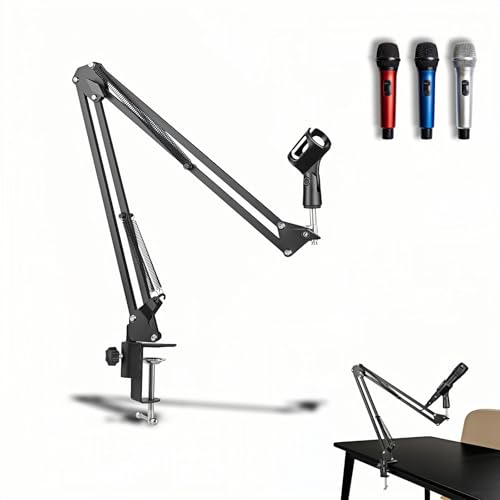
- Supports up to 4.4 pounds
- Fits desks up to 1.97 inches thick
- Folds to about 15.75 inches
Best For: Compact setups needing extra load capacity
Proven Adjustable Choice

- Supports up to 3.3 pounds
- Folds away to save desk space
- Fits flat desk edges up to 2 inches
Best For: Flexible streaming and recording setups
Best Space-Saving Pick – InnoGear Low Profile Mic Arm
If you need a microphone boom arm for small desk setups, the InnoGear LP98 keeps its lower arm just 3.35 inches above the desktop. Its low-profile design, magnetic cable channel, and padded clamp help create a cleaner recording or streaming station without taking over your workspace.
Best For: Minimalist desks, compact workstations, and users who want discreet cable management.
Pros:
- Low-profile arm helps preserve valuable desk space.
- Magnetic cable channel keeps wires hidden and tangle-free.
- Offers 360-degree base rotation, 180-degree swivel, and 170-degree tilt.
- Supports microphones and accessories up to 3.3 pounds.
Cons:
- The clamp fits flat-edged desks up to 2.36 inches thick.
- A shock mount is not included.
The LP98 is a strong fit when desk clearance and appearance matter most. Its 3.3-pound capacity covers many popular microphones, while the compact structure and integrated cable routing keep a small setup orderly.
Best for Quiet Adjustments – RØDE PSA1+ Professional Boom Arm
The RØDE PSA1+ is a practical microphone boom arm for small desk users who frequently reposition their microphone. Internal spring damping is designed for quiet movement, while the integrated cable management helps maintain a clean podcasting or streaming workspace.
Best For: Podcasters, streamers, and creators who prioritize quiet repositioning and a professional finish.
Pros:
- Internal spring damping helps reduce creaks and handling noise.
- 360-degree rotation and full extension provide flexible positioning.
- Supports microphones and shock mounts from 0.25 to 1.2 kilograms.
- Clamps to desks up to 70 mm thick and includes 3/8-inch and 5/8-inch adapters.
Cons:
- Its maximum supported weight is lower than heavy-duty alternatives.
- The arm can extend up to 0.9 meters, which may be more reach than very compact desks need.
The PSA1+ stands out for smooth, quiet operation rather than maximum weight capacity. It is a sensible choice for a small recording desk where microphone adjustments happen during live sessions or broadcasts.
Best Heavy-Duty Option – AA AUDIO ACCESSORY Low Profile Mic Arm
For a microphone boom arm for small desk setups that still needs to support heavier equipment, the AA AUDIO ACCESSORY ABA01 combines a low-profile format with a 6.6-pound load rating. Its gear-lock mechanism is designed to resist sagging, and the deep cable channels help accommodate multiple cables.
Best For: Heavy microphones such as the Shure SM7B, SM7dB, MV7, and RODE PodMic.
Pros:
- Supports up to 6.6 pounds, or approximately 3 kilograms.
- Gear-lock design is intended to prevent sagging over time.
- Extra-long 780 mm reach and 360-degree horizontal adjustment.
- Includes 3/8-inch to 5/8-inch and 3/8-inch to 1/4-inch adapters.
Cons:
- At approximately 1.63 kilograms, the arm is heavier than lighter-duty models.
- The extra-long reach may require careful positioning on especially narrow desks.
The ABA01 is the strongest choice here for users who need substantial support without giving up a low-profile desk mount. Its locking design and broad compatibility make it particularly suitable for heavier studio microphones.
Best Budget-Friendly Starter – FIFINE CS1 Scissor Boom Arm
The FIFINE CS1 is a straightforward microphone boom arm for small desk setups, with a foldable scissor design that helps free up space when it is not in use. Its metal clamp fits desktops up to 2 inches thick, and the included adapter supports common 3/8-inch and 5/8-inch microphone connections.
Best For: Beginners, gamers, streamers, and home-office users with limited desk space.
Pros:
- Foldable design makes storage and portability easier.
- Metal clamp includes an anti-scratch pad and fits desks up to 2 inches thick.
- Provides 180-degree up-and-down adjustment.
- Includes a 5/8-inch to 3/8-inch metal adapter.
Cons:
- The microphone is not included.
- Its listed maximum height is 13 inches, offering less reach than some larger arms.
- Compatibility is focused on microphones using the included 3/8-inch or 5/8-inch connection.
The CS1 is a practical entry-level option when easy storage and basic adjustability matter more than advanced cable routing or heavy-microphone support. Its folding structure is especially useful for smaller desks and portable recording setups.
Best Overall – InnoGear MU-PSA28 Mic Arm
If you need a microphone boom arm for small desk setups, the InnoGear MU-PSA28 combines a clamp-mounted design with useful reach and built-in cable channels. Its 32.3-inch horizontal reach and included extension riser help position a microphone around monitors, while the clamp fits desks up to 2 inches thick.
Best For: Streamers and podcasters who want a flexible clamp arm with tidy cable routing and support for heavier microphones.
Pros:
- Built-in cable channels help keep the setup neat.
- Supports up to 3.5 pounds, including microphones such as the Blue Yeti and Shure SM7B.
- Offers 135-degree back-and-forth and 180-degree up-and-down adjustment, plus a 360-degree rotating base.
- Includes a 6.3-inch extension riser for additional height.
Cons:
- The desk clamp is limited to desks up to 2 inches thick.
- A shock mount is not included.
The MU-PSA28 is a well-rounded choice when a small desk needs both reach and cable organization. Its sturdy steel construction and 3.5-pound capacity make it particularly useful for larger microphones, provided your desk fits the clamp specifications.
Best Low-Profile Pick – FIFINE BM88 Boom Arm
For a microphone boom arm for small desk spaces, the FIFINE BM88 stands out with a low-profile design that can extend beneath a monitor. It is built to preserve screen visibility while providing hidden cable management, a 29-inch reach, and a clamp for desktops between 0.8 and 2.4 inches thick.
Best For: Gamers and streamers who want a stable arm that stays below the monitor and leaves the desktop view less obstructed.
Pros:
- Low-profile layout is designed to extend under the bottom of a computer screen.
- All-metal construction and a non-slip C-clamp provide a sturdy mounting platform.
- Includes 1/4-inch, 3/8-inch, and 5/8-inch thread options for broad microphone compatibility.
- Hidden cable management helps reduce cable pulling and clutter.
Cons:
- The section near the C-clamp cannot be adjusted up and down.
- The microphone is not included.
- Its maximum reach is 29 inches, less than some longer boom arms.
The BM88 is a practical solution when monitor clearance and desktop visibility matter more than maximum reach. Its low-profile geometry and multiple thread adapters make it convenient for compact gaming and recording stations.
Best Weighted-Base Option – InnoGear MS542 Desktop Stand
If clamping a microphone arm to a small desk is inconvenient, the InnoGear MS542 offers a weighted desktop alternative. Its powder-coated cast-iron base uses a rubber gasket for stability and vibration absorption, while the adjustable boom arm supports microphones up to 4.4 pounds when extended halfway.
Best For: Users who prefer a freestanding microphone stand for a compact desk, instrument setup, or amplifier-miking application.
Pros:
- Heavy-duty weighted base provides a stable freestanding platform.
- Rubber bottom gasket helps absorb vibrations and protect the surface.
- Height adjusts from 11 to 15.8 inches using the twist-clutch mechanism.
- Supports up to 4.4 pounds when the boom is extended halfway and includes a 3/8-inch-to-5/8-inch adapter.
Cons:
- The weighted base occupies more desk space than a clamp-mounted arm.
- Its maximum height is 15.8 inches, so it does not provide the same elevated reach as a long clamp arm.
The MS542 is a strong fit when desk-edge clamping is not possible or when a stand must also serve music and recording tasks. Choose it for stability and versatility, but allow room for its substantial weighted base.
Compact QuadCast Pick – SUNMON Adjustable Mic Arm
If you need a microphone boom arm for small desk setups, this SUNMON model offers a compact clamp-on design with adjustable positioning. It supports several popular microphones, including Blue Yeti and HyperX QuadCast models, while its reinforced knobs and dual springs are intended to help keep the arm steady.
Best For: Small desks using HyperX QuadCast, Blue Yeti, SoloCast, or similar microphones.
Pros:
- Clamp fits desktops up to 1.89 inches thick.
- Includes a pre-installed 3/8-inch to 5/8-inch adapter for broad compatibility.
- Dual suspension springs and reinforced knobs help reduce shaking and arm sag.
- Padded clamp helps protect the desktop from scratches.
Cons:
- Microphone and shock mount are not included.
- Maximum supported weight is 1.4 kg, so heavier setups should be checked carefully.
Its relatively compact format and padded clamp make it a practical choice when desk space is limited. Confirm your microphone’s mounting requirements and desk thickness before buying.
Heavy-Duty Space Saver – 360° Metal Scissor Boom Arm
This heavy-duty microphone boom arm for small desk setups combines a folding scissor design with broad positioning adjustments. Its metal construction supports up to 4.4 pounds, while the rotating base and padded clamp help make it suitable for streaming, recording, gaming, and home-office use.
Best For: Users who want high load capacity and a boom arm that can fold away when not in use.
Pros:
- Supports microphones and accessories weighing up to 4.4 pounds.
- Offers 360-degree base rotation, 135-degree tilt, and multiple joint adjustments.
- Metal clamp fits desk edges up to 1.97 inches thick and includes anti-scratch pads.
- Folds to approximately 15.75 inches for easier storage and desk clearance.
Cons:
- Microphone is not included.
- The supplied universal clip is designed for microphones up to 1.77 inches in diameter.
With its higher stated weight capacity and foldable design, this arm is a strong option for compact workstations that still need a substantial microphone setup. Measure your desk edge and microphone diameter to confirm fit.
Proven Adjustable Choice – InnoGear MU01 Mic Arm
The InnoGear MU01 is a flexible microphone boom arm for small desk setups, with a clamp base that rotates 360 degrees and folds away when idle. Its steel construction, reinforced spring design, and included adapters support a wide range of dynamic and condenser microphones.
Best For: Streaming, gaming, or recording setups that need flexible positioning and easy fold-away storage.
Pros:
- Provides 360-degree base rotation with multiple arm and adapter adjustments.
- Steel construction and strong springs support up to 3.3 pounds.
- Folds away to help free desk space when not in use.
- Clamp fits squared, flat desk edges up to 2 inches thick.
Cons:
- Clamp may not suit slanted, curved, or non-square desk edges.
- Shock mount is not included.
- Its 3.3-pound capacity is lower than the heavier-duty alternative in this roundup.
The MU01 balances adjustability, compatibility, and storage convenience for a compact workstation. It is especially worth considering if your desk has a flat squared edge and your microphone setup stays within the stated weight limit.
How We Picked the Best Microphone Boom Arm for Small Desk
We focused on arms suited to limited workspace and evaluated the practical details that matter most in daily use: desk footprint, clamp or base design, reach, adjustment range, load capacity, thread compatibility, cable management, and stability. We also included options for common microphones such as the Blue Yeti, HyperX QuadCast, FIFINE models, and standard studio microphones.
Because compact desks vary widely, no single arm is ideal for everyone. A low-profile model may preserve monitor and keyboard space, while a heavy-duty arm may be better for a large microphone or shock mount.
Quick Comparison
| Best For | Look For |
|---|---|
| Smallest footprint | Low-profile arm and compact clamp |
| Heavy microphones | High load rating and reinforced joints |
| Streaming and gaming | Quiet adjustments, cable routing, and easy reach |
| Flexible positioning | 360-degree rotation and long horizontal reach |
| Simple installation | Wide clamp opening and included thread adapters |
Key Buying Factors for a Microphone Boom Arm for Small Desk
Footprint and Mounting Style
A clamp-mounted arm usually leaves more usable surface area than a weighted-base stand, but it needs a sturdy desk edge and sufficient clearance underneath. Check your desk thickness, rear space, and whether shelves or monitor supports will obstruct the clamp.
Reach and Adjustment Range
Measure the distance from the mounting point to your preferred speaking position. A compact arm can be stable but too short, while an overly long arm may occupy more space and require tighter joints. Look for smooth vertical and horizontal adjustment and enough rotation to move the microphone aside when not in use.
Weight Capacity and Stability
Compare the stated capacity with the combined weight of the microphone, shock mount, pop filter, and any accessories. Leave some margin rather than operating at the limit. Spring damping, locking joints, and a rigid clamp can help prevent sagging and unwanted movement.
Compatibility and Cable Management
Confirm whether the arm includes 3/8-inch and 5/8-inch adapters or requires a separate mount. Built-in clips or channels keep the cable away from your keyboard and reduce desk clutter. Also check connector clearance if your microphone uses a USB cable with a bulky plug.
Who Should Buy Which Microphone Boom Arm for Small Desk?
Choose a low-profile arm if preserving desk depth and monitor visibility is your top priority. Pick a heavy-duty model if you use a large condenser microphone, shock mount, or pop filter. A scissor-style arm is a practical value choice for gaming, calls, and beginner recording, especially when you want familiar height adjustment.
For frequent repositioning, prioritize smooth rotation and secure locking joints. If your setup centers on a Blue Yeti, HyperX QuadCast, or FIFINE microphone, an option with included adapters and compatible mounting hardware can simplify installation. Finally, measure before buying: the best Microphone Boom Arm for Small Desk use is the one that clears your screen and keyboard while placing the microphone close enough for consistent audio.