Mini PCs with Intel Core Ultra 9 processors combine desktop-class performance, AI acceleration, and compact designs for demanding work, content creation, development, and multitasking.
This roundup compares 10 configurations across the Core Ultra 9 185H, 285H, and 285HX platforms, including ready-to-use systems, upgrade-friendly models, and barebone workstations.
Best 10 Mini PCs with Core Ultra 9 Picks for 2026
Best Overall
MINISFORUM M1 Pro Ultra 9 285H

- Core Ultra 9 285H with Arc 140T graphics
- 32GB DDR5 and 1TB PCIe 4.0 SSD
- OCuLink, quad displays, and Wi-Fi 7
Best For: Creative work, multitasking, and expansion
Best for Supported Workflows

- Ultra 9 185H with Arc graphics and NPU
- 24GB LPDDR5 and 500GB PCIe 4.0 SSD
- Dual 2.5GbE and quad-display support
Best For: Creative work, offices, and business deployments
Best Expansion
MINISFORUM MS-02 Ultra 9 285HX
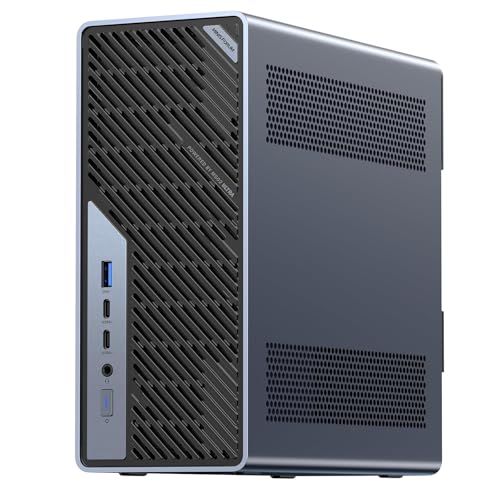
- 24-core Ultra 9 285HX processor
- PCIe 5.0 x16 and four DDR5 slots
- Dual 25GbE plus four M.2 slots
Best For: Expandable AI, engineering, and workstation workloads
Best Compact Creative PC

- Ultra 9 185H with Arc graphics and NPU
- 24GB LPDDR5 and 500GB PCIe SSD
- Quad displays, dual Ethernet, and three-year warranty
Best For: Compact creative work and office productivity
Best Barebone Pick
MINISFORUM M1 Pro Core Ultra 9

- Core Ultra 9 285H with Arc graphics
- OCuLink and dual M.2 expansion
- Up to four display outputs
Best For: Custom builds and external-GPU expansion
Best with Extra Features
Beelink GTI14 Pro Core Ultra 9 Mini PC

- Core Ultra 9 185H with Intel Arc graphics
- 32GB DDR5 and 1TB PCIe 4.0 SSD
- Three-monitor support and extensive connectivity
Best For: Home offices, media servers, and multi-monitor productivity
Best Heavy-Duty Pick
MINISFORUM MS-02 Ultra Core Ultra 9
- Core Ultra 9 285HX with up to 5.5GHz
- PCIe 5.0 x16 for desktop-class GPU upgrades
- Up to 256GB RAM and 24TB RAID-capable storage
Best For: AI, engineering, media production, and enterprise workloads
Best for AI Workloads
MINISFORUM M1 Pro Core Ultra 9 AI Mini PC

- Core Ultra 9 285H with Arc 140T graphics
- 64GB DDR5, 1TB SSD, and up to 128GB RAM
- 99 TOPS AI performance and OCuLink expansion
Best For: Creative professionals, AI users, and multi-display setups
Best Overall – MINISFORUM M1 Pro Ultra 9 285H
If you want mini PCs with Core Ultra 9 performance for demanding creative work, the MINISFORUM M1 Pro combines the Ultra 9 285H with 32GB of upgradeable DDR5 memory, a 1TB SSD, and Intel Arc 140T graphics. Its strong connectivity and OCuLink support also make it a flexible choice for multi-display setups and future expansion.
Best For: Creative professionals, multitaskers, and users who want a compact AI-capable workstation with expansion potential.
Pros:
- Core Ultra 9 285H processor with up to 5.4GHz and 16 cores
- 32GB DDR5 memory and 1TB PCIe 4.0 SSD included
- 99 TOPS combined AI performance with Arc 140T graphics
- OCuLink, dual USB4, quad-display support, Wi-Fi 7, and 2.5GbE
Cons:
- OCuLink uses one M.2 SSD slot and is not hot-swappable
- Its extensive features may be more than needed for basic office tasks
The M1 Pro is the most balanced option here for buyers who want substantial out-of-box memory and storage without giving up high-speed networking, multiple displays, or external GPU potential.
Best for Supported Workflows – GEEKOM IT13 MAX Ultra 9 185H
The GEEKOM IT13 MAX is a practical pick among mini PCs with Core Ultra 9 processors for users who want fast everyday performance in a compact system. Its Ultra 9 185H, 24GB LPDDR5 memory, Intel Arc graphics, and NPU are suited to multitasking, creative applications, and supported AI features.
Best For: Home offices, creators, business users, and deployments that benefit from long-term support and flexible connectivity.
Pros:
- Core Ultra 9 185H paired with Intel Arc graphics and an NPU
- 24GB LPDDR5 memory and a 500GB PCIe 4.0 SSD
- Storage expansion through M.2 2242, SATA/HDD, and SD card options
- Dual 2.5GbE, quad-display support, and RS-232/RS-485 connectivity
Cons:
- 500GB of included storage is less than some competing configurations
- LPDDR5 memory is designed as an integrated compact-system solution
Choose this model when warranty coverage, accessible maintenance, and business-friendly ports matter as much as raw processor performance. Its cooling system is also designed for sustained work sessions.
Best Expansion – MINISFORUM MS-02 Ultra 9 285HX
For buyers seeking mini PCs with Core Ultra 9 power closer to a workstation platform, the MINISFORUM MS-02 stands out with its Ultra 9 285HX and unusually broad expansion options. It supports desktop-class GPU upgrades, up to 256GB of DDR5 memory, multiple M.2 drives, and very high-speed networking.
Best For: Engineers, AI developers, media professionals, and businesses that need extensive expandability and remote management.
Pros:
- 24-core Ultra 9 285HX processor with speeds up to 5.5GHz
- PCIe 5.0 x16 slot for a desktop-class GPU upgrade
- Four DDR5 slots and four M.2 slots support substantial expansion
- Dual 25GbE, 10GbE, 2.5GbE, USB4 v2, Wi-Fi 7, and vPro features
Cons:
- Its workstation-oriented design may be excessive for routine productivity
- Memory compatibility should be checked carefully, especially for barebone configurations
- It requires a larger 350W power setup than typical mini PCs
The MS-02 is the clear specialist choice for users who expect to add memory, storage, or a discrete GPU. It offers the strongest platform for sustained, expandable workloads in this group.
Best Compact Creative PC – GEEKOM IT13 MAX AI
This GEEKOM IT13 MAX is a compact option for shoppers comparing mini PCs with Core Ultra 9 processors for photo editing, video work, office tasks, and supported AI-assisted applications. It pairs the Ultra 9 185H with 24GB of LPDDR5 memory, a 500GB PCIe SSD, and a cooling design intended for extended sessions.
Best For: Creators, students, home-office users, and organizations buying compact systems in quantity.
Pros:
- Core Ultra 9 185H with Intel Arc graphics and NPU support
- 24GB LPDDR5 memory supports multitasking and creative applications
- Quad-display capability and dual Ethernet for flexible workspaces
- Compact 1.4-pound design with IceBlast 3.0 cooling and a three-year warranty
Cons:
- 500GB storage may require additional space for large media libraries
- Actual display resolution and refresh rate depend on connected devices
This model is a sensible fit when you want a small, ready-to-use creative workstation with warranty-backed support. It is especially appealing for shared offices, studios, and users who do not need workstation-class expansion.
Best Barebone Pick – MINISFORUM M1 Pro Core Ultra 9
For shoppers comparing mini PCs with Core Ultra 9 processors, the MINISFORUM M1 Pro is a flexible barebone option built around the Core Ultra 9 285H. It leaves storage and the operating system to the buyer while offering Arc graphics, fast networking, multiple display outputs, and an OCuLink port for external GPU expansion.
Best For: Buyers who want to customize memory, storage, and software for gaming, creative work, or multi-display productivity.
Pros:
- Core Ultra 9 285H with 16 cores, 16 threads, and up to 5.4GHz.
- OCuLink provides a PCIe 4.0 x4 connection for compatible external GPUs.
- Supports up to four displays through HDMI, DisplayPort, and two USB4 outputs.
- Includes 2.5G Ethernet, Wi-Fi 7, and Bluetooth 5.4.
Cons:
- Barebone configuration does not include storage or an operating system.
- Memory and SSDs must be installed separately.
- OCuLink is not hot-swappable and uses an M.2 slot.
The M1 Pro is a strong choice when expandability matters more than out-of-box convenience. Its dual DDR5 and dual M.2 slots make it easy to build a tailored system, while OCuLink gives users a faster external-GPU path than USB4 or Thunderbolt 4 according to the supplied specifications.
Best Ready-to-Use Option – GEEKOM GT15 Max Core Ultra 9
The GEEKOM GT15 Max is a ready-to-use choice among mini PCs with Core Ultra 9 processors, pairing the Core Ultra 9 285H with 32GB of DDR5 memory, a 1TB SSD, and a pre-installed operating system. Its CPU, GPU, and NPU are designed for demanding multitasking, creative applications, and compatible on-device AI workloads.
Best For: Professionals, developers, and creators who want substantial memory and storage without assembling a barebone system.
Pros:
- Includes 32GB DDR5 RAM and a 1TB SSD out of the box.
- Up to 99 TOPS of combined platform AI performance is specified.
- RAM is expandable to 128GB, with dual NVMe slots supporting up to 6TB total storage.
- Supports up to four displays and includes dual 2.5G LAN ports.
Cons:
- Integrated graphics share the system rather than using a dedicated GPU.
- Some AI features depend on compatible software and workloads.
- Its broad feature set may be more than needed for basic office use.
With memory, storage, and Windows-like ready-to-use convenience included, the GT15 Max is the most approachable option in this group. The upgradeable design and three-year limited warranty add value for users planning sustained development, analysis, video, or AI-focused work.
Best Workstation Pick – MINISFORUM MS-02 Ultra Core Ultra 9
For workstation-class networking and expansion, the MINISFORUM MS-02 Ultra stands out among mini PCs with Core Ultra 9 processors. Its Core Ultra 9 285HX offers 24 cores and up to 5.5GHz, while four memory slots, four SSD slots, PCIe expansion, and multiple high-speed network ports support demanding professional deployments.
Best For: Advanced users needing high-speed networking, large storage arrays, virtualization, or a compact workstation platform.
Pros:
- Core Ultra 9 285HX with 24 cores, 24 threads, and up to 5.5GHz.
- Two 25G SFP+ ports, plus 10G and 2.5G Ethernet connections.
- Four DDR5 slots support up to 256GB, with ECC support specified.
- Four M.2 SSD slots support RAID 0/1/5/10 configurations.
Cons:
- Barebone configuration does not include storage or an operating system.
- Its enterprise-grade networking features may be unnecessary for typical home users.
- The detailed PCIe layout limits some slots because of the pre-installed networking hardware.
The MS-02 Ultra is the performance-and-connectivity specialist of this lineup. Its 25GbE interfaces, large memory ceiling, RAID support, and server-oriented cooling make it particularly compelling for labs, storage servers, and professional workloads, provided the buyer is comfortable completing the barebone build.
Best with Extra Features – Beelink GTI14 Pro Core Ultra 9 Mini PC
For shoppers comparing mini pcs with core ultra 9, the Beelink GTI14 Pro offers a balanced setup with a Core Ultra 9 185H processor, 32GB of DDR5 memory, and a 1TB PCIe 4.0 SSD. Its integrated Intel Arc graphics and broad port selection make it a practical choice for everyday productivity, media use, and multi-monitor work.
Best For: Home offices, business users, education, Plex Media Server, and multi-display productivity.
Pros:
- Core Ultra 9 185H with 16 cores, 22 threads, and speeds up to 5.1GHz.
- 32GB DDR5 RAM and a 1TB PCIe 4.0 SSD provide a strong starting configuration.
- Supports three monitors, 4K UHD playback, dual 10GbE, USB-C, HDMI, DisplayPort, and a PCIe x8 slot.
- Includes Windows 11 Pro, a three-year warranty, and lifetime technical support.
Cons:
- Integrated graphics are less suitable for users seeking a dedicated high-end gaming GPU.
- The listing contains inconsistent processor references, so buyers should verify the exact model before purchase.
The GTI14 Pro is a well-rounded option when connectivity and out-of-box readiness matter more than workstation-class expansion. Its dual M.2 storage support and upgradeable memory also leave room for future expansion.
Best Heavy-Duty Pick – MINISFORUM MS-02 Ultra Core Ultra 9
Among mini pcs with core ultra 9, the MINISFORUM MS-02 Ultra stands out for expansion and sustained professional workloads. Its Core Ultra 9 285HX processor, PCIe 5.0 x16 slot, high-speed networking, and 350W power supply are designed for demanding AI, engineering, media, and enterprise environments.
Best For: AI development, engineering, media production, enterprise deployment, and users planning to add a desktop-class GPU.
Pros:
- Core Ultra 9 285HX delivers 24 cores, 24 threads, and speeds up to 5.5GHz.
- PCIe 5.0 x16 expansion supports desktop-class GPU upgrades.
- Four DDR5 SODIMM slots support up to 256GB, while four M.2 slots support up to 24TB and RAID configurations.
- Includes Wi-Fi 7, dual 25GbE, 10GbE, 2.5GbE, USB4 v2 at 80Gbps, ECC support, and Intel vPro features.
Cons:
- Its workstation-focused expansion and networking may be excessive for basic home or office use.
- Memory installation requires careful slot placement and compatibility checking.
- The supplied notes do not specify the included operating system.
The MS-02 Ultra is the strongest fit for buyers who need mini-PC size without giving up serious expansion potential. It is best evaluated as a compact workstation or enterprise platform rather than a simple everyday desktop.
Best for AI Workloads – MINISFORUM M1 Pro Core Ultra 9 AI Mini PC
The MINISFORUM M1 Pro is a compelling choice among mini pcs with core ultra 9 for creators and AI-focused users. It combines a Core Ultra 9 285H processor with 64GB of DDR5 memory, Intel Arc 140T graphics, a claimed 99 TOPS total AI performance, and OCuLink support for an external GPU.
Best For: Video and photo editing, 3D rendering, live streaming, AI applications, and expanded multi-monitor workspaces.
Pros:
- Core Ultra 9 285H reaches up to 5.4GHz and includes 16 cores and 16 threads.
- 64GB DDR5 memory is included, with support for upgrading to 128GB.
- Intel Arc 140T graphics and a stated 99 TOPS combined AI performance target demanding creative software.
- Supports up to four displays, Wi-Fi 7, 2.5GbE, dual USB4, and OCuLink external-GPU connectivity.
Cons:
- Using OCuLink for an external GPU consumes one M.2 PCIe 4.0 SSD slot and is not hot-swappable.
- The supplied notes do not confirm an included operating system.
- Its advanced AI and display features may be unnecessary for straightforward office tasks.
The M1 Pro offers an appealing middle ground between a conventional mini desktop and a portable AI workstation. Its generous memory, strong integrated graphics, and OCuLink option make it particularly flexible for creative users who may expand later.
How We Picked the Best Mini PCs with Core Ultra 9
We compared these systems by processor generation, core and thread count, memory, storage, upgrade potential, connectivity, display support, and overall fit for demanding workloads. We also separated ready-to-use configurations from barebone systems, since the latter require buyers to supply compatible memory, storage, and an operating system.
The Core Ultra 9 185H models target efficient high-performance computing in a compact enclosure, while newer 285H and 285HX systems generally offer newer platform features and stronger performance potential. Specifications can vary by configuration, so confirm the exact memory, storage, ports, and operating system before purchasing.
Quick Comparison
- Best for compact AI productivity: Core Ultra 9 285H systems with 32GB or 64GB of DDR5 and a 1TB SSD.
- Best for maximum expansion: The MINISFORUM MS-02 configurations, with multiple DDR5 and M.2 slots plus workstation-oriented connectivity.
- Best for customization: Barebone M1 Pro and MS-02 models, provided you are comfortable installing memory, storage, and software.
- Best plug-and-play value: Ready-to-use systems with at least 32GB of memory and a 1TB SSD.
Key Buying Factors for Mini PCs with Core Ultra 9
Processor and AI Performance
Do not compare the Core Ultra 9 name alone. The 185H, 285H, and 285HX use different platforms and have different power and performance characteristics. If local AI tools are important, look for a listed NPU rating, such as 99 TOPS, while remembering that software support and workload optimization also affect real-world results.
Memory and Storage
For office work and light creative workloads, 24GB can be sufficient, but 32GB is a more comfortable baseline for multitasking. Choose 64GB when working with large datasets, virtual machines, code projects, or demanding media applications. A 1TB SSD is preferable if you expect to store projects locally. Check whether memory is replaceable or soldered and how many M.2 slots are available.
Expansion and Connectivity
Count the ports you actually need: USB4, USB-A, HDMI, DisplayPort, Ethernet, and audio. Multi-monitor users should verify the supported number and resolution of displays. Workstation-style systems with four memory slots, multiple SSD slots, or PCIe expansion offer more long-term flexibility but may be larger, louder, and more expensive.
Thermals, Noise, and Setup
High-performance mini PCs need effective cooling. Review independent testing when available, especially for sustained rendering, compiling, or AI workloads. Barebone models can reduce the purchase price but add installation time and compatibility decisions.
Who Should Buy Which Mini PCs with Core Ultra 9?
Choose a Core Ultra 9 285H mini PC for a balanced combination of modern AI features, compact size, and strong everyday or creative performance. These are suitable for professionals who want a capable desktop without a traditional tower.
Choose a Core Ultra 9 285HX workstation for heavier sustained workloads, extensive storage, more memory, or PCIe expansion. It is the better direction for power users, developers, engineers, and small-office workstation deployments.
Choose a Core Ultra 9 185H model when the configuration, price, or availability is more attractive and your workload does not require the newest platform. These systems remain well suited to productivity, development, media playback, and moderate content creation.
Choose a barebone system only if you already have compatible components or want precise control over memory, storage, and operating-system installation. Otherwise, a preconfigured model is simpler and usually ready to use immediately.