Copying one USB drive at a time is slow, inconsistent, and difficult to scale. The best multi-target USB duplicators let you create several verified copies simultaneously while reducing hands-on work.
This roundup compares 10 options ranging from PC-based USB 3.0 systems to standalone touchscreen duplicators, with attention to target count, speed, drive compatibility, erasing tools, and everyday usability.
Best 10 Multi Target USB Duplicators Picks for 2026
Best PC-Based Pick

- Copies to 16 USB targets
- USB 3.0 support with Drive Manager software
- PC-based operation
Best For: PC-connected bulk USB copying
Best High-Capacity Standalone
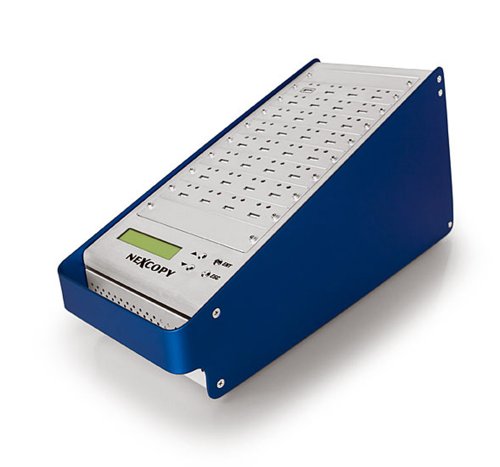
- Copies one master to 31 targets
- No PC or software required
- LCD status and performance feedback
Best For: Large standalone duplication runs
Best Advanced Features
- 16-target USB 3.0 copying
- Partition tools with compatible Nexcopy media
- Data streaming and extraction features
Best For: Managed USB distribution and specialized media creation
Best Versatile Standalone
1-to-15 USB Cyclone Duplicator

- Supports USB media and external HDDs or SSDs
- Four copy and four erase modes
- No computer or software required
Best For: Mixed-media duplication and drive maintenance
High-Speed 7-Target Pick
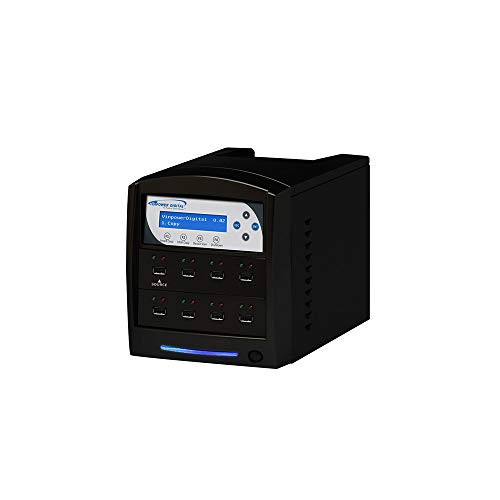
- Seven-target standalone USB duplication
- Smart Copy and bit-by-bit modes
- USB Prescan and Secure Erase
Best For: High-volume USB copying without a PC
Security-Focused Value

- Copies to seven Type-A USB drives
- Four erase modes, including DoD options
- Copy-and-compare verification
Best For: Verified duplication and media sanitization
Maximum-Capacity Choice
USBDBL 15-Target Flash Duplicator

- Fifteen target slots for larger batches
- Asynchronous independent duplication
- Smart Copy, Raw Mode, and Secure Erase
Best For: High-volume flash-media duplication
Best Touchscreen Pick
Acumen Disc EZ Dupe 1-to-10 USB Duplicator

- Touchscreen operation with real-time status information
- Copies, compares, erases, and formats without a computer
- Duplicates up to 10 USB drives at listed speeds up to 35 MB/s
Best For: Small offices and users seeking simple standalone USB duplication
Best for IT Workflows
StarTech 1-to-15 USB Duplicator and Eraser

- Handles up to 15 USB targets simultaneously
- Includes duplication, verification, erasing, and overwrite modes
- LCD monitoring and error scanning support technician workflows
Best For: IT teams managing USB deployment and data sanitization
Best Easy-Use Option
EZ Dupe SOHO Touch USB Duplicator
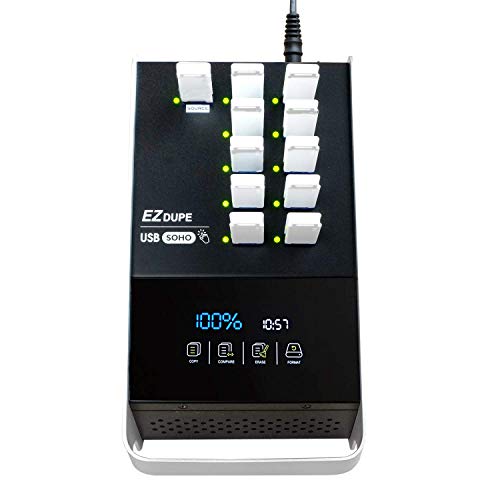
- Touchscreen menu simplifies copy and drive-management tasks
- Supports USB 2.0, 3.0, and 3.1 thumb drives
- Includes Smart Copy, Compare, Format, and one-touch Erase
Best For: Small businesses wanting accessible daily USB duplication
Best PC-Based Pick – 16-Target USB 3.0 Duplicator
For buyers comparing multi target usb duplicators, the Nexcopy SSUSB160PC is a PC-connected option designed to copy to 16 USB targets while taking advantage of USB 3.0 transfer speeds. Its Drive Manager software is intended to make the process straightforward.
Best For: Users who want a 16-target, computer-based duplicator with USB 3.0 support.
Pros:
- Copies to 16 USB targets.
- Supports USB 3.0 and USB interfaces.
- Can copy at the flash drive’s maximum transfer speed.
- Includes Nexcopy Drive Manager software.
Cons:
- Requires a PC connection and software.
- Its 12-pound weight makes it less portable than smaller duplicators.
This is a practical choice when centralized PC control and 16-target capacity matter more than standalone operation.
Best High-Capacity Standalone – 1-to-31 USB Duplicator
The Nexcopy USB131SA stands out among multi target usb duplicators for its 1-to-31 configuration and standalone design. It needs no PC or software, while its LCD provides real-time performance and status feedback during duplication.
Best For: Organizations that need to copy one master to 31 USB targets without using a computer.
Pros:
- Supports one master and 31 target drives.
- Standalone operation requires no PC or software.
- Offers asynchronous duplication for masters up to 256MB/s.
- Provides LCD performance and status feedback.
Cons:
- At 18 pounds, it is relatively heavy.
- Its large target capacity may be unnecessary for occasional or small-batch copying.
Choose this model when maximum target count and independent operation are the priorities.
Best Advanced Features – 16-Target USB 3.0 Duplicator
Nexcopy USB160PRO - 16 Target USB 3.0 Duplicator with Partition Tool Module Drive Manager Software
Check Price On AmazonFor buyers seeking multi target usb duplicators with more specialized controls, the Nexcopy USB160PRO combines 16-target USB 3.0 copying with Drive Manager software. With compatible Nexcopy media, it can create read-only and USB CD-ROM partitions and hard-code USB serial numbers.
Best For: PC-connected users who need 16-target copying plus media-partitioning and data-management tools.
Pros:
- Supports 16-target USB duplication.
- Uses USB 3.0 and remains backward compatible with USB 2.0.
- Offers read-only and USB CD-ROM partition tools with compatible Nexcopy media.
- Includes data streaming, extraction, and a user-friendly software interface.
Cons:
- Requires a PC connection and Nexcopy software.
- Advanced features require Nexcopy USB media.
- Its listed 1GB storage capacity is not a substitute for included target media.
This model is a strong fit for controlled USB distribution where partition behavior and serial-number features are important.
Best Versatile Standalone – 1-to-15 USB Cyclone Duplicator
The EZ DUPE USB Cyclone is a flexible standalone choice among multi target usb duplicators, supporting up to 15 Type-A USB targets plus external USB HDDs and SSDs. It offers one-touch copy, compare, erase, and format functions without requiring a computer or software.
Best For: Users who need standalone USB and external-drive duplication, copying, comparison, erasing, and formatting.
Pros:
- Supports USB 1.0 through USB 3.1 media and external USB HDDs.
- Provides four copy modes and four erase modes, including DoD 3-pass and 7-pass options.
- Supports drives above 2TB with no stated capacity limit.
- Independent bandwidth design helps maintain speed across channels.
Cons:
- Maximum listed speed is 45MB/s and depends on the connected USB device.
- Supports up to 15 targets, fewer than some 31-target models.
- Advanced erase modes may take longer than a quick erase.
Its broad media compatibility and maintenance functions make it especially useful for businesses handling mixed USB drives and external storage.
High-Speed 7-Target Pick – USBShark 7-Target Duplicator
Vinpower Digital USBShark Standalone USB Flash Drive Duplicator - 7 Targets (High Speed)
Check Price On AmazonFor buyers comparing multi target usb duplicators, the Vinpower Digital USBShark offers seven target ports, standalone operation, and bit-by-bit duplication for USB 3.0, 2.0, and 1.0 devices. Its Smart Copy and USB Prescan features add practical speed and error-checking options.
Best For: Organizations that need a standalone seven-drive USB duplicator with high-speed copying and secure erasure.
Pros:
- Duplicates to seven USB targets without a PC.
- Supports Smart Copy and bit-by-bit duplication across USB data formats.
- Includes USB Prescan for detecting physical reading errors and Secure Erase.
Cons:
- Its 10-pound standalone design may be more equipment than occasional users need.
- The supplied notes do not specify a warranty.
With broad USB compatibility and multiple copy modes, the USBShark is a strong fit when repeatable, independent duplication matters more than portability.
Security-Focused Value – AD07 1-to-7 USB Duplicator
The Acumen Disc AD07-USB is a practical choice among multi target usb duplicators, combining seven-target copying with copy-and-compare verification and several erase modes. It is a standalone Type-A system designed for straightforward operation through a four-key interface and LCD.
Best For: Users who need seven-drive Type-A duplication plus DoD-style erase options and copy verification.
Pros:
- Copies to up to seven USB drives at up to 35 MB/sec, depending on media.
- Offers Quick, Full, DoD 3-Pass, and DoD 7-Pass erase modes.
- Supports synchronous and asynchronous copying with real-time copy-and-compare.
- Includes a one-year parts-and-labor warranty and lifetime technical support.
Cons:
- Supports only USB-IF-compliant Type-A flash media; USB-C requires an adapter.
- Does not work with hardware-encrypted or protected USB memory devices.
- Its listed transfer rate is lower than the USBShark’s stated write speed.
This model stands out for buyers who value verification and documented erase procedures, provided their workflow uses compatible Type-A flash drives.
Maximum-Capacity Choice – USBDBL 15-Target Flash Duplicator
For larger production runs, the Vinpower USBDBL provides 15 target slots, making it one of the more capable multi target usb duplicators in this group. Its asynchronous duplication lets each target copy independently, while Smart Copy, Raw Mode, and Secure Erase cover common duplication and cleanup tasks.
Best For: Teams that need high-volume, standalone duplication across up to 15 flash-media targets.
Pros:
- Provides 15 target slots for larger simultaneous duplication jobs.
- Uses patented asynchronous duplication to copy targets independently.
- Supports Smart Copy, bit-by-bit Raw Mode, and Secure Erase.
- Can support SD, MicroSD, CF, and other formats with optional adapter modules.
Cons:
- Alternative flash formats require corresponding Interface Adaptor Modules.
- Its 11-pound form factor is intended more for a fixed workspace than portability.
- The supplied notes do not list a specific transfer speed.
If throughput and target count are the priorities, the USBDBL is the strongest capacity-focused option here, especially for users who can take advantage of asynchronous copying.
Best Touchscreen Pick – Acumen Disc EZ Dupe 1-to-10 USB Duplicator
For shoppers comparing multi target usb duplicators, the Acumen Disc EZ Dupe stands out for its touchscreen controls and standalone operation. It can copy, compare, erase, or format multiple USB drives without requiring a computer, with listed transfer speeds of up to 35 MB/s.
Best For: Home offices, small businesses, and users who want straightforward touchscreen control for recurring USB duplication tasks.
Pros:
- 1-to-10 duplication capacity with a bright touchscreen interface
- Standalone design requires no computer
- Supports copy, compare, erase, and format functions
- Source Analysis and real-time status information simplify operation
Cons:
- Listed transfer speed is up to 35 MB/s, which may be modest for high-volume workflows
- Supplied specifications list USB 1.1 for the hard-disk interface and USB 2.0 Type-A connectivity
This is a practical multi target usb duplicator for users who prioritize simple controls and an independent workflow over maximum throughput.
Best for IT Workflows – StarTech 1-to-15 USB Duplicator and Eraser
The StarTech USBDUPE115 is a strong option among multi target usb duplicators when you need higher port capacity and drive-management features. Its standalone design supports duplication, verification, quick erasure, and single- or three-pass overwriting for compatible USB media.
Best For: IT technicians and administrators who regularly create multiple boot drives, distribute data, or sanitize USB storage.
Pros:
- 1-to-15 USB duplication and erasing capacity
- Supports USB 3.0 and USB 2.0 flash drives and external USB storage
- Offers file, sector-by-sector, quick-erase, and overwrite modes
- Copy-and-Compare verification, LCD monitoring, and error scanning support quality control
Cons:
- Asynchronous Copy mode is limited to source content under 128 MB
- Some external USB devices may require their own power source
- At 3.9 pounds, it is less portable than lightweight desktop accessories
With its larger target count and sanitization options, this StarTech model is better suited to structured IT work than occasional personal copying.
Best Easy-Use Option – EZ Dupe SOHO Touch USB Duplicator
The EZ Dupe SOHO Touch is designed for buyers who want multi target usb duplicators with an accessible touchscreen menu. It supports USB 2.0, 3.0, and 3.1 thumb drives and provides dedicated Copy, Compare, Format, and Erase functions at listed speeds of up to 35 MB/s.
Best For: Small businesses and regular users who want a simplified touchscreen interface for copying and managing USB flash media.
Pros:
- 1-to-10 USB duplication capacity with touchscreen controls
- Supports USB 2.0, 3.0, and 3.1 thumb drives
- Includes Smart Copy, Compare, Format, and one-touch Erase functions
- Designed for daily use with a lightweight, heavy-duty construction
Cons:
- Listed duplication speed is up to 35 MB/s
- The supplied notes do not specify a computer-free workflow as explicitly as some standalone models
This model balances broad USB compatibility with an approachable interface, making it a convenient choice when ease of operation matters more than advanced enterprise controls.
How We Picked the Best Multi Target USB Duplicators
We evaluated these multi-target USB duplicators according to the features that matter during repeated copying jobs: the number of target ports, USB generation, advertised transfer speed, standalone or PC-based operation, source-drive compatibility, verification features, and data-erasure tools. We also considered workflow controls such as LCD or touchscreen menus, partition management, drive-cloning functions, and software support.
Target count matters, but it is not the only measure of productivity. A 16-target machine may be ideal for production environments, while a smaller seven- or 10-target unit can be easier to deploy in an office, classroom, lab, or service counter.
Quick Comparison
- Highest throughput potential: Choose a USB 3.0 model with many target ports, such as a 16-target system, when volume is the priority.
- Best for standalone work: Standalone duplicators operate without a dedicated computer and are useful for repeatable technician or office workflows.
- Best for software control: PC-based models are preferable when partition tools, drive management, logging, or more detailed job control are important.
- Best for media sanitation: Look for dedicated erasing or DoD-sanitation functions if drives will be reused, resold, or redeployed.
- Best for simpler operation: LCD and touchscreen interfaces can reduce training time and make batch jobs easier to monitor.
Key Buying Factors for Multi-Target USB Duplicators
Target Count and Real-World Speed
More ports can increase output, but actual performance depends on the source drive, target-drive speeds, file structure, and whether the device copies synchronously or asynchronously. USB 3.0 support is generally the better choice for large files and modern flash media.
Compatibility and Copying Modes
Confirm that the duplicator supports the USB connectors, capacities, partition layouts, and file systems used by your source media. Some models are designed primarily for flash drives, while others also support broader storage or hard-drive cloning workflows.
Verification, Erasing, and Security
Verification helps detect incomplete or corrupted copies before distribution. Secure erase or DoD-style sanitation is valuable for organizations that routinely recycle media containing sensitive information. Check whether these functions are built in or require additional software.
Standalone Versus PC-Based Control
A standalone unit saves a computer from the job and can simplify repeat production. A PC-based duplicator may provide better reporting, partition tools, and drive-management flexibility, but it also adds software and workstation requirements.
Who Should Buy Which Multi Target USB Duplicators?
Choose a high-port USB 3.0 duplicator for manufacturers, distributors, educators, and IT teams producing many copies per batch. Choose a compact standalone unit for repair shops, small businesses, and technicians who value portability and simple operation. Choose a touchscreen model when multiple users need clear on-device controls. Choose a PC-based system when partitioning, job management, and detailed control outweigh the convenience of a standalone appliance.
Before buying, estimate your typical batch size, confirm source and target-media compatibility, and compare the total workflow cost—not just the number of ports. The right duplicator should make copying faster while also making verification, erasure, and repeatability easier.