Long SDI cable runs can introduce signal loss, unreliable connections, and difficult troubleshooting—especially in broadcast, live production, surveillance, and studio installations. The right converter can extend a feed over fiber, bridge SDI and HDMI equipment, or distribute a signal without forcing a complete system redesign.
This roundup covers 10 options spanning 3G-SDI, HD-SDI, 12G-SDI, HDMI conversion, audio de-embedding, and fiber links up to 20 km. Use the guide below to match the converter type, bandwidth, distance, and connectors to your setup.
Best 10 Sdi Converters for Long Cable Runs Picks for 2026
Long-Run Fiber Kit
3G/HD-SDI 20km Optical Extender

- Complete TX/RX kit with LC modules
- Up to 20km single-mode transmission
- Compact USB-C powered design
Best For: Long-distance SDI links in studios, field setups, and industrial installations
SDI Signal Splitter
Blackmagic 8-Output SDI Distribution Converter

- Eight reclocked SDI outputs
- Auto-switches SD, HD, and 3G-SDI
- Supports embedded audio and ASI
Best For: Broadcast and live-event SDI signal distribution
12G Fiber Link
12G-SDI 20km LC Fiber Converter

- Supports 12G, 3G, HD, and SD-SDI
- 20km single-mode fiber reach
- Dual 12G-SDI receiver outputs
Best For: High-bandwidth broadcast, CCTV, and long-distance SDI systems
Camera Interface Converter
Blackmagic 12G BiDirectional SDI/HDMI

- Bidirectional SDI and HDMI conversion
- Supports HDMI 2.0 and 12G-SDI
- Includes universal 5V power supply
Best For: Camera and monitoring setups bridging SDI and HDMI
Long-Run Fiber Link

- 20 km stated transmission distance
- LC single-mode fiber connection
- HD-SDI 1080p at 60Hz
Best For: Long-distance HD-SDI links using LC single-mode fiber
Multi-Rate HDMI Conversion
Blackmagic 12G HDMI-to-SDI Converter

- Two SDI video outputs
- Supports rates through 12G
- Reclocking and automatic HDMI matching
Best For: HDMI-to-SDI conversion in multi-rate video systems
Flexible HD-SDI Fiber Link

- 20 km stated fiber transmission
- LC fiber connection
- 1080p at 30Hz and 60Hz
Best For: Long HD-SDI runs using common 1080p frame rates
Color-Calibrated Compact Pick
Blackmagic Micro Converter SDI to HDMI 12G
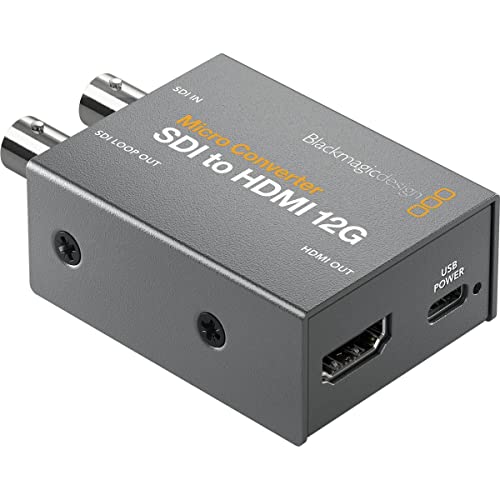
- 33-point 3D LUT for display calibration
- 3D LUT output through SDI loop output
- Robust, compact metal body
Best For: Color-critical SDI-to-HDMI monitoring
Long-Distance HDMI-to-SDI Choice
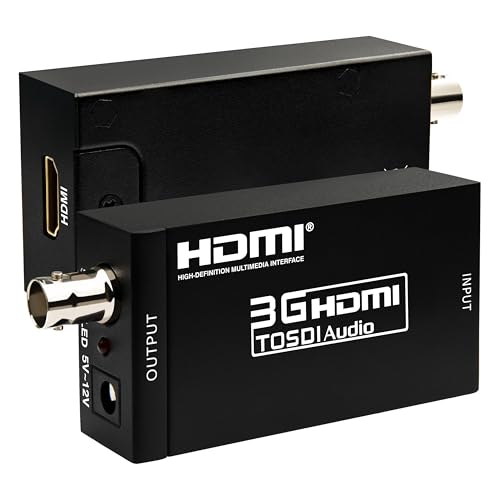
- Transmission up to 100m at 3G-SDI
- Supports up to eight audio channels
- Works with 720p, 1080i, and 1080p formats
Best For: Extending HDMI sources over SDI in large venues
Distance-Rated Monitoring Pick
Anber-Tech SDI to HDMI Converter
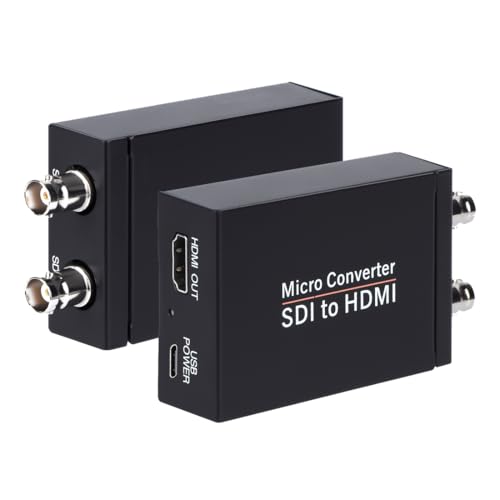
- Runs up to 1,000ft at SD-SDI
- Automatic 3G, HD, and SD format detection
- HDMI output plus SDI loopout
Best For: Extended SDI-to-HDMI monitoring and signal looping
Long-Run Fiber Kit – 3G/HD-SDI 20km Optical Extender
For sdi converters for long cable runs, this matched transmitter-and-receiver kit offers a ready-to-deploy fiber link. It supports SD, HD, and 3G-SDI signals, reaching up to 20 km over single-mode fiber or 1 km over multimode fiber.
Best For: Camera systems, studios, racks, and installations needing compact, long-distance SDI-over-fiber transmission.
Pros:
- Complete TX/RX kit with pre-installed LC SFP modules and two USB-C power supplies.
- Supports SD/HD/3G-SDI, including 1080p60 and DVB-ASI.
- Compact housing with DIN rail and wall-mount options.
- Power and link-status LEDs simplify diagnostics.
Cons:
- Requires compatible single-mode or multimode fiber cabling.
- Limited to one SDI channel.
This is a strong practical choice when distance, portability, and straightforward installation matter more than multi-channel expansion.
SDI Signal Splitter – Blackmagic 8-Output SDI Distribution Converter
This Blackmagic Design Mini Converter is not a fiber extender, but it can complement sdi converters for long cable runs by distributing one incoming SDI feed to multiple downstream devices. Its eight reclocked outputs support SD, HD, and 3G-SDI formats.
Best For: Broadcast, live-event, and studio systems that need one SDI source sent to several devices.
Pros:
- Provides eight reclocked SDI outputs from one input.
- Automatically switches among supported SD, HD, and 3G-SDI formats.
- Supports embedded audio, ancillary data, and ASI.
- Includes a redundant SDI input for mission-critical use.
Cons:
- Does not convert SDI to fiber or extend cable distance itself.
- Requires a 12V power supply.
Choose this unit for signal splitting and distribution rather than long-haul transmission; pair it with an appropriate fiber converter when distance is the main challenge.
12G Fiber Link – 12G-SDI 20km LC Fiber Converter
For demanding sdi converters for long cable runs, this 12G-SDI fiber converter supports a single-mode LC fiber connection over distances up to 20 km. It also handles 3G, HD, and SD-SDI signals, with dual SDI outputs on the receiver.
Best For: Broadcast, CCTV, and professional video systems using 12G-SDI with embedded audio over long single-mode fiber links.
Pros:
- Supports 12G-SDI as well as 3G, HD, and SD-SDI signals.
- Reaches up to 20 km over single-mode LC fiber.
- Provides dual 12G-SDI outputs on the receiver.
- Supports embedded audio and DVB-ASI applications.
Cons:
- Uses one SDI channel.
- Its supplied notes do not specify included power supplies or mounting hardware.
This model is the better fit for high-bandwidth 12G workflows where long-distance fiber transmission and receiver-side output flexibility are priorities.
Camera Interface Converter – Blackmagic 12G BiDirectional SDI/HDMI
Blackmagic Design Micro Converter BiDirectional SDI/HDMI 12G with Power Supply CONVBDC/SDI/HDMI12G/P
Check Price On AmazonThis compact Blackmagic converter is useful alongside sdi converters for long cable runs when a camera or display system needs SDI-to-HDMI and HDMI-to-SDI compatibility. It supports one SDI input, one HDMI 2.0 input, and automatic output matching for the HDMI source.
Best For: Camera rigs and monitoring setups that need bidirectional conversion between professional SDI and HDMI equipment.
Pros:
- Provides bidirectional SDI and HDMI conversion.
- Supports HDMI 2.0 and 12G-SDI workflows.
- Compatible with SDI cameras, computers, monitors, projectors, and displays.
- Includes a 5V universal power supply with international adapters.
Cons:
- It is a protocol/interface converter, not a fiber long-distance extender.
- Offers one SDI input and one HDMI input rather than multiple channels.
Consider this converter at the equipment ends of a video chain when you need to bridge SDI and HDMI; use a dedicated fiber extender for the actual long cable run.
Long-Run Fiber Link – 20km HD-SDI LC Converter
For sdi converters for long cable runs, this fiber optic model is designed around an LC single-mode connection and a stated 20 km reach. Its listed HD-SDI capability supports 1080p at 60Hz, making it a practical option when distance is the main consideration.
Best For: Long-distance HD-SDI links using LC single-mode fiber.
Pros:
- Designed for up to 20 km transmission.
- Uses LC single-mode fiber connectivity.
- Supports HD-SDI 1080p at 60Hz.
Cons:
- The supplied notes identify the unit as a fiber optic receiver, so the complete link configuration should be verified.
- No additional features are specified in the supplied details.
This is a distance-focused choice for buyers who need an HD-SDI fiber connection over a substantial run and already know their system requires LC single-mode hardware.
Multi-Rate HDMI Conversion – Blackmagic 12G HDMI-to-SDI Converter
Among sdi converters for long cable runs, the Blackmagic Design Micro Converter HDMI to SDI 12G is suited to setups that need to turn an HDMI source into SDI for distribution or longer cable paths. It offers two SDI outputs, automatic HDMI input matching, reclocking, and support from SD through 12G rates.
Best For: Converting HDMI sources to dual-output SDI in multi-rate video systems.
Pros:
- Provides two SDI video outputs.
- Supports 270Mb, 1.5G, 3G, 6G, and 12G rates.
- Automatically matches the HDMI input and includes reclocking.
- Supports SD, HD, 2K, Ultra HD, and 4K formats.
Cons:
- The supplied notes specify an HDMI-to-SDI converter, not a fiber-optic transport system.
- Power requirements are narrowly listed at 5 to 5.25 V DC, so compatible power should be confirmed.
This compact converter is a flexible front end for HDMI equipment, especially when two SDI outputs and broad video-rate compatibility matter more than an integrated long-distance fiber link.
Flexible HD-SDI Fiber Link – 20km LC HD-SDI Converter
This LC fiber optic converter is another option among sdi converters for long cable runs, with a stated 20 km reach for HD-SDI signals. The listing specifies 1080p operation at both 30Hz and 60Hz, giving buyers a choice for common HD frame rates.
Best For: 20 km HD-SDI connections that need 1080p at 30Hz or 60Hz.
Pros:
- Designed for a stated 20 km transmission distance.
- Uses LC fiber connectivity.
- Lists support for 1080p at 30Hz and 60Hz.
Cons:
- The supplied notes identify it as a fiber optic receiver, so the required transmitter should be checked separately.
- The notes do not specify additional formats or operating features.
Choose this model when your long run is based on LC fiber and your HD-SDI workflow needs either 1080p30 or 1080p60. Verify the full transmitter-and-receiver arrangement before ordering.
Color-Calibrated Compact Pick – Blackmagic Micro Converter SDI to HDMI 12G
For buyers comparing SDI converters for long cable runs, this Blackmagic Design model is a compact SDI-to-HDMI option built around broadcast-style hardware. Its metal body and 3D LUT support make it especially useful when accurate monitoring is important.
Best For: Color-critical monitoring with a monitor, projector, or television.
Pros:
- 33-point 3D LUT supports monitor, projector, and television color calibration.
- Can output the 3D LUT through the SDI loop output.
- Compact, robust metal construction with a portable design.
Cons:
- It converts SDI to HDMI rather than HDMI to SDI.
- The supplied notes do not specify maximum cable-run distances.
- Only one SDI channel is listed.
This is a strong choice when calibration features and durable construction matter more than documented distance ratings. For a long-run installation, confirm that the rest of the SDI chain and cabling meet your required distance.
Long-Distance HDMI-to-SDI Choice – Boobrie 3G-SDI Converter
If you need SDI converters for long cable runs and your source is HDMI, this Boobrie converter is designed for extended coaxial transmission. It supports up to 100m for 3G-SDI, 200m for HD-SDI, and 300m for SD-SDI, making it suited to larger venues and mobile production setups.
Best For: Converting HDMI sources for long-distance SDI distribution at events, venues, and live productions.
Pros:
- Supports 3G-SDI transmission up to 100m, HD-SDI up to 200m, and SD-SDI up to 300m.
- Handles resolutions through 1080p at 60Hz, along with multiple 720p and 1080i formats.
- De-embeds and transmits up to eight channels of 48 kHz audio.
- All-metal housing provides durability and heat dissipation.
Cons:
- This is an HDMI-to-SDI converter, not an SDI-to-HDMI model.
- Distance performance depends on the SDI format and coaxial cable used.
- The supplied notes do not identify the included power adapter or other accessories.
Its clearly stated distance ratings and audio de-embedding make it one of the more practical options here for extending HDMI sources over SDI. Match the cable and format to the distance you actually need.
Distance-Rated Monitoring Pick – Anber-Tech SDI to HDMI Converter
For SDI converters for long cable runs, the Anber-Tech SDI-to-HDMI converter stands out for its explicit distance guidance. It supports up to 300ft for 3G-SDI, 500ft for HD-SDI, and 1,000ft for SD-SDI, while also providing an SDI loop output for continued signal distribution.
Best For: Monitoring and looping SDI signals across extended cable runs.
Pros:
- Supports long runs up to 300ft for 3G-SDI, 500ft for HD-SDI, and 1,000ft for SD-SDI.
- Automatically detects 3G-SDI, HD-SDI, and SD-SDI formats.
- Provides both HDMI output and SDI loop output.
- Supports eight channels of 48 kHz digital audio with stereo audio de-embedding.
Cons:
- It is not bi-directional and cannot convert HDMI to SDI.
- The SDI loopout is rated for up to 300ft in the supplied notes.
- Its HDMI output and format support should be matched to the receiving display.
This is a practical SDI-to-HDMI choice when distance ratings and signal looping are priorities. Its format detection simplifies setup, while the one-way design means you should verify the direction of conversion before buying.
How We Picked These Sdi Converters for Long Cable Runs
We selected products across the main use cases involved in extended SDI installations: fiber-optic transmission, SDI distribution, HDMI-to-SDI and SDI-to-HDMI conversion, 3G-SDI compatibility, and 12G-SDI support. We also considered advertised transmission distance, connector types, signal formats, audio handling, power requirements, and whether a product is intended for point-to-point extension or local signal conversion.
Specifications vary by model and installation. A stated 20 km range generally applies to compatible single-mode fiber under suitable conditions, while copper SDI distance depends on cable quality, data rate, connectors, and the number of joins or patches.
Quick Comparison
| Use case | Best-fit converter type | What to check |
|---|---|---|
| Very long point-to-point links | SDI-over-fiber transmitter and receiver kit | Fiber mode, wavelength, connector, and supported SDI rates |
| 12G-SDI production systems | 12G-SDI fiber or bidirectional SDI/HDMI converter | 12G compatibility, UHD frame rates, and cable or fiber requirements |
| HDMI camera or computer to SDI infrastructure | HDMI-to-SDI converter | Input resolution, embedded audio, and SDI output rate |
| SDI monitor or display connection | SDI-to-HDMI converter | Output resolution, audio de-embedding, and display compatibility |
| One SDI feed to multiple destinations | SDI distribution converter | Number of outputs, reclocking, and supported signal formats |
Key Buying Factors for Sdi Converters for Long Cable Runs
Distance and Transmission Medium
For runs beyond the practical limits of copper coax, choose a matched fiber transmitter and receiver. Confirm whether the unit uses single-mode or multimode fiber and whether it has LC, BNC, or another connector. For shorter runs, high-quality coax may be simpler and less expensive.
Signal Bandwidth
Match the converter to the highest format in your workflow. 3G-SDI handles common HD production formats, while 12G-SDI is designed for higher-bandwidth UHD signals. A converter that accepts HD-SDI may not support 4K or every frame rate your source produces.
Conversion Direction and Audio
Check whether the device converts HDMI to SDI, SDI to HDMI, or both. If audio must be extracted or embedded, verify the supported channel layout and whether audio is passed through, de-embedded, or added separately.
Power and Installation
Compact converters are useful near cameras, monitors, and switchers, but confirm the included power supply, voltage requirements, mounting options, and ventilation. Fiber kits also need two correctly connected endpoints and compatible optical modules or cables.
Who Should Buy Which Sdi Converters for Long Cable Runs?
Choose a fiber converter kit when the priority is moving SDI across a building, venue, campus, or other long route with strong resistance to electrical interference. Choose a 12G-SDI model if your system already uses UHD or you want more bandwidth headroom. HDMI-to-SDI models suit computers, consumer cameras, and HDMI monitors joining an SDI workflow, while SDI-to-HDMI units are more practical for confidence displays and inexpensive monitoring.
For a simple multi-output installation, an SDI distribution converter is the more direct choice than adding multiple conversion stages. If audio extraction matters, prioritize a model that explicitly supports de-embedding and confirm its format compatibility before purchase. Finally, check every source, destination, cable, and frame rate as a complete chain; the converter alone cannot correct an incompatible signal or inadequate cabling.