The best subwoofers for desktop setups add fuller bass to music, movies, and games without requiring a full-size home theater system. The right choice depends on your available space, existing speakers, connection options, and desired output.
This roundup includes compact USB and multimedia speaker systems alongside standalone powered subwoofers for desktop monitors. Use the guide below to narrow the options by performance, placement, connectivity, and value.
Best 10 Subwoofers for Desktop Setups Picks for 2026
Compact USB Bass Upgrade
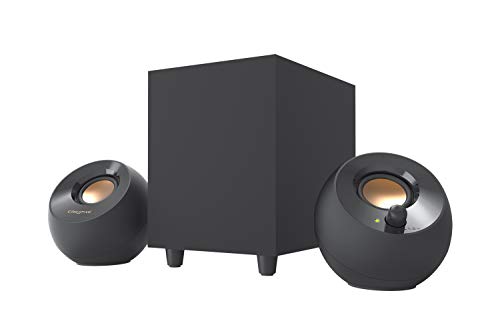
- 4-inch down-firing subwoofer
- USB-powered with 3.5mm AUX
- Up to 8W RMS in High Gain Mode
Best For: Small desks and simple computer audio
Studio Desk Bass Control

- 8-inch studio subwoofer
- Adjustable crossover and bypass
- Bluetooth, RCA, and TRS inputs
Best For: CR Series monitors and dedicated audio desks
THX-Certified Desktop Impact

- 6.5-inch side-firing subwoofer
- THX-certified 2.1 speaker system
- Separate subwoofer gain control
Best For: Gaming, movies, and high-output desktop audio
Low-Profile RGB Desk Audio

- 5-inch wired subwoofer
- 15.9-inch, 1.6-inch-high soundbar
- USB, optical, AUX, Bluetooth 5.3, and HD-ARC
Best For: Gaming desks and compact multi-device setups
RGB Power Pick

- Up to 60 watts peak power
- USB, AUX, and Bluetooth 5.4
- Eight RGB lighting modes
Best For: Gaming desktops and customizable battlestations
Strong Bass Value

- 62 watts peak, 30 watts RMS
- 5.25-inch down-firing subwoofer
- Dual titanium drivers per satellite
Best For: Wired desktop music, movies, and gaming
Best Budget Bass Upgrade

- 8-inch driver with 70W RMS output
- Low-pass filter down to 38Hz
- MDF enclosure and auto standby
Best For: Straightforward RCA-connected desktop audio upgrades
Best for Studio Desktops

- Bluetooth 5.0 plus TRS, RCA, and aux inputs
- 8-inch driver reaches down to 30Hz
- Adjustable crossover and room-tuning controls
Best For: Desktop studios and flexible multimedia listening
Best for Adjustable Integration
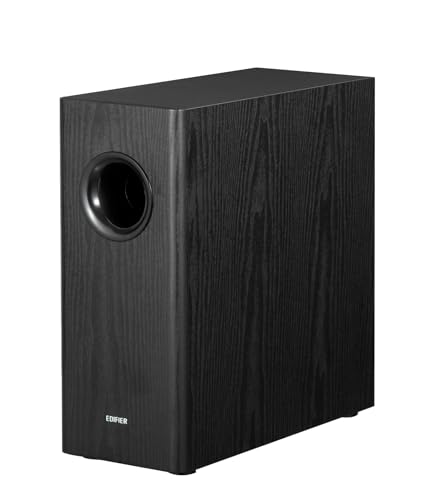
- 70W RMS output and 35Hz bass response
- Adjustable low-pass filter and phase selector
- Includes RCA and 3.5mm-to-RCA cables
Best For: RCA-based desktop and bookshelf-speaker systems
Compact USB Bass Upgrade – Pebble Plus 2.1
If you want subwoofers for desktop setups without adding a wall-powered component, the Creative Pebble Plus is a compact 2.1 speaker system with a standalone 4-inch down-firing subwoofer. USB power, front volume controls, and a 3.5mm AUX connection keep the setup straightforward for computers and laptops.
Best For: Small desks, everyday computer audio, and users who want simple USB-powered bass.
Pros:
- 4-inch down-firing, ported subwoofer adds depth to desktop audio.
- USB-powered design avoids requiring a wall outlet.
- 45-degree elevated drivers aim sound toward the listener.
- High Gain Mode can raise output to 8W RMS with a suitable 5V 2A USB adapter.
Cons:
- The included system is limited to 8W RMS maximum output.
- High Gain Mode requires a 5V 2A USB adapter, which is not included.
- Connectivity is wired through USB and 3.5mm AUX.
The Pebble Plus is a practical choice when desk space, easy installation, and low-power operation matter more than room-filling volume. Its external subwoofer gives it a clearer bass advantage over typical small desktop speakers.
Studio Desk Bass Control – CR8SBT 8-Inch
For desktop setups built around studio monitors, the Mackie CR8SBT adds a dedicated 8-inch subwoofer with adjustable crossover control. TRS and RCA connections support compatible monitor systems, while Bluetooth and a desktop remote make it flexible for both focused listening and casual playback.
Best For: CR Series monitor owners, desktop music production, and listeners who want adjustable low-frequency blending.
Pros:
- Large 8-inch driver adds bass to monitors that cannot reproduce it fully.
- Adjustable crossover helps blend the subwoofer with connected monitors.
- Desktop remote provides volume and subwoofer bypass controls.
- Built-in Bluetooth supports wireless audio input.
Cons:
- Its 32.4-pound weight and floor-standing design need substantial space.
- The subwoofer is designed especially for CR Series monitors.
- It requires corded electric power.
The CR8SBT is the most studio-oriented option here, offering the connection choices and crossover adjustment needed to integrate bass with monitor speakers. It is less suitable for a crowded desk, but a strong fit for a dedicated desktop audio workspace.
THX-Certified Desktop Impact – ProMedia 2.1
The Klipsch ProMedia 2.1 is a complete computer speaker system for shoppers comparing subwoofers for desktop setups alongside satellites. Its 6.5-inch side-firing, ported subwoofer works with Klipsch MicroTractrix horn technology, while the control pod provides separate main-volume and subwoofer-gain adjustment.
Best For: Gaming, movies, and music when you want a plug-and-play 2.1 system with substantial output.
Pros:
- 6.5-inch side-firing subwoofer delivers full-bandwidth bass.
- THX certification and Klipsch horn technology support clear, dynamic playback.
- Control pod includes main volume and subwoofer gain controls.
- Compatible with computers, TVs, music players, and gaming consoles through 3.5mm input.
Cons:
- The wired system requires room for the satellites and a relatively large subwoofer.
- Connectivity is centered on a wired 3.5mm input rather than Bluetooth.
- The listed dimensions may be demanding for very small desks.
The ProMedia 2.1 is a straightforward choice for users who want a complete, energetic desktop audio system rather than a standalone subwoofer. Its dedicated bass controls make it easy to tailor the low end for games, films, or music.
Low-Profile RGB Desk Audio – MEREDO G38 Soundbar
The MEREDO G38 combines a low-profile soundbar with a wired 5-inch subwoofer, making it a space-conscious alternative for subwoofers for desktop setups. Its 15.9-inch soundbar fits beneath many monitors, while USB, AUX, optical, Bluetooth 5.3, and HD-ARC connections support computers, consoles, TVs, and projectors.
Best For: Gaming desks and small spaces that need flexible inputs, remote control, and customizable RGB lighting.
Pros:
- Low-profile 1.6-inch soundbar helps preserve monitor clearance.
- 5-inch wired subwoofer and 160W peak output add fuller bass.
- Supports USB audio, AUX, optical, Bluetooth 5.3, and HD-ARC.
- Remote-controlled RGB lighting and independent bass and treble controls add customization.
Cons:
- The included subwoofer is wired rather than wireless.
- It does not support Dolby or DTS.
- ARC mode requires a compatible TV ARC or eARC port, and USB audio requires a supported USB port.
The G38 is a versatile pick when desk clearance and connection flexibility are priorities. It offers more than basic computer audio, but buyers seeking a wireless subwoofer or Dolby/DTS support should look elsewhere.
Compact Classic – Logitech Z313
The Logitech Z313 is a straightforward 2.1 option for shoppers seeking subwoofers for desktop setups without a complicated installation. Its wired subwoofer, 25-watt RMS output, and included control pod make it practical for everyday computer audio.
Best For: Basic desktop listening, including music, videos, and general personal use.
Pros:
- Compact wired subwoofer and tabletop-friendly design
- 25 watts RMS output for everyday desktop audio
- Convenient corded control pod and 3.5mm auxiliary connectivity
Cons:
- Uses wired connectivity rather than wireless audio
- Provides stereo output without the broader connectivity options of newer systems
The Z313 focuses on simplicity and compact sizing. It is a sensible pick when you want an affordable, easy-to-control 2.1 speaker system for a desktop, MP3 player, or television.
RGB Power Pick – Nylavee SK400Pro
The Nylavee SK400Pro is a feature-rich choice among subwoofers for desktop setups, combining up to 60 watts of peak power with Bluetooth 5.4, USB, and AUX inputs. Its compact 2.1 layout and adjustable RGB lighting suit gaming-focused desks.
Best For: Gaming desktops and battlestations that need flexible connectivity, prominent bass, and customizable lighting.
Pros:
- Up to 60 watts peak power with a dedicated subwoofer
- Supports USB, AUX, and Bluetooth 5.4 connections
- Offers eight RGB lighting modes and four brightness levels
- Extended cable supports flexible subwoofer placement
Cons:
- Requires an external power adapter
- RGB features may be unnecessary for non-gaming setups
With its broad device compatibility, touch controls, and 18-month warranty, the SK400Pro is a versatile desktop system. It makes the most sense for users who want both strong low-end presence and visible setup customization.
Strong Bass Value – Cyber Acoustics CA-3610
The Cyber Acoustics CA-3610 is a wired 2.1 system for shoppers comparing subwoofers for desktop setups with an emphasis on bass and conventional audio performance. It combines 62 watts of peak power, 30 watts RMS, and a down-firing 5.25-inch subwoofer.
Best For: Computer, gaming, movie, and music setups that prioritize strong wired stereo sound.
Pros:
- 62 watts peak power and 30 watts RMS output
- Down-firing 5.25-inch subwoofer with tuned port
- Dual 2-inch titanium drivers in each satellite
- Control pod and broad compatibility with computers and other source devices
Cons:
- Connectivity is wired through an auxiliary connection
- Larger and heavier than some compact desktop speaker systems
The CA-3610 offers a traditional multimedia speaker layout with dedicated satellites and a bass-focused subwoofer. Its 80 dB signal-to-noise ratio and one-year warranty add practical value for a conventional desktop audio system.
Best Budget Bass Upgrade – Edifier T5 Powered Subwoofer
Edifier T5 Powered Subwoofer - 70w RMS Active Woofer with 8 inch Driver and Low Pass Filter
Check Price On AmazonThe Edifier T5 is a practical choice among subwoofers for desktop setups when you want fuller, more powerful bass from speakers with RCA connectivity. Its 8-inch driver, 70W RMS output, and low-pass filter help add low-end impact without asking your main speakers to handle the deepest frequencies.
Best For: Desktop and indoor audio systems that need a straightforward wired bass upgrade.
Pros:
- 8-inch driver with 70W RMS output
- Low-pass filter reaches down to 38Hz
- Dense MDF enclosure helps reduce acoustic resonance
- Automatic standby helps conserve power
Cons:
- Uses wired RCA connectivity rather than a wireless subwoofer connection
- Its tabletop footprint may be large for especially compact desks
The T5 suits listeners who value simple setup, solid construction, and stronger bass over advanced tuning features. Check that your source or speakers provide compatible RCA connections and allow enough room for its substantial cabinet.
Best for Studio Desktops – PreSonus Eris Sub 8BT
The PreSonus Eris Sub 8BT is one of the more flexible subwoofers for desktop setups, combining Bluetooth 5.0 with balanced and unbalanced wired inputs. Its 8-inch driver reaches down to 30Hz, while adjustable crossover and tuning controls make it easier to integrate with compact monitors.
Best For: Music production, studio monitoring, and desktop listeners who want flexible connections and detailed bass adjustment.
Pros:
- 8-inch driver delivers low frequencies down to 30Hz
- Bluetooth 5.0, balanced TRS, RCA, and front aux connectivity
- High-pass and low-pass controls support monitor integration
- Front headphone output and built-in headphone amplifier
Cons:
- Its studio-focused controls may be more than casual listeners need
- The 8-inch cabinet requires dedicated floor or desk-adjacent space
The Eris Sub 8BT stands out when connection flexibility and precise system matching matter. It is especially compelling for a desktop studio, though its larger feature set may be unnecessary if you only need a basic RCA bass boost.
Best for Adjustable Integration – Edifier T5s Powered Subwoofer
The Edifier T5s is a strong option among subwoofers for desktop setups when you want deeper bass and more control over how the sub blends with your speakers. It combines 70W RMS power with a 35Hz response, adjustable low-pass filtering, phase selection, and included cables for a convenient wired installation.
Best For: Desktop or bookshelf-speaker systems with RCA or subwoofer outputs and a need for flexible bass integration.
Pros:
- 8-inch long-throw woofer with 70W RMS output
- 35Hz response with adjustable 30Hz–160Hz low-pass filter
- 0°/180° phase selector supports speaker matching
- Includes 3.5mm-to-RCA and RCA cables
Cons:
- No wireless communication technology
- Series connection requires main speakers with a line-in input
- Its 10.38 kg cabinet may be difficult to place on a small desk
The T5s offers more integration control than a basic powered subwoofer, making it useful for fine-tuning a desktop speaker system. Before buying, confirm that your setup has a compatible sub-out or RCA path and sufficient space for the cabinet.
How We Picked the Best Subwoofers for Desktop Setups
We selected products that suit common desktop listening environments, including compact computer desks, gaming stations, home offices, and small studio spaces. The lineup covers complete 2.1 speaker systems for users who need speakers and bass together, as well as standalone powered subwoofers designed to pair with existing monitors.
Our comparisons focus on practical specifications rather than headline power alone: driver size, stated RMS or peak output, connection methods, controls, enclosure size, and ease of integration. A compact subwoofer with sensible connections may be a better desktop choice than a louder model that overwhelms a small room.
Quick Comparison
- Best compact all-in-one approach: Creative Pebble Plus, Logitech Z313, and Cyber Acoustics CA-3610 provide speakers and a subwoofer in one package.
- Best higher-output multimedia systems: Klipsch ProMedia 2.1 and the MEREDO soundbar system target gaming, movies, and general desktop entertainment.
- Best standalone upgrades: Mackie CR8SBT, Edifier T5, Edifier T5s, and PreSonus Eris Sub 8 are designed for pairing with separate powered speakers or studio monitors.
- Best wireless convenience: Models with Bluetooth, including the Mackie, Nylavee, and PreSonus options, reduce cable clutter for compatible sources.
Key Buying Factors for Subwoofers for Desktop Setups
Compatibility and Connections
Check whether the subwoofer is a complete 2.1 system or an add-on for existing speakers. Standalone models typically need line-level inputs and may work best with monitors that offer suitable outputs. Bluetooth is convenient, but wired connections are usually preferable for fixed desktop audio and low-latency gaming.
Size, Placement, and Bass Control
Measure the space beneath or beside your desk before buying. Down-firing designs can be convenient on the floor, while front-firing studio subwoofers may need more open placement. A volume control, crossover, or low-pass filter helps blend bass with your main speakers instead of producing boomy or disconnected sound.
Power and Driver Size
RMS power is more useful for comparing sustained output than peak power, though manufacturer ratings are not perfectly standardized. An 8-inch driver can deliver deeper, fuller bass than many compact systems, but it also needs more room and may be excessive for a small office.
Desk Use and Listening Habits
Consider whether you mainly listen nearfield at moderate volume or want room-filling sound. For podcasts and casual music, a compact 2.1 package is often sufficient. Games, action movies, electronic music, and larger rooms benefit from stronger low-frequency extension and more adjustment control.
Who Should Buy Which Subwoofers for Desktop Setups?
Choose a compact 2.1 system if you need an affordable, simple upgrade with included satellite speakers. Choose a standalone powered subwoofer if you already own quality desktop monitors and want deeper bass without replacing them. Choose a Bluetooth model if you regularly switch between a computer, phone, and tablet. Choose a studio-oriented subwoofer if accurate integration and adjustable crossover matter more than exaggerated bass. Finally, prioritize a smaller enclosure and moderate output for a shared office or apartment, where excessive low-end energy can travel easily through walls and floors.