Acer 8K DisplayPort Cable review is for buyers who need a sturdy, long DisplayPort lead for a serious monitor setup.
This Acer 8K DisplayPort Cable review focuses on whether its bandwidth, build, and compatibility claims make it a sensible pick.
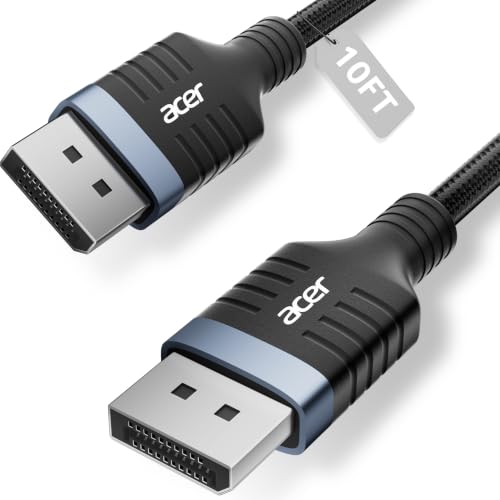
Acer 8K DisplayPort Cable Review Summary
If you are connecting a high-end GPU to a gaming monitor or a multi-monitor desk and want a cable that is clearly built for demanding DisplayPort 1.4 use, the Acer 8K DisplayPort Cable makes sense.
It is aimed at people who care more about signal headroom, cable durability, and compatibility than flashy extras.
The strongest case for this cable is straightforward: it is a 10-foot, braided DP-to-DP cable with a stated 32.4Gbps bandwidth, support for 8K@60Hz, 5K@240Hz, and 4K@144Hz, plus gaming-oriented features like FreeSync, G-Sync, HDR, HDCP 2.2, and MST support.
That combination makes it a practical fit for modern desktops with premium monitors, especially when you want one cable that can handle current hardware and still leave room for future upgrades.
Review Scorecard
| Category | Score | Why it matters |
|---|---|---|
| Bandwidth headroom | 9/10 | The listing claims 32.4Gbps and DP 1.4 support, which is the main selling point for high-refresh and high-resolution setups. |
| Display compatibility | 9/10 | Support for 8K@60Hz, 4K@240Hz/144Hz, HDR, and broad GPU/monitor compatibility makes it flexible. |
| Build quality | 8/10 | The braided jacket and reinforced aluminum shell suggest better durability than a basic office cable. |
| Desk practicality | 8/10 | Ten feet is long enough for many tower-to-monitor runs without being excessive. |
| Multi-monitor usefulness | 8/10 | MST-ready support is useful for people building extended or mirrored display setups. |
| Value proposition | 8/10 | It targets buyers who want a robust, spec-heavy cable rather than the cheapest generic option. |
Key Features and Specifications of Acer 8K DisplayPort Cable
This Acer cable is a DisplayPort to DisplayPort cable with a 10-foot length and a DP 1.4 feature set.
The listing emphasizes performance for gaming monitors, graphics cards, and high-resolution displays rather than casual office use.
Key listed details include:
| Spec | Details |
|---|---|
| Cable type | DisplayPort to DisplayPort |
| Length | 10 feet |
| Standard | DP 1.4 |
| Maximum listed bandwidth | 32.4Gbps |
| Listed resolution support | 8K@60Hz, 5K@240Hz, 4K@240Hz/144Hz |
| Gaming features | FreeSync, G-Sync, HDR, HDCP 2.2 |
| Multi-display support | MST-ready daisy chaining |
| Build | Braided jacket, reinforced aluminum shell, multi-layer shielding |
| Compatibility notes | Works with listed monitors from Odyssey, Alienware, Dell, ASUS, and HP, plus RTX 4090/3090 and RX 7900 series GPUs |
| Plug and play | No drivers required |
The most important part of the spec sheet is not the branding, but the mix of bandwidth and compatibility.
A cable like this is meant to reduce the chance that your display link becomes the weak point in a system built around a strong GPU and monitor.
Pros and Cons of Acer 8K DisplayPort Cable
Pros
- Strong listed bandwidth for demanding displays. The 32.4Gbps claim and DP 1.4 support are what buyers need for modern high-refresh monitor setups.
- Good length for real desks. Ten feet is long enough for flexible routing without feeling unnecessarily bulky.
- Durable construction. The braided jacket and reinforced shell should hold up better than thin bargain cables.
- Useful for gaming and productivity. Support for HDR, FreeSync, G-Sync, and MST gives it broader utility than a bare-bones cable.
Cons
- It is still a cable, not a feature upgrade. If your current cable already works at your target resolution and refresh rate, the improvement may be mostly about reliability and build quality.
- Some claims depend on your hardware chain. Reaching the listed performance still requires compatible GPU, monitor, and port support.
- Overkill for basic setups. If you only need a simple 1080p or standard 60Hz monitor connection, this is more cable than you need.
Who Should Buy Acer 8K DisplayPort Cable?
This Acer 8K DisplayPort Cable is a strong fit for gamers, creators, and PC users who need a reliable DisplayPort link between a desktop and a premium monitor.
It is especially sensible if you are running a high-resolution panel, want a braided cable that feels built for long-term use, or need enough length to keep a tidy desk layout.
It also makes sense for buyers who are planning around future monitor upgrades.
A cable with this kind of stated headroom is easier to keep in rotation when you move from a standard display to a higher-end panel.
You should probably skip it if your setup is simple, your monitor does not need DP 1.4 features, or your desk layout only needs a short basic cable.
In that case, a less expensive option may be enough.
DisplayPort Cable Buying Notes for High-Refresh Setups
Match the cable to the monitor, not the marketing
The useful question is whether your monitor and GPU can actually use the cable’s stated capabilities.
If your display is capped below the cable’s headline specs, the cable can still be a sensible purchase, but mostly for reliability and future-proofing.
Ten feet is a practical middle ground
The 10-foot length is one of the most buyer-friendly parts of this listing.
It gives you flexibility for under-desk routing, rear-mounted PCs, or a little slack for cable management without forcing you into an unnecessarily long run.
Braided construction matters more than it sounds
For a DisplayPort cable, the visible extras are often less important than the shielding and strain resistance.
The braided jacket, aluminum shell, and multi-layer shielding are the kind of details that matter if you move hardware around or keep a cable in place for years.
Multi-display users get extra value
MST-ready support is relevant if you work across multiple screens and want the cable to fit into a more complex desktop layout.
It is not the main reason to buy the cable, but it is a meaningful bonus for workstation-style setups.
Alternatives to Acer 8K DisplayPort Cable
If you want alternatives, look at established DisplayPort cable lines from brands like Cable Matters DisplayPort cable, UGREEN DisplayPort cable, or IVANKY DisplayPort cable.
These are common Amazon search paths for buyers comparing build quality, length options, and DP 1.4 support.
Another credible route is a monitor or GPU accessory brand’s own cable lineup if you want to stay close to a known ecosystem.
The main comparison point should be the same: DP 1.4 support, enough bandwidth for your target refresh rate, and a build that matches how often you move or reroute your desk.
Is Acer 8K DisplayPort Cable Worth It?
Yes, if you need a dependable long DisplayPort cable for a high-end monitor setup. The Acer 8K DisplayPort Cable looks worthwhile for buyers who want DP 1.4 headroom, braided construction, and broad compatibility in one practical package.
If your setup is basic, this is more cable than necessary.
If your setup is demanding, it is the kind of unglamorous accessory that can prevent avoidable display problems and simplify future upgrades.