Long HDMI runs can introduce signal dropouts, flicker, handshake failures, and resolution limits. The right converter or active fiber cable helps deliver a stable picture when a standard copper HDMI cable is not practical.
We selected 10 options covering 1080p and 4K distribution, Cat5e/Cat6 extenders, HDMI-over-Ethernet kits, and high-bandwidth fiber HDMI cables. Use the guide below to match the connection type, distance, features, and installation requirements to your setup.
Best 10 Hdmi Converters for Long Cable Runs Picks for 2026
Best Budget 165-Foot Extender

- 1080p at 60Hz over Cat6/7
- Up to 165 feet
- USB-powered point-to-point design
Best For: Budget-friendly Full HD home theater and conference-room runs
Best Multi-Display System
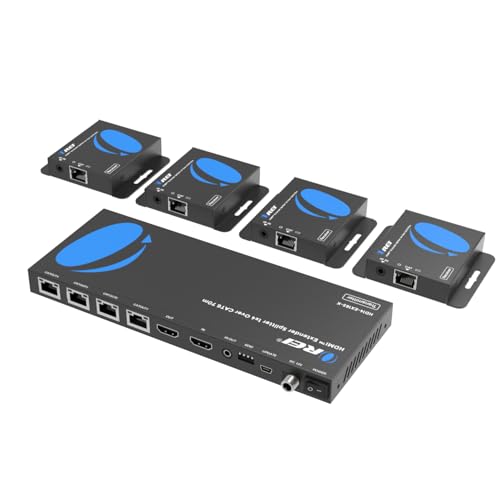
- Distributes one source to four displays
- Cat6/6a/7 connectivity
- Local loop-out and one-way IR
Best For: Multi-screen meeting rooms, bars, and exhibitions
Best 230-Foot Extender
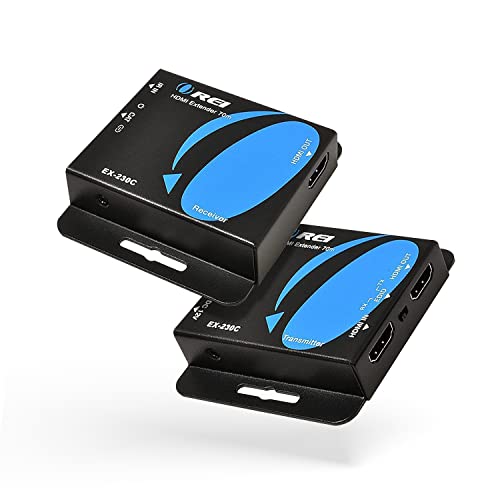
- 1080p up to 230 feet
- 4K/30Hz up to 130 feet
- POC, loop-out, IR, and EDID
Best For: Long-distance 1080p installations with occasional 4K use
Best HDMI-over-Cat Extender

- Up to 230 feet at 1080p over CAT5e/CAT6
- 4K@30Hz with IR, PoC, and EDID copy
- Loop-out supports a local display connection
Best For: Structured-cabling installations and commercial AV
Best for In-Wall Runs
Highwings 100-Foot 8K Fiber HDMI Cable

- CL3-rated for in-wall installation
- 8K@60Hz and 4K@120Hz at 48Gbps
- Supports eARC, VRR, HDR, and 3D
Best For: Long concealed home theater and gaming installations
Best 4K Distance Pick

- 4K@30Hz up to 131 feet
- 1080p up to 230 feet
- IR, EDID, loop out, and PoC
Best For: Longer 4K installations needing remote control
Best Budget 1080p Run
Wiistar HDMI-to-Cat5e/6 Extender

- 1080p extension up to 196 feet
- Works over Cat5e or Cat6
- Plug-and-play transmitter and receiver
Best For: Simple Full HD TV and projector connections
Best 1080p PoC Kit

- 1080p at 60Hz up to 164 feet
- PoC uses one power adapter
- EDID copy supports compatibility
Best For: Clean Full HD classroom and commercial AV runs
Best Budget 165-Foot Extender – 1080p HDMI Over Cat Cable
For shoppers comparing HDMI converters for long cable runs, this compact extender sends Full HD 1080p video and synchronized audio over Cat5e, Cat6, or Cat7 network cable. It reaches up to 165 feet with Cat6/7 and uses HDMI male connectors on the transmitter and receiver.
Best For: Home theaters, conference rooms, and indoor 1080p installations that already use Ethernet cable.
Pros:
- Transmits 1080p at 60Hz up to 165 feet over Cat6/7 cable.
- Supports 3D signals and backward-compatible resolutions.
- Includes USB power cable and a 12-month warranty.
Cons:
- Cat5e runs are limited to 130 feet, while Cat6/7 reaches the full 165 feet.
- Requires 5V/1A power through USB.
- Designed for Full HD rather than 4K output.
This is a straightforward choice for long-distance 1080p distribution when you want a simple point-to-point setup without adding HDMI patch cables.
Best Multi-Display System – 1×4 HDMI Extender Splitter
This OREI system stands out among HDMI converters for long cable runs when one source needs to feed several screens. It distributes a signal to four remote displays over Cat6/6a/7 cable, while the transmitter also provides a local HDMI output and IR control.
Best For: Meeting rooms, bars, exhibitions, and other installations needing one HDMI source on up to four displays.
Pros:
- Feeds four receivers simultaneously from one HDMI source.
- Supports up to 165 feet at 4K/30Hz according to the product bullets.
- Power over cable lets the included power adapter supply the receivers.
- Includes one-way IR passback and a local loop-out HDMI port.
Cons:
- The listed specifications also identify 1920×1080 at 60Hz as the highest resolution supported, so 4K capability should be verified for the intended setup.
- Requires four remote receivers and a more involved installation than a point-to-point extender.
- Uses one-way IR control rather than a more flexible bidirectional system.
Choose this model when distribution is the priority. Its four-output architecture and power-over-cable design can reduce wiring and adapter clutter across a multi-screen installation.
Best Direct-Cable Option – 100-Foot Fiber Optic HDMI 2.0
For a clean direct connection, this 100-foot fiber optic HDMI 2.0 cable avoids separate transmitter and receiver boxes. It supports 4K at 60Hz, ARC, HDCP 2.2, and a range of audio formats, making it a practical alternative to HDMI converters for long cable runs.
Best For: In-wall home theater, gaming, projector, and TV installations requiring a single 100-foot HDMI connection.
Pros:
- Supports 4K 3840×2160 at 60Hz with an 18Gbps data rate.
- CL3-rated construction is suited to in-wall indoor installation.
- Supports ARC, HDCP 2.2, 3D video, and up to 32 audio channels.
- Triple shielding helps reduce EMI/RFI interference.
Cons:
- Not compatible with 8K signals.
- A fixed 100-foot cable is less flexible than an Ethernet extender for variable-distance layouts.
- It does not provide signal splitting or remote IR control.
If the source and display are exactly where you need them, this cable offers a simpler installation than a converter pair while covering common 4K home theater and gaming requirements.
Best 230-Foot Extender – 4K HDMI Over Cat6/7
This OREI extender is a strong option for HDMI converters for long cable runs where distance matters. It sends 1080p up to 230 feet over Cat6/7, while 4K at 30Hz reaches up to 130 feet, and it adds loop-out, IR, EDID management, and power over cable.
Best For: Long home cinema, business, education, and media-player installations using shielded Cat6 or Cat7 cable.
Pros:
- Reaches up to 230 feet for 1080p and up to 130 feet for 4K/30Hz.
- One power adapter can power both transmitter and receiver through POC.
- Supports EDID copying, loop-out, one-way IR, and audio formats up to PCM 7.1.
- Plug-and-play operation requires no drivers.
Cons:
- 4K is limited to 30Hz rather than 4K/60Hz.
- Shielded cable is recommended for the best signal quality.
- HDCP support is specified as 1.4.
For the longest 1080p runs in this group, the EX-230C offers useful installation controls without requiring power at the remote end. Use appropriate shielded network cable when signal reliability is critical.
Best Fiber Cable – Snowkids 50-Foot 8K HDMI 2.1 Cable
For shoppers comparing hdmi converters for long cable runs, this Snowkids cable is a straightforward fiber-optic option when you need to carry a high-bandwidth HDMI signal 50 feet. It supports HDMI 2.1 features including 8K at 60Hz, 4K at 120Hz, eARC, VRR, and a 48Gbps bandwidth rating.
Best For: Long-distance gaming, home theater, and office setups that need HDMI 2.1 performance.
Pros:
- Supports 8K at 60Hz and 4K at 120Hz with up to 48Gbps bandwidth.
- Includes gaming features such as VRR, QFT, QMS, ALLM, and eARC.
- Backward compatible with earlier HDMI versions and a wide range of devices.
Cons:
- Unidirectional design requires the SOURCE and DISPLAY ends to be connected correctly.
- It is a cable rather than an HDMI-over-Cat extender, so it does not use structured network cabling.
The Snowkids is a strong fit when you want a simple 50-foot run without adding transmitter and receiver boxes. Confirm the cable direction before installation, especially for concealed or hard-to-reach connections.
Best HDMI-over-Cat Extender – OREI 165-Foot HDMI Extender
Among hdmi converters for long cable runs, the OREI EX-165C+ stands out for installations that already use Cat5e or Cat6 cabling. Its transmitter-and-receiver design sends HDMI over a single direct cable, reaching up to 230 feet at 1080p or 131 feet at 4K at 30Hz.
Best For: Conference rooms, classrooms, digital signage, and home theaters using existing Cat cabling.
Pros:
- Supports long runs over one CAT5e/CAT6 cable, with up to 4K at 30Hz.
- Provides IR pass-through, EDID copy, PoC, and an HDMI loop-out connection.
- Supports up to 7.1-channel HD audio and includes the required transmitter, receiver, IR accessories, and power adapter.
Cons:
- 4K support is limited to 30Hz.
- Requires separate transmitter and receiver units plus power.
- For best performance, the Cat cable should connect directly rather than through a network switch or router.
This OREI kit is more flexible than a long HDMI cable when you need to route signals through installed Cat infrastructure or control a source from the display location. It is best suited to HDMI 1.4-era requirements rather than high-refresh 4K gaming.
Best for In-Wall Runs – Highwings 100-Foot 8K Fiber HDMI Cable
For a very long run, the Highwings 100-foot fiber cable is a compelling alternative to hdmi converters for long cable runs when you prefer a direct HDMI connection. Its 48Gbps HDMI 2.1 design supports 8K at 60Hz, 4K at 120Hz, dynamic HDR, eARC, and VRR, while the CL3 rating is intended for in-wall installation.
Best For: In-wall home theater, projector, and high-refresh gaming installations extending up to 100 feet.
Pros:
- CL3-rated construction is suited to in-wall installations.
- Supports 8K@60Hz, 4K@120Hz, 48Gbps, eARC, VRR, and dynamic HDR.
- Fiber construction is described as thinner, lighter, and more resistant to signal attenuation and interference than traditional copper.
Cons:
- Unidirectional, so the SOURCE and DISPLAY ends must be installed correctly.
- A 100-foot cable can be more difficult to route and replace than a modular extender setup.
- Its high-end HDMI 2.1 features may exceed the needs of basic 1080p installations.
The Highwings makes the most sense when you are planning a long, concealed cable path and want current HDMI 2.1 capabilities. Map the route and verify connector orientation before pulling the cable through walls or conduit.
Best 4K Distance Pick – OREI EX-170C HDMI Extender
For shoppers comparing hdmi converters for long cable runs, the OREI EX-170C is a strong choice when you need 4K video over a direct Cat5e, Cat6, or Cat7 connection. It reaches up to 131 feet at 4K@30Hz or 230 feet at 1080p, while adding useful features such as IR control, EDID copy, and HDMI loop out.
Best For: 4K home theaters, CCTV systems, conference rooms, classrooms, and digital signage installations.
Pros:
- Supports up to 4K@30Hz over 131 feet and 1080p over 230 feet.
- HDMI loop out supports local display monitoring.
- One-way IR pass-through and PoC reduce installation clutter.
- EDID copy helps improve display compatibility.
Cons:
- Does not support 4K@60Hz.
- Requires a direct cable connection rather than a network switch or router.
- Not compatible with HDMI ARC.
The EX-170C is the most capable option here for longer 4K runs, particularly if remote control and local monitoring matter. Use quality cable and plan around its 4K@30Hz limit.
Best Budget 1080p Run – Wiistar HDMI-to-Cat5e/6 Extender
The Wiistar extender is a straightforward option for hdmi converters for long cable runs when Full HD is sufficient. Its transmitter and receiver send HDMI video and audio up to 196 feet over Cat6, or up to 164 feet over Cat5e, without requiring software or network access.
Best For: 1080p TVs, projectors, DVD players, set-top boxes, conference rooms, and monitoring setups.
Pros:
- Extends 1080p video and audio up to 196 feet with Cat6.
- Uses affordable, readily available Cat5e or Cat6 cable.
- Plug-and-play design requires no setup or drivers.
- Includes separate power adapters for the transmitter and receiver.
Cons:
- Designed for 1080p rather than 4K.
- Requires power at both ends.
- Cannot be used to connect a TV to the internet.
Choose the Wiistar when you want an uncomplicated Full HD extension and already have a suitable cable path. Cable quality affects the achievable distance, so avoid using poor-quality network cable.
Best 1080p PoC Kit – Steetek HT202P HDMI Extender
The Steetek HT202P is a practical pick among hdmi converters for long cable runs if your installation needs dependable 1080p at 60Hz. It carries uncompressed HDMI video and audio up to 164 feet over one Cat5e, Cat6, or Cat7 cable and uses PoC to power the receiver through the cable.
Best For: Home, office, classroom, and commercial AV installations using Full HD displays.
Pros:
- Supports 1080p at 60Hz and 3D over up to 164 feet.
- PoC requires only one included power adapter.
- EDID copy helps establish compatible display settings.
- Plug-and-play operation works with computers, players, TVs, monitors, and projectors.
Cons:
- Limited to 1080p rather than 4K.
- Designed for point-to-point connections, not networked streaming.
- Performance depends on the connected cable and devices.
The HT202P is well suited to clean, fixed Full HD installations where reducing power-cord clutter is important. Its 1080p/60Hz support makes it a sensible alternative to lower-refresh-rate extenders.
How We Picked the Best Hdmi Converters for Long Cable Runs
We focused on products designed specifically for extended HDMI connections rather than ordinary short patch cables. The selection includes HDMI-over-Cat5e/Cat6 transmitters and receivers, splitter-extender systems, and active fiber optic HDMI cables. We compared stated transmission distance, supported resolution and refresh rate, installation flexibility, and features such as IR control, Power over Cable (PoC), EDID management, HDCP support, and loop-out connectivity.
Published distance ratings are useful reference points, but actual results depend on cable quality, wall interference, source and display compatibility, connector condition, and the number of joins in the path.
Quick Comparison
- Best for basic 1080p distribution: HDMI-over-Cat5e/Cat6 extenders rated around 164 to 197 feet.
- Best for 4K over structured cabling: OREI Cat5 or Cat6 extender kits with 4K support and installation features.
- Best for multiple displays: A 1×4 splitter-extender system that sends one source to several receivers or screens.
- Best for a direct cable run: Active fiber HDMI cables, especially when you do not need remote IR or Ethernet termination.
- Best for modern gaming and high refresh rates: An HDMI 2.1 fiber cable with 48Gbps bandwidth, provided the source and display support those specifications.
Key Buying Factors for Hdmi Converters for Long Cable Runs
Resolution, Refresh Rate, and Bandwidth
Choose based on the complete signal requirement, not just the distance. A 1080p extender may be adequate for a projector, signage screen, or older receiver, while 4K systems need compatible source, display, cabling, and extender hardware. For 4K at 60Hz, check for explicit support rather than assuming it from a product title. HDMI 2.1 fiber cables are the better fit for 4K at 120Hz, 8K, VRR, or other high-bandwidth features, but they are often unidirectional.
Ethernet Cabling Versus Fiber HDMI
Cat5e or Cat6 extenders are practical when cable already runs through walls, racks, or ceilings. They use a transmitter and receiver and may offer IR, PoC, loop-out, or EDID controls. Fiber HDMI cables are simpler for a direct point-to-point connection and resist electromagnetic interference, but they usually cannot branch to several displays and must be installed in the correct direction.
Installation and Control Features
For concealed installations, look for in-wall ratings such as CL3 where required by local code. IR pass-through matters when the source is in another room. PoC can reduce the number of power adapters, while EDID management can help resolve blank screens or unstable handshakes. Confirm whether the system is one-way and whether its connectors fit your equipment layout.
Who Should Buy Which Hdmi Converters for Long Cable Runs?
Choose a 1080p Ethernet extender if affordability and long-distance basic video are more important than 4K detail. Choose a 4K Cat5e/Cat6 kit if you want structured-cable installation, remote-control support, or loop-out functionality. A splitter-extender is the right choice for sending one source to multiple screens. For a clean, direct run between one source and one display, use an active fiber HDMI cable. Finally, select an HDMI 2.1 fiber cable when gaming, high-refresh video, 8K capability, or maximum bandwidth is the priority.
Before buying, verify the exact distance, cable category, supported HDCP version, power requirements, connector direction, and compatibility with every device in the signal chain.